
Introduction
This manual provides comprehensive instructions for the OMAIC EN2Q36H replacement remote control, designed for Hisense Smart TVs. It covers essential information regarding setup, operation, and maintenance to ensure optimal performance and user experience. This remote offers a direct replacement solution without the need for complex programming.
Installation
The OMAIC EN2Q36H remote control is designed for immediate use with compatible Hisense Smart TVs. No programming or pairing is required.
Installation de la batterie
- Localisez le compartiment à piles à l'arrière de la télécommande.
- Pour ouvrir le couvercle de la batterie, faites-le glisser vers le bas ou dans le sens indiqué par la flèche.
- Insert two AAA alkaline batteries (not included), ensuring the positive (+) and negative (-) terminals align correctly with the markings inside the compartment.
- Remettez le couvercle de la batterie en le faisant glisser dans sa position jusqu'à ce qu'il s'enclenche correctement.
Once batteries are installed, the remote is ready to operate your Hisense Smart TV.

Mode d'emploi
This remote control utilizes infrared (IR) technology for communication with your Hisense Smart TV. Ensure a clear line of sight between the remote and the TV's IR receiver for optimal performance.
Caractéristiques principales
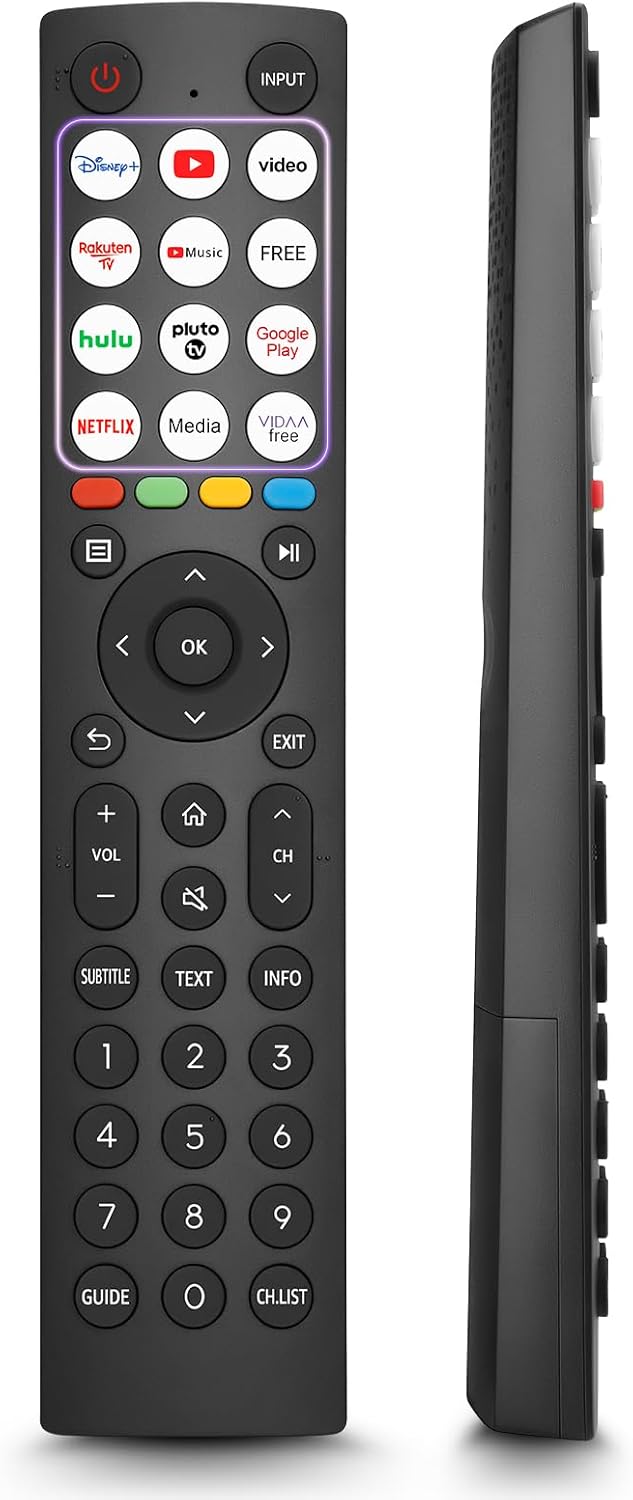
- 12 Shortcut Buttons: Quickly access popular streaming services and applications with dedicated buttons.
- Strong IR Signal: Provides a longer transmission distance and quick response without noticeable delay.
- Construction durable : Made from high-quality ABS and silicone materials for extended lifespan.

Fonctions des boutons
Familiarize yourself with the functions of each button on your OMAIC EN2Q36H remote control:
| Bouton | Fonction |
|---|---|
| POUVOIR | Switches the TV on or into standby mode. |
| SAISIR | Sélectionne les sources d'entrée (HDMI, AV, etc.). |
| APP Buttons | Quick access buttons for specific applications (e.g., Disney+, Netflix, YouTube). |
| MENU | Displays the Quick Setup menu. |
| Contrôle MÉDIA | Buttons for Play, Pause, Stop, Fast Forward, Rewind. |
| Navigation (Haut/Bas/Gauche/Droite) | Navigates on-screen menus and adjusts system settings. |
| OK | Confirms selection in on-screen menus. |
| DOS | Retourne au menu précédent. |
| EXIT | Quitte le menu actuel. |
| VOL +/- | Règle le niveau de volume. |
| MAISON | Enters the Home screen. |
| MUTE | Coupe ou rétablit le son du téléviseur. |
| CH ^/v | Switches channels. |
| SUBTITLE | Activates or deactivates subtitle mode. |
| TEXTE | Turns teletext function on and off. |
| INFO | Affiche les informations du programme en cours. |
| NUMBER Buttons (0-9) | Direct channel selection or number input. |
| GUIDE | Displays the Electronic Programme Guide (DTV input). |
| LISTE CH | Displays the Channel List on the screen. |

Compatible Hisense TV Models
The OMAIC EN2Q36H replacement remote control is compatible with the following Hisense VIDAA 4K HDTV Smart TV series:
- 32A4K, 40A4K, 43A4K
- 32A5KQ, 40A5KQ
- 43A6K, 50A6K, 55A6K, 58A6K, 65A6K, 70A6K, 75A6K, 85A6K
- 55U6KQ, 65U6KQ
- 43A7KQ, 50A7KQ, 55A7KQ, 65A7KQ, 75A7KQ
- 43E7KQ, 50E7KQ, 55E7KQ, 65E7KQ, 75E7KQ
Entretien
Pour assurer la longévité et le bon fonctionnement de votre télécommande, suivez ces consignes d'entretien :
- Nettoyage: Use a soft, dry cloth to clean the remote. Avoid using liquid cleaners or abrasive materials, as they may damage the surface or internal components.
- Remplacement de la batterie : Replace batteries when the remote's response becomes sluggish or stops working. Always replace both batteries at the same time with new ones of the same type (AAA alkaline).
- Stockage: Rangez la télécommande dans un endroit frais et sec, à l'abri de la lumière directe du soleil, des températures extrêmes et d'une forte humidité.
- Évitez les chutes : Protégez la télécommande des chocs physiques, car les chutes peuvent endommager les circuits internes.
Dépannage
Si vous rencontrez des problèmes avec votre télécommande, reportez-vous aux étapes de dépannage suivantes :
| Problème | Cause possible | Solution |
|---|---|---|
| La télécommande ne répond pas | Piles déchargées ou mal insérées. | Remplacez les piles par des piles alcalines AAA neuves, en veillant à respecter la polarité. |
| La télécommande ne répond pas | Obstruction entre la télécommande et le téléviseur. | Ensure a clear line of sight to the TV's IR receiver. Remove any objects blocking the path. |
| La télécommande ne répond pas | La télécommande est trop loin du téléviseur. | Move closer to the TV. The remote has an extended range, but extreme distances may affect performance. |
| Les boutons sont collants ou ne répondent pas | Saletés ou débris sous les boutons. | Gently clean around the buttons with a soft, dry cloth. Avoid liquids. |
| Certaines fonctions ne fonctionnent pas. | TV model incompatibility (rare). | Verify your Hisense TV model is listed in the 'Compatible Hisense TV Models' section. |
Caractéristiques
| Fonctionnalité | Détail |
|---|---|
| Nom du modèle | EN2Q36H |
| Marque | OMAÏQUE |
| Appareils compatibles | Téléviseurs intelligents Hisense |
| Technologie de connectivité | Infrarouge (IR) |
| Nombre de boutons | 48 |
| Type de contrôle | Contrôle des boutons |
| Caractéristiques spéciales | Universal, Comfortable |
| Couleur | Noir |
| Description de la batterie | AAA (alcalin) |
| Supported Devices (Max) | 1 |
| Dimensions du produit (approximatives) | 34.7 x 24.7 x 2.2 cm |
| Poids du produit (environ) | 80 grammes |

Garantie et assistance
OMAIC is committed to the quality and compatibility of its replacement remote controls. We provide professional after-sales support to ensure customer satisfaction.
If you have any questions or concerns regarding your OMAIC EN2Q36H remote control or your order, please contact us directly. Our support team aims to respond to inquiries within 12 working hours.