
1. Introduction
Thank you for choosing the INFINMIND Wireless Bluetooth Mouse. This manual provides detailed instructions for the Y670G (rechargeable green mouse) and D890 (battery-powered black mouse) models, designed for multi-device connectivity and enhanced productivity. Please read this manual carefully before use to ensure optimal performance and longevity of your device.
2. Contenu du colis
- 1 x INFINMIND Wireless Bluetooth Green Mouse (Y670G)
- 1 x INFINMIND Wireless Bluetooth Black Mouse (D890)
- 2 x 2.4GHz USB Receivers (one for each mouse)
- 1 x USB Charging Cable (for Y670G mouse)
- 2 x AA Batteries (pre-installed in D890 mouse)
- 1 x Manuel d'utilisation
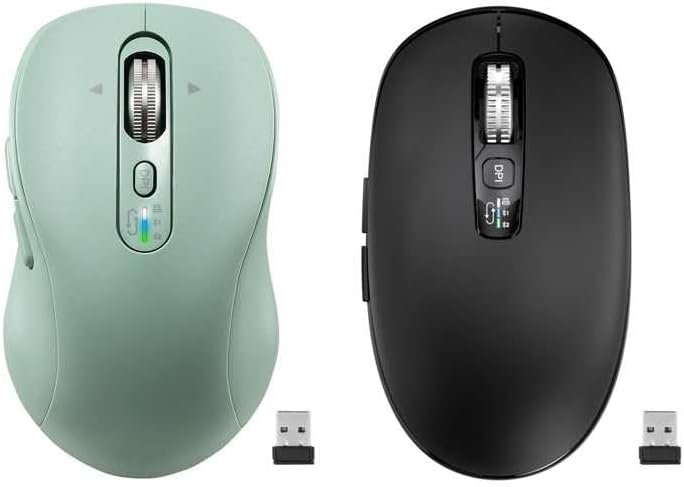
Image: The package includes both the green rechargeable mouse and the black battery-powered mouse, along with their respective USB receivers.
3. Produit terminéview
Familiarize yourself with the buttons and features of your INFINMIND wireless mice.
3.1 Green Rechargeable Mouse (Y670G)

Image : détaillée view of the green mouse with labels for each button and indicator.
- Bouton gauche : Fonction standard de clic gauche.
- Bouton droit : Fonction standard de clic droit.
- Molette de défilement intelligente : For vertical and horizontal scrolling.
- Bouton marche/arrêt : Interrupteur marche/arrêt de la souris.
- Bouton PPP : Ajuste la sensibilité du curseur (1000/1600/2400/3200 DPI).
- Indicateurs des appareils : LED lights (White, Blue, Green) to show active connection mode (2.4G USB, Bluetooth 1, Bluetooth 2).
- Bouton de commutation des appareils : Cycles between 2.4G USB, Bluetooth 1, and Bluetooth 2 connections.
- Bouton avant : Navigue vers l'avant dans web navigateurs ou file explorateurs.
- Bouton Retour : Navigue en arrière dans web navigateurs ou file explorateurs.
- Windows/Mac System Switch Button: Optimise les fonctions de la souris pour Windows ou macOS.
3.2 Black Battery-Powered Mouse (D890)

Image: The black mouse features a similar ergonomic design and button layout to the green model, with a DPI button and scroll wheel.
The black D890 mouse shares most functionalities with the Y670G, including Left/Right buttons, Scroll Wheel, DPI button, Forward/Back buttons, and multi-device switching. The primary difference is its power source (AA batteries) and the specific indicator lights for connection modes.
4. Installation
Your INFINMIND mice support three connection modes: 2.4GHz wireless via USB receiver, and two independent Bluetooth channels (BT1 and BT2).

Image: The mouse can connect to a tablet via Bluetooth 2, a monitor via Bluetooth 1, and a laptop via 2.4GHz wireless, switching between them with a single click.
Connexion sans fil 4.1 2.4 GHz
- Locate the USB receiver. For the Y670G, it is typically stored in a slot on the bottom of the mouse. For the D890, it is also stored in a similar slot.
- Branchez le récepteur USB dans un port USB disponible sur votre ordinateur.
- Allumez la souris à l'aide de l'interrupteur MARCHE/ARRÊT situé en dessous.
- Press the Devices Switch Button until the White LED indicator lights up, indicating 2.4G mode. The mouse should connect automatically.
4.2 Bluetooth Connection (BT1 & BT2)
- Allumez la souris à l'aide de l'interrupteur MARCHE/ARRÊT.
- Press the Devices Switch Button to select either Bluetooth Mode 1 (Blue LED) or Bluetooth Mode 2 (Green LED).
- Pour entrer en mode d'appairage : Press and hold the Devices Switch Button for 3-5 seconds until the corresponding LED (Blue or Green) starts flashing rapidly.
- Sur votre appareil (ordinateur, tablette, téléphone), ouvrez les paramètres Bluetooth.
- Rechercher new devices and select "INFINMIND Mouse" (or similar name) from the list.
- Once paired, the LED indicator will stop flashing and remain solid for a few seconds before turning off, confirming the connection.
4.3 Basculement entre les appareils connectés
To switch between your connected devices (2.4G, BT1, BT2), simply press the Devices Switch Button. The LED indicator will briefly light up in White, Blue, or Green to show which mode is currently active.
5. Mode d'emploi
5.1 Ajustement PPP
Appuyez sur le Bouton DPI (located below the scroll wheel) to cycle through the available DPI settings: 1000, 1600, 2400, and 3200 DPI. A higher DPI setting increases cursor sensitivity, making the cursor move faster across the screen with less physical mouse movement.
5.2 4-Way Hyper-Fast Scrolling
The scroll wheel supports both vertical and horizontal scrolling.
- Défilement vertical : Roll the scroll wheel up or down.
- Défilement horizontal : Tilt the scroll wheel to the left or right. This allows for seamless navigation across wide documents or web pages.

Image: The scroll wheel can be moved Upward, Downward, Left, and Right for comprehensive navigation.
5.3 Boutons Suivant/Précédent
Utilisez le Avant et Dos buttons (located on the side of the mouse) to quickly navigate through web pages, documents, or folders.
5.4 System Switch (Windows/Mac)
The Y670G mouse includes a dedicated Bouton de commutation du système Windows/Mac on its underside. Toggle this switch to optimize mouse functionality and gestures for your operating system.
5.5 Silent Click Design
Both mice feature a silent click design, reducing click noise for a quieter working environment, ideal for offices and shared spaces.

Image: The mouse is designed for quiet operation, minimizing click sounds.
6. Gestion de l'alimentation
6.1 Charging the Y670G (Rechargeable Green Mouse)
The Y670G mouse is equipped with a built-in rechargeable battery.
- Connect the provided USB charging cable to the charging port on the front of the mouse and to a USB power source (e.g., computer USB port, USB wall adapter).
- Une charge complète prend généralement environ 2 heures.
- A single full charge can provide up to 60 days of use, depending on usage patterns.
- Note: Fast charging is not supported. Please use standard USB charging.
6.2 Battery Installation for D890 (Battery-Powered Black Mouse)
The D890 mouse operates on 2 AA batteries, which are pre-installed.
- To replace batteries, open the battery compartment cover on the underside of the mouse.
- Insérez deux piles AA neuves en respectant la polarité (+/-).
- Fermez soigneusement le couvercle du compartiment à piles.
- Battery life can extend up to 40 months, varying based on usage and environmental factors.
6.3 Fonction de mise en veille automatique
Both mice feature an intelligent auto-sleep function to conserve power. If inactive for 5 minutes, the mouse will enter sleep mode. To wake it up, simply click any button or move the mouse.
7. Entretien
- Nettoyez la souris avec un chiffon doux et sec. Évitez d'utiliser des produits chimiques agressifs ou des matériaux abrasifs.
- Do not expose the mouse to extreme temperatures, direct sunlight, or moisture.
- Store the USB receiver in its designated slot on the mouse when not in use to prevent loss.
8. Dépannage
| Problème | Cause possible | Solution |
|---|---|---|
| La souris ne répond pas | Low battery (Y670G) / Dead batteries (D890) La souris est désactivée. Mode de connexion incorrect sélectionné USB receiver not plugged in (2.4G) Bluetooth not paired or disconnected | Charge the Y670G mouse or replace AA batteries in D890. Allumez la souris. Press the Devices Switch Button to select the correct mode (White for 2.4G, Blue for BT1, Green for BT2). Assurez-vous que le récepteur USB est correctement branché sur un port USB fonctionnel. Réappairez la souris via les paramètres Bluetooth de votre appareil. |
| Le curseur est erratique ou saccadé. | Capteur sale Using mouse on unsuitable surface Ingérence | Nettoyez le capteur optique situé sous la souris avec un chiffon doux. Utilisez la souris sur une surface propre, non réfléchissante et opaque ou sur un tapis de souris. Move the mouse closer to the receiver/device or away from other wireless devices. |
| Impossible de basculer entre les appareils | Devices not properly paired/connected | Ensure all desired devices are correctly paired (Bluetooth) or connected (2.4G). Follow setup instructions for each connection mode. |
9. Spécifications
- Connectivité : Sans fil 2.4 GHz, Bluetooth 5.0 (BT1, BT2)
- Paramètres DPI : 1000 / 1600 / 2400 / 3200 DPI
- Boutons: 10 (Left, Right, Scroll Wheel, DPI, Forward, Back, Devices Switch, System Switch, ON/OFF)
- Défilement : 4-Way Hyper-Fast Scrolling (Vertical & Horizontal)
- Source d'alimentation :
- Y670G: Rechargeable Lithium Battery (USB-C charging)
- D890: 2 x AA Batteries
- Autonomie de la batterie :
- Y670G: Up to 60 days on a 2-hour charge
- D890: Up to 40 months (varies with usage)
- Compatibilité: Windows, macOS, Chrome OS, Linux, iPadOS, Android (with Bluetooth)
- Ergonomie: Designed for Small to Medium-sized hands (Y670G), Medium to Large hands (D890)
- Caractéristiques spéciales : Silent Click, Auto Sleep Function
10. Garantie et assistance
INFINMIND products are designed for reliability and performance. For any questions, technical support, or warranty inquiries, please refer to the contact information provided with your purchase or visit the official INFINMIND webVeuillez conserver votre preuve d'achat pour toute réclamation au titre de la garantie.