
Introduction
Welcome to the user manual for your new 2025 PowaKaddy RX Remote Electric Golf Trolley. This document provides essential information for the safe and efficient assembly, operation, maintenance, and troubleshooting of your golf trolley. Please read it thoroughly before first use to ensure optimal performance and longevity of your product.
Consignes de sécurité
Adhering to these safety guidelines is crucial for preventing injury and damage to your trolley.
- Always read the entire manual before operating the trolley.
- Keep hands, feet, and clothing clear of all moving parts, especially the wheels and motor area.
- Do not operate the trolley in extreme weather conditions, such as heavy rain or lightning.
- Ensure the trolley is stable and on level ground before attaching or detaching your golf bag.
- Use only the specified PowaKaddy 30V battery and charger provided with your trolley.
- Keep the remote control dry and protected from impacts or extreme temperatures.
- Do not attempt to modify or disassemble the trolley or its components. Refer all servicing to authorized personnel.
Contenu du colis
Vérifiez que tous les éléments sont présents dans votre colis :
- PowaKaddy RX Remote Electric Golf Trolley
- Slimline Soft Touch Remote-Control Handset
- XL-Plus Plug’n’Play 30V Battery System
- Battery Charger (not explicitly listed but implied for battery system)
- The Golfather Towel Tag Golf Towel Bundle
Installation
Déplier le chariot
Place the trolley on a flat surface. Gently lift the handle upwards and extend the frame until it fully unfolds and locks into its operating position. Ensure all locking mechanisms are securely engaged before proceeding.

Image: The PowaKaddy RX Remote Electric Golf Trolley in its fully unfolded state, viewvu de côté, montrantasing its robust frame and wheels.
Fixation des roues
The main rear wheels are designed for easy attachment. Align the wheel axle with the hub on the trolley frame and push firmly until it clicks into place. The swivel front wheel and anti-tip rear wheel are typically pre-attached.

Image : Une image détaillée view of the trolley's large rear wheels and the central chassis, highlighting the sturdy construction.
Installation de la batterie
Locate the battery compartment on the trolley. Insert the XL-Plus Plug’n’Play 30V battery into the compartment, ensuring it is correctly oriented and clicks securely into place. A fully charged battery is essential for operation.

Image: The compact PowaKaddy 30V Plug'n'Play battery pack, ready for installation.
Réglage de la poignée
The soft-touch handle is height adjustable. Use the quick-release mechanism to set the handle to a comfortable height for pushing or controlling the trolley remotely. Ensure it is locked firmly in position before use.
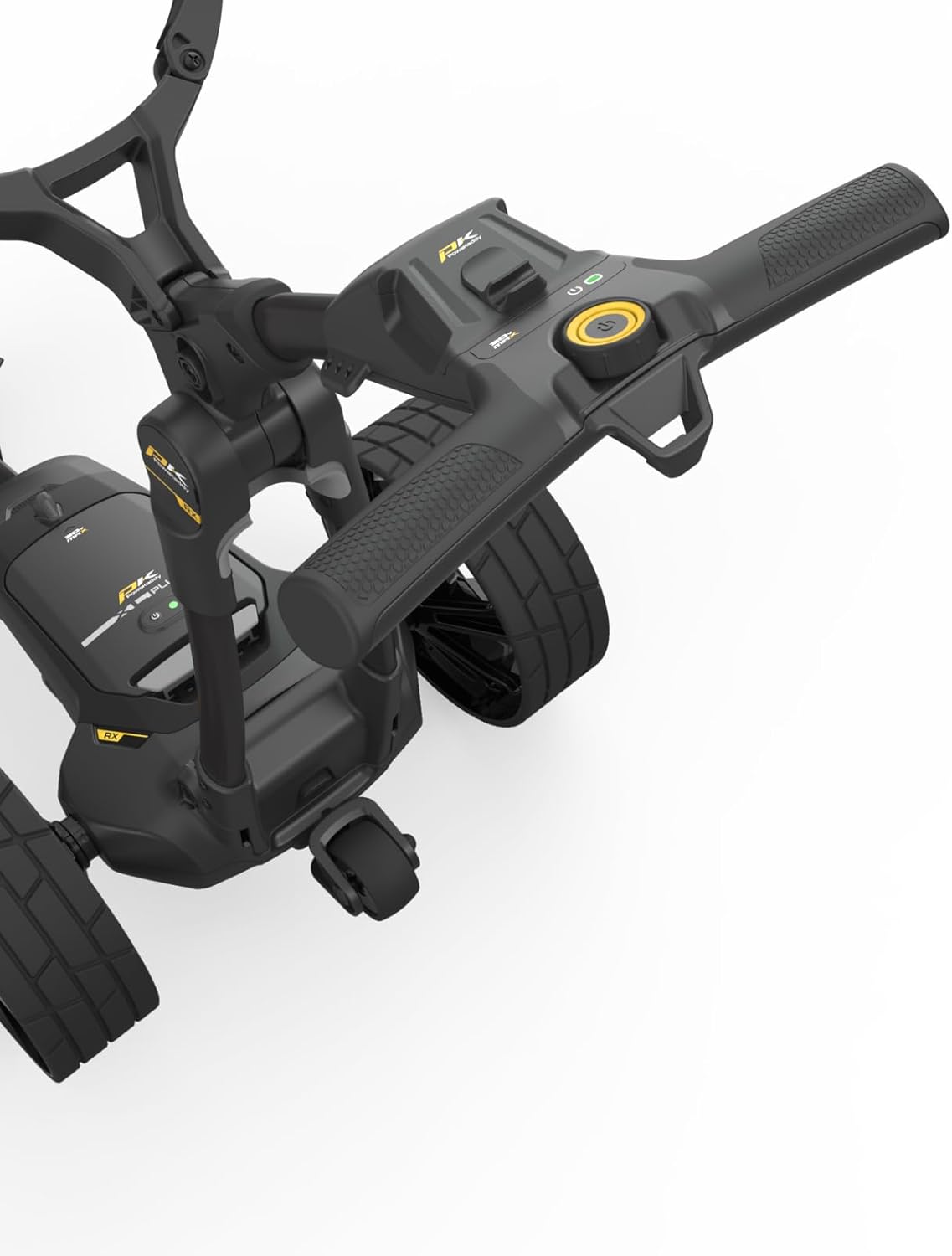
Image : Un gros plan view of the trolley's ergonomic handlebar, showing the control panel and soft-touch grip.
Mode d'emploi
Mise sous/hors tension
To power on the trolley, press and hold the power button located on the trolley's main console or the remote control until the indicator lights illuminate. To power off, press and hold the same button until the lights turn off.
Utilisation de la télécommande
The slimline remote control provides full directional command of your trolley. Use the directional arrows to move the trolley forward, backward, left, and right. The central red square button acts as an immediate stop/pause function.

Image: The PowaKaddy RX Remote Control, featuring directional buttons, a stop button, and a power button.
Driving the Trolley
When operating the trolley, always maintain a clear line of sight. Be mindful of uneven terrain, obstacles, and other golfers. The high traction all-terrain wheels are designed for various course conditions.
Slope Traverse Assist (STA)
The integrated Slope Traverse Assist (STA) system helps the trolley maintain a straight path and stability when traversing slopes, reducing the effort required to guide it.
Smartphone/GPS USB-C Charging Port
A convenient USB-C charging port is located on the handle, allowing you to charge your smartphone or GPS device during your round.
Unique PowaKaddy MAG-LOK Cart Bag System
The MAG-LOK system provides a quick and secure way to attach compatible PowaKaddy cart bags to your trolley. Powerful neodymium magnets ensure your bag remains firmly in place without the need for a lower strap, even in challenging conditions.
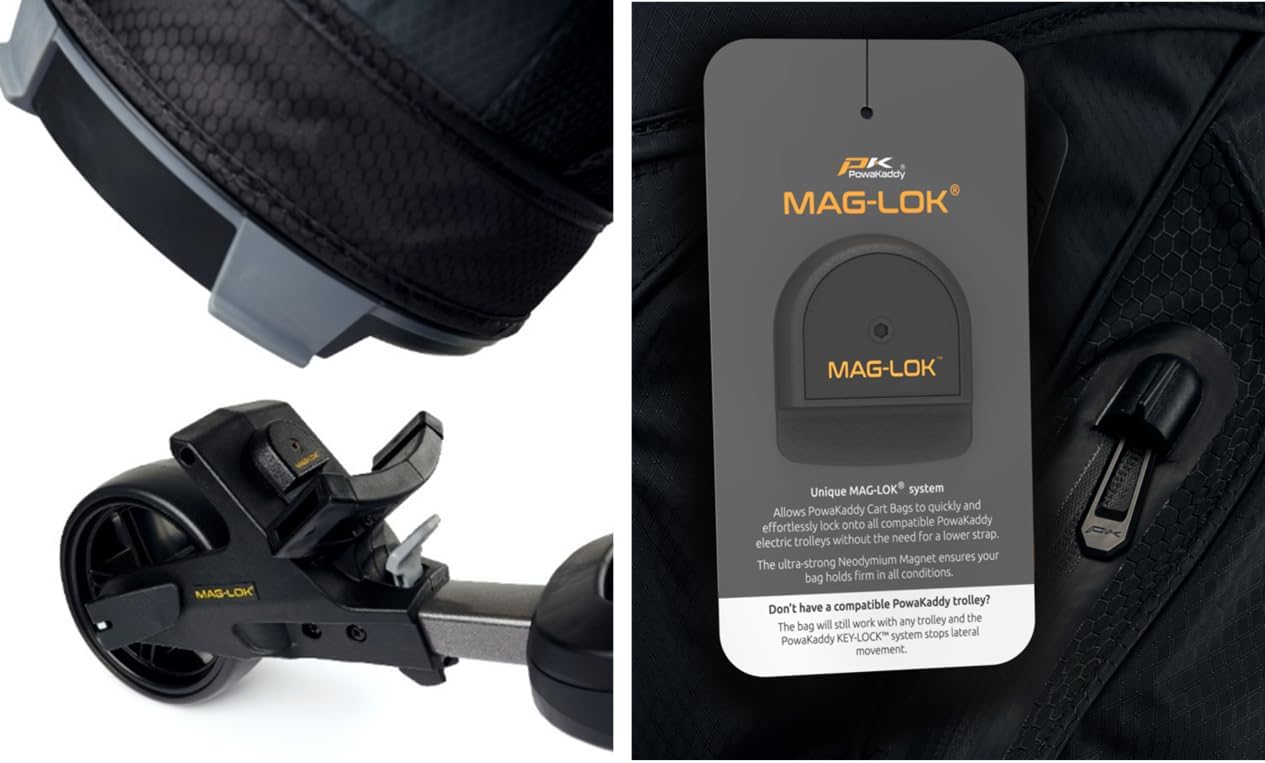
Image : détaillée view of the MAG-LOK system, showing the magnetic attachment point on the trolley and the corresponding part on a golf bag.
Informations sur la batterie
Your PowaKaddy RX Remote Electric Golf Trolley is powered by an XL-Plus Plug’n’Play 30V battery system. This high-performance battery is designed for reliability and longevity.
- Autonomie de la batterie : A fully charged battery provides approximately 6 hours of continuous operation, sufficient for a typical round of golf.
- Chargement : Always charge the battery fully before its first use and after each round. Use only the provided PowaKaddy charger.
- Stockage: When not in use, store the battery in a cool, dry place, away from direct sunlight and extreme temperatures. It is recommended to charge the battery periodically during long storage periods to maintain its health.
Entretien
Regular maintenance ensures your trolley remains in optimal condition.
- Nettoyage: After each use, wipe down the trolley frame and wheels with a damp cloth to remove dirt and debris. Avoid using abrasive cleaners or high-pressure washers, which can damage electronic components.
- Stockage: Fold the trolley for compact storage in a dry, sheltered environment. Ensure the battery is disconnected if storing for extended periods.
- Inspection des roues : Periodically check the wheels for any signs of wear or damage. Ensure they rotate freely and are free from obstructions.
- Entretien de la batterie: Follow the specific charging and storage guidelines for the 30V battery to maximize its lifespan.
Dépannage
Cette section aborde les problèmes courants que vous pourriez rencontrer.
| Problème | Cause possible | Solution |
|---|---|---|
| Trolley not powering on | Battery not connected, battery discharged, power button issue | Ensure battery is fully inserted and charged. Press power button firmly. |
| La télécommande ne répond pas | Remote battery low, remote not paired, interference | Check remote battery. Refer to pairing instructions in the full manual (if applicable). Move away from strong electronic signals. |
| Trolley veers off course | Uneven terrain, wheel obstruction, wheel alignment issue | Navigate carefully on uneven ground. Check wheels for debris. If persistent, consult support for alignment. |
| Durée de vie de la batterie réduite | Battery not fully charged, battery aging, extreme temperatures | Ensure full charge before use. Avoid operating in very cold or hot conditions. Consider battery replacement if significantly degraded. |
Caractéristiques
Key technical specifications for the PowaKaddy RX Remote Electric Golf Trolley:
| Fonctionnalité | Détail |
|---|---|
| Nom du modèle | RX Remote |
| Fabricant | Powakaddy |
| Dimensions du colis | 76.5 x 46 x 42 cm |
| Poids de l'article | 10.5 kilogrammes |
| Type de batterie | 1 Product Specific 30V (included) |
| Autonomie de la batterie | 6 heures |
| Taille de l'écran | 1 pouces |
| Technologie de connectivité | Wifi |
| Type de service de véhicule | Voiturette de golf |
| Sport | Golf |
Garantie et assistance
Your PowaKaddy RX Remote Electric Golf Trolley comes with comprehensive warranty coverage:
- Trolley Warranty: 2 Year manufacturer warranty.
- Lithium Battery Warranty: 5 Year pro rata warranty.
For technical support, warranty claims, or service inquiries, please contact your retailer or the PowaKaddy customer service department. Refer to the official PowaKaddy website contenant les informations de contact et les ressources d'assistance les plus récentes.