
Introduction
Thank you for choosing the zelotes T80 Ergonomic Gaming Mouse. This wired optical mouse is designed for both gaming and office use, offering adjustable DPI, customizable LED lighting, and a comfortable ergonomic design for extended use. Please read this manual carefully to ensure proper setup and operation of your new mouse.
Caractéristiques du produit
- 7 Buttons & Quick Fire Button: Includes forward, backward, and a rapid fire (double click) button for enhanced control in gaming and productivity.
- 5 niveaux de DPI réglables : Easily switch between 1000/1600/2400/3200/7200 DPI to match your speed and precision needs.
- 7 LED Backlit Modes: Personalize your setup with various lighting effects.
- Conception ergonomique : Crafted for comfort with skin-friendly material, sweat-resistant, and anti-slip features to prevent fatigue during long sessions.
- Large compatibilité : Compatible with Windows 11/10/8/7 and Mac OS, suitable for various applications including MMD, FPS games, and office tasks.
Contenu du colis
- 1 x zelotes T80 Wired Gaming Mouse
- 1 x Manuel d'instructions
Installation
- Déballer: Carefully remove the mouse and its accessories from the packaging.
- Retirez le film protecteur : Before use, please remove the protective film from the mouse's foot pads.
- Connecter: Plug the USB cable of the zelotes T80 Gaming Mouse into an available USB port on your computer (PC or Laptop).
- Installation du pilote : The mouse is plug-and-play. Your operating system will automatically detect and install the necessary drivers. No additional software installation is typically required for basic functionality.
Mode d'emploi
Explications des boutons
The zelotes T80 mouse features 7 buttons for versatile control:
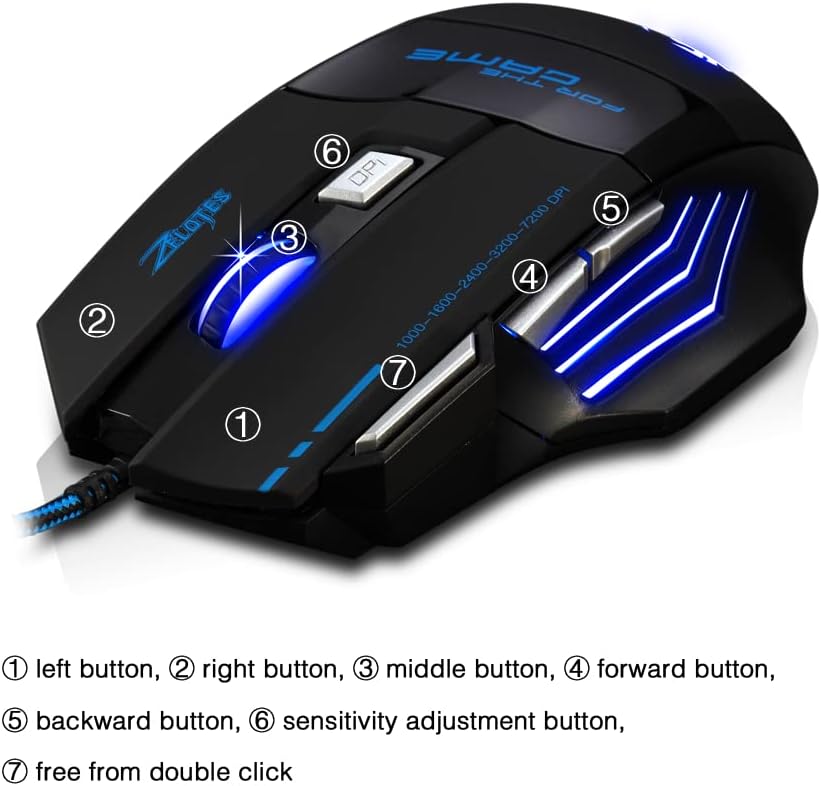
- Bouton gauche (1) : Fonction standard de clic gauche.
- Bouton droit (2) : Fonction standard de clic droit.
- Middle Button / Scroll Wheel (3): Scrolls up/down. Pressing it acts as a middle-click.
- Bouton Avancer (4) : Navigue vers l'avant dans web navigateurs ou file explorateurs.
- Bouton Retour (5) : Navigue en arrière dans web navigateurs ou file explorateurs.
- Bouton DPI (6) : Adjusts mouse sensitivity (DPI) and changes LED colors.
- Rapid Fire Button (7): Functions as a double-click of the left button, useful for continuous firing in games.
Réglage DPI
The mouse offers 5 adjustable DPI levels to suit different tasks and preferences:
- 1000 DPI
- 1600 DPI
- 2400 DPI
- 3200 DPI
- 7200 DPI
Appuyez sur le Bouton PPP (6) to cycle through these sensitivity levels. Each change will be indicated by a corresponding LED color change.
Contrôle de l'éclairage LED
The mouse features 7 LED lighting modes. To change the LED color, long press the DPI button (6). The LED will flash rapidly 7 times and then remain constant on the selected color.

Entretien
- Nettoyage: Utilisez un chiffon doux et sec pour nettoyer la surface de la souris. Pour les saletés tenaces, un chiffon légèrement plus sec peut être utile.amp Un chiffon peut être utilisé, en veillant à ce qu'aucun liquide ne pénètre dans la souris.
- Entretien des câbles : Évitez les coudes brusques ou les tractions excessives sur le câble USB afin de prévenir tout dommage.
- Stockage: Conservez la souris dans un endroit sec et frais, à l'abri de la lumière directe du soleil et des températures extrêmes.
Dépannage
Souris ne répondant pas
- Assurez-vous que le câble USB est correctement branché dans un port USB fonctionnel.
- Essayez de brancher la souris sur un autre port USB de votre ordinateur.
- Testez la souris sur un autre ordinateur pour déterminer si le problème vient de la souris ou de l'ordinateur.
LED Lights Not Working/Changing
- Vérifiez que la souris est correctement connectée à l'ordinateur.
- Ensure you are long-pressing the DPI button to cycle through colors. A short press changes DPI.
DPI non modifié
- Ensure you are short-pressing the DPI button to cycle through DPI levels.
- Si le problème persiste, essayez de reconnecter la souris.
Caractéristiques
| Fonctionnalité | Détail |
|---|---|
| Numéro de modèle | T80 |
| Boutons | 7 (with scroll wheel) |
| DPI réglable | 1000/1600/2400/3200/7200 DPI |
| Éclairage LED | 7 modes d'éclairage |
| Connectivité | Câble USB |
| Système de suivi | Optique |
| Conception ergonomique | Oui |
| Changer de vie | 5 millions de cycles |
| Dimensions | 130x105x45mm |
| Poids | 160 ± 5g |
| Longueur du câble USB | 1.5 m |
| Compatibilité | Win11, Win10, Win8, Win7, Mac OS |
Garantie et assistance
For warranty information and technical support, please refer to the product packaging or contact zelotes customer service through the retailer where the product was purchased. Keep your purchase receipt for warranty claims.