
Introduction
This manual provides instructions for the assembly, operation, and maintenance of your Member Mark Dakota 2-Piece Writing Desk and C-Table Set. This set is designed to offer a functional and stylish workspace for home offices, student areas, or compact living spaces. It includes a writing desk with a dark brown wood top and a mobile C-table with shelves and casters.

Image: The Member Mark Dakota 2-Piece Writing Desk and C-Table Set, featuring a dark brown desktop and black metal frame, positioned in a contemporary room with plants and a laptop.
Consignes de sécurité
- Lisez attentivement toutes les instructions avant le montage et l'utilisation.
- Conserver toutes les petites pièces et les matériaux d'emballage hors de portée des enfants.
- Ensure all connections are secure before using the desk and C-table.
- Do not overload the desk or C-table. Refer to specifications for weight limits.
- À utiliser sur une surface plane pour éviter tout basculement.
- Évitez de poser des objets chauds directement sur le bureau sans protection.
Contenu du colis
Vérifiez que tous les composants sont présents avant de commencer l'assemblage.
- 1 x Writing Desk (Desktop, Frame components)
- 1 x Mobile C-Table (Shelves, Frame components, Casters)
- Assembly Hardware (Screws, bolts, tools if included)
- Adjustable Feet Levelers for Desk
- Wire Management Clips for Desk
- Under-mount USB/Power Hub for Desk
Configuration et assemblage
Assembly is required for this product. Follow these general steps. Specific diagrams and hardware may vary; refer to any included manufacturer's diagrams for precise instructions.
- Déballer les composants : Retirez soigneusement toutes les pièces de leur emballage et disposez-les sur une surface propre et douce afin d'éviter les rayures.
- Assembler le cadre du bureau : Connect the metal frame components of the writing desk using the provided hardware. Ensure all screws are finger-tightened initially.
- Attacher un ordinateur de bureau : Secure the K21 oak veneer desktop to the assembled desk frame. Fully tighten all screws once the desktop is aligned.
- Install Adjustable Feet Levelers: Screw the adjustable feet levelers into the bottom of the desk legs. Adjust them as needed to ensure the desk is stable and level on uneven floors.
- Install USB/Power Hub and Wire Clips: Mount the under-mount USB/Power hub to the underside of the desk using the designated hardware. Attach the wire management clips to organize cables.
- Assemble C-Table Frame: Connect the metal frame components for the C-table.
- Attach C-Table Shelves: Secure the top and bottom shelves to the C-table frame.
- Install Rolling Casters: Attach the rolling casters to the base of the C-table. Ensure the casters with locking brakes are positioned for easy access.
- Vérification finale : Verify all connections are tight and the furniture is stable before use.
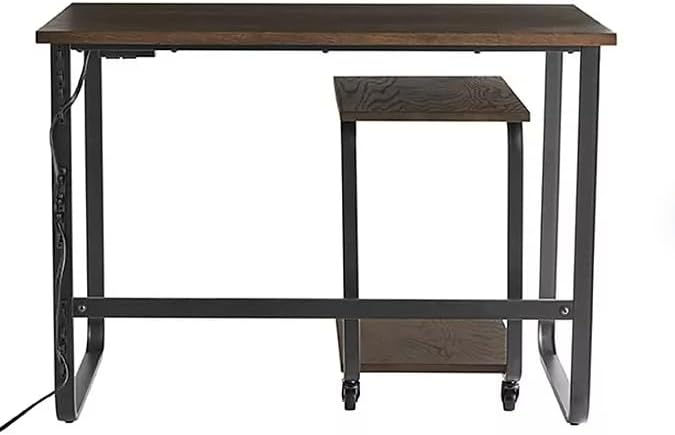
Image : Avant view of the writing desk, highlighting the integrated under-mount USB/Power hub on the left side of the desk frame.
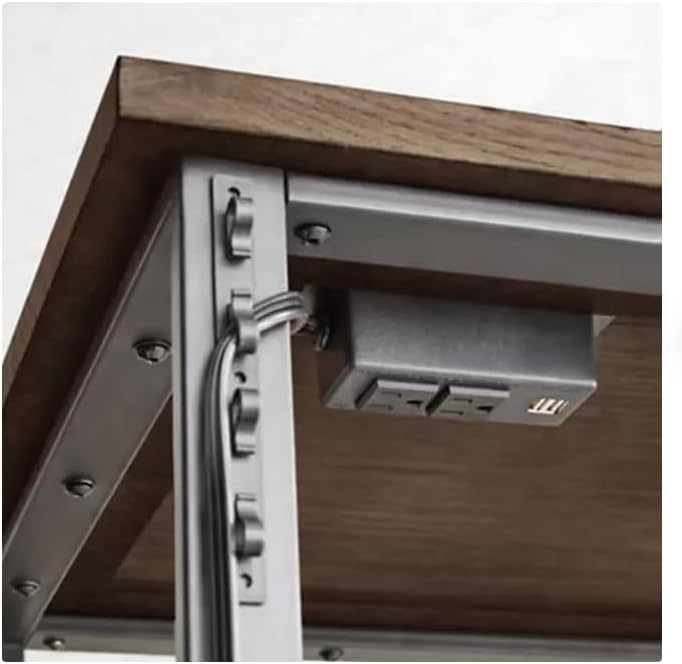
Image : détaillée view of the under-mount USB/Power hub with two power outlets and two USB ports, along with wire management clips attached to the desk frame.
Mode d'emploi
Using the Writing Desk
- Espace de travail : The desk provides a spacious surface for your laptop, documents, and other office essentials.
- Pieds réglables: If the desk wobbles, adjust the feet levelers at the bottom of the legs by twisting them until the desk is stable.
- USB/Power Hub: Utilize the integrated under-mount USB/Power hub to conveniently charge devices and power electronics directly from your desk. Plug the hub's main power cord into a wall outlet.
- Gestion des câbles : Use the wire management clips to keep cables tidy and prevent clutter on and around your desk.

Image : Gros plan view of the dark brown K21 oak veneer desktop, showing its wood grain texture.
Using the Mobile C-Table
- Positionnement : The C-table can be easily rolled and positioned alongside or tucked underneath the main desk for versatile storage or an extended surface.
- Stockage: Use the top and bottom shelves of the C-table for books, files, office supplies, or decorative items.
- Roulettes verrouillables : The C-table is equipped with smooth-rolling casters, some of which have locking brakes. To secure the C-table in place, press down on the lever of the locking casters. To allow movement, lift the lever.
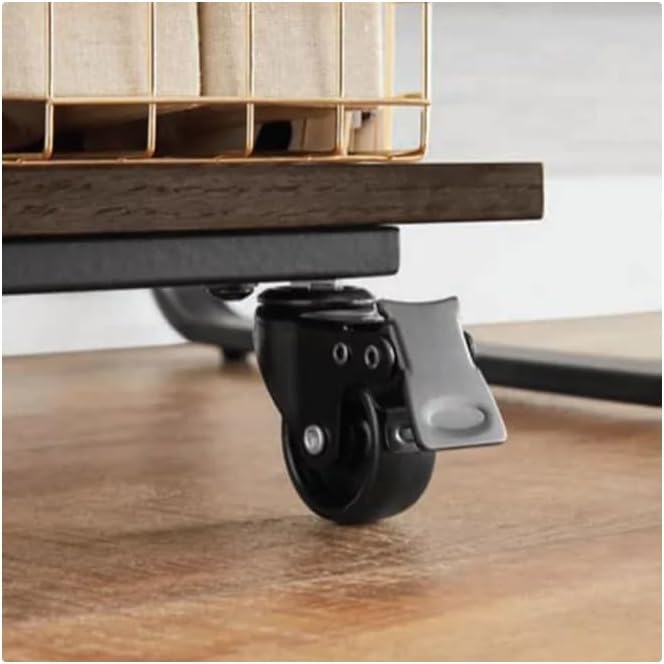
Image: Close-up of one of the C-table's rolling casters, showing the gray lever for engaging and disengaging the locking brake.

Image : Côté view of the mobile C-table, demonstrating how it can be partially tucked under the writing desk, providing flexible space utilization.
Entretien
- Nettoyage: Essuyez les surfaces avec de la publicitéamp cloth to remove dust and spills. Follow with a dry cloth to prevent water spots.
- Évitez les produits chimiques agressifs : N’utilisez pas de nettoyants abrasifs ni de solutions chimiques puissantes, car ils peuvent endommager la finition.
- Contrôles réguliers : Vérifiez régulièrement le serrage de toutes les vis et fixations. Resserrer si nécessaire.
- Protéger les surfaces : Use coasters or placemats for drinks and hot items to protect the desktop from heat and moisture damage.
Dépannage
- Desk/C-Table Wobbles: Ensure the product is on a level surface. Adjust the desk's feet levelers. Check all assembly screws and tighten if loose.
- C-Table Casters Not Rolling Smoothly: Check for debris caught in the casters. Ensure the locking brakes are disengaged.
- USB/Power Hub Not Working: Verify the hub's main power cord is securely plugged into a functional wall outlet. Check if the wall outlet itself is receiving power.
Caractéristiques
| Fonctionnalité | Détail |
|---|---|
| Nom du produit | Member Mark Dakota 2-Piece Writing Desk and C-Table Set |
| Numéro de modèle | GR20-SCH010-111 |
| Marque | Générique |
| Couleur | Dark Brown/Black |
| Type de matériau | Alloy Steel, Wood (K21 oak veneer desktop) |
| Desk Dimensions (Assembled) | 42 po L x 24 po P x 30 po H |
| C-Table Dimensions (Assembled) | 14 po L x 20 po P x 24 po H |
| Poids de l'article | 45 livres |
| Composants inclus | 1 Writing Desk, 1 mobile C-Table |
| Special Features (Desk) | Adjustable feet levelers, wire management clips, under-mount USB/Power hub |
| Special Features (C-Table) | Top and bottom shelf, rolling casters with locking brakes |
| Assemblage requis | Oui |
| Instructions d'entretien du produit | Essuyez avec Damp Chiffon, essuyer avec un chiffon sec |
Informations sur la garantie
This product is covered by a standard manufacturer's warranty against defects in materials and workmanship. Please retain your proof of purchase for any warranty claims. For specific warranty terms and conditions, refer to the documentation included with your purchase or contact the retailer.
Soutien
If you encounter any issues or have questions regarding the assembly, operation, or maintenance of your Member Mark Dakota 2-Piece Writing Desk and C-Table Set, please contact the retailer or manufacturer's customer support for assistance. Have your model number (GR20-SCH010-111) and proof of purchase ready when contacting support.