
Introduction
Merci pour votre achatasing the Sigma 50mm F2 DG Contemporary lens. This manual provides essential information for the safe and effective use of your new lens. Please read it thoroughly before using the product and keep it for future reference.
Précautions de sécurité
- Do not look at the sun or other strong light sources through the lens, as this can cause permanent vision damage.
- Keep the lens away from direct sunlight when not in use to prevent fire hazards.
- Avoid exposing the lens to extreme temperatures, humidity, or dust.
- Ne tentez pas de démonter ou de modifier l'objectif. Les réparations doivent être effectuées uniquement par un personnel de service agréé.
- Tenir hors de portée des enfants.
Contenu du colis
Vérifiez que tous les éléments sont présents dans votre colis :
- Sigma 50mm F2 DG Contemporary Lens
- Lens Hood (LH633-02S)
- Bouchon d'objectif avant
- Bouchon d'objectif arrière
- Manuel d'instructions (ce document)
Les parties de l'objectif
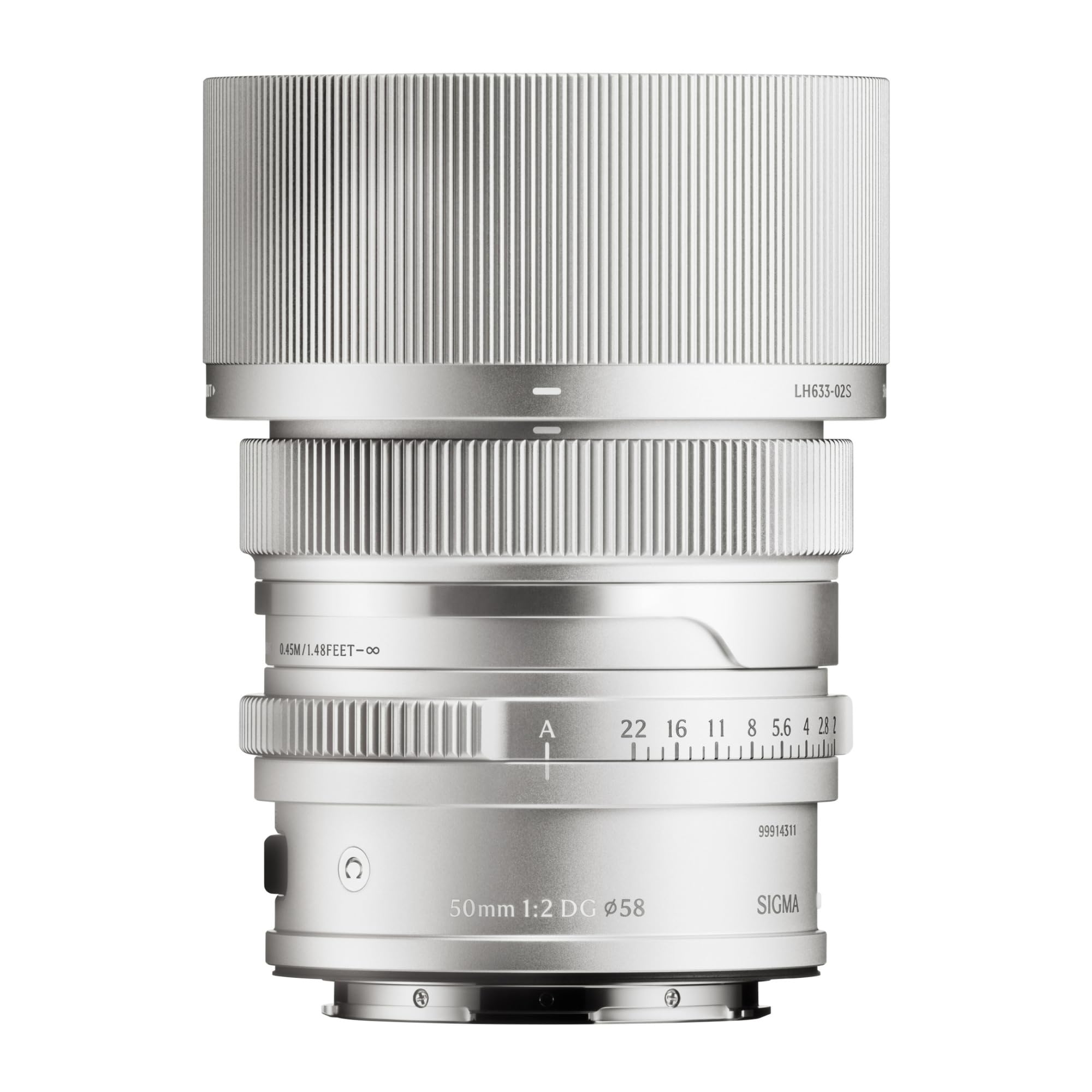
This image displays the Sigma 50mm F2 DG Contemporary lens, a prime lens designed for L-mount cameras. It features a sleek silver finish and a compact design, suitable for various photographic applications.
The Sigma 50mm F2 DG Contemporary lens features several key components:
- Bague de mise au point : Utilisé pour la mise au point manuelle.
- Bague d'ouverture : Allows direct control over the lens aperture.
- Monture d'objectif : Connects the lens to the camera body (L-Mount).
- Lens Hood Attachment Point: Where the dedicated lens hood is secured.

The image shows the LH633-02S lens hood, a cylindrical accessory with a ribbed exterior, designed to attach to the Sigma 50mm F2 DG Contemporary lens. It helps to prevent stray light from entering the lens, reducing flare and ghosting, and offers protection to the front element.
Installation
Fixation de l'objectif
- Assurez-vous que l'appareil photo et l'objectif sont éteints.
- Retirez le bouchon arrière de l'objectif et le bouchon du boîtier de l'appareil photo.
- Align the mounting index on the lens with the mounting index on the camera body.
- Insérez l'objectif dans la monture de l'appareil photo et tournez-le dans le sens horaire jusqu'à ce qu'il s'enclenche. Ne forcez pas l'objectif.
Attaching the Lens Hood (LH633-02S)
- Alignez le point rouge sur le pare-soleil avec le point rouge situé à l'avant de l'objectif.
- Tournez le pare-soleil dans le sens horaire jusqu'à ce qu'il se verrouille solidement en position.
- To remove, press the release button on the lens hood and rotate counter-clockwise.
Opérationnel
Se concentrer
Cet objectif prend en charge à la fois la mise au point automatique (AF) et la mise au point manuelle (MF).
- Autofocus: Set your camera's focus mode to AF. The lens will automatically focus when the shutter button is half-pressed.
- Mise au point manuelle : Set your camera's focus mode to MF. Rotate the focus ring on the lens to adjust focus manually. Use your camera's focus peaking or magnification features for precise focusing.
Contrôle d'ouverture
The lens features an aperture ring for direct control over the aperture setting. You can also control the aperture through your camera body, depending on your camera's settings and mode.
Caméras compatibles
This lens is designed for L-Mount cameras, including models such as Leica SL, Leica TL2, and Leica CL.
Entretien
Nettoyage de l'objectif
- Utilisez une brosse soufflante pour enlever la poussière de la surface de la lentille.
- Pour les traces de doigts ou les taches, utilisez un chiffon doux en microfibre propre, spécialement conçu pour les verres optiques. Appliquez une petite quantité de solution nettoyante pour lentilles sur le chiffon, et non directement sur la lentille.
- N’utilisez jamais de matériaux abrasifs, de solvants ou de produits chimiques agressifs pour nettoyer la lentille.
Stockage
- When not in use, attach both the front and rear lens caps.
- Conservez la lentille dans un endroit frais et sec, à l'abri de la lumière directe du soleil et d'une forte humidité.
- En cas de stockage prolongé, il est conseillé d'utiliser un dessiccant pour éviter la formation de moisissures.
Dépannage
- Objectif non reconnu par l'appareil photo : Ensure the lens is securely attached to the camera body. Power off and restart the camera. Check for any firmware updates for both the lens and camera.
- La mise au point automatique ne fonctionne pas : Verify the camera's focus mode is set to AF. Ensure there is sufficient light and contrast in the scene for the autofocus system to operate effectively.
- Les images sont floues : Check that the lens is properly focused. Ensure the shutter speed is fast enough to prevent camera shake, especially in low light. Clean the lens elements if smudges are present.
- Lens hood difficult to attach/remove: Ensure proper alignment of the red dots. Do not force the hood; it should click into place smoothly.
Caractéristiques
| Nom du modèle | 31S969 |
| Distance focale | 50 mm |
| Ouverture maximale | F2 |
| Ouverture minimale | F2 |
| Type de lentille | Objectif principal |
| Montages compatibles | Leica L |
| Type de mise au point | Mise au point automatique |
| Stabilisation d'image | Aucune stabilisation d'image |
| Niveau de résistance à l'eau | Non résistant à l'eau |
| Poids de l'article | 2 livres |
Garantie et assistance
Informations sur la garantie
Ce produit est livré avec un Garantie de 9 ans. Please retain your proof of purchase for warranty claims. The warranty covers manufacturing defects under normal use. It does not cover damage caused by misuse, accidents, unauthorized repairs, or normal wear and tear.
Assistance clientèle
For technical assistance, service, or warranty inquiries, please contact Sigma customer support through their official website or the retailer where you purchased the product. Have your model number (31S969) and proof of purchase ready when contacting support.