
1. Produit terminéview
The EUREKA ERGONOMIC L-Shaped Electric Standing Desk is designed to provide a versatile and ergonomic workspace. Featuring a solid wood desktop, dual motors for smooth height adjustment, and integrated accessories, this desk supports both sitting and standing postures to enhance comfort and productivity.
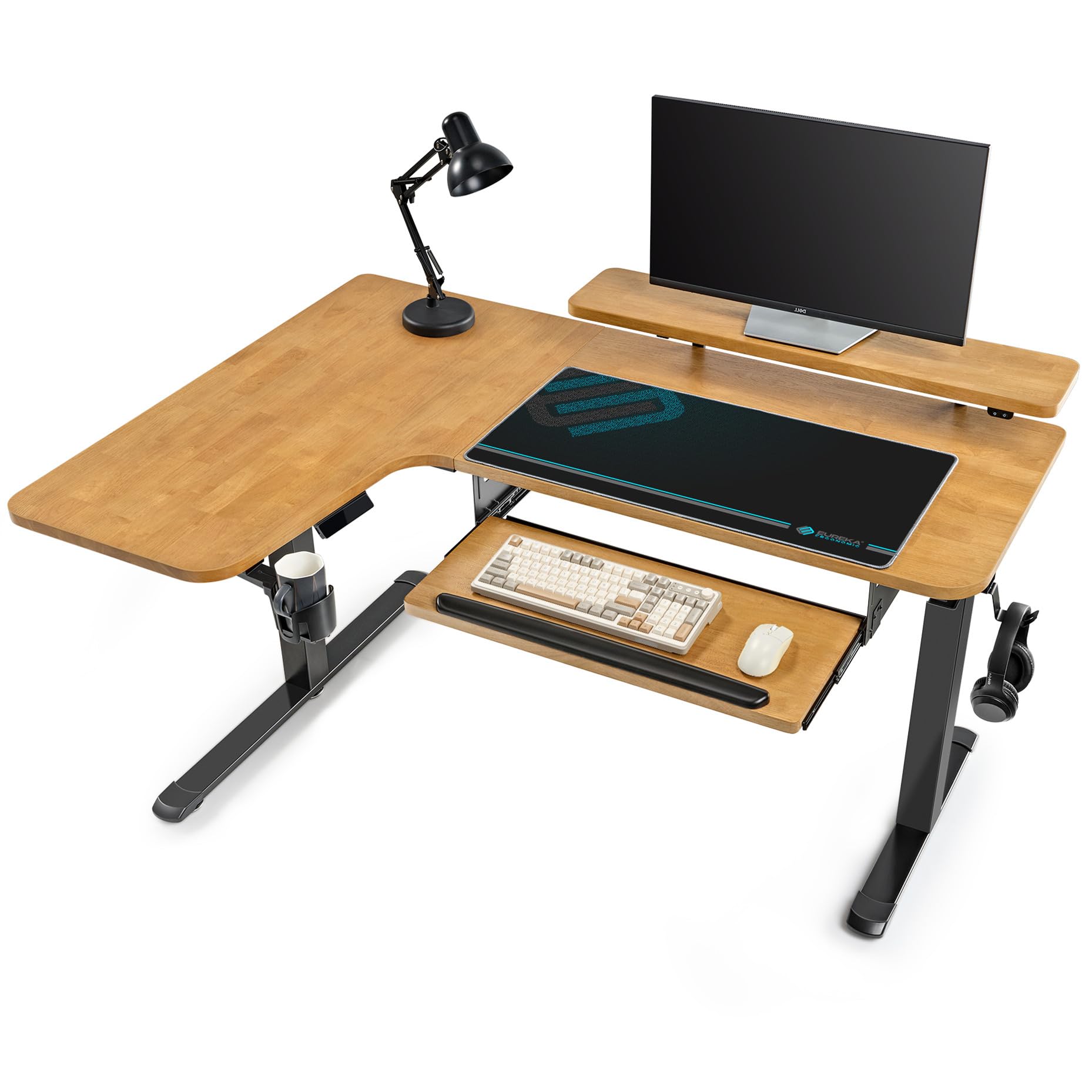
Image 1.1: The EUREKA ERGONOMIC L-Shaped Electric Standing Desk, showcasing its design and features in an office environment.
Caractéristiques principales :
- L-Shaped Solid Wood Desktop: Crafted from solid oak wood for durability and a natural aesthetic.
- Powerful Smart Dual Motor: Enables smooth and quiet height adjustment (under 40 dB) from 29.8" to 48.3".
- Strong 220 lbs Support: Sturdy carbon steel frame and solid wood tabletop ensure stability and a high weight capacity.
- Ergonomic Keyboard Tray & Monitor Stand: Includes a slide-out keyboard tray with an integrated wrist rest and a monitor stand to raise displays to eye level.
- Contrôleur de mémoire : Features 3 memory presets for easy switching between preferred sitting and standing heights, plus a built-in USB charging port.
- Smart Anti-Collision Technology: Built-in Hall Sensor & AI Control for safe operation.
Vidéo 1.1 : Un overview of the EUREKA ERGONOMIC Solid Wood L Shaped Standing Desk, highlighting its design and functionality.
2. Configuration et assemblage
Assembly is required for this product. The desk comes disassembled and needs to be put together by the user. The assembly process involves attaching the legs, the keyboard tray, the monitor stand, and connecting the electric components. Please follow the instructions carefully to ensure proper setup and functionality.
Étapes d'assemblage :
- Déballez tous les composants et vérifiez-les par rapport à la liste des pièces fournie dans l'emballage.
- Assemble the desk frame, ensuring all connections are secure.
- Attach the L-shaped desktop sections to the frame.
- Install the keyboard tray and monitor stand according to the diagrams.
- Connect all electrical components, including the dual motors and control panel.
- Perform initial calibration as described in the operating instructions.
Video 2.1: Detailed installation guide for the EUREKA ERGONOMIC Solid Wood L Shaped Standing Desk.

Image 2.1: The desk's dual motor system and sturdy carbon steel frame, highlighting its robust construction.
3. Mode d'emploi
Réglage de la hauteur :
The desk features a powerful dual motor system for electric height adjustment. Use the 'Up' and 'Down' buttons on the control panel to smoothly raise or lower the desk to your desired height between 29.8" and 48.3".
Préréglages de mémoire :
The memory controller allows you to save up to 3 preferred height settings. To set a memory position:
- Réglez le bureau à la hauteur souhaitée à l'aide des boutons « Haut » ou « Bas ».
- Press the 'M' button, then press one of the number buttons (1, 2, or 3) within 3 seconds. The display will show 'S-' followed by the number, indicating the height is saved.
- To recall a saved height, simply press the corresponding number button (1, 2, or 3).
Control Panel and Smart App:
The desk is equipped with a touch screen control panel for intuitive operation. Additionally, you can connect to the "Eureka Smart" app via Wi-Fi for remote control and advanced settings.

Image 3.1: The touch screen control panel, showing the digital display, up/down controls, memory/lock function, and 3 customizable preset height buttons.
Technologie anti-collision :
The built-in smart anti-collision technology with Hall Sensor & AI Control detects obstacles during height adjustment. If an obstruction is encountered, the desk will automatically stop and slightly reverse direction to prevent damage.
Keyboard Tray and Monitor Stand:
The slide-out keyboard tray provides an ergonomic typing position and helps keep the main desktop clear. It includes a soft gel wrist rest for comfort. The integrated monitor stand raises your display to a comfortable eye level, reducing neck strain. The monitor stand also features RGB lighting for customizable ambiance.

Image 3.2: The 29-inch keyboard tray with an integrated wrist rest, designed for ergonomic use.

Image 3.3: The ergonomic monitor stand featuring RGB lighting, which can be set to single or multi-color modes.
4. Entretien
To ensure the longevity and optimal performance of your EUREKA ERGONOMIC L-Shaped Electric Standing Desk, follow these maintenance guidelines:
- Nettoyage: Essuyez le bureau et le cadre avec un chiffon doux et sec.amp cloth. Avoid abrasive cleaners or harsh chemicals that could damage the wood finish or electronic components.
- Gestion des câbles: Regularly check and organize cables using the provided cable management tray to prevent tangling and interference with desk movement.
- Entretien du moteur : The dual motors are designed for long-term use. Avoid overloading the desk beyond its 220 lbs capacity. Do not attempt to disassemble the motor units.
- Inspection: Vérifiez régulièrement le serrage de toutes les vis et fixations. Resserrer si nécessaire.
- Conditions environnementales : Keep the desk in a dry environment and avoid extreme temperature fluctuations.
5. Dépannage
If you encounter issues with your EUREKA ERGONOMIC L-Shaped Electric Standing Desk, refer to the following common troubleshooting steps:
Desk Not Moving / Unresponsive Controls:
- Vérification de l'alimentation : Assurez-vous que le cordon d'alimentation est bien branché à la fois sur le bureau et sur une prise murale fonctionnelle.
- Remise à zéro: Débranchez le bureau de la prise électrique pendant 10 à 15 secondes, puis rebranchez-le. Cela permet souvent de résoudre les petits problèmes électroniques.
- Verrouillage du panneau de commande : Check if the control panel is locked. Some models have a lock function (often indicated by a 'L' on the display or a specific button combination). Refer to the full manual for specific lock/unlock procedures.
Déclenchement fréquent du système anticollision :
- Vérification d'obstruction : Ensure there are no physical obstructions (e.g., cables, furniture, objects under the desk) that could be triggering the anti-collision sensor.
- Réglage de la sensibilité : Some models allow adjustment of the anti-collision sensitivity via the control panel or app. Consult the full manual for instructions.
Réglage de la hauteur inégale :
- La répartition du poids: Ensure the weight on the desk is evenly distributed and not exceeding the maximum capacity.
- Recalibrage : Perform a full reset and recalibration of the desk. This typically involves lowering the desk to its lowest point and holding the 'Down' button until it cycles through a reset procedure. Refer to the full manual for precise steps.
Si ces étapes ne résolvent pas le problème, veuillez contacter le service client.
6. Spécifications

Image 6.1: Detailed dimensions of the EUREKA ERGONOMIC 61-inch L-Shaped Electric Standing Desk.
| Fonctionnalité | Détail |
|---|---|
| Marque | EUREKA ERGONOMIQUE |
| Numéro de modèle | ERK-DL60L-LB |
| Forme | Forme en L |
| Dimensions du produit (P x L x H) | 43"P x 61"L x 30"H |
| Couleur | Chêne |
| Style | Moderne |
| Matériau de base | Acier au carbone |
| Type de matériau supérieur | Bois de chêne |
| Type de finition | Bois massif |
| Caractéristiques spéciales | Adjustable Height, Electric, Ergonomic, Keyboard Tray Included, Monitor Stand |
| Poids de l'article | 123.2 livres |
| Épaisseur du plateau de table | 1 pouces |
| Hauteur minimale | 29.8 pouces |
| Hauteur maximale | 48.3 pouces |
| Poids maximum recommandé | 220 livres |
| Composants inclus | Cable Management Tray, Cup Holder, Headphone Hook |
| Assemblage requis | Oui |
7. Garantie et assistance
Informations sur la garantie :
This product is typically covered by a manufacturer's warranty. For specific details regarding warranty duration and coverage, please refer to the warranty card included with your product or visit the official EUREKA ERGONOMIC website. Standard return policy allows for returns within 30 days of purchase.
Assistance clientèle :
For technical assistance, missing parts, or any other inquiries, please contact EUREKA ERGONOMIC customer support. Contact information can typically be found on the product packaging, the official websur le site, ou auprès de votre détaillant.
Ressources en ligne : Visitez le Boutique EUREKA ERGONOMIC sur Amazon pour plus d'informations sur les produits et l'assistance.