1. Introduction
This manual provides detailed instructions for the setup, operation, and maintenance of your Generic HY-500B 5MP USB Microscope Camera. Please read this manual thoroughly before using the device to ensure proper function and longevity.
Contenu du colis
- 1 x 5.0MP Microscope Camera
- 1 câbles USB
- 1 x Software DISC
- 1 x 150X C-mount Lens
- 1 x Stand with LED Light
- 1 x adaptateur secteur
2. Consignes de sécurité
Respectez les consignes de sécurité suivantes afin d'éviter d'endommager l'appareil ou de vous blesser :
- Do not expose the camera or lens to direct sunlight or high temperatures.
- Évitez de laisser tomber ou de soumettre l'appareil à des impacts violents.
- Gardez l’appareil à l’écart de l’eau et d’autres liquides.
- Utilisez uniquement l'adaptateur secteur et le câble USB fournis.
- Do not attempt to disassemble or modify the device. Refer servicing to qualified personnel.
3. Installation
Follow these steps to set up your microscope camera system:
3.1 Assemble the Stand and Camera
- Déballez tous les composants de la boîte.
- Attach the microscope camera unit to the stand's mounting arm. Ensure it is securely fastened.
- Screw the 150X C-mount lens onto the camera unit.
- Position the LED lights on the stand to illuminate your observation area.

Figure 1: Fully assembled HY-500B microscope camera system.
3.2 Connect to Power and Computer
- Connect the power adapter to the stand's LED lights and plug it into a power outlet.
- Connect the USB line from the microscope camera to an available USB 2.0 port on your computer.

Figure 2: Microscope camera unit connected via USB cable.
3.3 Installation du logiciel
- Insert the provided Software DISC into your computer's optical drive.
- Follow the on-screen instructions to install the microscope camera software. If your computer does not have an optical drive, please contact customer support for alternative software download options.
- Once installed, launch the software. The camera should be automatically detected.
4. Mode d'emploi
This section details how to operate your HY-500B microscope camera for observation and image capture.
4.1 Mise en place de l'échantillon
Place the object you wish to observe directly under the microscope lens on the stand's base. Ensure it is stable and well-lit by the LED lights.
4.2 Adjusting Focus and Magnification
- In the software interface, you should see a live feed from the camera.
- Use the focus knob on the stand to adjust the distance between the lens and the specimen until the image appears clear and sharp on your computer screen.
- The 150X C-mount lens provides a fixed magnification. Further digital magnification may be available through the software.
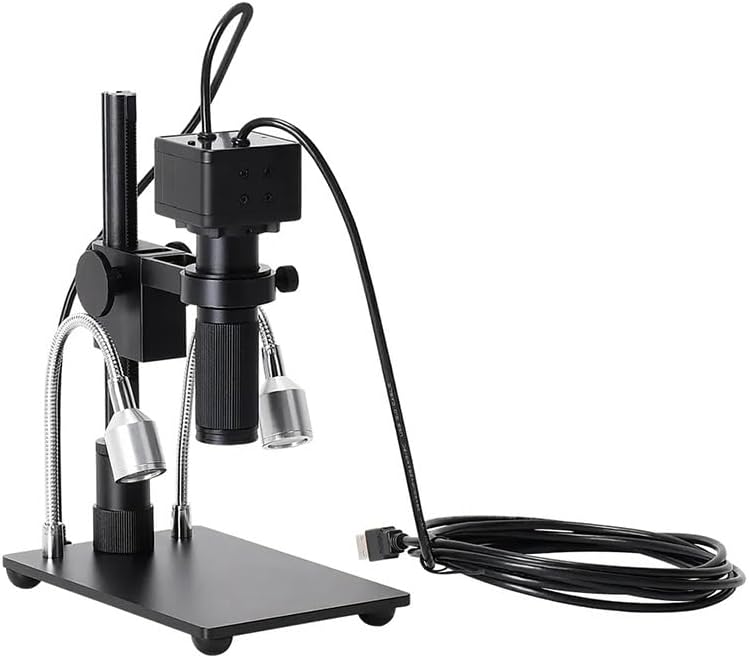
Figure 3 : Face avant view of the camera with C-mount lens attached.
4.3 Capture d'images et de vidéos
Refer to the specific instructions within the installed software for capturing still images and recording video footage. Typically, there are dedicated buttons or menu options for these functions.

Figure 4 : Interne view of the 5MP camera sensor.
5. Entretien
Proper maintenance ensures the longevity and performance of your microscope camera.
5.1 Cleaning the Lens and Camera
- Use a soft, lint-free cloth to gently wipe the exterior of the camera and stand.
- For the lens, use a specialized lens cleaning solution and a microfiber lens cloth. Avoid touching the lens surface with your fingers.
- N'utilisez jamais de nettoyants abrasifs ou de solvants.
5.2 Stockage
When not in use, store the microscope camera system in a clean, dry, and dust-free environment. It is recommended to cover the lens to prevent dust accumulation.
6. Dépannage
If you encounter issues with your HY-500B microscope camera, refer to the following common problems and solutions:
| Problème | Cause possible | Solution |
|---|---|---|
| Aucune image à l'écran | USB cable not connected; Software not launched; Camera not selected in software. | Ensure USB cable is securely connected. Launch software. Select the HY-500B camera in the software settings. |
| L'image est floue | Incorrect focus; Dirty lens. | Adjust the focus knob on the stand. Clean the lens as described in Section 5.1. |
| Les lumières LED ne fonctionnent pas | Power adapter not connected; Faulty adapter. | Ensure the power adapter is securely connected and plugged into a working outlet. Test with another outlet if possible. |
| Software not detecting camera | Driver issue; USB port issue. | Reinstall the software and drivers from the DISC. Try a different USB port on your computer. Restart your computer. |
7. Spécifications
- Modèle: HY-500B
- Résolution de la caméra : 5.0 mégapixels
- Lentille: 150X C-mount Lens
- Interface de sortie : USB 2.0 (480Mb/s)
- Longueur du fil : 1.5 mètres
- Réponse spectrale: 400 nm à 1000 nm
- Plage dynamique : 74 dB (Linear), 85 dB (HDR)
- Taille du pixel : 2.2 µm x 2.2 µm
- Poids de l'article : Environ 1.76 livres (800 grammes)
- Dimensions du colis : 1.18 x 0.79 x 0.39 inches (Camera unit only)
- Fabricant: Générique
8. Garantie et assistance
We are committed to providing high-quality after-sales service. If you have any questions, require assistance, or encounter any issues not covered in this manual, please do not hesitate to contact our customer support. We are available to serve you wholeheartedly.
For support, please refer to the contact information provided with your purchase or visit the manufacturer's official website.


