1. Introduction et plusview
This manual provides essential information for the installation, operation, and maintenance of your Generic TMPS 2 Tire Pressure Monitoring System (TPMS) Module Receiver Antenna. This module is designed to receive signals from your vehicle's tire pressure sensors, transmitting critical tire pressure data to the vehicle's electronic control unit (ECU).
The module is constructed from durable plastic, weighs approximately 0.5 kg, and operates on a 12V power supply. It is designed for integration into vehicles equipped with MQB TPMS systems and operates at a frequency of 433MHz.
2. Configuration et installation
Installation of the TMPS 2 module requires technical knowledge and should ideally be performed by a qualified automotive technician. Incorrect installation can lead to system malfunctions or damage to vehicle components. Always refer to your vehicle's specific service manual for detailed installation procedures and wiring diagrams.
Étapes générales d'installation :
- Localiser la position de montage : Identify the designated mounting location for the TPMS module receiver antenna within your vehicle, typically in the trunk area or under the rear seat.
- Débrancher l'alimentation : Before beginning installation, disconnect the vehicle's battery to prevent electrical shorts or damage.
- Module de montage : Securely mount the TMPS 2 module using appropriate fasteners. Ensure the antenna is positioned for optimal signal reception.
- Connecter le câblage : Connect the module's wiring harness to the vehicle's electrical system according to the vehicle's service manual. Pay close attention to power, ground, and data bus connections.
- Rebrancher l'alimentation : Rebranchez la batterie du véhicule.
- System Coding/Adaptation: After physical installation, the module may require coding or adaptation using a diagnostic tool (e.g., VCDS) to integrate it with the vehicle's TPMS system. This step is crucial for proper functionality.

Figure 1 : Face avant view of the TMPS 2 module with part number 3AA 907 273F clearly visible.

Figure 2 : Face avant view of an alternative TMPS 2 module with part number 2H6 907 273.
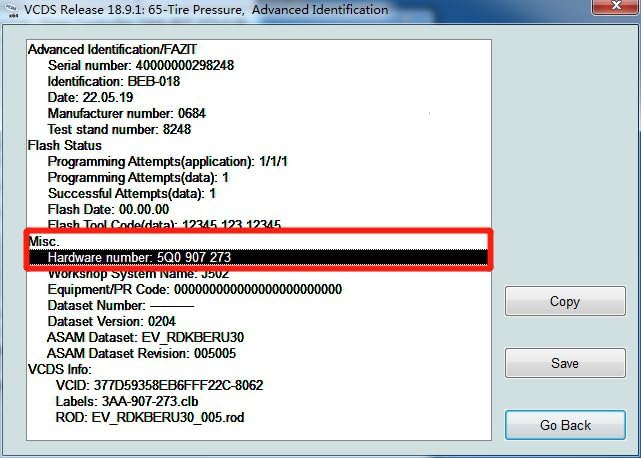
Figure 3 : Example of a VCDS diagnostic screen, illustrating the type of interface used for module coding and adaptation.
3. Mode d'emploi
Once correctly installed and coded to your vehicle, the TMPS 2 module operates automatically. It continuously monitors signals from the tire pressure sensors installed in each wheel.
- Opération automatique: The module functions passively, receiving data from tire sensors without direct user interaction.
- Transmission de données : It processes the received tire pressure data and transmits it to the vehicle's ECU, which then displays the information on the dashboard or alerts the driver to low tire pressure conditions.
- Initialisation du système : After tire rotation, replacement, or significant pressure adjustments, your vehicle's TPMS may require re-initialization. Refer to your vehicle's owner's manual for the specific procedure.
4. Entretien
The TMPS 2 module is designed to be a maintenance-free component. However, proper care of your vehicle's electrical system and environment can prolong its lifespan.
- Protection de l'environnement : Ensure the module remains protected from excessive moisture, extreme temperatures, and physical impact.
- Intégrité de la connexion : Periodically inspect the wiring harness and connectors for any signs of corrosion or damage, especially if the module is located in an exposed area.
- Nettoyage: If necessary, gently clean the exterior of the module with a dry, soft cloth. Do not use harsh chemicals or abrasive cleaners.
5. Dépannage
If you experience issues with your vehicle's TPMS after installing this module, consider the following troubleshooting steps:
- Voyant d'avertissement TPMS allumé :
- Vérifiez la pression des pneus : Ensure all tires are inflated to the manufacturer's recommended pressure.
- Fonctionnalité du capteur : Verify that all tire pressure sensors are functioning correctly. Faulty sensors will prevent the module from receiving data.
- Module Coding: Confirm that the module has been correctly coded and adapted to your vehicle's ECU using a diagnostic tool.
- Connexions de câblage : Inspect all electrical connections to the module for looseness, corrosion, or damage.
- No Tire Pressure Display:
- This could indicate a communication issue between the module and the vehicle's ECU, or a power supply problem to the module.
- Use a diagnostic scanner to check for fault codes related to the TPMS module.
- Lectures intermittentes :
- May be caused by electromagnetic interference, a weak signal from a tire sensor, or a loose connection.
- Ensure no other electronic devices are interfering with the 433MHz frequency.
For complex issues or persistent problems, it is recommended to consult a professional automotive technician with access to specialized diagnostic equipment.
6. Spécifications
| Fonctionnalité | Spécification |
|---|---|
| Marque | Générique |
| Nom du modèle | MQB TMPS |
| Numéros de pièces | 3AA907273F, 2H6907273 |
| Type de matériau | Plastique |
| Poids de l'article | 0.5 kg |
| Voltage | 12V |
| Fréquence de fonctionnement | 433 MHz |
| Fabricant | HUNTAN |
| ASIN | B0DXPHNVDM |
7. Garantie et assistance
For warranty information, please refer to the terms and conditions provided by your original retailer or the manufacturer at the time of purchase. As this is a Generic brand product, warranty coverage may vary.
For technical support or further assistance, please contact the seller from whom you purchased this product. They can provide guidance specific to your purchase and any applicable support services.