Introduction
The Generic 7565U Advanced Oil Burner Control is a 120 VAC primary safety control designed for residential and light commercial oil burners. It is suitable for boiler, furnace, and water heater applications with firing rates less than 20 gallons per hour (gph). This control operates in conjunction with a 7006 s s CAD cell or an equivalent flame sensor to manage the oil burner motor, igniter, and an optional solenoid valve.
The 7565U features 24 VAC thermostat terminals, ensuring compatibility with both mechanical and many power-stealing thermostats. It supports configurable interrupted or intermittent duty ignition. This control is also compatible with the myTechnician Ecosystem, allowing for enhanced diagnostics and programming via the myTechnician app on iOS and Android devices.
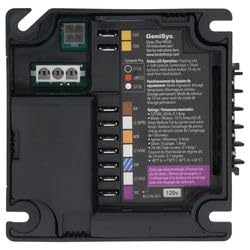
Illustration 1 : Avant view of the Generic 7565U Advanced Oil Burner Control. This image displays the compact design of the control unit, featuring various connection terminals and status indicators.
Configuration et installation
Proper installation is crucial for the safe and efficient operation of the 7565U control. Installation should only be performed by qualified personnel in accordance with all local and national codes and regulations.
Instructions de câblage:
- Ensure all power to the oil burner system is disconnected at the main service panel before beginning installation.
- Connect the 7565U control to the oil burner motor, igniter, and optional solenoid valve according to the wiring diagram provided with your specific oil burner system.
- Connect the 7006 s s CAD cell or equivalent flame sensor to the designated terminals on the 7565U.
- Connect the 24 VAC thermostat wires to the thermostat terminals on the control. The control is compatible with both mechanical and many power-stealing thermostats.
- Utilize the separate inputs for combustion air and blocked vent as required by your system configuration.
Configuration initiale :
- The control can be configured for interrupted or intermittent ignition operation based on system requirements.
- Configurable timings for valve on delay (pre-purge) and motor off delay (post-purge) can be set. The control auto-configures valve on delay timing for a solenoid valve upon detection.
- These configurations can be adjusted through the myTechnician app for precise control.
Mode d'emploi
Once installed and configured, the 7565U control manages the safe operation of your oil burner system.
Fonctionnement normal :
- The control monitors the flame sensor and thermostat signals to initiate and terminate burner cycles.
- Eight status lights on the unit provide real-time understanding of burner operation status. Refer to the label on the control for specific light indications.
myTechnician App Integration:
- Download the myTechnician app from your device's app store (iOS and Android compatible).
- Connect to the 7565U control via the app to monitor current status, control timing, burner cycle history, and program control variables directly from your phone.
- The app provides enhanced diagnostics and troubleshooting information.
Pump Prime Mode:
For technicians, the control includes a pump prime mode to facilitate initial system startup and maintenance procedures.
Entretien
The 7565U Advanced Oil Burner Control is designed for reliable operation with minimal maintenance. However, periodic checks of the overall oil burner system are recommended by a qualified technician.
- Ensure the control unit is free from dust and debris.
- Verify all wiring connections remain secure and free from corrosion.
- Regularly inspect the CAD cell or flame sensor for cleanliness and proper positioning as per the oil burner manufacturer's instructions.
Dépannage
The 7565U control offers several features to assist in diagnosing operational issues.
Diagnostic Features:
- Voyants d'état : The eight status lights provide immediate visual feedback on the burner's operational state. Consult the control's labeling for the meaning of each light sequence.
- Fault History: The control stores the last 50 cycles and the last 15 faults, which can be accessed via the myTechnician app. This history is invaluable for identifying intermittent issues.
- myTechnician App: Use the app for enhanced diagnostics. It can present detailed troubleshooting information and allow technicians to send live control data and history to R W Technical Support upon request.
Problèmes courants et solutions :
- Le brûleur ne s'allume pas : Check power supply, thermostat call for heat, and flame sensor condition. Review fault history via the myTechnician app.
- Fonctionnement intermittent : Examine wiring connections for looseness or corrosion. Check for proper fuel supply and flame sensor integrity. Utilize the cycle history in the app.
- Blocked Vent/Combustion Air Fault: Inspect the vent system and combustion air intake for obstructions. Verify connections to the blocked vent/combustion air inputs on the control.
Caractéristiques
| Paramètre | Valeur |
|---|---|
| Voltage (nominale) | 120 Vac (102-132 Vac) |
| Fréquence | 60 Hz |
| Current Draw (Control) | 100 mA (plus burner motor, igniter, and valve loads) |
| Charge du moteur | 120 Vac, 10 FLA, 60 LRA (Note: Reduce FLA rating by igniter and valve currents) |
| Igniter Load | 120 VCA, 3 A |
| Solenoid Valve Load | 120 VCA, 1 A |
| Volume du thermostattage | 24 Vac |
| Thermostat Anticipator Current | 0.1 A |
| Combustion Air/Blocked Vent (Front) | 10mA, 24Vac min |
| Combustion Air/Blocked Vent (Underside) | 1.9mA, 120Vac min |
| Plage de température de fonctionnement | -40°F à 150°F (-40°C à 65°C) |
| Plage de température de stockage | -40°F à 150°F (-40°C à 65°C) |
| Humidité | 5 to 95% RH, non-condensing and non-crystallizing |
| Approbations | UL 60730-1, UL 60730-2-5, CSA E60730-1, C22.2 NO. 60730-2-5 |
| Carburants compatibles | #2 fuel oil, up to 100% biodiesel, up to 100% renewable diesel |
Informations sur la garantie
Specific warranty details for the Generic 7565U Advanced Oil Burner Control are not provided in this document. Please refer to the product packaging or contact the manufacturer or your point of purchase for comprehensive warranty information.
Soutien
For technical assistance, diagnostics, and programming, utilize the myTechnician app available for iOS and Android operating systems. The app is designed to communicate with myTechnician compatible devices and provide relevant diagnostic and troubleshooting information.
For further support, including sending live control data and history to R W Technical Support when troubleshooting, please use the features within the myTechnician app or contact your installer or supplier.


