
1. Introduction
The COWAY Airmega 450 Air Purifier is designed to provide clean and healthy air for large rooms, covering up to 3,285 sq ft in 60 minutes. It features HyperVortex air technology for optimized airflow and filtration efficiency, ensuring quiet operation at 21.6 dB. This unit is equipped with a custom 3-in-1 filter system to effectively remove smoke, allergens, pet dander, odors, and various particulate matter (PM1, PM2.5, PM10).
Key features include a real-time air quality indicator, smart modes (Auto, Sleep, Eco, Turbo) for adaptive purification, and Energy Star certification for energy efficiency. The Airmega 450 is built for reliability and comes with a 3-year manufacturer's limited warranty.

Figure 1: COWAY Airmega 450 Air Purifier highlighting HyperVortex technology, 360° + Bottom Air Intake, 4 Smart Modes, PM(1, 2.5, 10) & Real-time AQI, Whisper Quiet operation, and 3-in-1 Custom Filter.
Vidéo 1 : Terminéview of the Airmega 350 & 450, showcasing their award-winning design and features.
2. Installation
2.1 Déballage et placement
Carefully remove the air purifier from its packaging. Place the unit on a flat, stable surface, ensuring there is adequate space around it for optimal airflow. Avoid placing it directly against walls or furniture that might obstruct air intake or output.
2.2 Installation du filtre
The Airmega 450 utilizes a 3-stage filtration system. The filters are typically pre-installed but should be checked and unwrapped before first use.
- Ouvrir la couverture avant : Gently pull the front cover of the unit to detach it.
- Remove and Unwrap Filters: Locate the pre-filter, activated carbon filter, and HEPA filter. Remove them from their protective plastic packaging.
- Réinstaller les filtres : Insert the filters back into the unit in the correct order: first the HEPA filter, then the activated carbon filter, and finally the pre-filter. Ensure they are securely seated.
- Close the Front Cover: Reattach the front cover, ensuring it clicks firmly into place.

Figure 2 : Illustration du 3-stage filtration system: Vacuumable Pre-Filter, HEPA Filter, and Activated Carbon Filter.
3. Modes de fonctionnement
The Airmega 450 offers various operating modes to suit different needs and environments.
- Mode automatique: The unit automatically adjusts fan speed based on real-time air quality readings. This is the recommended default mode for continuous operation.
- Mode veille: Operates at the lowest fan speed and noise level, with all indicator lights dimmed or off, ideal for nighttime use.
- Mode écologique: Optimizes energy consumption by operating at a low fan speed and only increasing airflow when air quality requires it.
- Mode Turbo: Runs the fan at maximum speed for rapid air purification, suitable for quickly clearing pollutants or odors.
3.1 Real-Time Air Quality Indicator (AQI)
The Airmega 450 continuously monitors air quality using a laser particle sensor for PM1, PM2.5, and PM10. The LED ring on the top of the unit changes color to indicate the current air quality:
- Bleu: Bonne qualité de l'air
- Vert: Qualité de l'air modérée
- Jaune: mauvaise qualité de l'air
- Rouge: Very unhealthy air quality

Figure 3: The four smart operating modes of the Airmega 450.
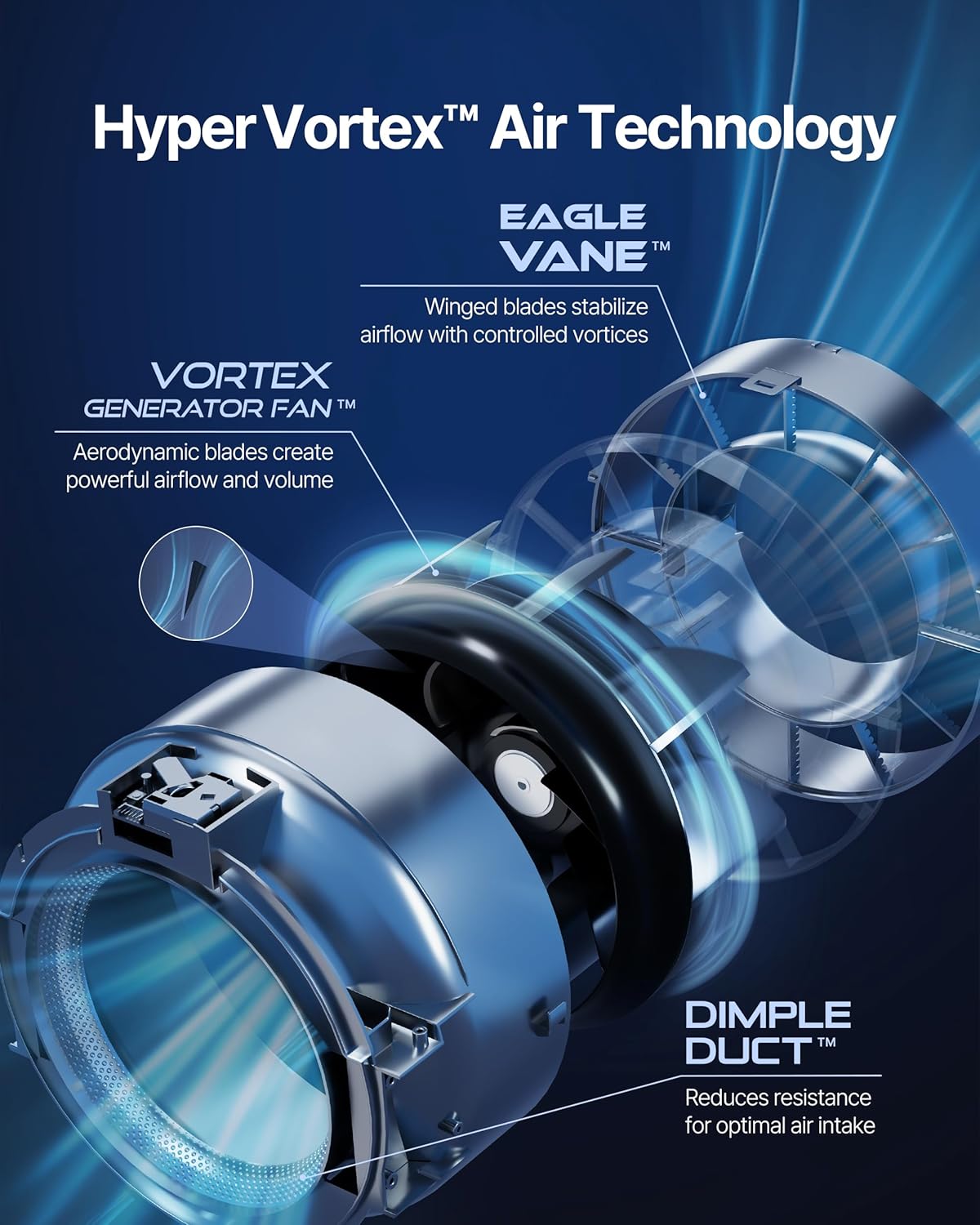
Figure 4 : Détaillé view of the intuitive control panel, including air quality indicators and mode selection.
Video 2: Demonstrates the Airmega's quick response to changes in air quality, activating purification as needed.
4. Système de filtration
The Airmega 450 features a comprehensive 3-stage custom filter system designed to capture a wide range of airborne pollutants.
- Préfiltre aspirable : Captures larger particles such as dust, pet hair, and lint, extending the life of subsequent filters.
- Filtre à charbon actif: Absorbe les odeurs, les composés organiques volatils (COV) et les gaz nocifs.
- Filtre HEPA: Traps up to 99.999% of particles as small as 0.01 microns, including pollen, dust mites, fungi, and pet dander.
4.1 Custom Filter Options
The Airmega 450 offers specialized custom filters to address specific air quality concerns:
- Fresh Starter+ Filter: An all-around filter for odors, mold, and micro-sized pollutant removal (included with product).
- Allergen+ Filter: Extra effective against pet, pollen, and mite matter allergens.
- Intense Smoke+ Filter: Carbon-upgraded protection against wildfire smoke, gas, and VOCs.

Figure 5 : Plusview of the three available custom filter types for personalized air care.
5. Entretien
Regular maintenance ensures optimal performance and longevity of your Airmega 450.
5.1 Nettoyage du préfiltre
The pre-filter should be cleaned regularly, typically every 2-4 weeks, depending on usage and air quality. It is vacuumable and washable.
- Éteindre et débrancher : Éteignez et débranchez toujours l'appareil avant d'effectuer tout entretien.
- Retirer le capot avant : Détachez le capot avant.
- Remove Pre-Filter: Gently unclip and remove the pre-filter.
- Préfiltre propre : Use a vacuum cleaner to remove dust and debris. For a deeper clean, wash it with mild soap and water. Ensure it is completely dry before reinstallation.
- Reinstall Pre-Filter: Place the clean, dry pre-filter back into its slot and secure it.
5.2 Remplacement du filtre HEPA et du filtre à charbon actif
The HEPA and activated carbon filters are combined into a single unit and typically need replacement every 12 months, or when the filter replacement indicator light illuminates.
- Éteindre et débrancher : Éteignez et débranchez l’appareil.
- Retirer le capot avant : Détachez le capot avant.
- Supprimer le filtre utilisé : Carefully pull out the combined HEPA/Activated Carbon filter.
- Installer un nouveau filtre : Insert a new genuine COWAY Airmega replacement filter into the unit, ensuring correct orientation.
- Fermer la couverture avant : Remettez le capot avant.
- Indicateur de réinitialisation du filtre : With the unit powered on, press and hold the 'Filter Reset' button for 3 seconds until the indicator light turns off.

Figure 6: Step-by-step guide for replacing the 3-in-1 filter.
6. Dépannage
If you encounter issues with your Airmega 450, refer to the following common troubleshooting steps:
- L'appareil ne s'allume pas : Assurez-vous que le cordon d'alimentation est correctement branché à une prise fonctionnelle. Vérifiez que le bouton marche/arrêt n'est pas enfoncé.
- Mauvaise circulation d'air/purification : Check if the filters are installed correctly and unwrapped. Clean the pre-filter if it appears dirty. Replace the HEPA/Activated Carbon filter if the indicator light is on.
- Bruit inhabituel : Ensure the unit is on a flat, stable surface. Check for any foreign objects obstructing the fan or filters.
- Indicateur de qualité de l'air : toujours rouge/jaune. This indicates high levels of pollutants. Ensure the unit is operating in Auto or Turbo mode for effective cleaning. If the issue persists in a clean environment, the sensor may need cleaning (refer to the full user manual for sensor cleaning instructions).
- Filter Replacement Light Remains On After Replacement: Ensure you have reset the filter indicator by pressing and holding the 'Filter Reset' button for 3 seconds.
7. Spécifications
| Marque | Coway |
| Numéro de modèle | AP-2524B(W) |
| Couleur | Blanc |
| Dimensions du produit | 13.4"P x 13.4"L x 29.6"H |
| Poids de l'article | 24.9 livres |
| Couverture de la surface au sol | Jusqu'à 3285 pieds carrés (en 60 minutes) |
| Niveau de bruit | 23.7 décibels (réglage le plus bas) |
| Classe de filtre | HEPA |
| Taille de rétention des particules | 0.3 microns |
| Capacité de filtration des contaminants | Dust, Odors, Pet Dander, Pollen, Volatile Organic Compounds (VOCs) |
| Type de contrôleur | Touche |
| Quoitage | 72 watts |
| Source d'énergie | Électrique avec fil |
| Caractéristiques spéciales | Indicateur de durée de vie du filtre, indicateur de qualité de l'air en temps réel, mode intelligent |
| Certifications | Certifié CARB, certifié ETL, certifié Energy Star |
8. Garantie et assistance
8.1 Garantie limitée du fabricant
The COWAY Airmega 450 Air Purifier is backed by a 3-year manufacturer's limited warranty. This warranty covers defects in materials and workmanship under normal use. Please retain your proof of purchase for warranty claims.
8.2 Assistance clientèle
For further assistance, technical support, or warranty inquiries, please contact Coway customer service. Refer to the contact information provided in your product packaging or visit the official Coway website.