
HETP HX160Q2
Manuel d'utilisation de la batterie externe sans fil HETP
Modèle : HX160Q2
Introduction
Thank you for choosing the HETP Wireless Power Bank. This 40800mAh portable charger is designed to provide versatile and efficient power for your electronic devices. Featuring 7-in-1 charging capabilities, including built-in cables, multiple output ports, and wireless charging, it ensures your devices remain powered on the go. Please read this manual carefully before use to ensure proper operation and maintenance.

Image : Avant view of the HETP Wireless Power Bank, displaying its LCD screen with 100% charge and the wireless charging pad. The side shows the built-in cables.
Caractéristiques du produit
- Haute capacité : 40800mAh premium Li-polymer battery for multiple device charges.
- Chargement 7 en 1 : Simultaneously charge up to 7 devices.
- Câbles intégrés : Includes iOS, USB-C, and Micro USB cables for convenience.
- Plusieurs ports de sortie : Two USB-A ports and one USB-C port.
- Chargement sans fil : 15W wireless charging compatible with all wireless-enabled devices.
- Charge rapide : 25W PD 3.0 and QC 4.0 fast charging technology.
- Écran LCD : Clear digital display showing battery percentage.
- Caractéristiques de sécurité : Multi-security protection for safe charging.

Image: Diagram illustrating the wide compatibility of the power bank with various electronic devices, including smartphones, tablets, smartwatches, and earbuds.
Contenu du colis
- 1 x HETP Wireless Portable Charger Power Bank (40800mAh)
- 1 x Manuel d'instructions du produit (ce document)
Précautions de sécurité
- N’exposez pas la batterie externe à des températures extrêmes (chaudes ou froides), à la lumière directe du soleil ou au feu.
- Ne démontez pas, ne modifiez pas et ne réparez pas vous-même l'appareil.
- Tenir à l'écart de l'eau et d'autres liquides.
- Évitez de laisser tomber ou de soumettre la batterie externe à des impacts violents.
- Conserver dans un endroit frais et sec lorsqu'il n'est pas utilisé.
- Tenir hors de portée des enfants.
Configuration et utilisation initiale
Charger la batterie externe
Before first use, fully charge the power bank. The LCD display will show the charging progress and battery percentage.
- Utilisation du câble USB-C intégré : Connect the built-in USB-C cable from the power bank to a USB wall adapter (not included).
- Utilisation du port d'entrée USB-C : Connect a USB-C cable (not included) from a USB wall adapter to the USB-C input port on the power bank.
The LCD screen will illuminate and display the charging percentage. Once it reaches 100%, the power bank is fully charged.

Image: Illustration demonstrating two methods to recharge the power bank: via its integrated USB-C cable or by connecting an external USB-C cable to the dedicated input port.
Mode d'emploi
Dispositifs de charge
The HETP Wireless Power Bank offers multiple ways to charge your devices simultaneously.
1. Wired Charging (Using Built-in Cables)
- Pull out the appropriate built-in cable (iOS, USB-C, or Micro USB) from its slot.
- Branchez le câble au port de chargement de votre appareil.
- The power bank will automatically begin charging your device. The LCD display will show "OUT" indicating output.
2. Wired Charging (Using Output Ports)
- Use your device's original charging cable or a compatible cable.
- Connect one end of the cable to one of the power bank's output ports (USB-A1, USB-A2, or USB-C).
- Connectez l'autre extrémité à votre appareil.
- La charge commencera automatiquement.
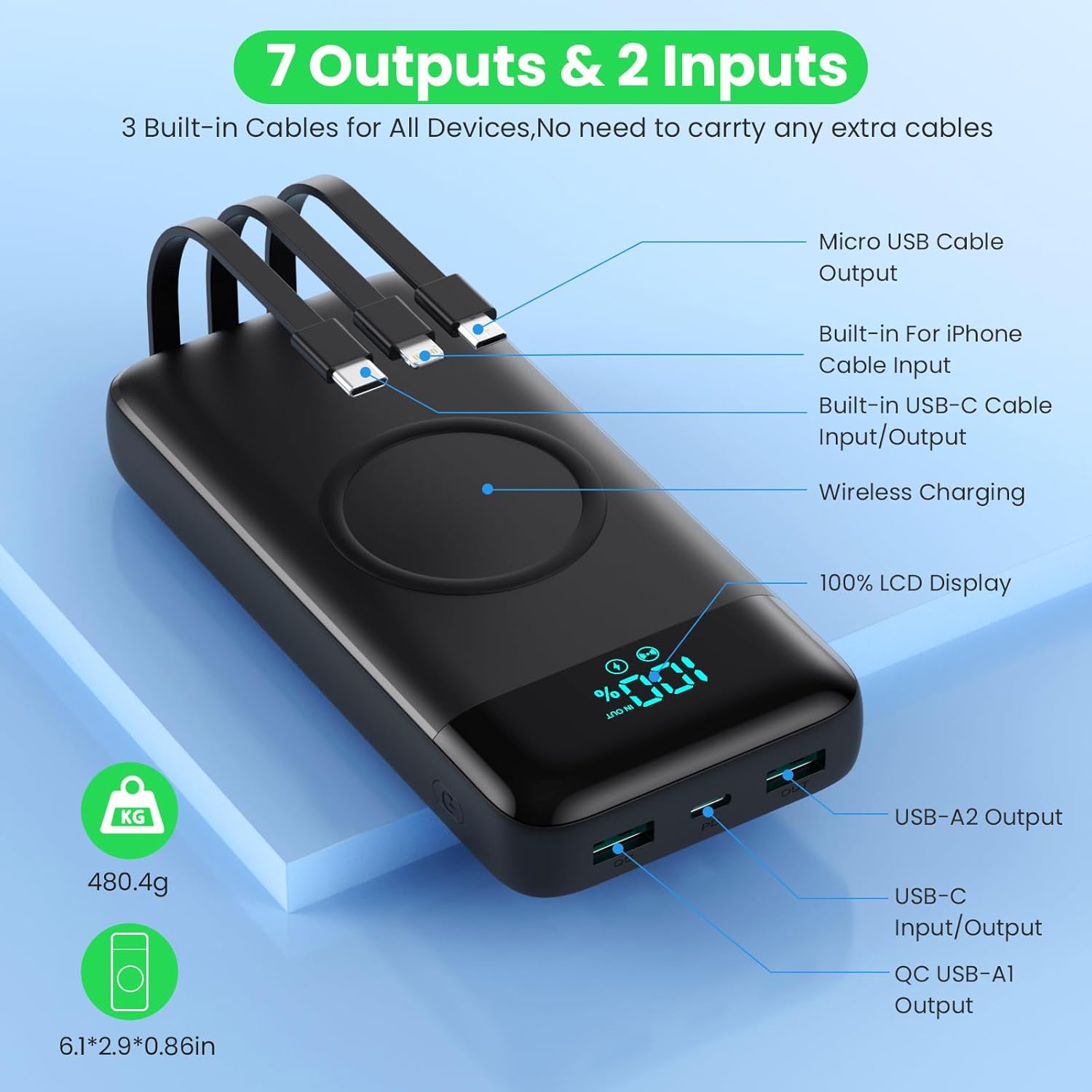
Image: Detailed diagram highlighting all 7 output options (3 built-in cables, 3 USB ports, 1 wireless) and 2 input options (built-in USB-C cable, USB-C port) on the power bank, along with the LCD display.
3. Chargement sans fil
- Assurez-vous que votre appareil prend en charge le chargement sans fil.
- Place your wireless-enabled device directly onto the wireless charging pad located on the top surface of the power bank.
- Align the device centrally on the pad for optimal charging.
- La batterie externe détectera automatiquement la charge et commencera la charge sans fil.

Image: A smartphone being wirelessly charged on the power bank, illustrating the fast wireless charging feature and supported wattaget.
Charge simultanée
The HETP Wireless Power Bank is designed to charge multiple devices concurrently using a combination of its built-in cables, output ports, and wireless charging pad.

Image : Vue aérienne view showing the power bank simultaneously charging a tablet, multiple smartphones, and a smartwatch using its various charging methods.
Entretien
- Nettoyage: Use a soft, dry cloth to clean the surface of the power bank. Do not use abrasive cleaners or solvents.
- Stockage: If storing for an extended period, charge the power bank to approximately 50-70% capacity. Recharge every 3-6 months to maintain battery health.
- Entretien des câbles : When retracting built-in cables, do so gently to avoid damage.
Dépannage
| Problème | Cause possible | Solution |
|---|---|---|
| La banque d'alimentation ne charge pas | Câble de charge ou adaptateur défectueux ; batterie externe complètement déchargée ; problème avec le port d’entrée. | Try a different charging cable and wall adapter. Ensure the power bank is connected correctly. Allow a few minutes for the LCD to activate if fully discharged. |
| L'appareil ne se charge pas depuis la banque d'alimentation | Power bank low on charge; device cable faulty; device not compatible; incorrect port used; wireless charging misalignment. | Check power bank's charge level. Try a different cable. Ensure device is compatible. For wireless charging, reposition device on the pad. |
| Chargement lent | Câble non compatible avec la charge rapide ; appareil non compatible avec la charge rapide ; plusieurs appareils en charge simultanément. | Utilisez un câble compatible avec la charge rapide. Assurez-vous que votre appareil prend en charge la charge rapide. Charger plusieurs appareils simultanément peut réduire la vitesse de charge de chacun. |
| L'écran LCD ne fonctionne pas | Batterie externe hors service ; problème interne. | Press the power button to activate the display. If problem persists, contact customer support. |
Caractéristiques
| Fonctionnalité | Détail |
|---|---|
| Numéro de modèle | HX160Q2 |
| Capacité de la batterie | 40800mAh |
| Type de batterie | Li-polymère |
| Dimensions du produit | 10.58 x 6.78 x 1.31 cm |
| Poids de l'article | 100 g |
| Entrée (USB-C) | Charge rapide PD 25 W |
| Sortie (USB-C) | Charge rapide PD 25 W |
| Sortie (USB-A) | QC 4.0 Fast Charging |
| Sortie sans fil | 15W (5W, 7.5W, 10W, 15W compatible) |
| Câbles intégrés | iOS, USB-C, Micro USB |
| Afficher | Affichage numérique LCD |
| Couleur | Noir |
Garantie et assistance
Each HETP product is safety certified. If you encounter any problems or have questions regarding your Wireless Power Bank, please do not hesitate to contact our customer support team. We are committed to providing professional after-sales service and satisfactory solutions within 12 hours.
Veuillez consulter votre documentation d'achat pour connaître les conditions de garantie spécifiques et les coordonnées de contact.
Ask a question about this manual
Ask about setup, troubleshooting, compatibility, parts, safety, or missing instructions. Manuals+ will review the question and use this page’s manual context to help answer it.