
Winfita T703
Manuel d'utilisation du tapis roulant Winfita T703
Model: T703 | Brand: Winfita
1. Introduction et présentation du produitview
Thank you for choosing the Winfita T703 Treadmill. This manual provides essential information for the safe and effective use of your new fitness equipment. The Winfita T703 is designed for home use, offering a comprehensive workout experience with its advanced features.
Key features include a powerful 4.0HP motor, 0-15% automatic incline, a spacious 18'' x 50'' running belt, and Bluetooth connectivity for app integration. It supports users up to 300 lbs and comes with 64 preset programs to diversify your workouts.
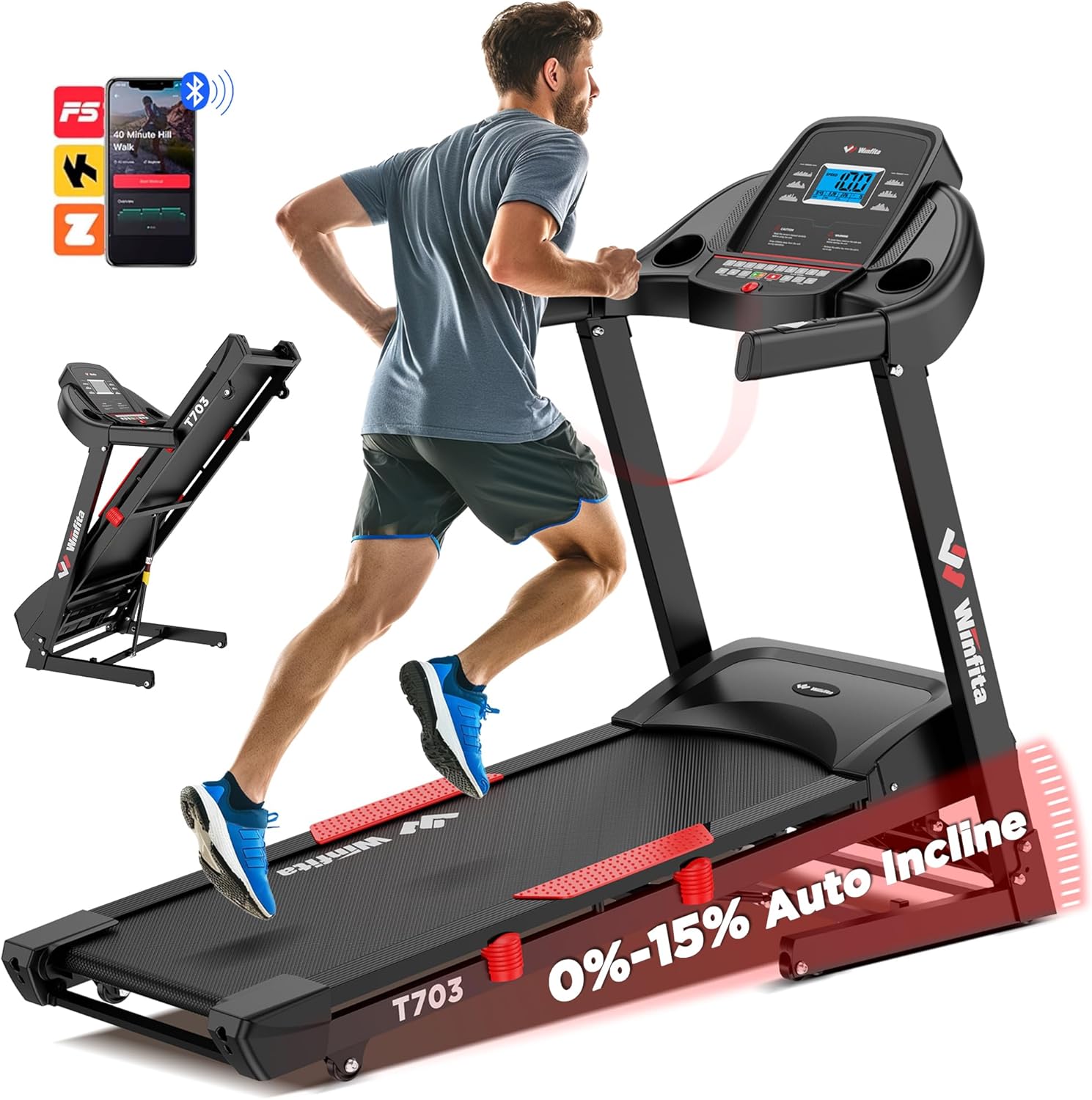
Figure 1.1: Winfita T703 Treadmill. This image shows the overall design of the treadmill, highlighting its robust frame and console.
Video 1.1: Winfita Folding Treadmill for Home with Auto Incline. This video provides a general overview of the treadmill's features and functionality.
2. Consignes de sécurité
Before operating the Winfita T703 Treadmill, please read and understand all safety instructions. Failure to follow these instructions may result in injury or damage to the product.
- Placement: Place the treadmill on a flat, stable surface. Ensure there is adequate clear space around the treadmill (at least 6 feet behind and 2 feet on each side).
- Pouvoir: Branchez le tapis roulant à une prise de courant correctement mise à la terre. N’utilisez pas de rallonges ni d’adaptateurs.
- Poids de l'utilisateur: Ne pas dépasser la capacité de poids maximale de l'utilisateur de 300 lb.
- Enfants et animaux domestiques : Keep children and pets away from the treadmill during operation. Always remove the safety key when the treadmill is not in use.
- Tenue: Portez des chaussures et des vêtements de sport adaptés. Évitez les vêtements amples qui pourraient se coincer dans les pièces mobiles.
- Clé de sécurité : Always attach the safety key clip to your clothing before starting the treadmill. In case of an emergency, the safety key will detach, stopping the treadmill.
- Entretien: Perform regular maintenance as described in this manual. Unplug the treadmill before cleaning or servicing.
- Conditions médicales : Consultez un médecin avant de commencer un nouveau programme d'exercices, surtout si vous souffrez de problèmes de santé préexistants.

Figure 2.1: Console with Safety Warnings. Note the warning labels on the console, reminding users to read the manual and remove the safety key when not in use.
3. Configuration et assemblage
The Winfita T703 Treadmill arrives 99% pre-assembled, requiring minimal setup. Follow these steps to complete the assembly:
- Déballage : Carefully remove the treadmill from its packaging. It is recommended to have two people for this step due to the weight of the unit.
- Positionnement : Place the main frame on a flat, stable surface where you intend to use it.
- Dépliez les montants : Gently lift the console and uprights into the upright position. Ensure they lock securely into place.
- Fixez les montants : Locate the pre-installed bolts and washers on the base of the uprights. Use the provided Allen wrench (5MM) to tighten these bolts. There are typically 6 screws in total that need tightening. Repeat this procedure on both sides of the treadmill.
- Fixez les mains courantes (si elles sont séparées) : If the handrails are not already attached, align them with the designated slots on the uprights and secure them with the provided hardware.
- Connect Safety Key: Insérez la clé de sécurité rouge dans l'emplacement prévu à cet effet sur la console. Le tapis roulant ne fonctionnera pas sans la clé de sécurité.
- Connexion électrique : Branchez le cordon d’alimentation sur une prise électrique reliée à la terre.
- Lubrication (Initial): Before first use, apply a small amount of the provided silicone oil under the running belt. Lift the belt slightly and apply the oil evenly across the deck. This ensures smooth operation and prolongs belt life.

Figure 3.1: Pre-assembled Treadmill and Tools. This image illustrates the minimal assembly required, showing the main unit and the small tool kit.
Video 3.1: Unboxing video of the Winfita treadmill. This video demonstrates the unboxing process and initial setup steps.
Video 3.2: Just tighten 6 screws to install the treadmill. This video specifically shows the process of securing the uprights with the provided screws.
4. Mode d'emploi
The Winfita T703 Treadmill offers various modes and programs to enhance your workout. Familiarize yourself with the console and its functions.
4.1 Console Overview
The user-friendly console features a 5-inch LCD display that provides real-time data such as speed, incline, time, distance, calories burned, and heart rate. It also includes quick-access buttons for speed and incline adjustments.
Figure 4.1: Multi-Function Console. This image highlights the various buttons and the LCD display for tracking workout metrics.
4.2 Début d'une séance d'entraînement
- Assurez-vous que la clé de sécurité est correctement fixée à la console et à vos vêtements.
- Montez sur les barres latérales du tapis roulant.
- Appuyez sur le COMMENCER Appuyez sur le bouton. La courroie se mettra en mouvement à faible vitesse.
- Montez prudemment sur le tapis de course et commencez à marcher.
4.3 Réglage de la vitesse et de l'inclinaison
- Vitesse: Utilisez le VITESSE + et VITESSE - buttons on the console or handrails to adjust the speed from 0.6 MPH to 10 MPH. Quick speed buttons (e.g., 3, 6, 9, 12 MPH) are also available for rapid changes.
- Inclinaison: Utilisez le INCLINAISON + et INCLINAISON - buttons on the console or handrails to adjust the automatic incline from 0% to 15% (8.5°). Quick incline buttons (e.g., 3, 6, 9, 12, 15%) are available.

Figure 4.2: Automatic Incline Feature. This image demonstrates the treadmill's ability to adjust incline automatically, ranging from 0% to 15%.

Figure 4.3: Speed Range. This image illustrates the treadmill's speed capabilities, from a slow walk to a brisk run.
4.4 Programmes et modes
The treadmill includes 64 preset programs, 5 user-defined programs, and 3 countdown modes (time, distance, calories) to vary your workouts.
- Programmes prédéfinis : Appuyez sur le PROGRAMME button to cycle through the 64 built-in programs. Each program has varying speed and incline profiles.
- User-Defined Programs: Create and save your own custom workout routines. Refer to the detailed instructions in the included user manual for setting up user-defined programs.
- Modes de compte à rebours : Select a countdown mode (Time, Distance, or Calories) and set your desired target. The treadmill will stop once the target is reached.
4.5 Connectivité Bluetooth et intégration d'applications
Connect your treadmill to compatible fitness apps via Bluetooth for enhanced tracking and interactive workouts.
- Download a compatible app (e.g., Kinomap, FitShow) from your device's app store.
- Activez le Bluetooth sur votre appareil mobile.
- Open the app and follow the on-screen instructions to connect to your Winfita T703 Treadmill.
- Enjoy music through the built-in stereo speakers by connecting your device via Bluetooth.

Figure 4.4: Bluetooth Connectivity. This image highlights the treadmill's compatibility with popular fitness applications for an interactive workout experience.
4.6 Arrêter une séance d'entraînement
- Appuyez sur le ARRÊT button to gradually bring the treadmill to a halt.
- Alternatively, pull the safety key from the console for an immediate stop.
5. Entretien
Regular maintenance ensures the longevity and optimal performance of your Winfita T703 Treadmill.
- Nettoyage: Essuyez les surfaces du tapis roulant avec un chiffon humide.amp Essuyez le chiffon après chaque utilisation pour enlever la transpiration et la poussière. Évitez les nettoyants abrasifs.
- Lubrification: The running deck requires periodic lubrication with silicone oil. Apply oil every 3 months or after every 50 hours of use, whichever comes first. Lift the running belt and apply the oil evenly across the center of the deck.
- Tension et alignement de la courroie : Check the running belt tension and alignment regularly. If the belt slips or drifts to one side, refer to the detailed instructions in the full user manual for adjustment procedures.
- Couvercle du moteur : Periodically remove the motor cover (unplug the treadmill first) and vacuum any dust or debris that may have accumulated.
6. Dépannage
This section addresses common issues you might encounter with your treadmill. For more complex problems, please contact customer support.
| Problème | Cause possible | Solution |
|---|---|---|
| Le tapis roulant ne démarre pas. | Cordon d'alimentation débranché, clé de sécurité absente, disjoncteur déclenché. | Assurez-vous que le cordon d'alimentation est bien branché. Insérez complètement la clé de sécurité. Vérifiez le disjoncteur de votre installation électrique. |
| La ceinture de course patine. | La tension de la courroie est trop faible, elle a besoin d'être lubrifiée. | Adjust belt tension (refer to manual). Apply silicone oil. |
| Loud squeaking sound during operation. | Belt needs lubrication, loose components. | Apply silicone oil. Check and tighten all visible bolts and screws. |
| Code d'erreur E02. | Problème de moteur ou de contrôleur. | Unplug the treadmill for 5 minutes, then plug it back in. If the error persists, contact customer service. |
| L'inclinaison ne se règle pas. | Incline motor issue, loose connection. | Check all connections. If the issue persists, contact customer service. |
Video 6.1: Update on repairs on incline. This video shows a customer's experience with an incline issue, which may be helpful for troubleshooting.
Video 6.2: Plugged in, looked fine. Tried to use and get E02 error. This video shows a customer encountering an E02 error, which can help in diagnosing similar issues.
Video 6.3: Loud squeaking sound. This video demonstrates a common squeaking issue, which may indicate a need for lubrication or tightening.
7. Spécifications
Detailed technical specifications for the Winfita T703 Treadmill:
| Fonctionnalité | Spécification |
|---|---|
| Puissance du moteur | 4.0 CV |
| Plage de vitesse | 0.6 - 10 MPH |
| Inclinaison automatique | 0 - 15% (8.5°) |
| Dimensions de la ceinture de course | 18 po L x 50 po l |
| Poids maximum de l'utilisateur | 300 livres |
| Programmes | 64 Preset, 5 User-defined, 3 Countdown Modes |
| Connectivité | Bluetooth (Kinomap, FitShow compatible) |
| Type d'affichage | Écran LCD de 5 pouces |
| Dimensions plié (L x l x H) | 43 po x 28 po x 55 po |
| Poids de l'article | 125 livres |
| Matériau du cadre | Acier allié |
| Caractéristiques spéciales | Built-In Speaker, Shock Absorbent, Wheeled, Foldable |

Figure 7.1: Compact Design and Dimensions. This image provides a visual representation of the treadmill's dimensions and its foldable nature for space-saving storage.
8. Garantie et support client
Winfita stands behind the quality of its products. Your Winfita T703 Treadmill comes with a Garantie d'un an.
For any questions, concerns, or technical support, please do not hesitate to contact our dedicated customer service team. We offer 7/24 Online Customer Service and Lifetime Technical Support.
You can typically find contact information, including email, in the warranty section of the physical user manual included with your product.

Figure 8.1: Customer Service Information. This image outlines the steps to contact customer service for support.
Ask a question about this manual
Ask about setup, troubleshooting, compatibility, parts, safety, or missing instructions. Manuals+ will review the question and use this page’s manual context to help answer it.