
1. Introduction
Thank you for choosing the NJDQFA Smart Electric Heated Towel Rack. This appliance is designed to warm and dry towels, bathrobes, and other small garments, enhancing comfort in your bathroom. It features a timer function, a top shelf for additional storage, and can be wall-mounted to save space. Please read this manual thoroughly before installation and use to ensure proper operation and safety.

Image 1.1: The heated towel rack installed in a bathroom, illustrating its versatility for drying various items.
2. Consignes de sécurité
- Lisez toutes les instructions avant d’utiliser cet appareil.
- Ne plongez pas l’appareil dans l’eau ou d’autres liquides.
- Assurer l'alimentation voltage correspond à l'étiquette de puissance figurant sur l'appareil.
- N’utilisez pas l’appareil si le cordon ou la fiche est endommagé(e). Si le cordon est endommagé, il doit être remplacé par le fabricant, son service après-vente agréé ou une personne qualifiée afin d’éviter tout danger.
- Cet appareil est destiné à un usage domestique uniquement. Ne l'utilisez pas à l'extérieur.
- Débranchez l'appareil de la prise lorsqu'il n'est pas utilisé et avant de le nettoyer.
- Ne laissez pas le cordon pendre du bord d'une table ou d'un comptoir, ou toucher des surfaces chaudes.
- Une surveillance étroite est nécessaire lorsqu’un appareil est utilisé par ou à proximité d’enfants.
- The appliance is designed with IPX4 water resistance, meaning it is protected against splashing water from any direction. However, it should not be submerged.

Image 2.1: Illustration of the IPX4 water resistance rating, indicating protection against splashing water.
3. Contenu du colis
Verify that all items are present and undamaged upon opening the package. If any parts are missing or damaged, please contact customer support.
- 1x Towel Heater Unit
- 1x Installation Accessories Kit (screws, wall anchors, mounting brackets)
4. Spécifications
| Fonctionnalité | Description |
|---|---|
| Nom du produit | Smart Electric Towel Rack |
| Marque | NJDQFA |
| Numéro de modèle | 66222956-AWHITE42-LEFTLINE |
| Matériel | Aluminium |
| Couleur | A White 42 |
| Puissance du produit | 180 W |
| Plage de température | 45 à 70 °C / 113 à 158 °F |
| Méthode de chauffage | Carbon Fiber Heating |
| Résistance à l'eau | IPX4 |
| Type d'installation | Fixation murale |

Image 4.1: Product dimensions for installation planning. Height: 58 cm (22.8 inches). Width: 42 or 47 cm (16.5 or 18.5 inches). Depth from wall: 15 cm (5.9 inches).
5. Configuration et installation
This towel rack is designed for wall-mounted installation. Ensure you have the necessary tools (drill, screwdriver, measuring tape, level) and follow these general steps. Refer to Image 4.1 for dimensions and mounting points.
- Choisissez l'emplacement: Select a suitable wall location in your bathroom, away from direct water spray but within reach of a power outlet. Ensure the wall material can support the weight of the unit and any items placed on it.
- Points de forage marqués : Using the provided mounting template or by carefully measuring the mounting points on the unit, mark the drilling locations on the wall. Use a level to ensure horizontal alignment.
- Trous de forage : Drill holes at the marked locations using an appropriate drill bit for your wall type. Insert wall anchors if necessary.
- Fixer les supports : Fixez les supports de montage au mur à l'aide des vis fournies.
- Mount Towel Rack: Carefully align the towel rack with the mounted brackets and secure it in place. Ensure it is firmly attached and stable.
- Connecter l'alimentation : Plug the towel rack into a grounded electrical outlet.
6. Mode d'emploi
The towel rack features an intuitive control panel for setting the timer and managing heating.
- Marche/Arrêt : Appuyez sur le bouton d'alimentation (généralement indiqué par un cercle avec une ligne verticale) pour allumer ou éteindre l'appareil.
- Contrôle de la température : The unit will heat to its operating temperature range of 45-70°C (113-158°F) once powered on. Specific temperature adjustments may be available via dedicated buttons if present on your model.
- Fonction minuterie : Use the timer button (often indicated by a clock icon) to set the desired operating duration. The timer can typically be set from 1 to 24 hours. The display will show the remaining time.

Image 6.1: The control panel showing the timer function, allowing operation for 1 to 24 hours.

Image 6.2: Visual representation of the quick and even heating capability of the towel rack.
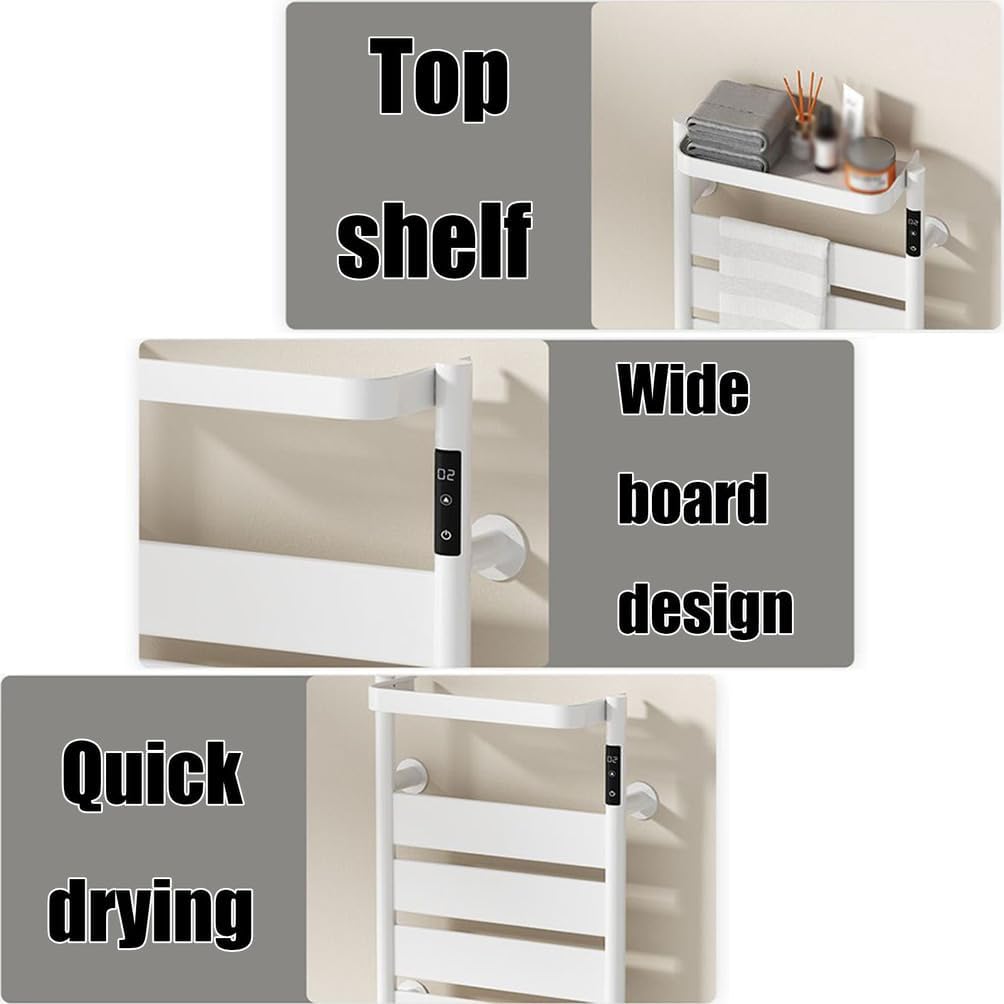
Image 6.3: Features including the convenient top shelf, wide board design for efficient drying, and quick drying capability.
7. Entretien
Regular cleaning and proper care will ensure the longevity and optimal performance of your heated towel rack.
- Nettoyage: Before cleaning, always unplug the unit from the power outlet and allow it to cool completely. Wipe the surface with a soft, damp Chiffon. N’utilisez pas de nettoyants abrasifs, de solvants ou de produits chimiques agressifs, car ils pourraient endommager la finition.
- Stockage: Si vous devez entreposer l'appareil pendant une période prolongée, assurez-vous qu'il soit propre et sec. Rangez-le dans un endroit frais et sec, de préférence dans son emballage d'origine.
- Inspection: Periodically check the power cord for any signs of damage. If damage is found, discontinue use and contact customer support.
8. Dépannage
If you encounter any issues with your heated towel rack, refer to the following common problems and solutions:
| Problème | Cause possible | Solution |
|---|---|---|
| L'appareil ne s'allume pas | Not plugged in; Power outlet fault; Unit fault | Ensure plug is fully inserted. Test outlet with another appliance. If still not working, contact support. |
| L'unité ne chauffe pas | Unit not powered on; Timer expired; Internal fault | Press power button. Check timer setting. If problem persists, contact support. |
| La minuterie ne fonctionne pas correctement | Incorrect setting; Control panel fault | Review operating instructions for setting the timer. If unresponsive, contact support. |
If the problem persists after attempting these solutions, please contact NJDQFA customer support for further assistance.
9. Garantie et assistance
Specific warranty details are not provided in this manual. For information regarding warranty coverage, returns, or technical support, please refer to the product packaging or contact NJDQFA customer service directly through their official website ou le détaillant où le produit a été acheté.