
1. Introduction
Merci pour votre achatasing the Kaiser MSA-2073M Professional One Body Speaker. This powerful and versatile audio system is designed to deliver clear, robust sound for various events, both indoors and outdoors. Featuring dual 8-inch woofers, 70W RMS power, Bluetooth connectivity, a wireless microphone, and dynamic Infinity Light effects, the MSA-2073M is built to enhance your audio experience. Please read this manual carefully to ensure proper setup, operation, and maintenance of your speaker.
2. Consignes de sécurité
- N’exposez pas le haut-parleur à la pluie ou à l’humidité afin d’éviter tout risque d’incendie ou d’électrocution.
- N'ouvrez pas le haut-parleur casing. Confiez toutes les interventions de maintenance à un personnel qualifié.
- Éloignez le haut-parleur des sources de chaleur telles que les radiateurs, les bouches de chauffage, les poêles ou tout autre appareil produisant de la chaleur.
- Utilisez uniquement les accessoires spécifiés par le fabricant.
- Débranchez l'enceinte en cas d'orage ou si elle n'est pas utilisée pendant une période prolongée.
- Assurez une ventilation adéquate. Ne bloquez aucune ouverture de ventilation.
- Ne placez pas d’objets lourds sur le haut-parleur.
- Avoid placing the speaker in unstable positions where it might fall.
3. Contenu du colis
Veuillez vérifier le contenu de votre colis. Si des articles sont manquants ou endommagés, veuillez contacter votre revendeur.
- Kaiser MSA-2073M Professional One Body Speaker
- Microphone sans fil
- Câble de chargement USB
- Câble audio (AUX 3.5 mm)
- Manuel d'utilisation
4. Produit terminéview
Familiarize yourself with the different parts and controls of your Kaiser MSA-2073M speaker.

Figure 4.1 : Face avant View. Shows the speaker's front panel with dual 8-inch woofers and the dynamic Infinity Light display.

Figure 4.2 : Arrière View. Displays the speaker's rear, including the integrated handle and transport wheels for easy mobility.
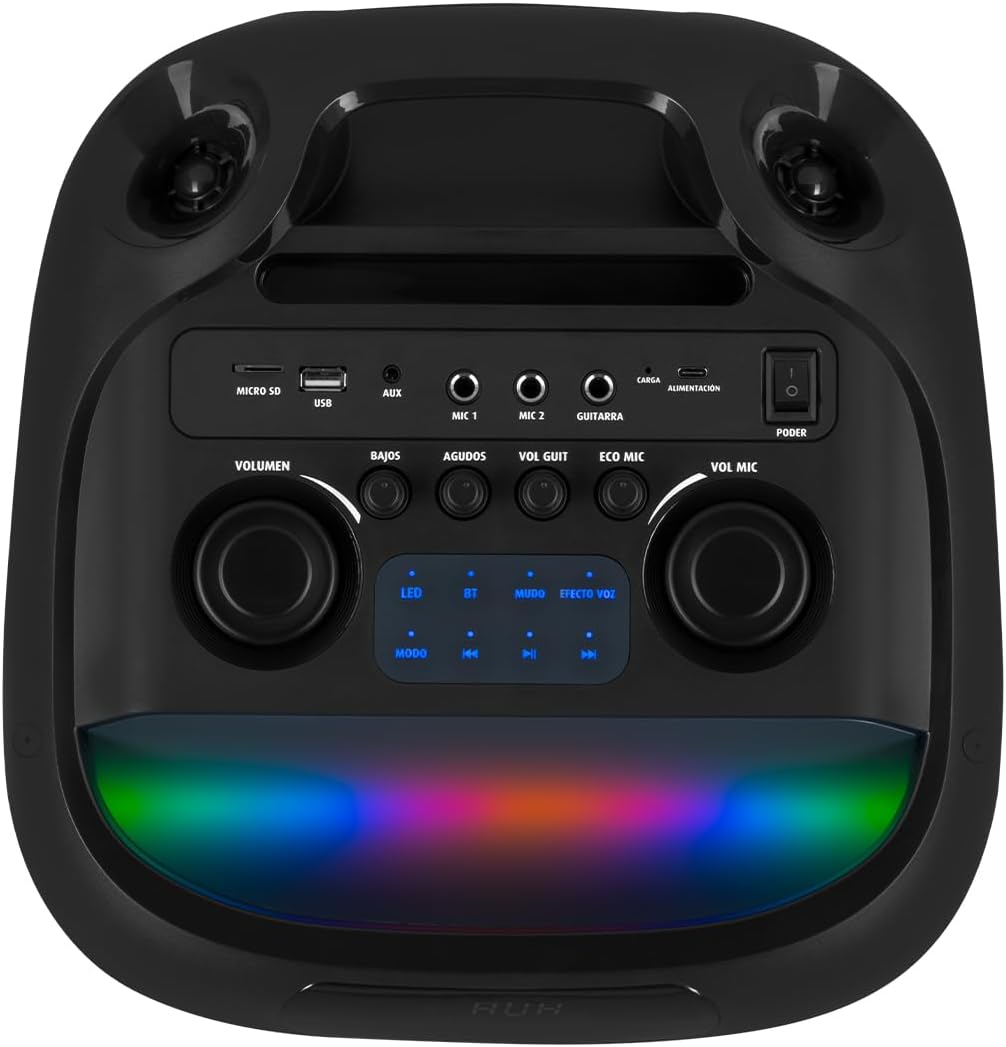
Figure 4.3 : Panneau de commande. Details the top-mounted control panel with inputs for USB, Micro SD, AUX, two microphones, and a guitar, along with volume, bass, treble, and effect controls.

Figure 4.4: Wireless Microphone. The included wireless microphone for vocal performances and announcements.
5. Installation
5.1 Déballage
- Retirez soigneusement l'enceinte et tous les accessoires de leur emballage.
- Conservez l'emballage pour un transport ou un stockage ultérieur.
5.2 Charge initiale
Before first use, it is recommended to fully charge the speaker's internal battery.
- Connect the provided USB charging cable to the speaker's charging port (labeled 'CARGA' or 'ALIMENTACIÓN' on the control panel).
- Connectez l'autre extrémité du câble USB à un adaptateur secteur USB compatible (non inclus) ou à un port USB alimenté.
- Le voyant de charge s'allumera. Prévoyez plusieurs heures pour une charge complète.
- Une fois la batterie complètement chargée, le voyant peut changer de couleur ou s'éteindre. Débranchez le câble de charge.
5.3 Mise sous/hors tension
To power on the speaker, locate the 'PODER' (Power) switch on the control panel and slide it to the 'ON' position. To power off, slide it to 'OFF'.
6. Mode d'emploi
6.1 Connexion Bluetooth
Connect your mobile device wirelessly to the speaker.
- Turn on the speaker. The 'BT' indicator on the control panel should blink, indicating it's in pairing mode.
- Sur votre appareil mobile, activez Bluetooth et recherchez les appareils disponibles.
- Select "Kaiser MSA-2073M" from the list of devices.
- Once paired, the 'BT' indicator will stop blinking and remain solid. You can now play audio from your device through the speaker.
- La portée Bluetooth peut atteindre 10 mètres.
6.2 Entrée AUX
Connectez les périphériques audio externes à l'aide du câble AUX 3.5 mm.
- Connect one end of the 3.5mm audio cable to the 'AUX' port on the speaker.
- Branchez l'autre extrémité à la prise casque ou à la sortie audio de votre appareil externe.
- Press the 'MODE' button on the speaker until 'AUX' mode is selected.
- Diffuser le son depuis votre périphérique externe.
Lecture USB/Micro SD 6.3 pouces
Écoutez de la musique directement depuis une clé USB ou une carte Micro SD.
- Insert a USB flash drive into the 'USB' port or a Micro SD card into the 'MICRO SD' slot.
- The speaker will automatically switch to USB/Micro SD mode and begin playing compatible audio fileSinon, appuyez sur le bouton « MODE » pour sélectionner l’entrée appropriée.
- Use the playback controls (play/pause, next/previous track) on the speaker to manage your music.
6.4 Utilisation du microphone
Use the included wireless microphone for karaoke or announcements.
- Assurez-vous que le microphone sans fil est sous tension.
- The microphone will automatically connect to the speaker.
- Adjust the microphone volume using the 'VOL MIC' knob on the control panel.
- Use the 'ECO MIC' knob to adjust the echo effect for the microphone.
- The speaker also features five voice effects for the microphone, accessible via the 'EFECTOS VOZ' button.
6.5 Entrée guitare
Connect an electric guitar to the speaker.
- Connect your guitar to the 'GUITARRA' input jack on the control panel.
- Adjust the guitar volume using the 'VOL GUIT' knob.
6.6 Réglages sonores
Customize your audio output.
- LE VOLUME: Régle le volume général de l'enceinte.
- BAJOS (Bass): Ajuste la sortie basse fréquence.
- AGUDOS (Treble): Ajuste la sortie haute fréquence.
6.7 Infinity Light Effects
Enhance your listening experience with dynamic LED lighting.
- Press the 'LED' button on the control panel to cycle through different light modes or turn the lights off.
- The lights synchronize with the music for an immersive effect.
6.8 KSR-LINK (True Wireless Stereo)
Connect two MSA-2073M speakers for a true wireless stereo experience.
- Assurez-vous que les deux enceintes sont allumées et en mode Bluetooth, mais non connectées à un appareil.
- On one speaker, press and hold the 'MUDO' (Mute) button (which also functions as the KSR-LINK pairing button). You will hear a confirmation tone.
- Les deux enceintes se connecteront automatiquement.
- Once paired, connect your mobile device to one of the speakers via Bluetooth as described in section 6.1. Audio will now play in stereo through both speakers.
7. Chargement
The speaker features a rechargeable battery for portable use. A full charge allows for prolonged use.
- Connect the USB charging cable to the speaker's charging port and a power source.
- L'indicateur de charge affichera l'état de charge.
- Avoid overcharging the battery. Disconnect the charger once the battery is full.
8. Entretien
8.1 Nettoyage
- Essuyez le haut-parleur avec un chiffon doux et sec.
- N’utilisez pas de nettoyants abrasifs, de cires ou de solvants.
8.2 Stockage
- Rangez l'enceinte dans un endroit frais et sec, à l'abri de la lumière directe du soleil et des températures extrêmes.
- En cas de stockage prolongé, rechargez la batterie périodiquement afin de préserver sa durée de vie.
9. Dépannage
| Problème | Cause possible | Solution |
|---|---|---|
| Pas de courant | La batterie est déchargée ; l'interrupteur d'alimentation est éteint. | Charge the speaker; Turn the power switch to 'ON'. |
| Pas de son | Le volume est trop faible ; le mode d’entrée sélectionné est incorrect ; l’appareil n’est pas correctement connecté. | Increase volume; Press 'MODE' to select correct input; Reconnect device/Bluetooth. |
| Bluetooth ne se connecte pas | Enceinte non en mode appairage ; appareil trop éloigné ; déjà connecté à un autre appareil. | Ensure 'BT' indicator is blinking; Move device closer; Disconnect from other devices and try again. |
| Le microphone ne fonctionne pas | Microphone is off; Microphone volume is low; Microphone battery is low. | Turn on microphone; Increase 'VOL MIC' knob; Charge/replace microphone battery. |
10. Spécifications
| Fonctionnalité | Spécification |
|---|---|
| Marque | kaiser |
| Modèle | MSA-2073M |
| Taille du haut-parleur | 2 x 8 pouces |
| Puissance de sortie efficace | 70 watts |
| PMPO Power Output | 28000 watts |
| Technologie de connectivité | Sans fil (Bluetooth) |
| Portée Bluetooth | Jusqu'à 10 mètres |
| Mode de sortie audio | Stéréo |
| Impédance | 3 ohms |
| Réponse en fréquence | 60 Hz |
| Méthode de contrôle | Bouton-poussoir, molettes rotatives |
| Source d'énergie | Batterie |
| Dimensions (PxLxH) | 37.4 x 36.2 x 80 cm |
| Poids de l'article | 10.8 kilogrammes |
| Accessoires inclus | Microphone sans fil |
11. Vidéo produitview
Video 11.1: Product Features and Unboxing. Cette vidéo offre un aperçu rapideview of the Kaiser MSA-2073M speaker, showcasing its unboxing, key features like 70W RMS power, 10m Bluetooth range, included cables, and detailed views of the control panel with independent volume, bass, treble, microphone, guitar, and echo controls. It also highlights the five voice effects for the microphone, 3 Ohm impedance, and convenient transport wheels. The video also mentions the KSR-LINK technology for connecting two speakers.
12. Garantie et assistance
Your Kaiser MSA-2073M speaker comes with a 90-day factory warrantyVeuillez conserver votre preuve d'achat pour toute réclamation au titre de la garantie.
For technical support, troubleshooting assistance, or warranty inquiries, please contact Kaiser customer service through their official website or the retailer where you purchased the product. Do not attempt to repair the device yourself, as this may void your warranty.