
Corsair CP-9020297-NA
Manuel d'utilisation de l'alimentation CORSAIR RM1000e (2025)
Brand: Corsair | Model: RM1000e (CP-9020297-NA)
Introduction
The CORSAIR RM1000e (2025) is a fully modular, low-noise ATX power supply designed to deliver reliable and efficient power to your PC. Compliant with ATX 3.1 and PCIe 5.1 standards, it features a native 12V-2x6 cable and is built with industrial-grade, 105°C-rated capacitors for superb electrical performance. Its compact design and quiet operation make it suitable for a wide range of modern PC builds.

Image: The CORSAIR RM1000e (2025) power supply, showcasing its modular connectors and sleek black design.
Caractéristiques principales
- Conception entièrement modulaire : Connect only the cables your system requires, simplifying cable management and improving airflow within your PC case.
- ATX 3.1 & PCIe 5.1 Compliance: Supports the latest power standards, including a native 12V-2x6 (12+4-pin) connector and cable for modern high-end graphics cards, ensuring stable power delivery and future compatibility.
- Fonctionnement à faible bruit : Equipped with a 120mm rifle bearing fan with a specially calculated fan curve, ensuring minimal noise even under full load. The fan supports Zero RPM Mode, meaning it remains off at low to moderate loads for silent operation.
- Condensateurs supportant une température de 105 °C : Industrial-grade capacitors deliver consistent, reliable power and dependable electrical performance, ensuring long-term stability and durability.
- Compatible avec la veille moderne : Enables extremely fast wake-from-sleep times and improved efficiency at low loads, enhancing overall system responsiveness.
- Compact 140mm Casing: Designed to fit easily into nearly any modern PC case, offering flexibility for various build sizes.

Image: Close-up of the fully modular connectors on the CORSAIR RM1000e, illustrating the ease of connecting only necessary cables.
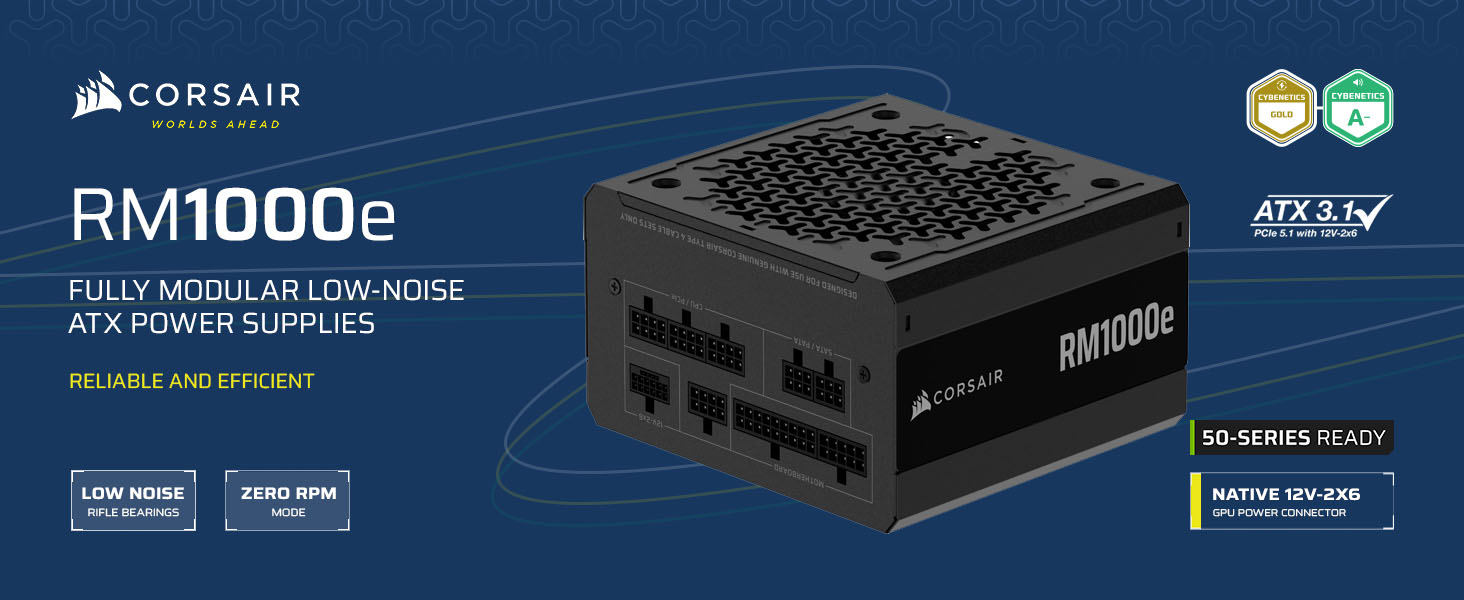
Image: Diagram highlighting ATX 3.1 and PCIe 5.1 compliance, showing the PSU's readiness for next-generation components.

Image : Haut view of the power supply, showing the 120mm fan and its patterned grille, indicating its low-noise design.

Image: Visual representation of the high-quality 105°C-rated capacitors used in the power supply, emphasizing reliability.

Image: Diagram illustrating the compact 140mm length of the power supply, highlighting its compatibility with various PC cases.
Contenu de la boîte
The CORSAIR RM1000e (2025) power supply package includes the following items:
- 1x CORSAIR RM1000e (2025) Power Supply Unit
- 1x 24-pin ATX (24-pin) Connector Cable
- 2x 8-pin ATX 12V/EPS12V (4+4-pin) Connector Cables
- 1x 8-pin PCIe (6+2-pin) Connector Cable
- 1x 600W 12V-2x6 (12+4-pin) Connector Cable
- 1x 12V-2x6 (12+4-pin) to dual 8-pin PCIe (6+2-pin) Cable
- 6x SATA Connectors
- 2x PATA Connectors
- Vis de montage
- Colliers de serrage
- Manuel d'utilisation et informations de sécurité

Image: A visual representation of the various modular cables included with the power supply, ready for connection.
Instructions d'installation
- Préparation: Before installation, ensure your PC is completely powered off and unplugged from the wall outlet. It is recommended to wear an anti-static wrist strap to prevent electrostatic discharge.
- Installation du bloc d'alimentation :
- Open your PC case and locate the power supply mounting bay, typically at the bottom or top rear of the case.
- Carefully slide the CORSAIR RM1000e into the bay, ensuring the fan faces the correct direction (usually downwards if your case has a bottom vent, or upwards if not).
- Fixez le bloc d'alimentation au boîtier à l'aide des vis de montage fournies.
- Câbles de connexion :
- Alimentation de la carte mère : Connectez le câble ATX à 24 broches au connecteur d'alimentation principal de votre carte mère.
- Puissance du processeur : Connect the 8-pin ATX 12V/EPS12V (4+4-pin) cables to your motherboard's CPU power connectors. Modern motherboards may require one or two such connections.
- GPU Power: For graphics cards requiring a 12V-2x6 connector, use the dedicated 600W 12V-2x6 cable. For other PCIe graphics cards, use the 8-pin PCIe (6+2-pin) cables. Ensure all required power connectors on your GPU are populated.
- SATA/PATA Devices: Connect SATA cables to your storage drives (SSDs, HDDs) and PATA cables to older peripherals if needed.
Note: Only connect the cables necessary for your system components to minimize cable clutter and improve airflow.
- Gestion des câbles: Route cables neatly behind the motherboard tray or in designated cable management channels to ensure optimal airflow and a clean build. Use the included cable ties to secure bundles.
- Vérifications finales : Vérifiez que toutes les connexions sont bien enclenchées. Refermez le boîtier de votre PC.
- Mise sous tension : Plug your PC back into the wall outlet and power it on.

Image: A CORSAIR power supply installed within a PC case, demonstrating proper placement and cable routing.
Informations d'exploitation
- Mode ventilateur zéro RPM : The RM1000e's fan is designed to remain off at low to moderate loads, providing silent operation. The fan will automatically spin up when the power supply reaches a certain temperature threshold or load level to maintain optimal cooling. This is normal operation and indicates efficient thermal management.
- Modern Standby: This feature allows your PC to wake from sleep almost instantly and improves power efficiency during low-power states. Ensure your operating system and motherboard support Modern Standby for full functionality.
- Efficacité énergétique : The Cybenetics Gold efficiency rating means the power supply converts a high percentage of AC power into usable DC power, reducing wasted energy and heat generation. This contributes to lower electricity bills and a cooler system.
Entretien
Un entretien approprié garantit la longévité et les performances optimales de votre alimentation :
- Nettoyage: Periodically clean the exterior of the power supply and the fan grille to prevent dust buildup. Use compressed air to gently clear dust from the fan blades and internal components. Always unplug the power supply from the wall before cleaning.
- Débit d'air : Ensure your PC case has adequate airflow to prevent heat buildup around the power supply. Keep the area around the PC clear of obstructions.
- Intégrité du câble : Occasionally inspect cables for any signs of wear, fraying, or damage. Replace any damaged cables immediately.
Dépannage
| Problème | Cause possible | Solution |
|---|---|---|
| L'ordinateur ne s'allume pas. | Power cable not fully connected, PSU switch off, faulty component, insufficient power. |
|
| Le ventilateur du bloc d'alimentation ne tourne pas. | Zero RPM Mode active, low system load. | This is normal operation. The fan will only spin when the PSU reaches a certain temperature or load. If the system is under heavy load and the fan is still not spinning, contact support. |
| Le système plante ou redémarre en cas de forte charge. | Insufficient power, overheating, faulty PSU. |
|
Caractéristiques
| Spécification | Valeur |
|---|---|
| Nom du modèle | CORSAIR RM1000e (2025) |
| Numéro de modèle de l'article | CP-9020297-NA |
| Puissance de sortietage | 1000 watts |
| Facteur de forme | ATX |
| Cote d'efficacité | L'or cybénétique |
| Capacitor Rating | Température nominale de 105 °C |
| Méthode de refroidissement | Ventilateur à roulement à billes de 120 mm avec mode zéro tr/min (Air) |
| Dimensions (L x l x H) | 5.91 x 5.51 x 3.35 pouces (150 mm x 140 mm x 85 mm) |
| Poids | 3.62 livres |
| Norme ATX | ATX 3.1 |
| Norme PCIe | PCIe 5.1 (with native 12V-2x6 cable) |
Garantie et assistance
The CORSAIR RM1000e (2025) Power Supply is backed by a garantie de sept ans, ensuring long-term reliability and peace of mind. For technical support, troubleshooting assistance, or warranty claims, please visit the official Corsair support website ou contactez leur service client.
Assistance officielle Corsair : www.corsair.com/support
Ask a question about this manual
Ask about setup, troubleshooting, compatibility, parts, safety, or missing instructions. Manuals+ will review the question and use this page’s manual context to help answer it.