
Introduction
This manual provides essential information for the safe and efficient use of your new CANDY FIDC X502IT electric built-in oven. This appliance features a 65-liter capacity, convection cooking, and grill functions, designed for modern kitchen integration. Please read these instructions carefully before installation and use, and keep them for future reference.

Image : Avant view of the CANDY FIDC X502IT electric built-in oven, showcasing son design noir et en acier inoxydable.
Informations importantes sur la sécurité
Respectez toujours les consignes de sécurité de base lors de l'utilisation d'appareils électriques afin de réduire les risques d'incendie, d'électrocution, de brûlures ou de blessures.
- Sécurité électrique : Ensure the oven is properly grounded. Do not use adapters or extension cords. Disconnect power before servicing.
- Sécurité des enfants : Keep children away from the oven during operation and cooling. The oven surfaces become hot.
- Risque de brûlure : Use oven mitts when handling hot dishes and oven accessories. Do not touch hot surfaces directly.
- Risque d'incendie : Never leave the oven unattended while cooking. Do not store flammable materials in or near the oven. Clean grease and food debris regularly to prevent fires.
- Utilisation appropriée : Use the oven only for its intended purpose of cooking food. Do not use it for heating the room.
- Ventilation: Assurez une ventilation adéquate autour de l'appareil conformément aux instructions d'installation.
Installation et configuration
The CANDY FIDC X502IT is a built-in electric oven. Installation should be performed by a qualified technician in accordance with local safety regulations and the provided installation template.
Déballage
- Retirez délicatement le four de son emballage.
- Inspect the oven for any damage during transit. Report any damage to your retailer immediately.
- Remove all packaging materials, including protective films and accessories, from inside the oven cavity.
Connexion électrique
- Assurez-vous que le vol secteurtage correspond à la plaque signalétique de l'appareil.
- The oven must be connected to a properly grounded electrical outlet.
- The electrical circuit must be protected by a suitable circuit breaker.
Montage du four
- Install the oven into a suitable cabinet opening, ensuring proper clearances for ventilation.
- Secure the oven to the cabinet using the provided screws.
- Ensure the oven is level before final tightening.

Image : Côté view of the CANDY FIDC X502IT oven, showing its built-in design and ventilation slots.
Mode d'emploi
Your CANDY FIDC X502IT oven features intuitive knob controls for function selection, temperature, and a mechanical timer.
Panneau de configuration terminéview

Image: Close-up of the oven's control panel with three rotary knobs for function, temperature, and timer settings.
- Bouton gauche : Function Selector (e.g., Convection, Grill, Conventional).
- Bouton central : Temperature Control (adjustable from 50°C to 250°C).
- Bouton droit : Minuteur mécanique (jusqu'à 60 minutes).
Première utilisation
Before cooking food, heat the empty oven for approximately 30 minutes at maximum temperature (250°C) using the conventional cooking mode. This helps to burn off any manufacturing residues and odors. Ensure the kitchen is well-ventilated during this process.
Modes de cuisson
- Cuisine conventionnelle : Heat from top and bottom elements. Ideal for baking cakes, bread, and roasting meats.
- Convection Cooking (Fan-Assisted): Heat distributed evenly by a fan. Suitable for cooking multiple dishes simultaneously, or for faster, more even cooking.
- Gril: Intense heat from the top element. Perfect for grilling meats, toasting, and browning dishes.
- Defrosting (Hot Air): Uses the fan to circulate ambient air for gentle defrosting.

Image: The CANDY FIDC X502IT oven installed in a kitchen, actively cooking a pizza on a rack inside.

Image: The CANDY FIDC X502IT oven installed in a kitchen, actively cooking a pie on a rack inside.
Réglage de la minuterie
The mechanical timer can be set for up to 60 minutes. Turn the right knob clockwise to the desired cooking time. The oven will automatically switch off when the timer reaches zero, and an audible signal will sound.
Entretien et maintenance
Un nettoyage et un entretien réguliers garantiront la longévité et le fonctionnement optimal de votre four.
Nettoyage de l'intérieur du four
- Assurez-vous toujours que le four est froid et débranché avant de le nettoyer.
- Essuyez l'intérieur avec de l'annonceamp cloth and mild detergent after each use to prevent food residue from baking on.
- For stubborn stains, use a specialized oven cleaner, following the product instructions carefully. Avoid abrasive cleaners or scourers.
- The oven features a polished stainless steel finish. Clean with a soft cloth and non-abrasive cleaner.
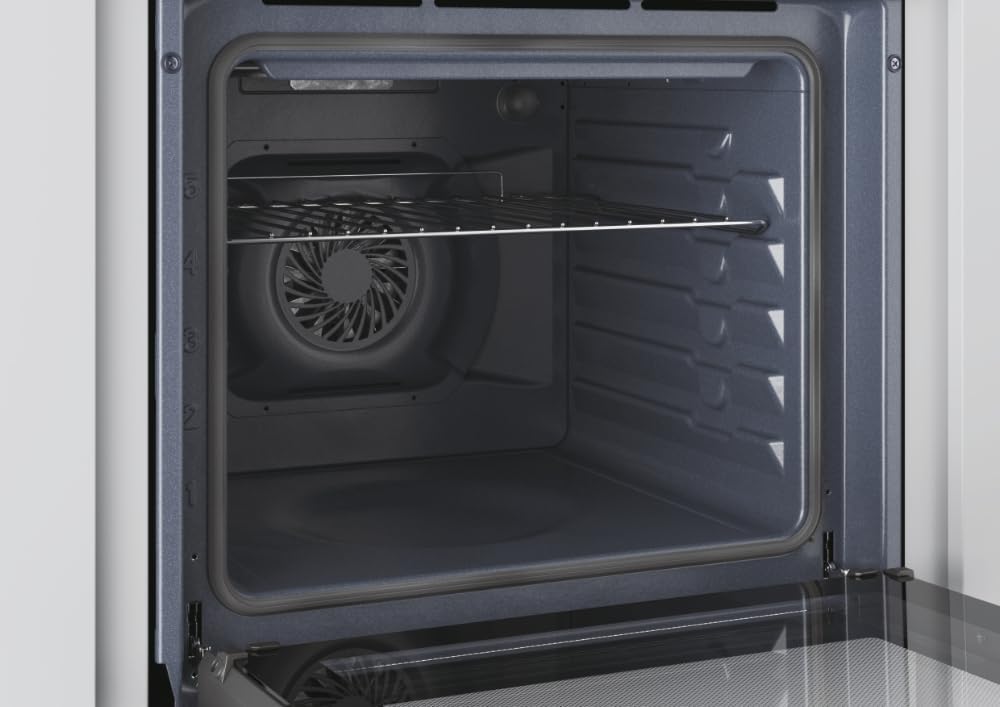
Image : Intérieur view of the CANDY FIDC X502IT oven, showing the removable wire rack and the fan at the back.
Accessoires de nettoyage
- Remove oven racks and the grill tray. Wash them in warm soapy water or in a dishwasher.
- The included grill rack is designed for easy cleaning.

Image: A standard black enamel baking tray, typically included with the oven.
Remplacement de l'ampoule du four
Ensure the oven is cool and disconnected from the power supply. Unscrew the protective glass cover, replace the bulb with a new oven-specific bulb (check wattage and type in specifications), and reattach the cover.
Guide de dépannage
Avant de contacter le service client, veuillez consulter le tableau suivant pour connaître les problèmes courants et leurs solutions.
| Problème | Cause possible | Solution |
|---|---|---|
| Le four ne chauffe pas. | Pas d'alimentation électrique ; four non allumé ; minuterie non réglée. | Check power connection and circuit breaker. Ensure function and temperature knobs are set. Set the mechanical timer. |
| La cuisson des aliments est inégale. | Incorrect temperature or cooking mode; improper rack position; overloaded oven. | Adjust temperature/mode. Use recommended rack position. Avoid overcrowding the oven. |
| La lumière du four ne fonctionne pas. | L'ampoule est défectueuse ou mal fixée. | Replace or tighten the oven light bulb (see Maintenance section). |
| Fumée excessive pendant la cuisson. | Déversements alimentaires ou accumulation de graisse. | Clean the oven interior thoroughly. Avoid excessive grease. |
Spécifications techniques
| Fonctionnalité | Détail |
|---|---|
| Nom du modèle | FIDC X502IT |
| Marque | BONBONS |
| Type de four | Electric, Built-in |
| Capacité | 65 litres |
| Classe d'efficacité énergétique | A |
| Type de contrôle | Bouton |
| Méthodes de chauffage | Convection, Grill, Conventional |
| Caractéristiques spéciales | Convection cooking, grill, LED indicator, adjustable temperature, mechanical timer, hot air defrosting |
| Couleur | Noir, acier inoxydable |
| Matériel | Acier inoxydable |
| Poids de l'article | 24.4 kilogrammes |
| Composants inclus | Grille de gril |
| Sens d'ouverture de la porte | Droite |
Garantie et assistance
Garantie du produit
This CANDY FIDC X502IT oven comes with a Garantie constructeur d'un an from the date of purchase. This warranty covers manufacturing defects and material faults under normal domestic use. Please retain your proof of purchase for warranty claims. The warranty does not cover damage caused by improper installation, misuse, neglect, or unauthorized repairs.
Assistance clientèle
For technical assistance, spare parts, or warranty claims, please contact CANDY customer service. You can find contact details on the official CANDY website or through your local retailer. When contacting support, please have your oven's model number (FIDC X502IT) and serial number ready.