
Vetroo 850 G5
Vetroo 850W Power Supply User Manual
Modèle : 850 G5
1. Produit terminéview
The Vetroo 850W Power Supply is a high-performance, fully modular unit designed for modern personal computers. It meets the latest ATX 3.1 and PCIe 5.1 standards, ensuring compatibility with current and future hardware. Featuring 80 Plus Gold certification, it provides high efficiency and reliable power delivery. Its quiet operation is maintained by a 120mm FDB fan, and premium 105°C capacitors contribute to stable, long-term performance.

Image: The Vetroo 850W Power Supply unit shown alongside its retail packaging, highlighting its compact design and the 850W rating.
Caractéristiques principales :
- Compatible PCIe Gen 5.1 : Supports the latest PCIe 5.1 standards, backward compatible with PCIe 4.0 and 3.0.
- Fully ATX 3.1 Compliant: Designed for optimal performance with the newest ATX 3.1 specifications.
- Premium 105°C Capacitors: Ensures stable and low-temperature operation for high-end systems.
- Certification 80 Plus Gold : Guarantees high efficiency and energy savings.
- Conception entièrement modulaire : Allows for easy cable management and reduced clutter by only installing necessary cables.
- Fonctionnement silencieux : Equipped with a 120mm Fluid Dynamic Bearing (FDB) fan for minimal noise.
- Garantie de 10 ans : Provides long-term assurance of product quality and durability.
2. Contenu de la boîte
À l'ouverture du paquet, vous trouverez les composants suivants :
- Vetroo 850W Power Supply Unit
- Modular Cable Set (detailed below)
- Cordon d'alimentation secteur
- Colliers de serrage / Sangles Velcro
- Vis de montage
- Manuel de l'utilisateur (ce document)
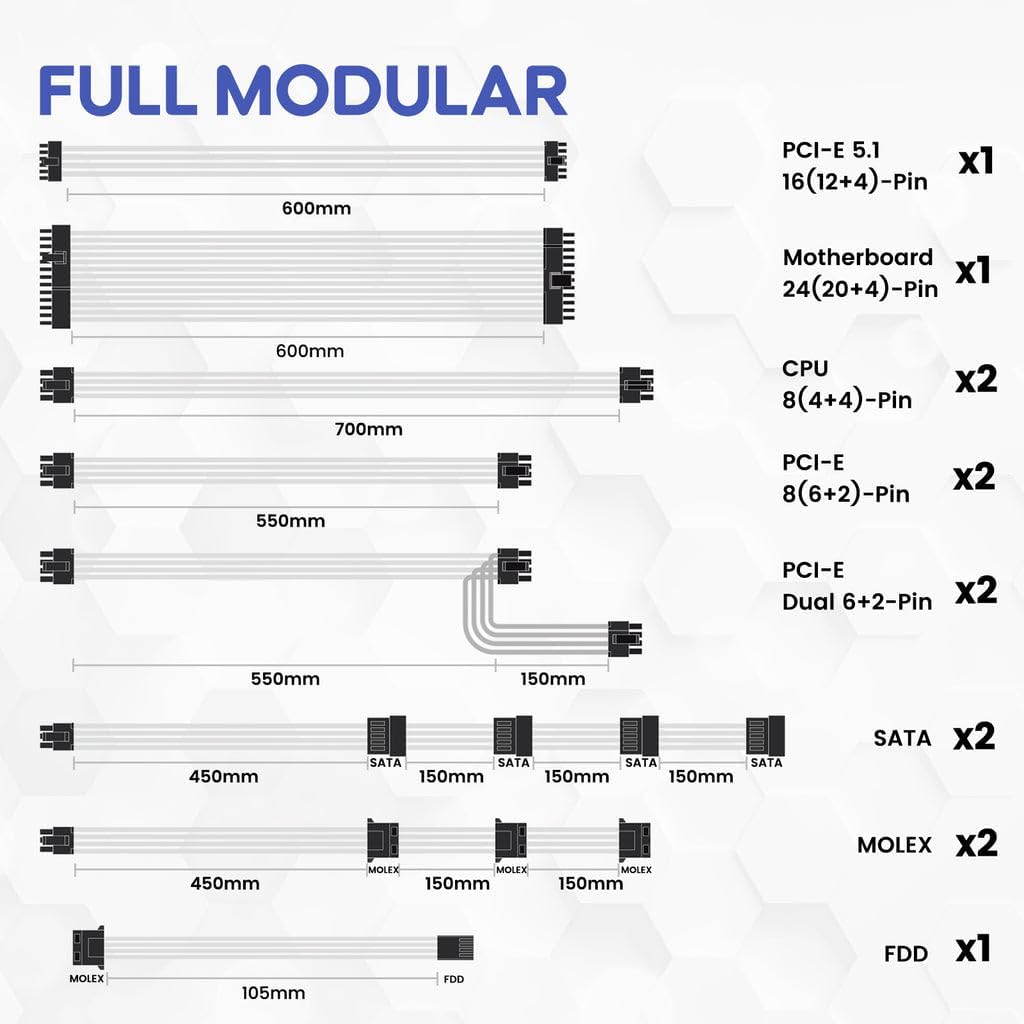
Image: A visual representation of all included modular cables and their lengths, demonstrating the full modular design.
Included Modular Cables:
| Type de câble | Quantité | Description |
|---|---|---|
| PCI-E 5.1 16 (12+4)-Pin | x1 | For next-generation graphics cards. |
| Motherboard 24 (20+4)-Pin | x1 | Connecteur d'alimentation principal pour la carte mère. |
| CPU 8 (4+4)-Pin | x2 | Pour la puissance du processeur. |
| PCI-E 8 (6+2)-Pin | x2 | For graphics cards requiring 8-pin or 6-pin connectors. |
| PCI-E Dual 6+2-Pin | x2 | Dual connectors for graphics cards. |
| SATA | x2 | For SATA devices like SSDs, HDDs, and optical drives. |
| MOLEX | x2 | For older peripherals or fan controllers. |
| FDD | x1 | For floppy disk drives or specific legacy devices. |
3. Configuration et installation
This section provides general guidance for installing your Vetroo 850W Power Supply. For detailed, step-by-step instructions, please refer to the official Manuel d'installation (PDF).
3.1 Installation physique
- Préparez votre boîtier PC : Ensure your PC case has adequate space for the power supply unit. The Vetroo 850W PSU has dimensions of approximately 5.9 x 5.5 x 3.4 inches.
- Monter le bloc d'alimentation : Carefully slide the power supply into its designated bay in your PC case. Secure it using the provided mounting screws.
- Connectez les câbles essentiels :
- Connectez le câble ATX 24 broches à votre carte mère.
- Connect the 8-pin (4+4) CPU power cable(s) to your motherboard.
- For graphics cards, connect the appropriate PCIe 8-pin (6+2) or the new PCIe 5.1 16 (12+4)-pin cable. Ensure your GPU is compatible with the connected cable type.
- Connectez les câbles périphériques : Attach SATA cables for SSDs, HDDs, and optical drives, and Molex cables for other peripherals as needed. The fully modular design allows you to connect only the cables required, reducing cable clutter and improving airflow.
- Gestion des câbles: Route cables neatly behind the motherboard tray or in designated cable management areas to optimize airflow and aesthetics. Use the included cable ties or Velcro straps.
- Branchez l'alimentation CA : Once all internal connections are secure, connect the AC power cord to the power supply and then to a wall outlet or surge protector.

Image: The compact dimensions of the Vetroo 850W Power Supply, illustrating how it fits into a standard PC case.

Image : Une image détaillée view of the power supply's modular cable ports, emphasizing the dual PCIe 5.1 connectors for modern GPUs.

Image: An illustration detailing the GPU support capabilities, including compatibility with NVIDIA RTX 50 series graphics cards via PCIe 5.1 and 8-pin connectors.
Video: An official Vetroo video demonstrating the unboxing, components, and key features of the 850W Power Supply, including a close-up of the modular connections and the ECO mode switch.
4. Mode d'emploi
The Vetroo 850W Power Supply is designed for straightforward operation. After successful installation, follow these steps:
- Interrupteur: Locate the main power switch on the back of the power supply unit. Ensure it is in the 'ON' (I) position before powering on your computer.
- Commutateur de mode ECO : The power supply features an ECO mode switch.
- ECO ON: In this mode, the fan will stop spinning under low load conditions (typically below 50% load) to provide silent operation. The fan will automatically activate when the load increases.
- ECO OFF: In this mode, the fan will spin continuously regardless of the load, providing constant cooling.
- Mise sous tension du système : Once the power supply is connected and switched on, you can power on your computer system using the case's power button.
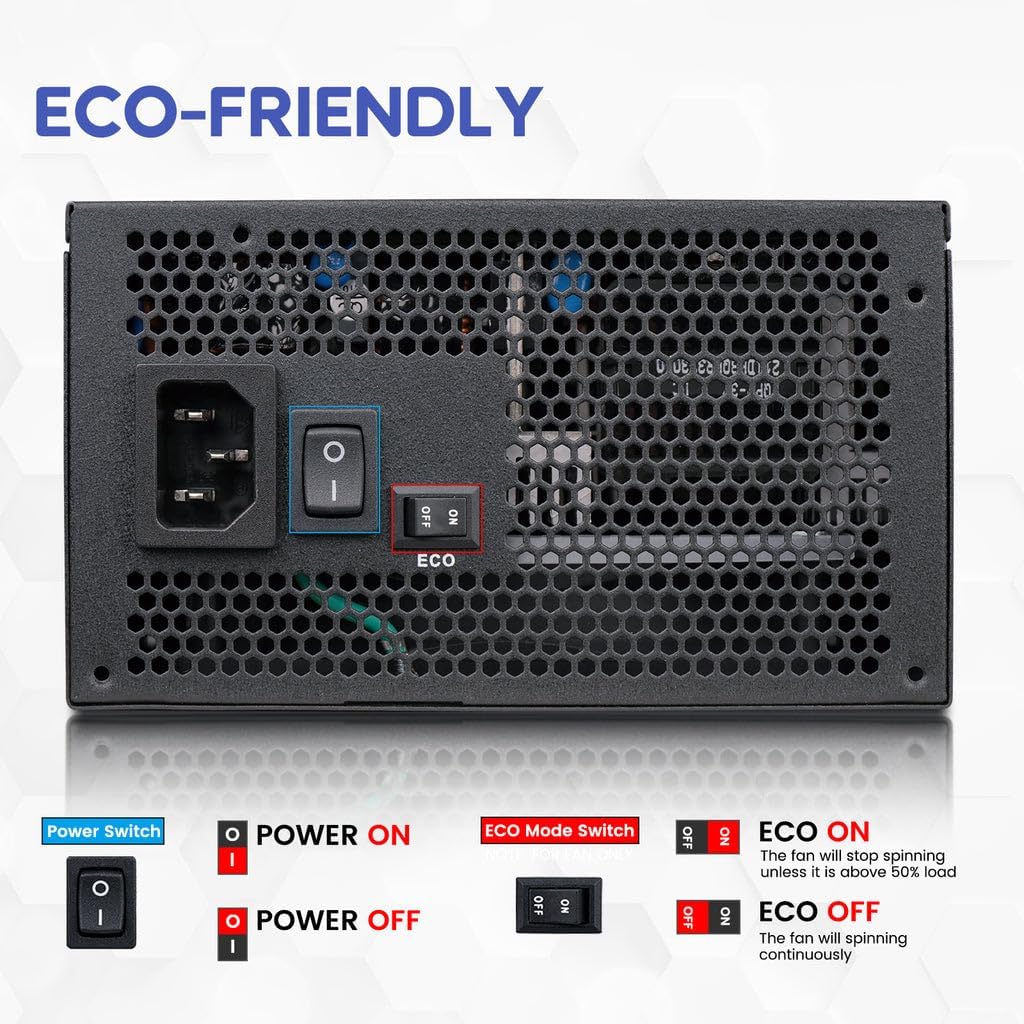
Image: The rear panel of the power supply, clearly showing the main power switch and the ECO mode switch with its 'ON' and 'OFF' positions.
5. Entretien
Proper maintenance ensures the longevity and optimal performance of your Vetroo 850W Power Supply.
- Élimination de la poussière : Periodically clean the power supply's fan and ventilation grilles to prevent dust buildup, which can impede airflow and lead to overheating. Use compressed air to gently blow dust out of the unit. Ensure the power supply is disconnected from the wall outlet before cleaning.
- Inspection des ventilateurs : The 120mm FDB fan is designed for quiet and efficient cooling. If you notice unusual noises or reduced fan performance, ensure there are no obstructions.
- Connexions de câble : Occasionally check all modular cable connections to ensure they are securely seated. Loose connections can lead to instability or component damage.
- Environnement d'exploitation : Ensure the power supply operates in a well-ventilated area, free from excessive heat, humidity, and direct sunlight.

Image : Un gros plan view of the power supply's internal components, emphasizing the premium capacitors that contribute to its reliability and stable performance.
6. Dépannage
If you encounter issues with your Vetroo 850W Power Supply, refer to the following common troubleshooting steps:
- Système hors tension :
- Assurez-vous que le cordon d'alimentation secteur est correctement branché à la fois à la prise de courant et à la prise murale.
- Verify the main power switch on the PSU is in the 'ON' (I) position.
- Check all modular cables are firmly connected to both the power supply and the respective components (motherboard, CPU, GPU).
- Testez la prise murale avec un autre appareil pour vous assurer qu'elle est alimentée.
- Fan Not Spinning (in ECO Mode):
- This is normal behavior if the ECO mode is enabled and the system load is low. The fan will activate automatically when the load increases.
- If you prefer continuous fan operation, switch the ECO mode to 'OFF'.
- Instabilité ou plantages du système :
- Assurez-vous que les besoins en énergie de votre système ne dépassent pas la capacité de 850 W du bloc d'alimentation.
- Vérifiez les connexions de câble desserrées.
- The power supply includes multiple protection features (OVP, OCP, OPP, SCP, UVP, OTP) to prevent damage. If the PSU shuts down unexpectedly, it might be due to one of these protections being triggered. Disconnect power, wait a few minutes, and re-attempt. If the issue persists, consult a professional.
- Bruits inhabituels :
- Ensure no cables or foreign objects are obstructing the fan.
- If the noise persists and is not related to normal fan operation, contact customer support.
Image: A graphic detailing the comprehensive protection features of the power supply, including Over Voltage Protection (OVP), Over Current Protection (OCP), Over Power Protection (OPP), Short Circuit Protection (SCP), Under Voltage Protection (UVP), and Over Temperature Protection (OTP).
7. Spécifications
Detailed technical specifications for the Vetroo 850W Power Supply (Model: 850 G5).
| Fonctionnalité | Détail |
|---|---|
| Nom du modèle | 850 G5 |
| Quoitage | 850 watts |
| Certification 80 PLUS | Certifié Or |
| Norme ATX | Conforme à la norme ATX 3.1 |
| Norme PCIe | PCIe Gen 5.1 Ready (Dual) |
| Facteur de forme | ATX |
| Modularité | Entièrement modulaire |
| Type de ventilateur | Ventilateur FDB 120 mm |
| Condensateurs | Premium 105°C Capacitors |
| Dimensions du produit (L x l x H) | 5.9 x 5.5 x 3.4 pouces |
| Poids de l'article | 5.68 livres |
| Appareils compatibles | Ordinateur personnel |
| Type de connecteur | ATX, PCI Express |
| Code UPC | 850050943815 |
| Date de première disponibilité | 26 novembre 2024 |
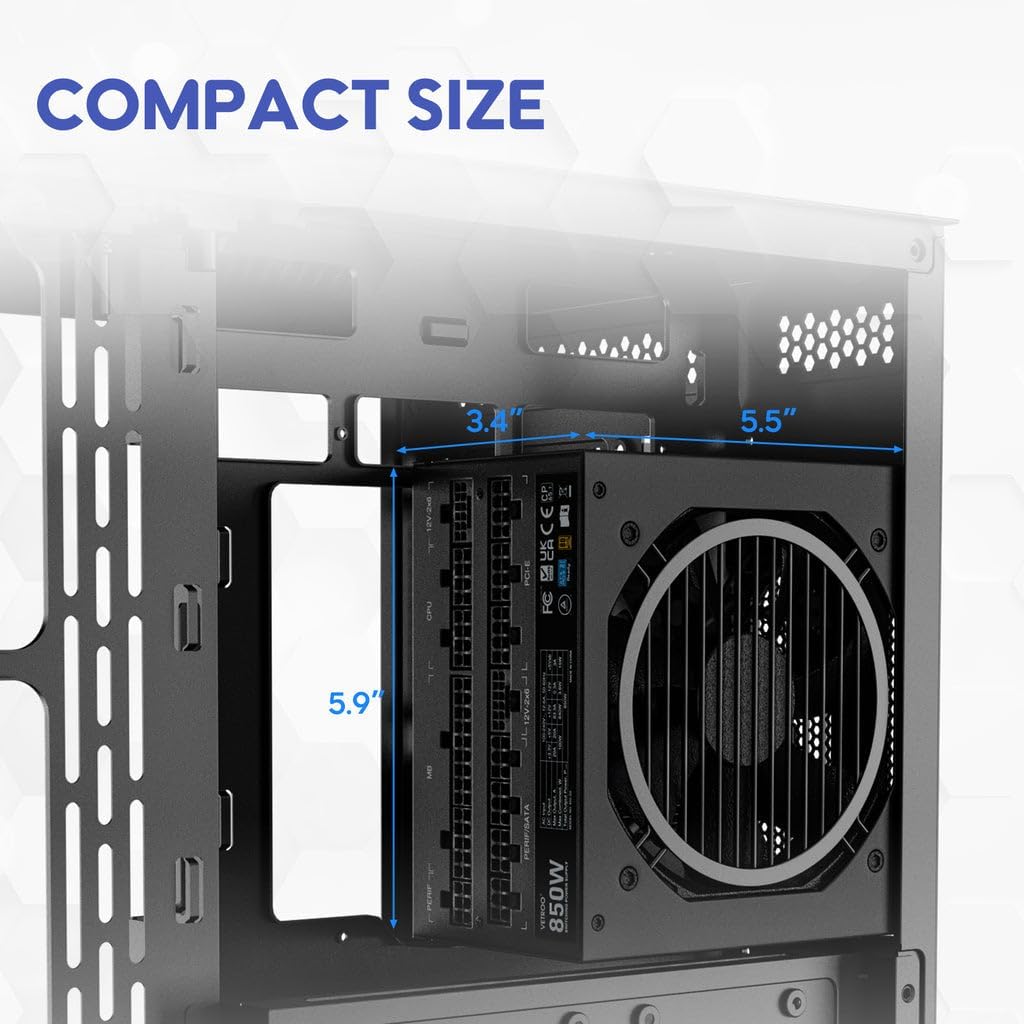
Image: The 80 Plus Gold certification badge prominently displayed on the power supply, indicating its high energy efficiency.

Image: The power supply unit featuring the ATX 3.1 Ready badge, signifying its enhanced performance capabilities for modern systems.
8. Garantie et assistance
Vetroo stands behind the quality of its products. Your Vetroo 850W Power Supply comes with a comprehensive warranty and dedicated support.
8.1 Informations sur la garantie
This power supply is covered by a Garantie d'un an À compter de la date d'achat. Cette garantie couvre les défauts de matériaux et de fabrication dans des conditions normales d'utilisation. Veuillez conserver votre preuve d'achat pour toute réclamation au titre de la garantie.
Politique de retour 8.2
Products purchased are typically eligible for a 30-day return policy for refund or replacement, subject to the retailer's terms and conditions.
8.3 Assistance clientèle
For further assistance, technical support, or warranty claims, please visit the official Vetroo store or contact their customer service:
- Vetroo Store: Visit the Vetroo Store on Amazon
- Installation Manuel: For detailed installation steps, download the Manuel d'installation (PDF).
Ask a question about this manual
Ask about setup, troubleshooting, compatibility, parts, safety, or missing instructions. Manuals+ will review the question and use this page’s manual context to help answer it.