
Anytone AT-D878UVII
Manuel d'utilisation du radiotélécommande portable DMR bi-bande Anytone AT-D878UVII
Model: AT-D878UVII | Brand: Anytone
1. Introduction
The Anytone AT-D878UVII is a versatile dual-band Digital Mobile Radio (DMR) handheld device designed for reliable communication across VHF and UHF frequencies. This manual provides essential information for setting up, operating, maintaining, and troubleshooting your radio to ensure optimal performance.
Key features include dual-mode digital and analog capabilities, a large color display, built-in GPS and APRS TX, and an upgraded USB Type-C rechargeable battery. With 2GB of memory, it supports up to 500,000 digital contacts and 250 zones, each with up to 250 channels. The radio is FCC Part 90 certified, making it suitable for various professional and amateur applications.
2. Contenu du colis
Vérifiez que tous les éléments énumérés ci-dessous sont inclus dans votre colis :
- Anytone AT-D878UVII Radio Unit
- 3100mAh USB Type-C Battery
- Charging Cradle with Power Supply
- USB Cable (for charging and programming)
- Câble de programmation
- Clip de ceinture
- Cordon
- Antenne
- Manuel d'utilisation imprimé
3. Composants terminésview
Familiarize yourself with the main components of your AT-D878UVII radio.
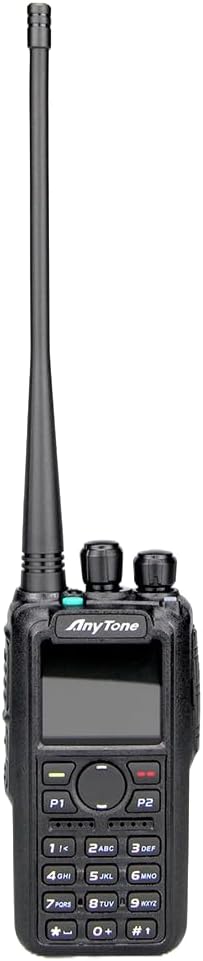
Figure 3.1 : Face avant view of the Anytone AT-D878UVII radio, highlighting the display, keypad, and control knobs.

Figure 3.2: The Anytone AT-D878UVII radio alongside its detached battery, illustrating the USB Type-C charging port on the battery unit.

Figure 3.3 : Un aperçu détaillé view of the USB Type-C charging port located on the AT-D878UVII battery.
4. Installation
4.1 Installation et charge de la batterie
- Alignez la batterie avec les rainures situées à l'arrière de la radio.
- Faites glisser la batterie vers le haut jusqu'à ce qu'elle s'enclenche correctement.
- To charge, connect the USB Type-C cable directly to the battery's port or place the radio in the charging cradle. The charging indicator will show the status.
4.2 Fixation de l'antenne
- Vissez l'antenne dans le connecteur situé sur le dessus de la radio en la tournant dans le sens horaire jusqu'à ce qu'elle soit serrée à la main. Ne serrez pas trop fort.
5. Mode d'emploi
5.1 Marche/Arrêt et contrôle du volume
- To power on/off, rotate the top-left knob clockwise/counter-clockwise until you hear a click.
- Réglez le volume en tournant le même bouton.
5.2 Channel Selection (VFO/Memory)
The radio supports both VFO (Variable Frequency Oscillator) mode for direct frequency input and Memory mode for pre-programmed channels.
- Use the navigation buttons or the top-right knob to select channels or adjust frequencies.
- Press the V/M button to switch between VFO and Memory modes.
5.3 DMR and Analog Mode Switching
The AT-D878UVII supports both Digital Mobile Radio (DMR) and traditional Analog communication.
- The radio automatically detects the mode for pre-programmed channels.
- In VFO mode, you can manually select the desired mode through the menu settings.
5.4 GPS and APRS TX
The integrated GPS module allows for location tracking, and APRS TX enables automatic position reporting.
- Access GPS and APRS settings via the main menu to configure reporting intervals and other parameters.
5.5 Programming and Codeplugs
The radio's extensive features are best managed through its Customer Programming Software (CPS). A codeplug is a configuration file that contains all your radio's settings, including channels, zones, contacts, and talkgroups.
For a detailed guide on understanding and creating codeplugs, refer to the video below. While the video demonstrates a similar model, the principles of codeplug creation and management are applicable to your AT-D878UVII.
Video 5.1: An Easy Intro to DMR Codeplugs. This video demonstrates the process of creating and managing codeplugs, a fundamental aspect of configuring your DMR radio. The concepts shown are applicable to the Anytone AT-D878UVII, though a different model is used for demonstration.
5.6 Chiffrement AES256
The AT-D878UVII supports AES256 encryption for secure digital communications, primarily for commercial use.
Video 5.2: Digital/Analog Walkie-Talkie with AES256. This video illustrates the AES256 encryption feature, which provides enhanced security for digital transmissions. While a different radio model is shown, the encryption functionality is similar to that found in the Anytone AT-D878UVII.
5.7 Bluetooth PTT Button
The radio includes Bluetooth connectivity, allowing for wireless operation with a Push-To-Talk (PTT) button.
Video 5.3: BTECH DMR-6X2 PRO Feature Highlights. This video demonstrates various features including Bluetooth PTT functionality, which is also available on the Anytone AT-D878UVII for convenient wireless operation.
5.8 Messagerie texte
Send and receive text messages over the DMR network.
- Navigate to the 'Messages' option in the main menu to compose, send, and view messages.
5.9 Copying Frequencies
The radio supports copying frequencies and sub-tones from other radios, simplifying channel setup.
Video 5.4: Copy a frequency and sub tone from other radio nearby. This video demonstrates how to quickly copy frequency and sub-tone settings from another radio, a useful feature for rapid channel configuration on your Anytone AT-D878UVII.
6. Entretien
6.1 Entretien de la batterie
- Chargez complètement la batterie avant la première utilisation.
- Évitez de surcharger ou de vider complètement la batterie pour prolonger sa durée de vie.
- Rangez la batterie dans un endroit frais et sec lorsqu'elle n'est pas utilisée pendant une période prolongée.
6.2 Nettoyage
- Essuyez la surface de la radio avec un chiffon doux et sec.amp tissu.
- N'utilisez pas de produits chimiques agressifs ou de nettoyants abrasifs.
- Assurez-vous que la radio soit sèche avant utilisation ou rangement.
7. Dépannage
| Problème | Cause possible | Solution |
|---|---|---|
| La radio ne s'allume pas. | Batterie faible ou morte | Chargez complètement la batterie. |
| No audio reception | Volume too low, incorrect frequency/channel, squelch too high | Increase volume, verify frequency/channel, adjust squelch level. |
| Impossible de transmettre | Incorrect frequency, low battery, transmit inhibit enabled | Verify frequency, charge battery, check programming for transmit inhibit. |
| Le GPS ne capte pas de signal. | Obstrué view of sky, indoor use | Déplacez-vous vers un espace extérieur dégagé sous un ciel clair. view. |
8. Spécifications
| Fonctionnalité | Détail |
|---|---|
| Numéro de modèle | AT-D878UVII |
| Gamme de fréquences | 136-174 MHz (VHF), 400-480 MHz (UHF) |
| Nombre de canaux | 4000 |
| Contacts numériques | 500,000 |
| Zones | 250 (up to 250 channels per zone) |
| Capacité de la batterie | 3100mAh (USB Type-C) |
| Caractéristiques spéciales | Dual Band, Digital DMR, Analog, GPS, APRS TX, AES256 Encryption |
| Portée de conversation maximale | 5 milles |
| Poids de l'article | 2 livres |
| Niveau de résistance à l'eau | Non résistant à l'eau |
| Voltage | 12 volts (CC) |
9. Garantie et assistance
9.1 Informations sur la garantie
The Anytone AT-D878UVII radio comes with a 1-Year Limited Warranty from the manufacturer, 12 Volt Power. This warranty covers defects in materials and workmanship under normal use. Please retain your proof of purchase for warranty claims.
9.2 Assistance clientèle
For technical assistance, troubleshooting, or warranty inquiries, please contact 12 Volt Power customer support through their official channels. Refer to the product packaging or the manufacturer's website pour les informations de contact les plus récentes.
Ask a question about this manual
Ask about setup, troubleshooting, compatibility, parts, safety, or missing instructions. Manuals+ will review the question and use this page’s manual context to help answer it.