
Introduction
Welcome to the user manual for your new Generic M59 Pro Max Smartwatch. This guide provides essential information on setting up, operating, maintaining, and troubleshooting your device. The M59 Pro Max Smartwatch is designed to enhance your daily life with features like advanced activity tracking, call support, smart notifications, and various sport modes.
Contenu du colis
Veuillez vérifier que tous les éléments suivants sont inclus dans votre colis :
- M59 Pro Max Smartwatch
- 7 Random Straps (Silicone, Rubber, Nylon)
- Câble de chargement sans fil
- Manuel d'utilisation

Image: The M59 Pro Max Smartwatch and its accessories, including a variety of interchangeable straps, neatly arranged in its packaging.
Installation
1. Recharge de la montre connectée
Before first use, fully charge your smartwatch. Place the smartwatch on the wireless charging cable. The screen will indicate charging status. A full charge typically takes 2-3 hours.
2. Marche/Arrêt
- Pour allumer : Maintenez le bouton latéral enfoncé jusqu'à ce que l'écran s'allume.
- Pour éteindre : Maintenez le bouton latéral enfoncé, puis sélectionnez « Éteindre » à l'écran.
3. Installation et appairage de l'application
To unlock the full potential of your smartwatch, download the companion fitness tracker application on your smartphone or tablet. Refer to the Quick Start Guide for the specific app name or QR code.
- Download and install the app from your device's app store.
- Activez le Bluetooth sur votre smartphone.
- Open the app and follow the on-screen instructions to pair your M59 Pro Max Smartwatch. Ensure the smartwatch is powered on and near your phone during pairing.
Mode d'emploi
Navigation de base
The M59 Pro Max features a 2-inch HD touchscreen display for intuitive interaction. Swipe left, right, up, or down to navigate through menus and access different functions. Tap to select items.
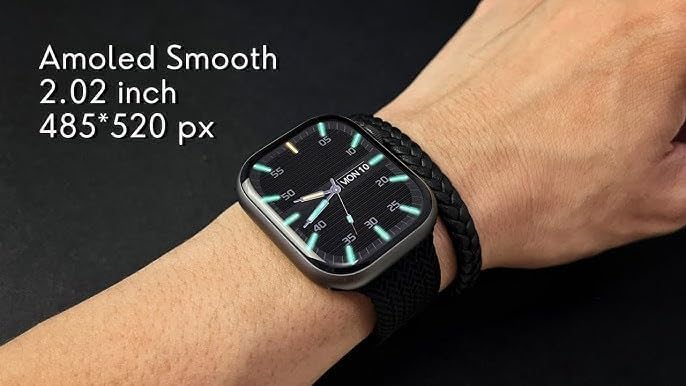
Image: The M59 Pro Max Smartwatch worn on a wrist, showcasing its vibrant 2.02-inch AMOLED display with a resolution of 485x520 pixels.
Appels et notifications
Once paired via Bluetooth, you can manage calls and receive notifications directly on your smartwatch.
- Passer des appels: Use the dialer on the watch or access your phone's contacts through the watch interface.
- Réception d'appels : Répondre ou rejeter les appels entrants directement depuis votre poignet.
- Notifications: View messages, app alerts, and other notifications.
Fitness Tracking and Sport Modes
The smartwatch offers comprehensive fitness tracking and multiple sport modes.
- Suivi des activités : Il enregistre le nombre de pas, la distance parcourue et les calories brûlées.
- Moniteur de fréquence cardiaque : Fournit des données de fréquence cardiaque en temps réel.
- Suivi du sommeil : Analyzes sleep patterns and duration.
- Modes sportifs : Select from various activities like running, cycling, and more to track specific workout data.
NFC and GPT Features
The M59 Pro Max supports NFC for convenient transactions and GPT for enhanced interaction. Refer to the companion app for specific setup and usage instructions for these advanced features.
Entretien
Nettoyage
Wipe the smartwatch and straps regularly with a soft, dry cloth. For stubborn dirt, a slightly damp Un chiffon peut être utilisé. Évitez les produits chimiques agressifs et les matériaux abrasifs.
Résistance à l'eau
The M59 Pro Max is water repellent. This means it can withstand splashes, sweat, and light rain. It is not suitable for swimming, showering, or diving. Avoid prolonged exposure to water.
Entretien du bracelet
The included straps are made of silicone, rubber, and nylon. Clean them according to their material type. Ensure straps are dry before reattaching to the watch.
Dépannage
Si vous rencontrez des problèmes avec votre montre connectée, essayez les solutions suivantes :
- Smartwatch not powering on: Assurez-vous que l'appareil est complètement chargé.
- Impossible de connecter le smartphone : Make sure Bluetooth is enabled on your phone and the smartwatch is within range. Try restarting both devices.
- Données de fitness inexactes : Ensure the watch is worn snugly on your wrist. Calibrate the app if available.
- Les notifications ne s'affichent pas : Check app permissions on your smartphone and ensure notifications are enabled for the companion app.
- Écran non réactif : Essayez de redémarrer la montre connectée.
For further assistance, please refer to the support section of the companion application or contact your retailer.
Caractéristiques
| Nom du modèle | M59 ProMax |
| Nom de marque | Générique |
| Système opérateur | Système d'exploitation propriétaire |
| Taille de l'écran | 2 pouces |
| Type d'affichage | OLED |
| Résolution | 240 x 280 |
| Technologie de connectivité | Bluetooth, Cellular (LTE) |
| Norme de communication sans fil | Bluetooth |
| Fonctionnalités de connectivité | NFC, Bluetooth, Cellular |
| Caractéristiques spéciales | Advanced Activity Tracking, Call and Chat Support |
| Composition des cellules de batterie | Lithium-ion |
| GPS | Pas de GPS |
| Forme de l'article | Rond |
| Type de matériau de la bande | Silicone, Rubber, Nylon |
| Niveau de résistance à l'eau | Hydrofuge |
| Type de sport | Sports multiples |
| Entrée de l'interface humaine | Écran tactile |
| Applications prises en charge | Suivi d'activité physique |
| Type de contrôleur | Contrôle vocal |
| Type de compteur | Heart Rate Monitor, Sleep Duration, Step Count |
| Type de fermeture | Boucle |
| Couleur | Noir |
| Couleur de la bande | Noir |
| Appareils compatibles | Smartphone, Tablette |
| Modèles de téléphones compatibles | Tous les modèles de smartphones actuels |
Garantie et assistance
Informations sur la garantie
This product is provided without an explicit warranty. Please check with your retailer regarding their return and exchange policies.
Assistance clientèle
For any questions or issues not covered in this manual, please contact the retailer where you purchased the product or refer to the support section within the companion application.