
Daakro SR-3800
Système audio domestique Daakro SR-3800 5.1 canaux AmpManuel d'utilisation de lifier
Modèle : SR-3800
1. Introduction
Thank you for choosing the Daakro SR-3800 5.1 Channel Home Audio Amplifier. This manual provides essential information for the proper setup, operation, and maintenance of your new audio system. Please read it thoroughly before use to ensure optimal performance and safety.
The Daakro SR-3800 is designed to deliver high-quality audio for your home theater, studio, or entertainment needs, featuring a dynamic DSP display, multiple input options, and Bluetooth 5.4 connectivity.
Vidéo 1.1: Surview of the Daakro SR-3800 5.1 Channel Home Audio Ampamplificateur, montreasing its design, features, and connectivity options.
2. Consignes de sécurité
- Sécurité électrique : To reduce the risk of fire or electric shock, do not expose this appliance to rain or moisture. Do not open the casing; confier toute intervention à un personnel qualifié.
- Ventilation: Assurez une ventilation adéquate autour de l'appareil. Ne bloquez pas les ouvertures de ventilation.
- Placement: Place the unit on a stable, flat surface. Avoid direct sunlight, heat sources, and excessive dust or vibration.
- Alimentation: Use only the specified power supply (110 Volts AC).
- Compatibilité des haut-parleurs : Ce amplifier is compatible only with 5-12 inch passive speakers with an impedance of 4 to 16 ohms. The subwoofer interface supports passive subwoofers only.
- Utilisation du microphone : External wired and wireless microphones may cause feedback noise if not positioned correctly or if gain levels are too high.
3. Contenu du colis
Vérifiez que tous les éléments sont présents dans le colis :
- Système audio domestique Daakro SR-3800 5.1 canaux Amplifier
- Télécommande
- Manuel de l'utilisateur (ce document)
- Câble d'alimentation
- Antenne FM
- Antenne Bluetooth
4. Produit terminéview
4.1 Commandes du panneau avant
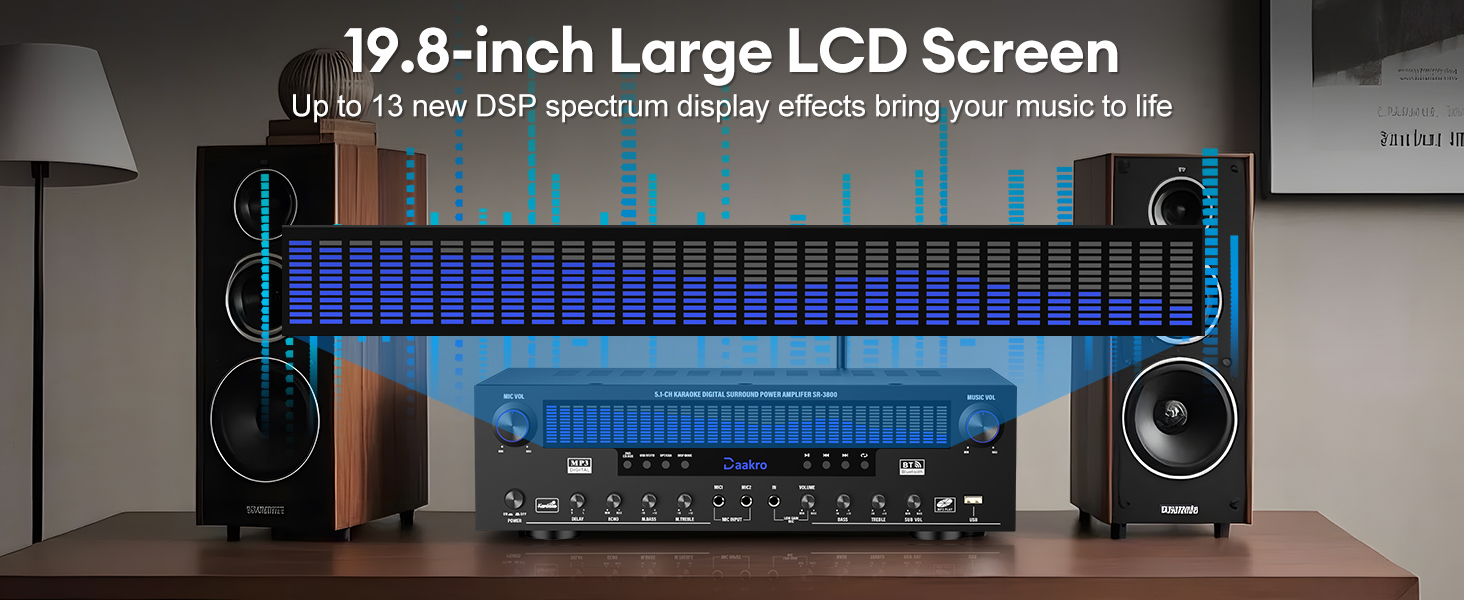
Figure 4.1 : Detailed diagram of the Daakro SR-3800 front panel, highlighting all controls and their functions, including microphone volume, power, delay, echo, microphone bass/treble, wireless microphone volume, master volume, bass, treble, subwoofer volume, and input selection buttons.
The front panel provides access to all primary controls and the dynamic DSP display. Key controls include:
- VOL MIC : Régler le volume d'entrée du microphone.
- MARCHE / ARRÊT: Interrupteur d'alimentation principal.
- Écran LCD : Displays current mode, input, and dynamic DSP spectrum.
- DÉLAI/ÉCHO : Adjusts microphone delay and echo effects.
- M.BASS/M.TREBLE : Adjusts microphone bass and treble.
- WIRELESS MIC VOL: Adjusts volume for wireless microphones.
- LE VOLUME: Master music volume control.
- GRAVES/AIGU : Adjusts music bass and treble.
- SOUS VOL : Adjusts passive subwoofer volume.
- Boutons de sélection d'entrée : Select between DVD/CD/AUX, USB/BT/FM, OPT/COAX, and DISP modes.
- Commandes de lecture : Play/Pause, Previous, Next, Single Song/Playlist Loop.
4.2 Connexions du panneau arrière

Figure 4.2 : Detailed diagram of the Daakro SR-3800 rear panel, illustrating all input and output ports for connecting speakers, audio sources, and antennas.
The rear panel houses all input and output ports for connecting your audio sources and speakers:
- Ant FM : FM antenna input.
- AUX IN: Entrée auxiliaire 3.5 mm.
- OPT/COAX : Optical and Coaxial digital audio inputs.
- BT ANT : Connexion de l'antenne Bluetooth.
- AUDIO INPUT (DVD, CD, LINE): RCA stereo inputs for DVD, CD players, and other line-level sources.
- AUDIO OUT (LINE): RCA stereo line output for connecting to active speakers or another amplifier.
- SORTIE HAUT-PARLEUR : Terminals for connecting passive speakers (Front Left/Right, Center, Surround Left/Right, Subwoofer).
- ENTRÉE DE PUISSANCE: Connexion à l'alimentation secteur.
4.3 Dynamic DSP Display

Figure 4.3 : The 19.8-inch dynamic DSP display of the Daakro SR-3800, illustrating real-time music rhythm analysis with various spectrum effects.
The 19.8-square-inch LED display screen analyzes and displays music rhythms in real-time within the 20 Hz to 20 kHz frequency response range. It offers 13 spectrum effects, enhancing your audio-visual experience.
5. Instructions de configuration
5.1 Connexions des enceintes
Connect your passive speakers to the corresponding terminals on the rear panel. Ensure correct polarity (+ to + and - to -) for each speaker. The amplifier supports 5-12 inch passive speakers with an impedance of 4 to 16 ohms.
- Front Left (FL) / Front Right (FR): For your main stereo speakers.
- Center (C): Pour le haut-parleur central.
- Surround Left (SL) / Surround Right (SR): For your surround sound speakers.
- Subwoofer (SUB): For a passive subwoofer only.

Figure 5.1 : Le panneau arrière du amplifier showing various audio inputs and speaker outputs with cables connected, demonstrating a typical setup.
5.2 Connexions des sources audio
Connect your audio sources to the appropriate input ports on the rear panel:
- DVD/CD/LINE: Use RCA cables to connect DVD players, CD players, or other analog audio devices.
- OPT/COAX : Use optical or coaxial cables for digital audio sources like TVs or game consoles.
- AUX IN: Use a 3.5mm audio cable for portable devices.
- USB: Insérez une clé USB pour la lecture directe des fichiers multimédias.
5.3 Connexions d'antenne
- Connect the provided FM antenna to the FOURMI FM terminal for radio reception.
- Connect the Bluetooth antenna to the BT FOURMI terminal for optimal Bluetooth signal reception.
5.4 Connexion d'alimentation
After all audio and speaker connections are made, connect the power cable to the PUISSANCE D'ENTRÉE on the rear panel and then to a standard 110V AC power outlet.
6. Mode d'emploi
6.1 Mise sous/hors tension
Appuyez sur le MARCHE/ARRÊT actionnez l'interrupteur sur le panneau avant pour allumer le amplifier allumé ou éteint.
6.2 Sélection d'entrée
Use the input selection buttons on the front panel or the remote control to choose your desired audio source (DVD/CD/AUX, USB/BT/FM, OPT/COAX).
6.3 Couplage Bluetooth
Pour connecter un appareil Bluetooth :
- Sélectionnez le USB/BT/FM input mode. The display will show 'BT'.
- On your smartphone, tablet, or other Bluetooth device, search for available devices and select 'Daakro SR-3800'.
- Une fois l'appairage effectué, l'écran affichera une indication de connexion réussie.
Le amplifier features Bluetooth 5.4 for a stable connection within a 30-foot range.

Figure 6.1 : The Daakro SR-3800 amplifier demonstrating its Bluetooth 5.4 connectivity with a stable 30-foot range, surrounded by various compatible smart devices.
6.4 Volume and Equalizer Control
Use the rotary knobs on the front panel or the remote control to adjust audio parameters:
- LE VOLUME: Controls the overall music volume.
- GRAVES/AIGU : Ajuste les basses et les hautes fréquences de la musique.
- SOUS VOL : Adjusts the volume of the connected passive subwoofer.
- The remote control also offers preset EQ settings (e.g., 'Hall') for quick sound adjustments.
6.5 Utilisation du microphone
Le amplifier supports two wired microphones and one wireless microphone input. Connect your microphones to the designated inputs on the front panel.

Figure 6.2 : The Daakro SR-3800 amplifier facilitating a karaoke session with multiple microphone inputs, allowing for simultaneous use.
Use the dedicated microphone controls:
- VOL MIC : Régule le volume global du microphone.
- DÉLAI/ÉCHO : Adds delay and echo effects to the microphone audio.
- M.BASS/M.TREBLE : Adjusts the bass and treble for microphone audio.
- WIRELESS MIC VOL: Adjusts the volume for the wireless microphone input.
6.6 Radio FM
In USB/BT/FM mode, select FM to access the radio tuner. Use the playback control buttons (Previous/Next) to scan for stations. Ensure the FM antenna is properly connected for optimal reception.
7. Entretien
7.1 Nettoyage
Wipe the unit with a soft, dry cloth. Do not use liquid cleaners or aerosol sprays, as they may damage the finish or internal components.
7.2 Aération
The Daakro SR-3800 features an innovative cooling system with built-in fans, heat sinks, and side ventilation ports. Ensure these vents are not obstructed to maintain optimal cooling efficiency and extend the equipment's lifespan. The fan operates quietly and is virtually inaudible at idle.
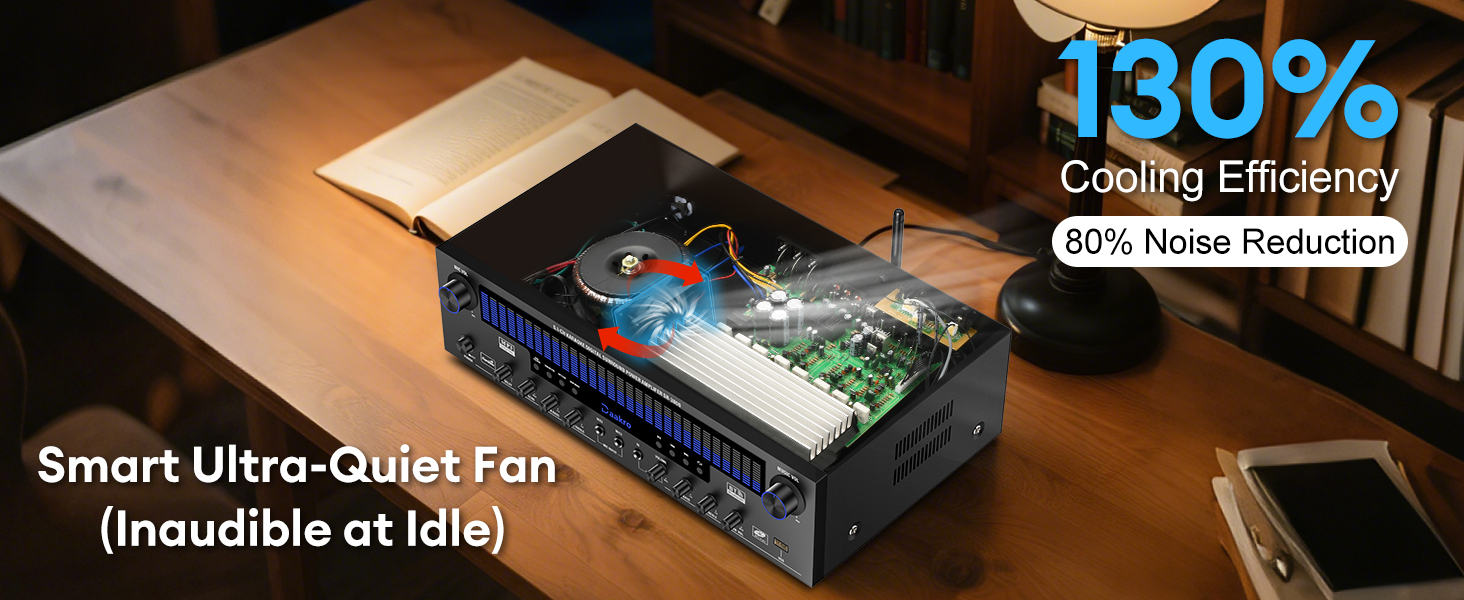
Figure 7.1 : Interne view of the Daakro SR-3800 amplifier, illustrating the smart ultra-quiet fan and heat sinks designed for efficient cooling and noise reduction.
8. Dépannage
| Problème | Cause possible | Solution |
|---|---|---|
| Pas de courant | Power cable not connected; Power switch off; Outlet issue | Ensure power cable is securely connected; Turn power switch on; Test outlet with another device. |
| Aucun son des haut-parleurs | Incorrect input selected; Speaker cables loose/incorrectly connected; Speaker impedance mismatch; Volume too low | Select correct input; Check all speaker connections for polarity; Ensure speakers are 4-16 ohms passive; Increase volume. |
| Bluetooth ne se connecte pas | Not in Bluetooth mode; Device too far; Interference; Bluetooth antenna loose | Select USB/BT/FM mode; Move device closer (within 30ft); Ensure Bluetooth antenna is securely attached. |
| Larsen/bruit du microphone | Microphone too close to speakers; Gain levels too high | Reposition microphone; Reduce MIC VOL or individual microphone gain controls. |
| La télécommande ne fonctionne pas | Batteries dead/incorrectly inserted; Obstruction between remote and unit | Replace batteries; Ensure clear line of sight to the ampRécepteur infrarouge de l'amplificateur. |
| Subwoofer ne fonctionne pas | Active subwoofer connected; Incorrect connection | Ensure only a passive subwoofer is connected to the SUB output; Check subwoofer cable connection. |
9. Spécifications
| Fonctionnalité | Spécification |
|---|---|
| Numéro de modèle | SR-3800 |
| Puissance de sortie nominale | 300 W (50 W par canal) |
| Nombre de canaux | 5.1 |
| Impédance du haut-parleur | 4-16 Ohms (Passive Speakers) |
| Version Bluetooth | 5.4 |
| Portée Bluetooth | Jusqu'à 30 pieds (10 mètres) |
| DSP Display Size | 19.8 pouces |
| Plage de réponse en fréquence | 20 Hz à 20 kHz |
| Interfaces d'entrée | Bluetooth, USB, Wireless Mic, 2x Wired Mic, FM, AUX, OPT, COAX, DVD, CD, LINE |
| Interfaces de sortie | 5.1 Channel Passive Speaker Output, Passive Subwoofer Output, Line Output |
| Voltage | 110 Volts (CA) |
| Poids de l'article | 13.31 livres |
| Dimensions du colis | 19.45 x 13.39 x 7.64 pouces |
10. Garantie et assistance
The Daakro SR-3800 amplificateur est livré avec un Garantie de 30 jours from the date of purchase. Daakro is committed to providing high-quality products and customer satisfaction.
For technical assistance, troubleshooting, or warranty claims, please contact our customer support team. We offer Service client en ligne 24h/XNUMX pour répondre rapidement à vos demandes.
You can find more information and support on the official Daakro brand store: Daakro Brand Store.