
CAMWAY CAM062CAV
CAMWAY RCA to HDMI Converter Instruction Manual
Model: CAM062CAV
Introduction
The CAMWAY RCA to HDMI Converter allows you to connect older devices with RCA composite outputs to modern displays with HDMI inputs. This converter supports 1080P/720P output resolutions and features an aspect ratio switch for 4:3 and 16:9 display modes.

Image: The CAMWAY RCA to HDMI Converter, a compact black device with three RCA input ports (yellow, white, red) and a button for aspect ratio switching.
Contenu du colis
- 1 x RCA to HDMI Converter
- 1 x USB Power Cable (1m/3ft)
- 1 x Manuel d'utilisation

Image: The converter, USB power cable, and user manual laid out next to the product box.
Caractéristiques du produit
- RCA to HDMI Conversion: Converts analog RCA composite input to HDMI 1080P(60hz)/720P(60hz) output.
- Large compatibilité : Supports PAL/NTSC formats and is compatible with devices such as Wii, PS1, PS2, N64, X-Box, VHS, VCR, and Blue-Ray DVD Players.
- Aspect Ratio Switch: Allows switching between 4:3 and 16:9 display ratios to restore the original output ratio of connected devices.
- Prêt à l'emploi : No drivers required. Requires external power via the included USB cable.
- Traitement avancé du signal : Provides enhanced signal processing for improved precision, colors, resolutions, and details.

Image : Un interne view of the converter highlighting the "Efficient Chip" responsible for video conversion.
Instructions d'installation
- Connectez les câbles RCA : Plug the yellow (video), white (left audio), and red (right audio) RCA cables from your source device (e.g., DVD player, game console) into the corresponding input ports on the CAMWAY converter.
- Connectez le câble HDMI : Connect an HDMI cable (not included) from the HDMI output port of the converter to an HDMI input port on your display (TV, monitor, projector).
- Fournir de l'énergie : Connect the included USB power cable to the Type-C power input on the converter and plug the other end into a DC 5V power source (e.g., a USB port on your TV or a USB wall adapter, not included). The converter requires external power to function.
- Sélectionnez l'entrée sur l'écran : Turn on your display and select the correct HDMI input source that the converter is connected to.

Image: A diagram illustrating the connection points: RCA inputs for audio and video, Type-C for power, and HDMI output to a TV.

Image: A visual guide showing how to connect various devices like Wii, PS2, N64, DVD players, and VCRs to the converter, which then connects to an HDTV or computer monitor.
Mode d'emploi
Once all cables are connected and the display input is selected, the video and audio from your RCA device should appear on your HDMI display.
Aspect Ratio Switching
The converter features a toggle switch to change the aspect ratio between 4:3 and 16:9. Press the button on the top of the converter to switch between these modes. This allows you to display content in its original aspect ratio, preventing stretching or distortion.

Image: Two screens showing the difference between 4:3 and 16:9 aspect ratios, with the converter in the middle indicating the switch function.
Compatibilité
This converter is designed for a wide range of legacy devices. It supports PAL and NTSC video formats.
Supported Input Devices:
- Wii
- PS1 (PlayStation 1)
- PS2 (PlayStation 2)
- N64 (Nintendo 64)
- X-Box (Original Xbox)
- Lecteurs VHS
- Magnétoscopes
- Blue-Ray DVD Players (with RCA output)
- Other devices with RCA composite video and stereo audio output
Supported Output Displays:
- Téléviseurs intelligents
- Écrans d'ordinateur
- Projecteurs
- Any display with an HDMI input
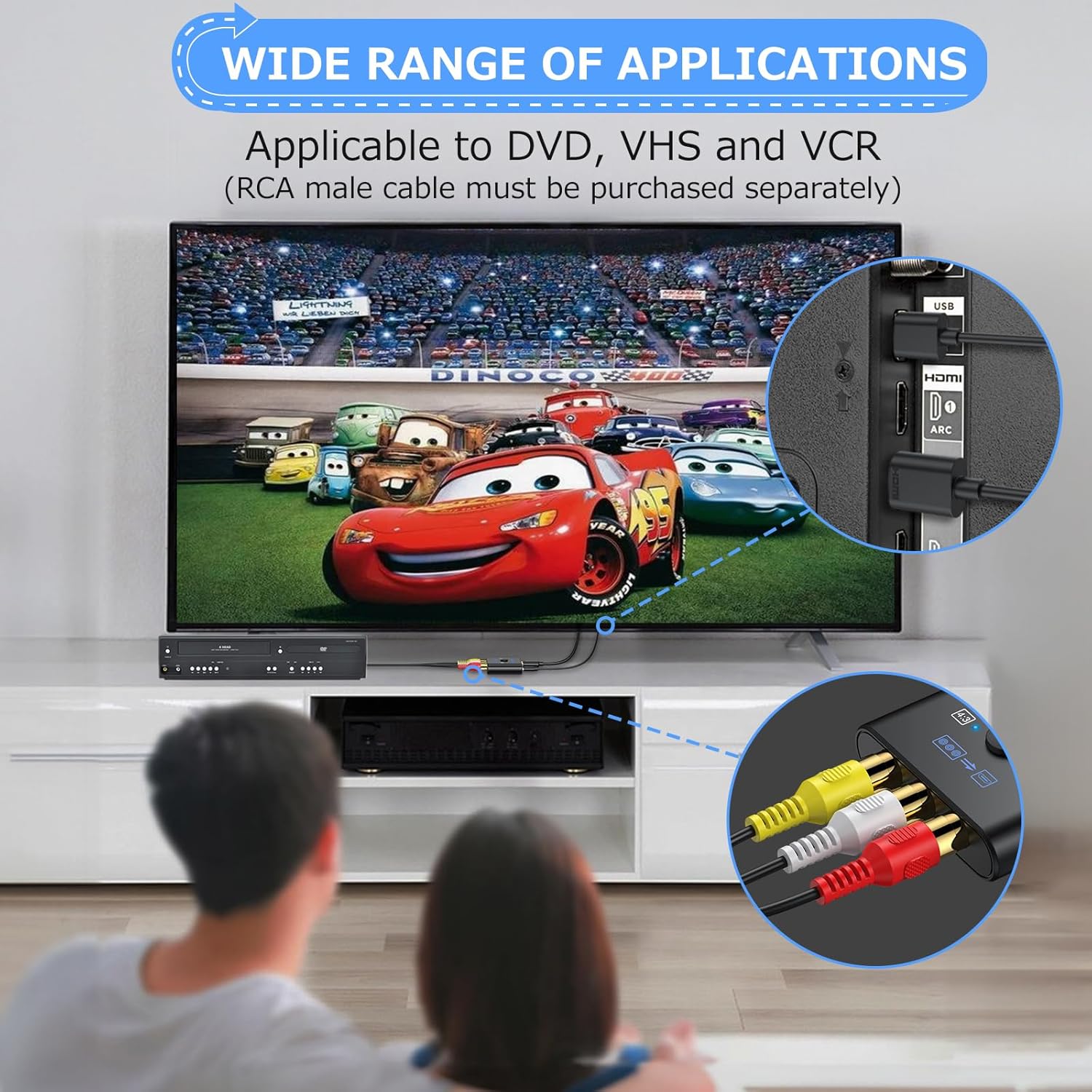
Image: A person watching a movie on a TV, with the converter connected to a DVD player and the TV, illustrating its use in home entertainment setups.
Dépannage
- No Signal/Blue Screen:
- Ensure the USB power cable is connected to a 5V DC power source and the converter is powered on.
- Verify that all RCA and HDMI cables are securely connected to their respective ports.
- Check that your display is set to the correct HDMI input channel.
- For N64 consoles, the native resolution is 240P. This converter supports 480P resolution, which may result in a blue screen if the N64 output is not compatible.
- Distorted or Poor Image Quality:
- Ensure the RCA cables are connected to the correct color-coded ports (yellow for video, white for left audio, red for right audio).
- Try switching the aspect ratio using the button on the converter.
- Test with different RCA or HDMI cables to rule out cable issues.
- Pas d'audio :
- Verify that the white and red RCA audio cables are correctly connected.
- Vérifiez les paramètres audio de votre appareil source et de votre écran.
Caractéristiques
| Format vidéo d'entrée | PAL/NTSC3.58/NTSC4.43/SECAM/PAL/M/PAL/N |
| Vidéo d'entrée Amplatitude | 0.45Vpp-1.1Vpp |
| Entrée audio | L/R stereo audio input |
| Support d'entrée | 24-bit RGB/YUV |
| Format de sortie vidéo | HDMI 1.3V and DVI 1.0 |
| Résolution de sortie | 1080P(60hz)/720P(60hz) |
| Commutateur de rapport d'aspect | 4:3/16:9 |
| Vol d'exploitationtage | DC + 5V |
| Courant de fonctionnement | 200-300 mA |
| Température de fonctionnement | -20°C ~ 70°C |
| Numéro de modèle de l'article | CAM062CAV |
| Poids de l'article | 3.2 onces (0.09 kilogrammes) |
| Dimensions du colis | 7.48 x 4.76 x 0.71 pouces |
Vidéo officielle du produit
Video: An official product video demonstrating the setup and functionality of the CAMWAY RCA to HDMI Converter, including connecting to various devices and switching aspect ratios.
Garantie et assistance
For warranty information or technical support, please refer to the contact details provided with your purchase or visit the official CAMWAY website. Conservez votre reçu d’achat pour les réclamations au titre de la garantie.