
1. Introduction
Thank you for choosing the HETP Portable Charger. This device is designed to provide convenient and fast charging for a wide range of electronic devices, including smartphones, tablets, and smartwatches. Featuring built-in charging cables and an integrated iWatch charger, it offers a versatile and compact power solution for your daily needs and travels.
Veuillez lire attentivement ce manuel avant d'utiliser le produit afin de garantir une utilisation sûre et optimale. Conservez ce manuel pour toute consultation ultérieure.
2. caractéristiques du produit
- Haute capacité : Batterie de 10800 mAh pour de multiples recharges.
- Charge rapide : QC4.0+PD 25W technology for rapid device charging.
- Câbles intégrés : Built-in Type-C, iOS, and Micro USB cables for universal compatibility without extra cords.
- iWatch Charger: Dedicated magnetic wireless charging pad for Apple Watch.
- Sorties multiples : 6 outputs (3 built-in cables, 1 wireless iWatch charger, 1 USB-C port, 1 USB-A port) to charge up to 6 devices simultaneously.
- Doubles entrées : Recharge the power bank via Type-C cable or Type-C port.
- Écran LCD : L'écran numérique clair affiche le pourcentage de batterie restant.tage.
- Compact et portable : Slim and lightweight design (6.02x2.8x0.59 inches, 280g) ideal for travel.
- Sécurité supérieure: Multi-protection smart microchip protects against short circuit, overheating, overcharging, over voltage, et surintensité.

Image: The HETP Portable Charger, highlighting its compact form factor and integrated LCD display.

Image : détaillée view of the power bank's multiple output and input options, including the built-in cables and ports.
3. Installation
- Déballer: Carefully remove the portable charger and all accessories from the packaging.
- Charge initiale: Before first use, fully charge the power bank. Connect the power bank to a USB wall charger (not included) using its built-in Type-C cable or a separate Type-C cable via the Type-C input port. The LCD display will show the charging progress.
- Vérifiez le niveau de la batterie : Once fully charged, the display will show 100%.
4. Mode d'emploi
4.1 Charger vos appareils
The power bank can charge up to 6 devices simultaneously using its various outputs:
- Utilisation des câbles intégrés : Extend the appropriate built-in cable (Type-C, iOS, or Micro USB) and connect it directly to your device.
- Utilisation des ports USB : Connect your device's charging cable to the USB-C output port or the USB-A output port on the power bank.
- Charger l'Apple Watch : Place your Apple Watch onto the magnetic wireless charging pad on the power bank. Ensure it aligns correctly for charging to begin.
The power bank will automatically detect the connected device and begin charging. The LCD display will show the remaining battery percentage de la banque d'alimentation.

Image: The power bank charging an iPhone, Android phone, tablet, and Apple Watch concurrently, demonstrating its multi-device charging capability.
4.2 Vérification du niveau de la batterie
Press the power button once to activate the LCD display, which will show the current battery percentage of the power bank. The display will turn off automatically after a few seconds to conserve power.
5. Compatibilité
This portable charger is widely compatible with a broad range of devices, including but not limited to:
- iPhone : iPhone 16/15/14/13/12/11/XS/XR/SE Pro/Pro Max series.
- Appareils Android : Samsung S24/S23 Series, Google Pixel, LG, Moto, and other Android smartphones and tablets.
- Apple Watch : Apple Watch 10/9/8/7/6/5/4/3/2/1/SE 1/SE2/Ultra/Ultra 2.
- Autres appareils: AirPods, and other USB-C or Micro USB compatible devices.
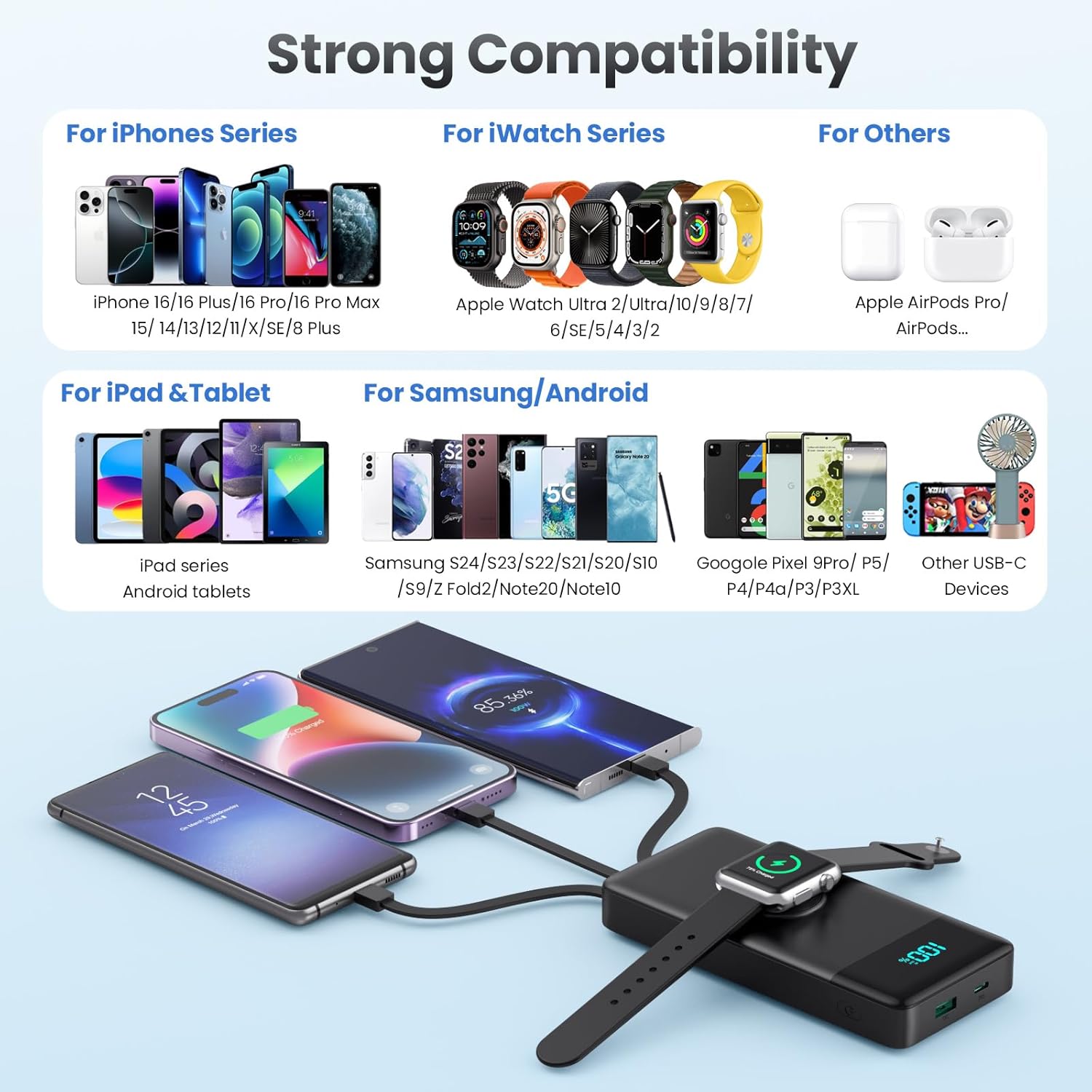
Image: Visual representation of the power bank's extensive compatibility with various device types.
6. Recharger la batterie externe
To recharge your HETP Portable Charger, you have two convenient options:
- Utilisation du câble USB-C intégré : Extend the built-in Type-C cable and plug it into a compatible USB wall charger or power adapter.
- Using Type-C Input Port: Connect a separate Type-C to Type-C or Type-C to USB-A cable to the power bank's Type-C input port and plug the other end into a compatible charger.
The power bank supports 25W fast recharging. The LCD display will show the charging percentaget pendant qu'il se recharge.

Image: Two methods for recharging the power bank, demonstrating the flexibility of using either the dedicated input port or the integrated Type-C cable.
7. Consignes de sécurité
The HETP Portable Charger is equipped with a multi-protection smart microchip to ensure safe operation. This includes protection against:
- Surcharge
- Sur-décharge
- Survoltage
- Surintensité
- Court-circuit
- Overheating (Temperature Protection)
- Maîtriser
- Recovery protection
To ensure your safety and prolong the product's lifespan, please adhere to the following:
- N’exposez pas la batterie externe à des températures extrêmes (chaudes ou froides), à la lumière directe du soleil ou à des environnements humides.
- Ne démontez pas, ne modifiez pas et n’essayez pas de réparer l’appareil vous-même.
- Tenir à l'écart de l'eau et d'autres liquides.
- Évitez de laisser tomber ou de soumettre la batterie externe à des impacts violents.
- Use only certified charging adapters and cables.
- Tenir hors de portée des enfants.

Image : Terminéview of the comprehensive safety features built into the power bank to protect both the device and connected electronics.
8. Entretien
- Nettoyez la batterie externe avec un chiffon doux et sec. N'utilisez pas de produits chimiques agressifs ni de matériaux abrasifs.
- Rangez la banque d'alimentation dans un endroit frais et sec lorsqu'elle n'est pas utilisée.
- En cas de stockage prolongé, rechargez la batterie externe à environ 50-70 % tous les trois mois afin de préserver sa durée de vie.
9. Dépannage
| Problème | Cause possible | Solution |
|---|---|---|
| La batterie externe ne charge pas les appareils. | Low battery on power bank; cable not connected properly; device not compatible; power bank in standby mode. | Recharge power bank; ensure cables are securely connected; verify device compatibility; press power button to activate. |
| La batterie externe ne se recharge pas. | Charging cable or adapter faulty; input port damaged; power bank battery issue. | Try a different charging cable and adapter; ensure connection is secure; contact support if issue persists. |
| Chargement lent. | Câble non compatible avec la charge rapide ; appareil non compatible avec la charge rapide ; plusieurs appareils en charge simultanément. | Use a fast-charging compatible cable; ensure device supports fast charging; charge fewer devices at once for faster individual charging. |
| L'écran LCD ne fonctionne pas. | Power bank is off; display malfunction. | Press the power button; if still unresponsive, contact customer support. |
| Apple Watch ne charge pas. | Watch not positioned correctly; watch battery too low; power bank in standby mode. | Adjust watch position on the magnetic pad; ensure power bank has sufficient charge; press power button. |
10. Spécifications
| Fonctionnalité | Détail |
|---|---|
| Numéro de modèle | HX100N9 |
| Capacité de la batterie | 10800mAh |
| Dimensions du produit | 6.02 x 2.8 x 0.59 pouces (environ 15.29 x 7.11 x 1.5 cm) |
| Poids de l'article | 12.3 onces (environ 348.7 grammes) |
| Technologie de charge rapide | QC4.0+PD 25W |
| Sorties | Built-in Type-C, Built-in iOS, Built-in Micro USB, Wireless iWatch Charger, USB-C Port, USB-A Port |
| Entrées | Built-in Type-C Cable, USB-C Port |
| Afficher | Affichage numérique à LED |
| Couleur | Noir |
| Fabricant | Dongguan Yuanhaoxun Technology Co., LTD |
| Pays d'origine | Chine |
11. Garantie et assistance
Your HETP Portable Charger comes with a Garantie de 24 mois from the date of purchase, covering manufacturing defects. Additionally, we provide support technique à vie for our product.
If you encounter any issues or have questions regarding your portable charger, please do not hesitate to contact our customer support team. Please have your purchase information and model number ready when contacting support.
Pour obtenir de l'aide, veuillez consulter les coordonnées figurant sur l'emballage du produit ou auprès du détaillant. website où vous avez acheté le produit.