
1. Introduction
Thank you for choosing the AromaTech Ambience Scent Diffuser. This waterless nebulizing diffuser is designed to disperse essential oil blends and fragrances efficiently, covering areas up to 1000 sq ft. Featuring Bluetooth connectivity for app control and ambient LED lighting, the Ambience diffuser provides a consistent and enjoyable scenting experience without heat or water. Please read this manual thoroughly before operation to ensure proper use and maintenance.

Image: The AromaTech Ambience Diffuser positioned on a coffee table in a living room, demonstrating typical placement.
2. Consignes de sécurité
- Lisez toutes les instructions avant d’utiliser l’appareil.
- Gardez le diffuseur hors de portée des enfants et des animaux domestiques.
- Use only AromaTech essential oil blends or fragrances. Other oils may damage the device.
- Ne pas immerger le diffuseur dans l'eau ou tout autre liquide.
- Assurez-vous que l'adaptateur secteur est compatible avec votre alimentation électrique locale.
- Unplug the diffuser from the power outlet before cleaning or when not in use for extended periods.
- Ne pas obstruer les aérations pendant le fonctionnement.
- Avoid placing the diffuser on unstable surfaces.
3. Contenu du colis
Vérifiez que tous les éléments sont présents dans le colis :
- AromaTech Ambience Scent Diffuser (White Stone Resin)
- Adaptateur secteur
- Empty 60ml Diffuser Oil Bottle (for your chosen fragrance oil, not included)
- Manuel de l'utilisateur (ce document)
4. Produit terminéview
Familiarize yourself with the components of your AromaTech Ambience Scent Diffuser.
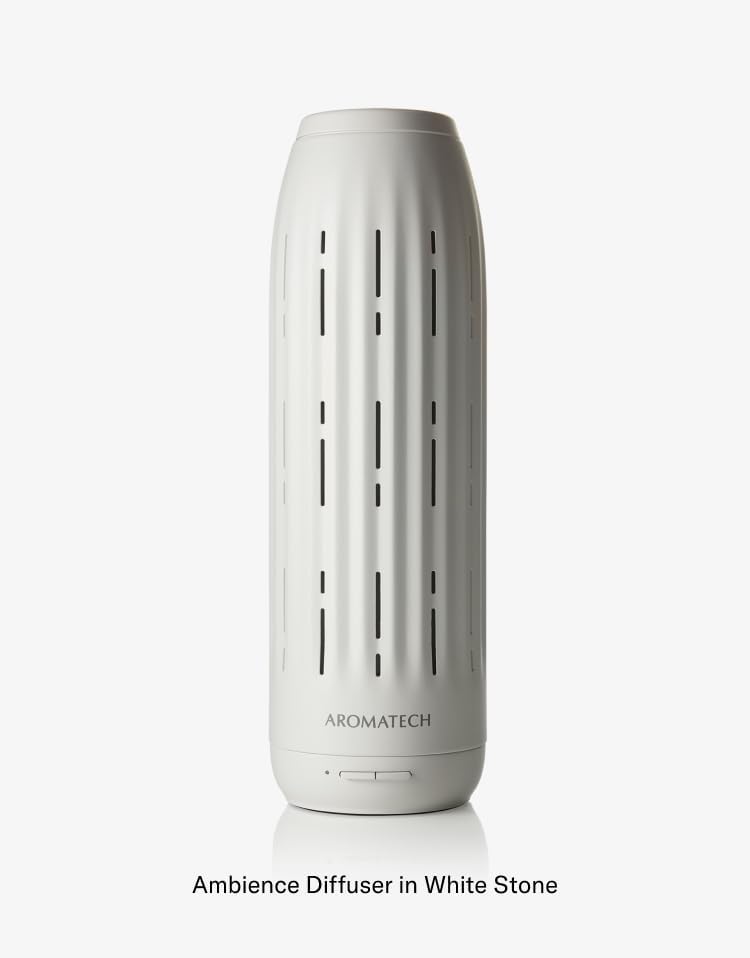
Image : Une image détaillée view of the Ambience Diffuser, highlighting its design and the AromaTech logo.
- Diffuser Body: The main unit housing the nebulizing technology.
- Boutons de contrôle : Located at the base for basic operation (e.g., power, LED).
- Oil Compartment: Area where the essential oil bottle is inserted.
- Bouches d'aération : Openings for scent dispersion.
- Port d'alimentation: Pour connecter l'adaptateur secteur.
5. Installation
- Déballer: Retirez soigneusement tous les composants de l'emballage.
- Placement: Place the diffuser on a flat, stable surface in your desired area. Ensure it is away from direct sunlight, heat sources, and out of reach of children and pets.
- Prepare Oil Bottle: Unscrew the cap from your AromaTech essential oil blend or fragrance bottle. If using the empty 60ml bottle, fill it with your chosen AromaTech oil.
- Insérer le flacon d'huile : Locate the oil compartment on the diffuser. Carefully screw the oil bottle into the designated port until secure. Do not overtighten.
- Connecter l'alimentation : Plug the power adapter into the diffuser's power port, then plug the adapter into a suitable electrical outlet.
6. Mode d'emploi
6.1 Mise sous/hors tension
- To power on the diffuser, press the power button located at the base of the unit.
- Pour éteindre, appuyez à nouveau sur le bouton d'alimentation.
6.2 Bluetooth Connectivity and AromaTech App
The AromaTech Ambience diffuser can be controlled via the AromaTech App on your smartphone (compatible with Apple and Android devices).
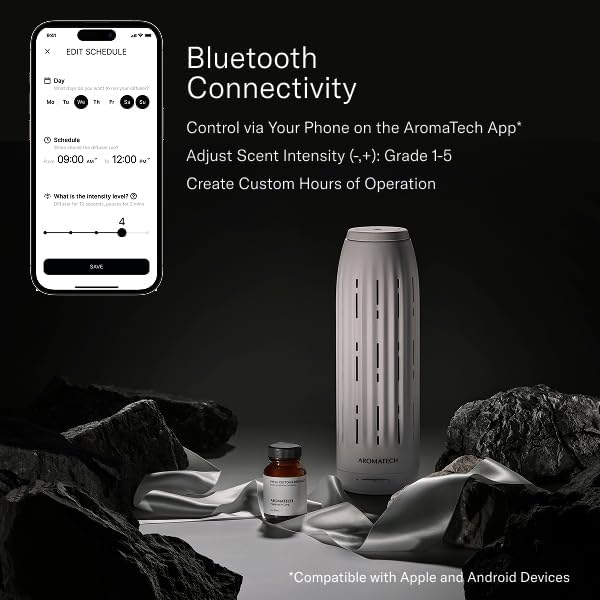
Image: A smartphone displaying the AromaTech App's scheduling and intensity control interface, alongside the Ambience diffuser and a bottle of fragrance oil.
- Téléchargez l'application: Download the "AromaTech" app from your device's app store (Apple App Store or Google Play Store).
- Activer Bluetooth : Assurez-vous que Bluetooth est activé sur votre smartphone.
- Associer l'appareil : Open the AromaTech App and follow the on-screen instructions to pair with your Ambience diffuser.
- Ajuster l'intensité du parfum : Within the app, you can adjust the scent intensity from Grade 1 to 5.
- Créer des horaires : Set custom operating hours and days for the diffuser to automatically turn on and off.
6.3 Éclairage LED d'ambiance
The diffuser features ambient LED lighting. Refer to the AromaTech App for specific controls to turn the LED light on/off or adjust its settings, if available.
7. Entretien
7.1 Cleaning the Diffuser
Un nettoyage régulier garantit des performances optimales et prolonge la durée de vie de votre diffuseur.
- Éteindre et débrancher : Éteignez et débranchez toujours le diffuseur avant de le nettoyer.
- Remove Oil Bottle: Carefully unscrew and remove the essential oil bottle.
- Essuyer l'extérieur : Utilisez un chiffon doux et sec.amp cloth to wipe the exterior of the diffuser. Do not use abrasive cleaners or solvents.
- Clean Nozzle (if necessary): If you notice reduced scent output or clogging, you may need to clean the nebulizing nozzle. Consult AromaTech support for specific instructions or use a small amount of rubbing alcohol on a cotton swab to gently clean the nozzle opening. Ensure it is completely dry before reassembling.
- Bien sécher : Assurez-vous que toutes les pièces soient parfaitement sèches avant de remonter le tout et de rétablir l'alimentation électrique.
7.2 Refilling/Replacing Oil
- When the oil bottle is empty, power off and unplug the diffuser.
- Carefully unscrew the empty bottle.
- Screw in a new bottle of AromaTech essential oil blend or fragrance.
- Reconnect power and resume operation.
8. Dépannage
| Problème | Cause possible | Solution |
|---|---|---|
| Le diffuseur ne s'allume pas. | Pas d'alimentation ; adaptateur secteur mal connecté. | Assurez-vous que l'adaptateur secteur est bien branché à la fois au diffuseur et à une prise électrique fonctionnelle. |
| Aucune ou faible diffusion d'odeur. | Oil bottle empty; Oil bottle not inserted correctly; Nozzle clogged; Incorrect intensity setting. | Check oil level and replace if empty. Ensure bottle is securely screwed in. Clean the nebulizing nozzle as per maintenance instructions. Adjust scent intensity via the AromaTech App. |
| Problèmes de connexion Bluetooth. | Bluetooth not enabled on phone; Diffuser too far from phone; App not updated. | Ensure Bluetooth is active on your device. Move closer to the diffuser. Restart the AromaTech App or reinstall it. |
| Le diffuseur émet un bruit inhabituel. | Diffuser not on a flat surface; Internal component issue. | Placez le diffuseur sur une surface stable et plane. Si le bruit persiste, contactez le service client d'AromaTech. |
9. Spécifications
- Marque: AromaTech
- Nom du modèle : Ambiance
- Couverture: Jusqu'à 1000 pieds carrés
- Technologie: Waterless Nebulizing
- Connectivité : Bluetooth (AromaTech App)
- Matériel: Resin (White Stone finish)
- Caractéristiques spéciales : Timer Setting, Ambient LED Lighting
- Capacité d'huile : Compatible with 60ml AromaTech oil bottles
10. Garantie et assistance
For warranty information, technical support, or customer service inquiries, please visit the official AromaTech webconsultez leur site ou contactez directement leur service client.
AromaTech Official Website: www.aromatech.com