
1. Introduction
Welcome to the user manual for your new ECHO Rainbow Pro S Smartwatch. This elegant and functional smartwatch is designed to enhance your daily life with integrated AI assistance, Bluetooth calling, comprehensive health sensors, and various sports modes. It comes with two interchangeable straps for maximum flexibility and is IP68 waterproof for worry-free use. This manual will guide you through the setup, operation, maintenance, and troubleshooting of your device.
2. Contenu de la boîte
Veuillez vérifier le contenu du colis pour vous assurer que tous les éléments sont présents :
- ECHO Rainbow Pro S Smartwatch (Rose Gold)
- Silicone Strap (Rose Gold)
- Nylon Strap (Bordeaux)
- Câble de charge magnétique
- Manuel de l'utilisateur (ce document)
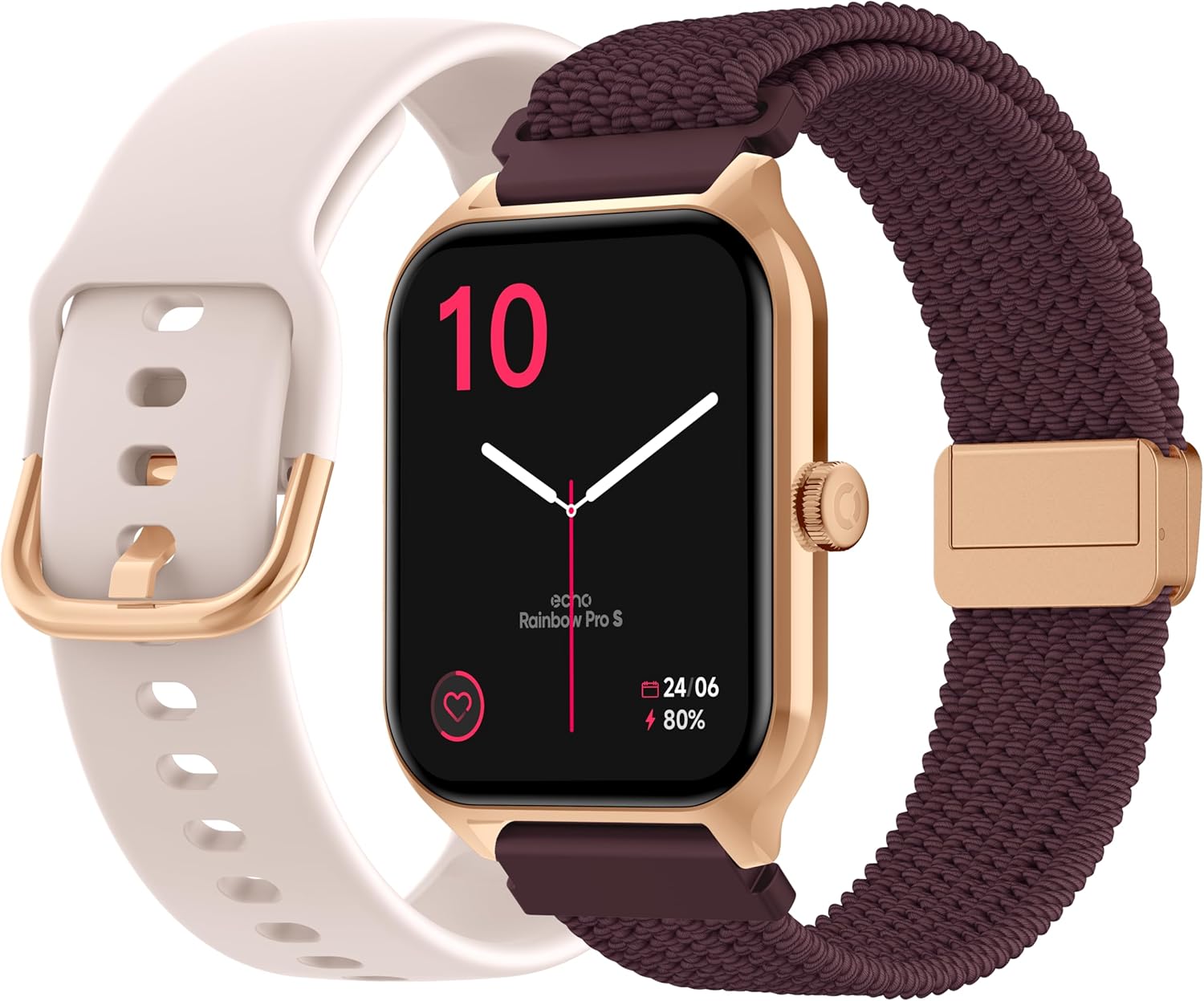
Image: The ECHO Rainbow Pro S Smartwatch, showcasing its rose gold finish, accompanied by both the rose gold silicone strap and the bordeaux nylon strap, along with the magnetic charging cable.
3. Installation
3.1 Chargement de l'appareil
Before first use, fully charge your smartwatch. Connect the magnetic charging cable to the charging points on the back of the watch and plug the USB end into a standard USB power adapter (not included) or a computer's USB port. A full charge takes approximately 2.5 hours.
3.2 Installation de l'application Da Fit
The ECHO Rainbow Pro S Smartwatch works with the Da Fit application. Download the Da Fit app from the Apple App Store (for iOS devices) or Google Play Store (for Android devices).
- Scan the QR code in the watch's manual or on the watch screen (if available) or search for "Da Fit" in your app store.
- Installez l'application sur votre smartphone.
3.3 Appairage avec votre smartphone
To unlock the full potential of your smartwatch, pair it with the Da Fit app:
- Assurez-vous que Bluetooth est activé sur votre smartphone.
- Ouvrez l'application Da Fit.
- Follow the on-screen instructions to add a new device. The app will search for your ECHO Rainbow Pro S.
- Select your watch from the list of found devices. Confirm the pairing request on both your phone and the watch.
- Une fois l'appairage effectué, votre montre synchronisera les données avec l'application.

Image: The ECHO Rainbow Pro S Smartwatch, showing the watch body, both the silicone and nylon straps, and the magnetic charging cable, illustrating the components for setup.
4. Utilisation de votre montre connectée
4.1 Navigation dans l'interface
The ECHO Rainbow Pro S features an intuitive 1.96-inch touchscreen. Swipe left, right, up, or down to access different functions and menus. The side button typically serves as a power button or a return-to-home screen button.
4.2 Surveillance de la santé
Your smartwatch is equipped with advanced sensors to track your well-being:
- Fréquence cardiaque : Surveille en continu votre fréquence cardiaque tout au long de la journée.
- Oxygène sanguin (SpO2) : Mesure la saturation en oxygène de votre sang.
- Pression artérielle: Fournit des estimations de votre tension artérielle.
- Suivi du sommeil : Analyzes your sleep patterns, including deep and light sleep staget.
Toutes les données de santé peuvent être viewed in detail within the Da Fit app, allowing you to track trends and progress over time.

Image : L'arrière view of the ECHO Rainbow Pro S Smartwatch, highlighting the optical sensors used for heart rate, SpO2, and blood pressure monitoring.

Image: The ECHO Rainbow Pro S Smartwatch screen showing various health metrics, including heart rate (BPM), SpO2 percentage, and activity data, demonstrating its health tracking capabilities.
4.3 Fonctionnalités de communication
Restez connecté directement depuis votre poignet :
- Appels Bluetooth : Passez et recevez des appels directement depuis votre montre lorsqu'elle est connectée à votre smartphone.
- Notifications: Recevez des alertes pour les appels, les messages et les notifications d'applications de votre smartphone associé.

Image: The ECHO Rainbow Pro S Smartwatch displaying incoming call and message notifications, illustrating its communication features when paired with a smartphone.
4.4 Assistant IA
The ECHO Rainbow Pro S integrates an AI assistant for convenient voice commands and information retrieval. Simply activate the AI feature on your watch and speak your query or command.

Image: The ECHO Rainbow Pro S Smartwatch screen showing the AI assistant interface, ready to receive voice commands or queries.
4.5 Sports Modes & Coaching
With over 100 sports modes and integrated training programs, your smartwatch is an ideal companion for your fitness journey. Select your activity from the watch's menu to track performance metrics such as calories burned, distance, and duration. The Da Fit app provides personalized tracking and allows you to follow your course using your smartphone's GPS.

Image: The ECHO Rainbow Pro S Smartwatch displaying various sports modes and training exercises, with accompanying smartphone app screenshots showing detailed workout plans and GPS tracking.
Personnalisation 4.6
Personnalisez votre expérience avec votre montre connectée :
- Regarder les visages: Choose from over 100 downloadable watch faces via the Da Fit app to match your style.
- Sangles interchangeables : Easily swap between the included silicone and nylon straps to suit your activity or outfit.
Image: The ECHO Rainbow Pro S Smartwatch, showcasing its rose gold finish, accompanied by both the rose gold silicone strap and the bordeaux nylon strap, highlighting the interchangeable design.
5. Entretien
5.1 Nettoyage
To keep your smartwatch in optimal condition, clean it regularly. Wipe the screen and body with a soft, lint-free cloth. For stubborn smudges, slightly dampNettoyez le chiffon avec de l'eau. Évitez d'utiliser des produits chimiques agressifs ou des matériaux abrasifs.
5.2 Résistance à l'eau (IP68)
The ECHO Rainbow Pro S is IP68 rated, meaning it is resistant to water up to 1 meter deep for 30 minutes. This makes it suitable for daily activities like hand washing, rain, or accidental splashes. However, it is not recommended for swimming, diving, or high-pressure water activities. Avoid exposing the watch to hot water, steam, or corrosive liquids.
5.3 Autonomie de la batterie
The smartwatch offers up to 5 days of battery life with typical usage. To optimize battery performance:
- Réduire la luminosité de l'écran.
- Désactivez la surveillance continue de la fréquence cardiaque si elle n'est pas nécessaire.
- Limitez le nombre de notifications de l'application.
6. Dépannage
If you encounter any issues with your ECHO Rainbow Pro S Smartwatch, please refer to the following common problems and solutions:
| Problème | Solution |
|---|---|
| La montre ne s'allume pas | Assurez-vous que la montre est complètement chargée. Branchez-la au câble de charge magnétique et à une source d'alimentation pendant au moins 30 minutes. |
| Impossible de jumeler avec le smartphone | 1. Assurez-vous que Bluetooth est activé sur votre téléphone. 2. Assurez-vous que la montre se trouve à portée de votre téléphone. 3. Redémarrez à la fois la montre et votre téléphone. 4. Videz le cache Bluetooth de votre téléphone (Android) ou oubliez l'appareil et réappairez-le (iOS/Android). 5. Ensure the Da Fit app has necessary permissions. |
| Lectures de santé inexactes | 1. Assurez-vous que la montre est bien ajustée à votre poignet, ni trop serrée ni trop lâche. 2. Nettoyez les capteurs situés à l'arrière de la montre. 3. Évitez les mouvements excessifs pendant les mesures. 4. Veuillez noter que ces lectures sont données à titre indicatif et ne constituent pas un diagnostic médical. |
| Notifications non reçues | 1. Ensure the watch is paired and connected to your phone. 2. Check notification settings in the Da Fit app and on your phone (e.g., app permissions, DND mode). 3. Make sure the Da Fit app is running in the background. |
| Durée de vie de la batterie courte | 1. Réduisez la luminosité de l'écran. 2. Disable continuous heart rate monitoring if not needed. 3. Limit background app refresh for the Da Fit app. 4. Ensure no apps are constantly running on the watch. |
7. Spécifications
| Fonctionnalité | Détail |
|---|---|
| Marque | ÉCHO |
| Modèle | Arc-en-ciel Pro S |
| Numéro de modèle | bd279646-58a1-4a95-ab0c-0847dc2ca4e6 |
| Couleur | Or rose |
| Taille de l'écran | 1.96 pouces |
| Type d'affichage | OLED or LED |
| Connectivité | Bluetooth |
| Appareils compatibles | Smartphone, Tablette |
| Composition de la batterie | Lithium-polymère |
| Autonomie de la batterie (typique) | 5 jours |
| Temps de charge | 2.5 heures |
| Résistance à l'eau | IP68 (jusqu'à 1 mètre pendant 30 minutes) |
| GPS | Pas de GPS |
| Forme | Rond |
| Compatibilité des applications | En forme |
| Pays d'origine | Chine |
8. Garantie et assistance
8.1 Garantie du produit
Your ECHO Rainbow Pro S Smartwatch is covered by a standard manufacturer's warranty against defects in materials and workmanship. The specific duration and terms of the warranty may vary based on your region and point of purchase. Please refer to your purchase documentation or contact your retailer for detailed warranty information.
8.2 Assistance clientèle
For technical assistance, troubleshooting beyond this manual, or warranty claims, please contact the retailer or manufacturer directly. Have your product model number (bd279646-58a1-4a95-ab0c-0847dc2ca4e6) and proof of purchase ready when contacting support.