
Introduction
The WAFTING Wallet Tracker is a wireless, rechargeable, and reusable smart track card designed to help you locate your important items using the Apple Find My app on iOS devices. Its ultra-thin design allows it to fit seamlessly into wallets, luggage, and more, providing peace of mind against loss.
This manual provides detailed instructions on how to set up, operate, and maintain your Wallet Tracker, ensuring you get the most out of its features.

Image : recto et verso view of the WAFTING Wallet Tracker card, highlighting its slim profile and wireless charging symbol.
Caractéristiques
- Works with Apple Find My App: Easily add the smart track card to your Find My App to link it to your important items. Leverage the vast Apple device network for location tracking. (Note: Android devices are not supported).
- Wireless Charging & Reusable: Features built-in wireless charging capability (charger not included). A single full charge can last up to 6 months.
- Left Behind Reminder: Receive instant notifications via the Find My app when your tracker goes out of Bluetooth range, showing the last known location.
- Find It Nearby: Trigger a loud alarm from the tracker card within a 164-foot range to quickly locate items at home.
- Mode perdu: Activate Lost Mode in the Find My app. Receive notifications when detected by any Apple device and provide contact information for finders.
- Protection de la vie privée : The tracker card stores no personal information. All location data is anonymized and encrypted by the Find My Network.
- Pas de frais mensuels : Enjoy all features without any subscription costs.
- Largement utilisé : At only 2.6mm thick, it fits perfectly in wallets, luggage tags, and other important items.
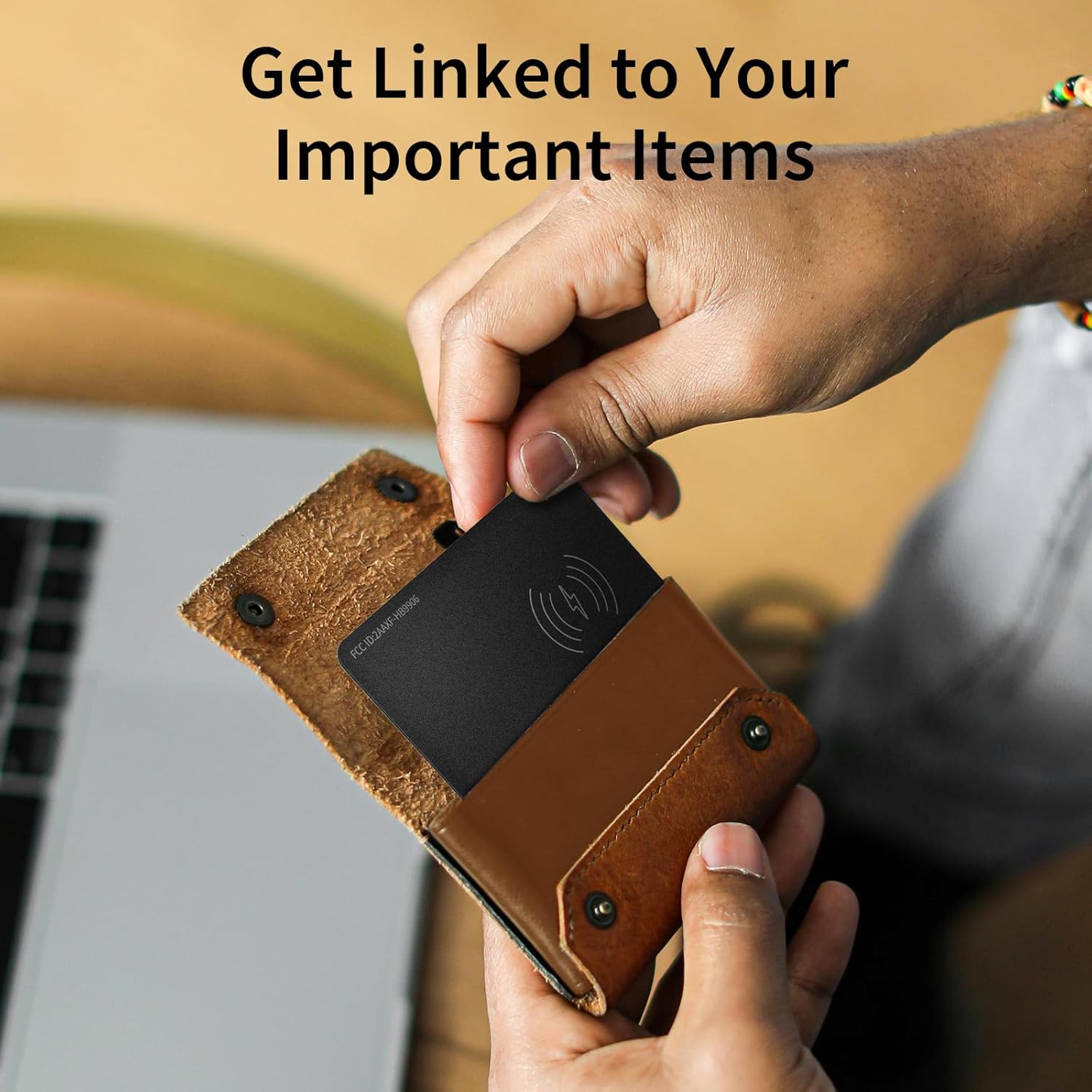
Image: The slim WAFTING Wallet Tracker being inserted into a brown leather wallet, demonstrating its compact size for everyday items.
Installation
- Charge initiale: Before first use, fully charge your Wallet Tracker using any compatible wireless charger. Place the side with the wireless icon facing down on the charger. A color-changing LED light indicates charging status. A full charge can last up to 6 months.
- Association avec Localiser d'Apple :
- Ensure your iOS device (iPhone, iPad, etc.) is updated to iOS 17 or later.
- Ouvrir le Trouver mon application sur votre appareil iOS.
- Appuyez sur le Articles languette.
- Robinet + Add New Item, puis sélectionnez Ajouter d'autres articles pris en charge.
- Press the power button on the Wallet Tracker. When you hear an audio tone, it indicates the device is on and entering pairing mode.
- Your iOS device will begin searching for the tracker. Once found, tap Connecter.
- Suivez les instructions à l'écran pour nommer votre objet et lui attribuer un emoji.
- Vérifiez que l'article est bien lié à votre identifiant Apple.

Image: The WAFTING Wallet Tracker resting on a wireless charging pad, with a red indicator light showing it is charging.
Video: An official WAFTING video demonstrating the process of wirelessly charging the smart track card and connecting it to the Apple Find My app on an iOS device. It highlights the card's compact size and ease of integration.
Mode d'emploi
- Locate Nearby: If your item is within 164 feet, open the Find My app, select your Wallet Tracker, and tap Jouer le son. The tracker will emit a loud alarm to help you pinpoint its location.
- Locate Far Away / Lost Mode: If your item is lost outside of your immediate range, the Find My network (millions of Apple devices worldwide) can help locate it. Activate Mode perdu in the app. You will receive a notification when your item is detected by another Apple device. You can also add a contact number or message for anyone who finds your item.
- Notifications laissées pour compte : Set up notifications in the Find My app to alert you if you leave your Wallet Tracker behind. This feature helps prevent accidental loss by reminding you when the tracker is no longer detected near you.
- Partager l'article : You can share the location of your Wallet Tracker with friends and family members who are part of your Apple Family Sharing group. This allows multiple trusted individuals to help locate a lost item.

Image: A phone displaying the Find My app interface with a 'Play Sound' option, next to a wallet emitting sound waves, illustrating the audible tracking feature.

Image: A smartphone screen displaying a map with multiple item locations marked, demonstrating the wide-area tracking capability of the Apple Find My network.

Image: A smartphone displaying a notification that reads "wallet" left behind, indicating the tracker's ability to alert users when an item is out of range.
Video: An official WAFTING video demonstrating the various functions of the Wallet Tracker within the Apple Find My app, including playing a sound, setting up lost mode, and receiving left-behind notifications.
Entretien
The WAFTING Wallet Tracker is designed for low maintenance. Its primary maintenance involves recharging the device.
- Rechargement : As mentioned in the setup, the tracker features wireless charging. A single full charge provides up to 6 months of battery life. Recharge the device when the battery is low to ensure continuous tracking capability.
- Nettoyage: Wipe the device with a soft, dry cloth as needed to keep it clean. Avoid using harsh chemicals or abrasive materials.
Dépannage
- Tracker not found in Find My app: Ensure Bluetooth is enabled on your iOS device and the tracker's power button has been pressed to enter pairing mode (indicated by an audio tone). If issues persist, try restarting your iOS device.
- Sound alarm not loud enough: While the alarm is designed to be loud (audible up to 164 feet), its effectiveness can be reduced if the tracker is deeply buried in items or inside a metal wallet. Try to reduce obstructions if possible.
- Appuis accidentels sur les boutons : Some users report accidental button presses when the card is in a tight wallet or pocket. Be mindful of how the card is placed to avoid unintended activation.
- Limited indoor tracking: The Find My app's precise location features rely on the network of Apple devices. In areas with limited device density or strong interference (e.g., inside some homes), precise indoor tracking might be less accurate than outdoor tracking.
Caractéristiques
| Attribut | Valeur |
|---|---|
| Dimensions du produit | 3.34 po L x 2.12 po l x 0.11 po ép. |
| Poids de l'article | 2.11 onces |
| Numéro de modèle de l'article | HB12 |
| Piles | 1 batterie lithium-ion requise (incluse) |
| Technologies de connectivité | Bluetooth |
| Couleur | Noir |
| Matériel | Acrylonitrile butadiène styrène (ABS) |
| Fabricant | SHENZHEN HOMELEAD ELECTRONICS CO.,LTD. |
| Pays d'origine | Chine |
| Date de première disponibilité | 18 septembre 2024 |
Garantie et assistance
For warranty information or technical support, please refer to the product packaging or contact WAFTING customer service directly. Keep your purchase receipt for any warranty claims.