
1. Introduction
Thank you for choosing the Inefala 10" Android 13 Car Radio. This manual provides essential information for the proper installation, operation, and maintenance of your new car radio. Please read it thoroughly before use to ensure optimal performance and safety.
2. Produit terminéview & Principales caractéristiques
The Inefala 10" Android 13 Car Radio is a high-performance multimedia system designed for specific vehicle models. It integrates advanced features for an enhanced driving experience.
- Système opérateur: Android 13
- Processeur: Processeur à 8 cœurs
- Mémoire/Stockage : 4 Go de RAM + 64 Go de ROM
- Afficher: Écran tactile IPS de 10 pouces
- Connectivité : Bluetooth 5.0, Dual-frequency WiFi
- Intégration Smartphone : Carplay sans fil et Android Auto
- Navigation: Online & Offline GPS Navigation support
- Audio: HI-FI, DSP, 32-band EQ Sound Effects, Full RCA Output, FM/RDS Radio
- Compatibilité du véhicule : Renault Master, Opel Movano, Nissan NV400 (2010-2021)
- Fonctionnalités supplémentaires : Backup Camera input, Steering Wheel Control support, Multiple UI Themes

Image : Terminéview of the Inefala Android 13 system, highlighting the 8-Core processor, 4GB RAM, 64GB ROM, Bluetooth 5.0, IPS screen, multiple UI themes, and WiFi capabilities.

Image: Display showing the Wireless Apple Carplay and Android Auto interfaces, demonstrating voice commands and app integration.
3. Contenu du colis
Veuillez vérifier que tous les articles sont présents dans le colis :
- 1 x Inefala Android Car Radio
- 2 x câbles d'alimentation
- 1 x antenne GPS
- 1 x câble d'entrée pour caméra de recul
- Câble 1 x RCA
- 2 x Câbles USB
- 1 x Outil d'installation
- 1 x Radio Cable
- 1 antenne radio
- 1 x décodeur CANBUS (si applicable à votre modèle de véhicule)
- 1 x Manuel d'instructions (ce document)
- 1 x caméra de recul
- 1 x microphone externe
- Accessoires supplémentaires
4. Configuration et installation
Installation of the car radio requires technical knowledge. It is recommended to have it installed by a qualified professional to avoid damage to the unit or your vehicle. Ensure the vehicle's power is disconnected before starting installation.
4.1 Compatibilité avec les véhicules
This unit is specifically designed for Renault Master, Opel Movano, and Nissan NV400 models manufactured between 2010 and 2021. Verify your vehicle's dashboard configuration matches the provided images.
4.2 Étapes d'installation (Guide général)
- Retirer l'autoradio d'origine : Retirez soigneusement l'autoradio et les garnitures du tableau de bord existants.
- Connecter le faisceau de câbles : Connect the provided power cables, RCA cables, USB cables, GPS antenna, and radio antenna to the corresponding ports on the new unit and your vehicle's wiring harness. Ensure all connections are secure.
- Connexion CANBUS : If your vehicle requires a CANBUS decoder (included), connect it as per the wiring diagram to ensure proper communication with vehicle systems (e.g., steering wheel controls).
- Installation de la caméra de recul : Install the backup camera at the rear of your vehicle and route its cable to the car radio's backup camera input.
- Micro externe : Connect the external microphone for improved call quality and voice command accuracy. Position it optimally.
- Fonctionnalité de test : Before fully reassembling the dashboard, temporarily connect power and test all functions of the new radio (power on/off, audio, touch screen, GPS, Bluetooth, Carplay/Android Auto, backup camera).
- Unité sécurisée : Once tested, secure the car radio in the dashboard opening and reassemble the trim.

Image: Visual representation of the car radio installed in a compatible vehicle dashboard, showing the original radio slot and the new 10-inch unit after installation.
5. Mode d'emploi
5.1 Mise sous/hors tension
The unit typically powers on automatically with the vehicle's ignition. To manually power on/off or restart, press and hold the power button on the unit or use the corresponding option in the system settings.
5.2 Fonctionnement de l'écran tactile
Navigate the Android interface by tapping, swiping, and pinching on the 10-inch IPS touchscreen, similar to a smartphone or tablet. The IPS screen provides wide viewDes angles de vue intéressants et des images nettes.
5.3 Home Screen & Apps
The home screen displays frequently used apps and widgets. You can customize the layout and install additional applications from the Google Play Store (requires internet connection).
5.4 Commande au volant
If your vehicle supports steering wheel controls and the CANBUS is correctly installed, you can configure the buttons to control various functions of the car radio, such as volume, track skipping, and mode selection. Access the steering wheel control learning function in the system settings to map your vehicle's buttons.

Image: Screenshot of the car radio's interface for configuring steering wheel controls, showing options to learn and assign functions to vehicle buttons.
6. Connectivité
6.1Bluetooth 5.0
Pair your smartphone via Bluetooth 5.0 for hands-free calling and audio streaming. Go to the Bluetooth settings on the car radio, enable Bluetooth, and search for available devices on your phone. Select the car radio from the list to pair.
6.2 Wi-Fi
Connect the car radio to a Wi-Fi network (e.g., mobile hotspot) to access online features, download apps, and receive software updates. Navigate to Wi-Fi settings, select your network, and enter the password.
6.3 CarPlay sans fil et Android Auto
Connect your iPhone or Android smartphone wirelessly to use Apple Carplay or Android Auto. This allows you to access navigation, music, messages, and other compatible apps directly on the car radio's screen. Follow the on-screen prompts for initial setup, usually involving Bluetooth pairing and Wi-Fi connection.
7. Navigation
The unit supports both online and offline GPS navigation. You can use pre-installed navigation apps or download your preferred navigation software from the Google Play Store. The included GPS antenna ensures accurate positioning.

Image: Split display showing GPS navigation on one side and a backup camera view on the other, illustrating the unit's capabilities.
8. Fonctionnalités audio
8.1 DSP & 32-band EQ
Utilize the built-in Digital Sound Processor (DSP) and 32-band Equalizer (EQ) to fine-tune the audio output to your preference. Adjust frequency bands, balance, fader, and other sound effects for an optimized listening experience.
Radio FM/RDS 8.2 GHz
Access FM radio stations with clear reception. The Radio Data System (RDS) function displays station information, song titles, and other relevant data where available. The unit supports 30 preset radio stations.
Sortie RCA complète 8.3
L'appareil offre une sortie RCA complète, permettant la connexion à des périphériques externes. amplifiers and subwoofers for a more powerful and customized audio system.
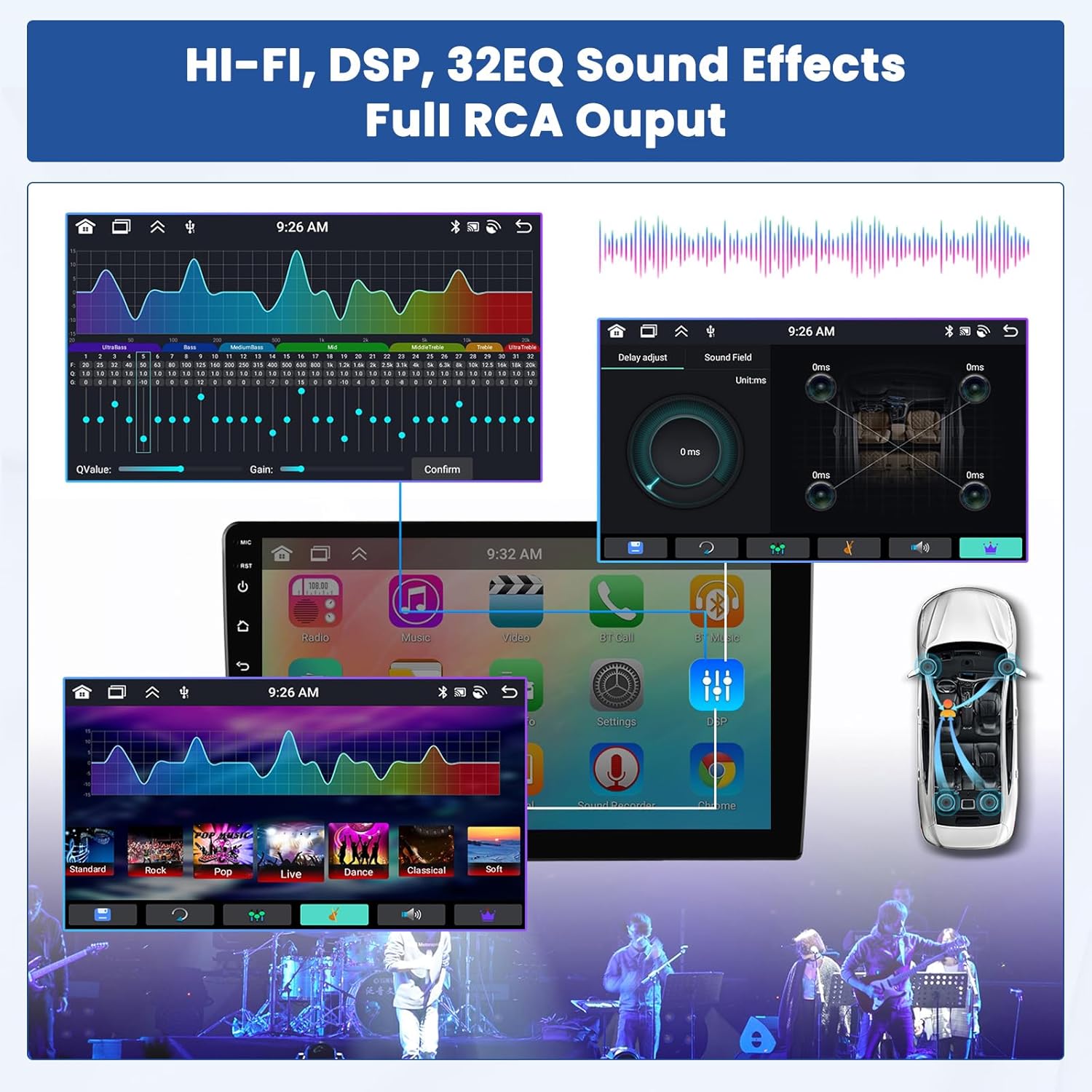
Image: Screenshots of the car radio's audio settings, showing the DSP interface with delay adjustment and the 32-band equalizer for sound customization.
Image: Display of the FM radio interface, showing frequency tuning, preset stations, and RDS information.
9. Caméra de recul
La caméra de recul intégrée offre une vue dégagée. view of the area behind your vehicle when reversing, enhancing safety. The display automatically switches to the camera feed when the vehicle is put into reverse gear.
Image : Un écran partagé view showing a car reversing with a clear backup camera feed on the car radio display, including parking guidelines.
10. Entretien
Pour garantir la longévité et les performances optimales de votre autoradio, suivez ces consignes d'entretien :
- Nettoyage: Utilisez un chiffon doux et sec pour nettoyer l'écran et l'extérieur. Évitez les nettoyants abrasifs et les solvants.
- Mises à jour logicielles : Vérifiez et installez régulièrement les mises à jour logicielles afin de garantir le bon fonctionnement du système et de bénéficier des dernières fonctionnalités et correctifs de sécurité.
- Température: Évitez d'exposer l'appareil à des températures extrêmes, chaudes ou froides, pendant des périodes prolongées.
- Alimentation: Assurez une alimentation électrique stable afin d'éviter tout dommage électrique.
11. Dépannage
Si vous rencontrez des problèmes avec votre autoradio Inefala, reportez-vous aux étapes de dépannage courantes suivantes :
- Pas d'alimentation : Vérifiez tous les branchements des câbles d'alimentation. Assurez-vous que le contact du véhicule est mis. Vérifiez les fusibles.
- Pas de son : Check speaker connections. Verify volume settings and ensure the mute function is not active. Check audio source selection.
- Écran tactile non réactif : Essayez de redémarrer l'appareil. Assurez-vous que l'écran est propre et dégagé.
- GPS non fonctionnel : Assurez-vous que l'antenne GPS est correctement connectée et que le signal est clair. view du ciel. Vérifiez les paramètres GPS du système.
- Problèmes de connexion Bluetooth/Wi-Fi : Ensure Bluetooth/Wi-Fi is enabled on both the unit and your device. Try re-pairing or re-connecting. Check network passwords.
- Caméra de recul non affichée : Check the camera cable connection. Ensure the vehicle is in reverse gear. Verify camera settings.
- Commandes au volant non fonctionnelles : Ensure CANBUS is correctly installed (if applicable). Re-learn the steering wheel controls in the settings.
If problems persist after attempting these steps, please contact Inefala customer support for assistance.
12. Spécifications
| Fonctionnalité | Spécification |
|---|---|
| Marque | Inefala |
| Numéro de modèle | Inefala-A7925A3477A4MI2-EU60 |
| Taille de l'écran | 10 pouces |
| Système opérateur | Android 13 |
| Processeur | 8 cœurs |
| Capacité de stockage de la mémoire | 64 Go |
| Technologie de connectivité | Bluetooth, Wi-Fi |
| Supported Navigation System | GPS |
| Mode de sortie audio | Stéréo |
| Méthode de contrôle | Touche |
| Poids de l'article | 2.7 kilogrammes |
| Type de véhicule compatible | Truck (Renault Master, Opel Movano, Nissan NV400) |
13. Garantie et assistance
Inefala provides comprehensive support for its products:
- Garantie: 24 months quality assurance.
- Retours : 30 days free return policy.
- Support technique : Online consultation available, with responses typically within 24 hours.
For technical assistance or warranty claims, please refer to the contact information provided with your purchase or visit the Inefala brand store on Amazon.

Image: Instructions for obtaining technical assistance, showing steps to contact Inefala support via email.