
1. Introduction
The KUAIQU SPS-C3010S is a highly efficient and precise DC regulated power supply, designed for laboratory and general electronic applications. It provides continuously adjustable output voltage from 0 to 30V and current from 0 to 10A, with a maximum power output of 300W. Key features include high precision voltage and current display, robust protection functions (OCP, OVP, short circuit), and integrated USB-A and USB-C fast charging ports.
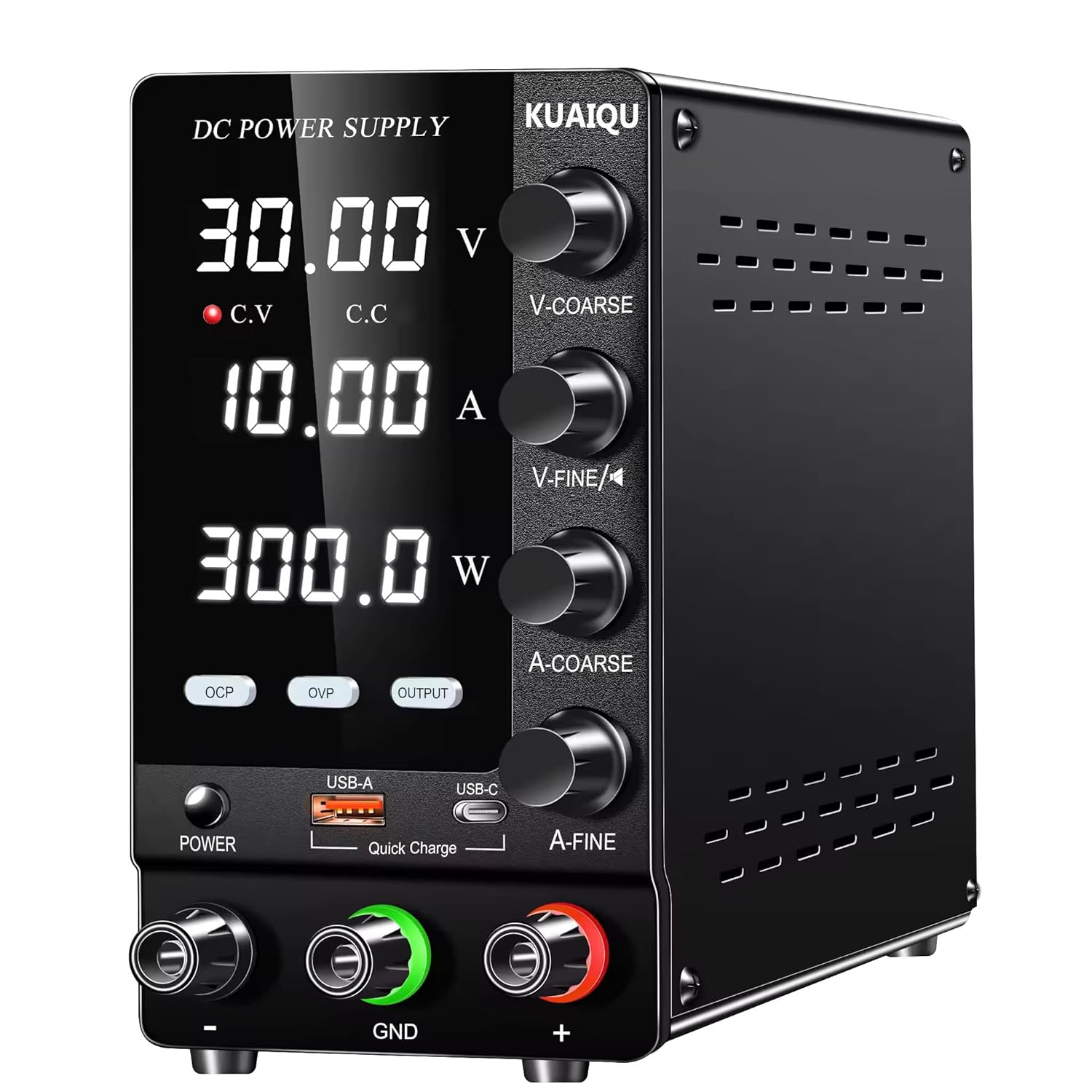
Figure 1.1 : Face avant view of the KUAIQU SPS-C3010S DC Regulated Power Supply, showing the digital display and control knobs.
This power supply is suitable for a wide range of applications, including electronic circuit testing, battery charging, DIY projects, and solar power system development.

Figure 1.2: Various application areas for the SPS-C3010S, including laboratory use, battery powering, handmade DIY, and solar power.
2. Caractéristiques et avantages du produittages
- Complete operating protection functions for enhanced safety.
- Highly efficient design with low ripple and noise.
- Compact size and light weight for portability.
- Dual display for simultaneous voltage and current readings with high precision.
- Vol stabletage output and precise current limiting capabilities.
- Double voltage input for convenient choice (AC 220V 50Hz).
- Ventilateur à température contrôlée pour une dissipation thermique efficace et un fonctionnement silencieux.
- Double potentiometers for more precise adjustment of voltage et actuel.
- Integrated USB-A and USB-C (Type-C) charging ports for external device charging, independent of main output settings.
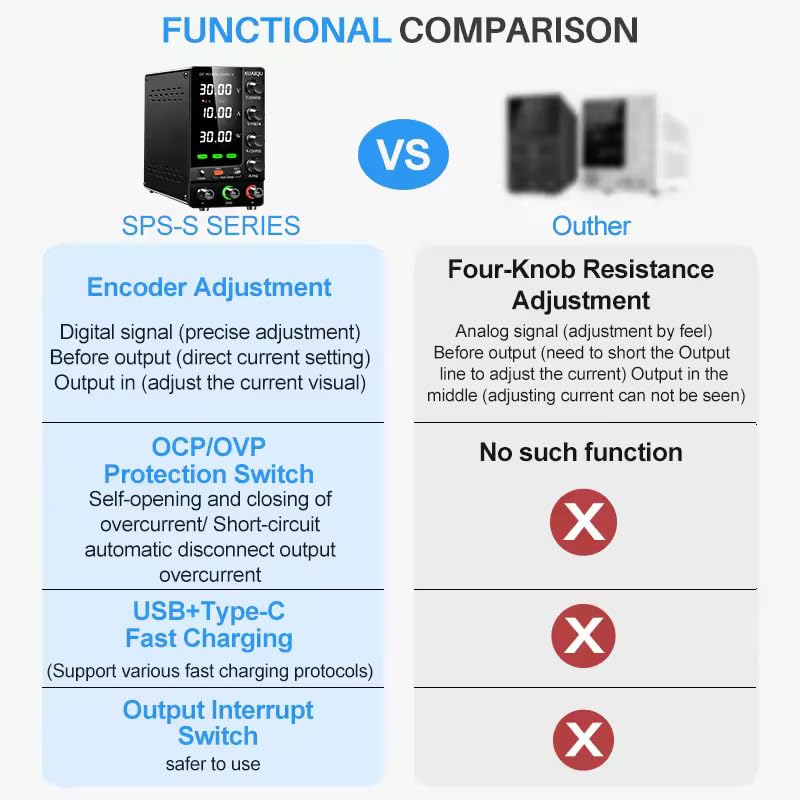
Figure 2.1 : Comparaison mettant en évidence l'avantagetages of the SPS-S series, including encoder adjustment, OCP/OVP protection, USB+Type-C fast charging, and an output interrupt switch, features often absent in other models.
3. Composants et commandes
Familiarize yourself with the various components and controls of the power supply to ensure proper operation.

Figure 3.1: Detailed front panel layout of the SPS-C3010S, indicating the Voltage Display, Current Display, Power Display, Constant Voltage Indicator (C.V), Constant Current Indicator (C.C), OVP/OCP indicators, USB-A and USB-C ports, Power button, OCP, OVP, and OUTPUT buttons, Encoder Knobs for Coarse and Fine Voltage/Current adjustment, and Output terminals (Negative, GND, Positive).
- Voltage Affichage : Affiche le volume de sortietage en Volt (V).
- Affichage actuel : Affiche le courant de sortie en Ampères (A).
- Affichage de la puissance : Affiche la puissance de sortie en watts (W).
- Indicateurs CV/CC : Indicate Constant Voltage or Constant Current mode.
- Boutons V-COARSE / V-FINE : Encoder switches for coarse and fine adjustment of output voltage. Press to move cursor position during setting.
- Boutons A-COARSE / A-FINE : Encoder switches for coarse and fine adjustment of output current. Press to move cursor position during setting.
- Bouton d'alimentation: Allume/éteint l'appareil.
- Bouton OCP : Short press to enable/disable OCP (Over Current Protection) alarm. Long press (3 seconds) to enter OCP setting mode.
- Bouton OVP : Short press to enable/disable OVP (Over Voltage Protection) function. Long press (3 seconds) to enter OVP setting mode.
- Bouton SORTIE : Short press to switch the power supply output on or off.
- USB-A / USB-C Ports: Pour recharger des appareils externes.
- Bornes de sortie: Connect load to GND (green) and Positive (red) terminals.
4. Installation
Before operating the power supply, ensure it is properly set up.
- Déballage: Carefully remove the power supply and all accessories from the packaging. Verify that the power cord is included.
- Placement: Placez le bloc d'alimentation sur une surface stable et plane, bien ventilée. Assurez-vous que le ventilateur de refroidissement situé à l'arrière n'est pas obstrué.
- Connexion électrique : Connect the provided power cord to the AC input socket on the rear of the unit and then to a suitable AC 220V 50Hz power outlet.
- Vérification initiale : Before connecting any load, ensure all control knobs are at their minimum settings.
5. Fonctionnement
Follow these steps for operating the KUAIQU SPS-C3010S power supply:
- Mise sous tension : Press the "POWER" button to turn on the power supply. The screen will illuminate and display the previously set voltage et valeurs actuelles.
- Voltage Réglage :
- Faites pivoter le « VOL »TAGE" encoder switch (V-COARSE or V-FINE) to set the desired output voltage.
- When adjusting, the current digit being set will blink. Rotate clockwise to increase the value and counter-clockwise to decrease it.
- Press the encoder switch to move the cursor position to adjust different digits.
- The blinking will stop automatically after 5 seconds of completing the voltage réglage.
- Paramètre actuel:
- Rotate the "CURRENT" encoder switch (A-COARSE or A-FINE) to set the desired output current limit.
- Similaire à voltage setting, the current digit being set will blink. Rotate clockwise to increase and counter-clockwise to decrease.
- Press the encoder switch to move the cursor position.
- Blinking stops after 5 seconds of completing the current setting.

Figure 5.1: Illustration of the encoder adjustment process, showing how pressing and rotating the V-COARSE/V-FINE and A-COARSE/A-FINE knobs allows for precise digital setting of voltage et actuel.
- OCP (Over Current Protection) Short Circuit Protection:
- Short press the "OCP" button to enable or disable the OCP alarm function.
- Press and hold the "OCP" button for 3 seconds to enter the OCP setting state. Use the current adjustment knob to set the OCP current value.
- When OCP is enabled, an alarm will sound, and the machine will stop outputting if an external load short circuit or over current occurs, protecting the load.
- To clear the OCP alarm, short press the OCP button.
- OVP (survoltage Protection) Function:
- Short press the "OVP" button to enable or disable the OVP function.
- Press and hold the "OVP" button for 3 seconds to enter the OVP setting state. Use the voltage adjustment knob to set the OVP voltage valeur.
- When OVP is enabled, if the load voltage exceeds the set OVP voltage, the machine will stop outputting and issue an alarm, protecting external loads.
- Short press the OVP button to clear the OVP alarm.
- OUTPUT On/Off: Short press the "OUTPUT" button to toggle the power supply output on or off. This allows for safe connection/disconnection of loads without powering down the unit.
- Fonction de chargement USB :
- The power supply includes USB-A and USB-C (TYPE-C) charging ports.
- These ports operate independently and are not affected by the main voltage and current regulation settings.
- Devices can be charged separately or simultaneously. When used separately, the ports support fast charging.

Figure 5.2: The SPS-C3010S featuring USB-A and USB-C ports for quick charging of cell phones and other electronic devices, demonstrating their use while the power supply is active.
6. Caractéristiques de sécurité
The KUAIQU SPS-C3010S is equipped with multiple protection mechanisms to ensure safe operation for both the device and connected loads.
- Protection contre les surintensités (OCP) : Prevents damage to the load and power supply by cutting off output if the current exceeds the set OCP limit or if a short circuit occurs.
- Plus de voltage-Protection (OVP) : Protège les appareils connectés contre les surtensions.tage by disabling output if the voltage surpasses the set OVP threshold.
- Protection contre les courts-circuits : Automatically detects and protects against short circuits at the output terminals.
- Protection contre la surchauffe: The internal temperature control fan helps prevent overheating by automatically activating when the operating temperature exceeds 50°C.

Figure 6.1: The power supply's accurate precision display, alongside icons representing its protection features: Over Voltage Protection, Over Heat Protection, Over Current Protection (OCP), and Short Circuit Protection.
7. Entretien
Proper maintenance ensures the longevity and reliable performance of your power supply.
- Nettoyage: Nettoyez régulièrement l'extérieur de l'appareil avec un chiffon doux et sec. Évitez d'utiliser des nettoyants abrasifs ou des solvants.
- Ventilation: Ensure the ventilation openings and the cooling fan are free from dust and obstructions. Periodically check and clean the fan area if necessary.
- Ventilateur de refroidissement : The smart cooling fan automatically activates when the internal temperature exceeds 50°C to prevent overheating. Ensure it operates freely.

Figure 7.1: Illustration of the smart cooling fan system, which automatically turns on when the operating temperature exceeds 50°C to maintain optimal performance and prevent overheating.
8. Dépannage
Cette section aborde les problèmes courants que vous pourriez rencontrer avec l'alimentation électrique.
| Problème | Cause possible | Solution |
|---|---|---|
| Pas d'alimentation/écran éteint | Power cord not connected, power switch off, no AC input. | Check power cord connection, ensure power switch is ON, verify AC outlet. |
| Pas de volume de sortietage/actuel | OUTPUT button is off, OCP/OVP activated, load short-circuited or open. | Press OUTPUT button to turn on. Check for OCP/OVP alarms and clear them. Verify load connection and integrity. |
| OCP/OVP alarm sounds | Courant de sortie/voltage exceeded set limit or short circuit detected. | Reduce load, increase OCP/OVP setting (if appropriate for load), or clear short circuit. Short press OCP/OVP button to clear alarm. |
| Ventilateur fonctionnant en continu/bruyamment | Unit is operating under heavy load, high ambient temperature, or fan vents are blocked. | This is normal if the unit is hot. Ensure adequate ventilation. Clean fan vents if dusty. |
| Affichage inexact | External factors, or unit requires calibration. | Ensure proper connections. If persistent, contact customer support for calibration or service. |
9. Spécifications
Detailed technical specifications for the KUAIQU SPS-C3010S DC Regulated Power Supply.
| Paramètre | Valeur |
|---|---|
| Numéro de modèle | SPS-C3010S |
| Vol d'entréetage | CA 220 V 50 Hz |
| Volume de sortietaget gamme | 0 ~ 30V (continuously adjustable) |
| Plage de courant de sortie | 0 ~ 10A (continuously adjustable) |
| Puissance de sortie | 300 W |
| Voltage Résolution | 0.01V |
| Résolution actuelle | 0.001A |
| Voltage Règlement (Ligne) | <5 mV |
| Voltage Régulation (Charge) | <5 mV |
| Temps de récupération | <500 µs (variation de charge de 50 %, charge minimale de 0.5 A) |
| Ondulation et bruit | <5mVrms, 100mVp-p |
| Coefficient de température | <100 ppm/°C |
| Réglementation actuelle (ligne) | <3 mA |
| Régulation actuelle (charge) | <3 mA |
| VoltagPrécision d'affichage | ±(0.5% de la lecture + 2 chiffres) |
| Précision d'affichage actuelle | ±(0.5% de la lecture + 2 chiffres) |
| Température et humidité de fonctionnement | 0~40°C, RH<80% |
| Température et humidité de stockage | -10~70°C, RH<70% |
| Dimensions (L x l x H) | 20 x 15 x 30 cm |
| Poids de l'article | 2 kg |
| Composants inclus | Cordon d'alimentation |

Figure 9.1: The compact dimensions of the SPS-C3010S, highlighting its portability with a length of 7.6 inches, making it smaller and more convenient for various workspaces.
10. Garantie et assistance
The KUAIQU SPS-C3010S DC Regulated Power Supply is intended to come with a Garantie de 1 ans À compter de la date d'achat. Veuillez conserver votre reçu d'achat comme preuve d'achat pour toute réclamation au titre de la garantie.
For any technical assistance, troubleshooting, or warranty inquiries, please contact the manufacturer's support team:
- Fabricant: KUAIQU-
- Packer/Support Contact: DHRUVcom
- Adresse: CHENNAI, TAMIL NADU, 600001, India
- E-mail: support@dhruvpro.in
- Numéro de téléphone: 7200470717
Note: While a 1-year warranty is provided, some users have reported issues with the physical warranty card being absent or torn from the manual. Please contact the provided support channels directly for warranty claims if you encounter this issue.