
1. Introduction
This manual provides detailed instructions for the setup, operation, and maintenance of your BPXX Bluetooth Thermal Shipping Label Printer, Model D463B. This printer is designed for efficient and clear printing of various thermal labels, including 4x6 inch shipping labels, with a resolution of 203 DPI. It supports both Bluetooth connectivity via the 'Ezlabel' mobile application and USB connection to computers.
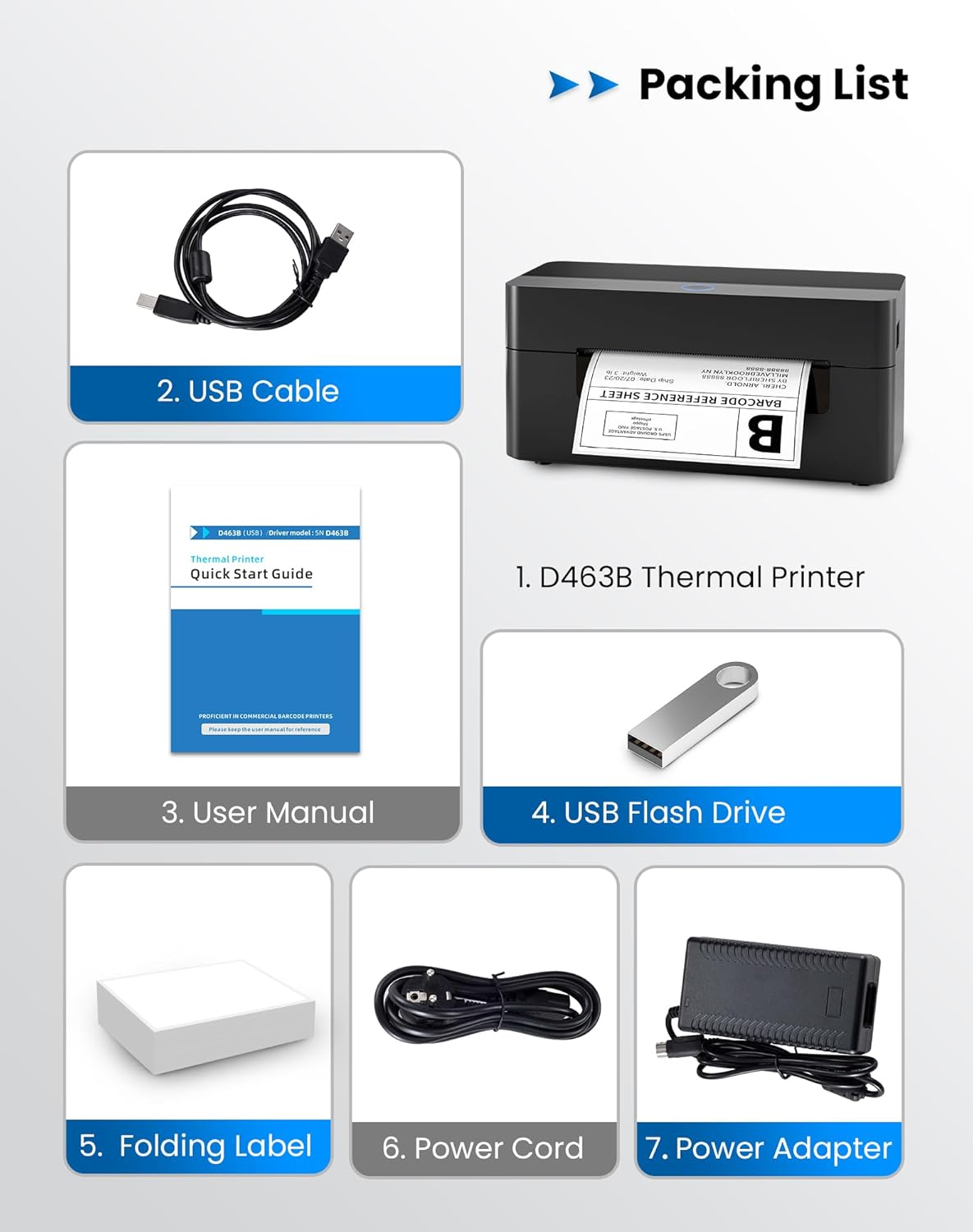
2. Liste de colisage
Veuillez vérifier que tous les éléments énumérés ci-dessous sont inclus dans votre colis :
- 1 x BPXX D463B Thermal Printer
- 1 x câble USB
- 1 x Manuel d'utilisation
- 1 x USB Flash Drive (containing drivers)
- 1 x Folding Label (sample rouleau)
- 1 x Power Cord
- 1 x adaptateur secteur
3. Guide de configuration
3.1 Connexion matérielle
- Connect the power adapter to the printer's power port and plug the power cord into an electrical outlet.
- Open the printer cover and load the thermal labels. Ensure the labels are facing the correct direction for printing and are properly aligned within the guide rails.
- Fermez correctement le capot de l'imprimante.

3.2 Installation des logiciels et des pilotes
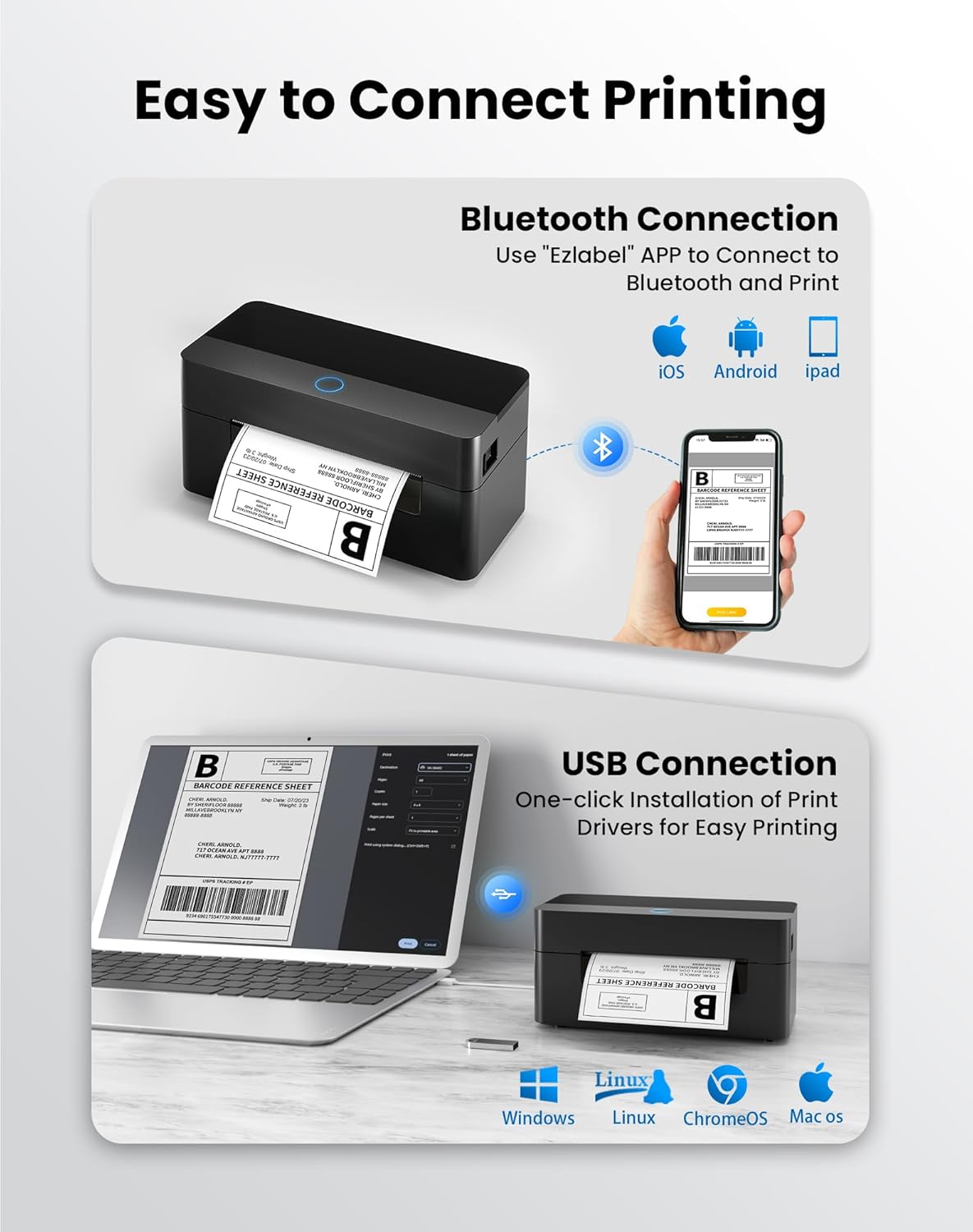
3.2.1 Application mobile (connexion Bluetooth)
For mobile printing, download the 'Ezlabel' application from your device's app store (available for iOS and Android).
- Rechercher 'Ezlabel' in the App Store (iOS) or Google Play Store (Android).
- Téléchargez et installez l'application.
- Activez le Bluetooth sur votre appareil mobile.
- Open the 'Ezlabel' app and follow the in-app instructions to connect to your BPXX D463B printer via Bluetooth.
3.2.2 Computer Driver (USB Connection)
For computer printing, install the appropriate drivers for your operating system (Windows, Mac OS, Linux, ChromeOS). Drivers are provided on the included USB flash drive or can be downloaded from the official website.
- Insert the provided USB flash drive into your computer.
- Locate and run the installer for your operating system.
- Suivez les invites à l'écran pour terminer l'installation du pilote.
- Alternatively, download drivers from: BPXX Driver Download
4. Mode d'emploi
4.1 Chargement des étiquettes
Ensure the thermal labels are loaded correctly for optimal printing. The printer supports thermal labels with widths ranging from 1 to 4.5 inches, including standard 4x6 inch shipping labels.
- Ouvrez le capot supérieur de l'imprimante.
- Place the roll of thermal labels into the label compartment, ensuring the printable side faces upwards.
- Feed the first label through the printer's output slot until it is slightly extended.
- Ajustez les guides d'étiquettes à la largeur de vos étiquettes sans trop les serrer.
- Fermez le capot supérieur. L'imprimante détectera et calibrera automatiquement la taille de l'étiquette.

4.2 Printing via Bluetooth (Mobile App)
- Ensure the printer is powered on and connected to the 'Ezlabel' app via Bluetooth.
- Open the 'Ezlabel' app on your mobile device.
- Select or create your desired label design. The app includes preset templates for various label sizes.
- Confirm print settings such as label size and quantity.
- Lancez la commande d'impression depuis l'application.
4.3 Impression via USB (ordinateur)
- Connectez l'imprimante à votre ordinateur à l'aide du câble USB fourni.
- Ensure the printer drivers are correctly installed.
- Open the document or application from which you wish to print (e.g., a PDF viewer, shipping software).
- Select the BPXX D463B printer from your printer options.
- Adjust print settings as needed (e.g., paper size to 4x6 inches for shipping labels).
- Envoyer la commande d'impression.
4.4 Supported Platforms and Print Quality
The BPXX D463B printer is compatible with major shipping carriers and e-commerce platforms, facilitating the printing of shipping labels, return labels, and postagétiquettes électroniques.
- Shipping Carriers: FedEx, UPS, USPS, DHL, EasyPost, etc.
- E-commerce Platforms: Amazon, Shopify, Etsy, eBay, Walmart, etc.
The printer utilizes a high-quality thermal print head and advanced algorithms to deliver clear and sharp barcodes and text at 203 DPI resolution. It achieves a high-speed output of 152mm/s, capable of printing approximately 72 4x6 inch shipping labels per minute.


5. Entretien
Un entretien régulier garantit des performances optimales et prolonge la durée de vie de votre imprimante.
- Nettoyage de la tête d'impression : Use an alcohol swab or a specialized thermal printer cleaning pen to gently wipe the print head. Ensure the printer is off and cooled down before cleaning.
- Nettoyage de l'extérieur : Essuyez l'extérieur de l'imprimante avec un chiffon doux et sec.amp chiffon. Évitez d'utiliser des produits chimiques agressifs ou des matériaux abrasifs.
- Élimination de la poussière : Periodically use compressed air to clear any dust or paper debris from inside the label compartment.
6. Dépannage
If you encounter issues with your BPXX D463B printer, refer to the following common problems and solutions:
- L'imprimante ne répond pas :
- Vérifiez que le cordon d'alimentation est correctement branché et que l'imprimante est allumée.
- For Bluetooth connection, verify that Bluetooth is enabled on your device and the printer is paired within the 'Ezlabel' app.
- For USB connection, check the USB cable connection and ensure drivers are correctly installed. Try a different USB port or cable.
- Poor Print Quality (Faint/Streaky Prints):
- Nettoyez la tête d'impression comme décrit dans la section Maintenance.
- Veillez à utiliser des étiquettes thermiques de haute qualité.
- Check print density settings in the 'Ezlabel' app or printer preferences on your computer.
- Étiquettes ne s'alimentant pas correctement :
- Verify that labels are loaded correctly and aligned with the guide rails.
- Assurez-vous qu'aucun obstacle ne se trouve sur le chemin de l'étiquette.
- Perform a label calibration from the printer settings or app if available.
- Printer Offline Error:
- Restart both the printer and your computer/mobile device.
- Re-establish the Bluetooth or USB connection.
- Check printer status in your operating system's printer settings.
7. Spécifications du produit
| Nom du modèle | D463B |
| Marque | BPXX |
| Technologie d'impression | Thermique |
| Technologie de connectivité | Bluetooth, USB |
| Résolution d'impression maximale | 203 x 203 Dots Per Inch (DPI) |
| Vitesse d'impression maximum | 152 mm/s (72 labels per minute) |
| Taille maximale du support | 4 x 6 pouces |
| Largeur d'étiquette prise en charge | 1 à 4.5 pouces |
| Appareils compatibles | PC (Windows, Mac OS, Linux, ChromeOS), Smartphones (iOS, Android) |
| Méthode de contrôle | App ('Ezlabel'), USB |
| Dimensions du produit | 7.3"P x 3.3"L x 3.3"H |
| Poids de l'article | 1.6 livres |
| Composants inclus | Printer, USB Cable, User Manual, USB Flash Drive, Sample Labels, Power Cord, Power Adapter |
8. Garantie et assistance
The BPXX D463B Thermal Shipping Label Printer comes with a limited warranty. For specific warranty terms and conditions, please refer to the documentation included with your product or contact BPXX customer support.
For technical assistance, troubleshooting, or any inquiries regarding your product, please contact BPXX customer support through the official website ou les coordonnées fournies dans l'emballage de votre produit.