
Introduction
This manual provides essential instructions for the setup, operation, and maintenance of your BLOW Portable Internet Radio RI 1. Please read this manual thoroughly before using the device to ensure proper functionality and to prevent damage.
Informations importantes sur la sécurité
- N'exposez pas l'appareil à la pluie ou à l'humidité.
- Ne pas démonter l'appareil. Confier toute réparation à un personnel qualifié.
- Utilisez uniquement l’adaptateur secteur fourni.
- Évitez les températures extrêmes et la lumière directe du soleil.
- Gardez l'appareil à l'écart des champs magnétiques puissants.
Contenu du colis
Vérifiez que tous les articles sont présents dans le colis :
- BLOW Internet Radio RI 1
- Adaptateur secteur
- User Manual (in Polish and English)

Image: The BLOW Internet Radio RI 1 packaging, showing the radio unit, power adapter, and user manual.
Produit terminéview
The BLOW Portable Internet Radio RI 1 offers a wide range of features for an enhanced audio experience. It includes internet radio access, FM tuner, Bluetooth connectivity, and a clear LCD display.

Image : Avant view of the BLOW Internet Radio RI 1, showcasing the display, speaker grille, and control buttons.
Caractéristiques principales :
- Radio Internet : Access thousands of stations worldwide via Wi-Fi.
- Connectivité Wi-Fi : Wireless access to internet radio and network features.
- Bluetooth : Stream music from mobile devices.
- Écran couleur TFT de 2.4 pouces : Shows station information and track details.
- Double alarme avec fonction snooze : Wake up to music or news.
- Line Out: Se connecter à un amplifier or external audio system.
- Conception compacte : Elegant black design suitable for various interiors.
- Tuner FM: For local radio broadcasts.
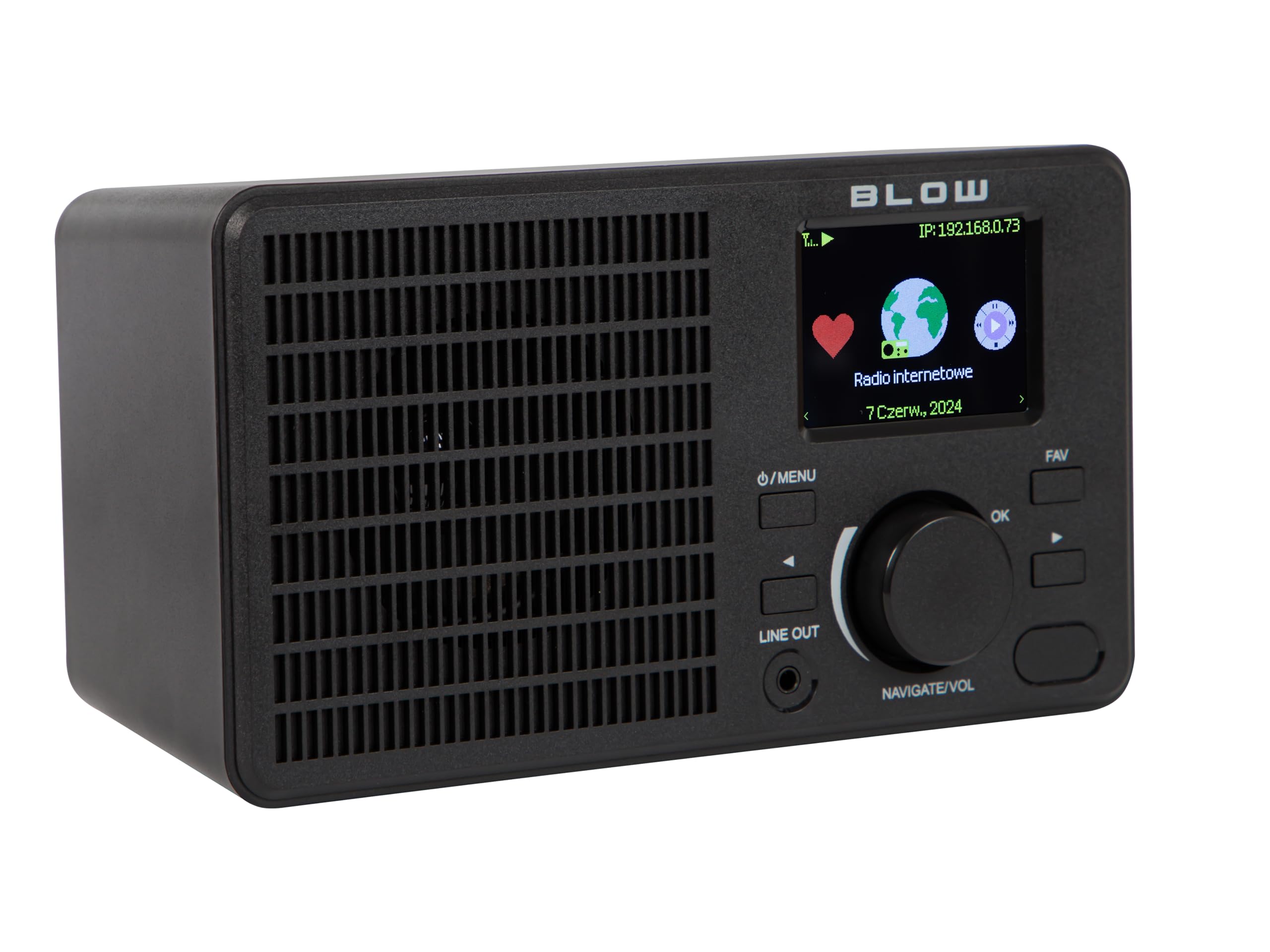
Image : Arrière view of the BLOW Internet Radio RI 1, showing the DC 5V power input and product information label.
Installation
1. Connexion électrique
- Connect the provided power adapter to the DC 5V input port on the back of the radio.
- Branchez l'adaptateur secteur sur une prise électrique standard.
- La radio s'allumera automatiquement ou passera en mode veille.

Image: The power adapter included with the BLOW Internet Radio RI 1, showing the plug and DC connector.
2. Configuration initiale du Wi-Fi
- Upon first power-on, the radio will guide you through the initial setup process.
- Use the navigation dial and OK button to select your preferred language.
- La radio va rechercher les réseaux Wi-Fi disponibles. Sélectionnez votre réseau dans la liste.
- Enter your Wi-Fi password using the navigation controls. Confirm with the OK button.
- Une fois la connexion établie, la radio affichera un message de confirmation.

Image: The BLOW Internet Radio RI 1 display showing the internet radio interface with network status.
Mode d'emploi
Commandes de base
- Bouton Marche/Arrêt/Menu : Press to turn on/off or access the main menu.
- Navigate/Volume Dial: Rotate to navigate menus or adjust volume. Press to confirm selection.
- Bouton OK : Confirme les sélections.
- Bouton FAV : Accès aux stations favorites.
- Line Out: 3.5mm jack for connecting to external audio systems.

Image : Un gros plan view of the BLOW Internet Radio RI 1's control panel, highlighting the display and buttons.
Mode radio Internet
- Dans le menu principal, sélectionnez « Radio Internet ».
- Parcourez les stations par emplacement, genre ou recherchez par nom.
- Select a station and press OK to start playback.
- To save a station as a favorite, navigate to the station and press the FAV button.
Mode radio FM
- Dans le menu principal, sélectionnez « Radio FM ».
- Use the navigation dial to tune to a frequency or perform an auto-scan for stations.
- Press OK to select a station.
Mode Bluetooth
- Dans le menu principal, sélectionnez « Bluetooth ». La radio passera en mode de couplage.
- On your mobile device (smartphone, laptop), enable Bluetooth and search for "BLOW RI 1".
- Sélectionnez la radio à appairer. Une fois connectée, vous pourrez diffuser du contenu audio depuis votre appareil vers la radio.

Image: The BLOW Internet Radio RI 1 shown alongside a smartphone, illustrating Bluetooth connectivity for music streaming.
Fonction réveil
- Access the "Alarm" settings from the main menu.
- Configurez jusqu'à deux alarmes indépendantes.
- Configure alarm time, source (buzzer, internet radio, FM), and snooze duration.
- Ensure the radio is connected to power for the alarm to function reliably.
Entretien
- Nettoyage: Utilisez un chiffon doux et sec pour nettoyer la surface de la radio. N'utilisez pas de nettoyants liquides ni de produits abrasifs.
- Stockage: Lorsque vous n'utilisez pas la radio pendant une période prolongée, rangez-la dans un endroit frais et sec.
- Mises à jour logicielles : Periodically check for firmware updates through the radio's system settings to ensure optimal performance and access to new features.
Dépannage
| Problème | Solution possible |
|---|---|
| Pas de courant | Check if the power adapter is securely connected to the radio and the electrical outlet. Try a different outlet. |
| Impossible de se connecter au Wi-Fi | Ensure your Wi-Fi password is correct. Check if your router is working. Try restarting the radio and your router. Ensure the radio is within range of your Wi-Fi signal. |
| Internet radio stations not playing | Verify your internet connection is active. Some stations may be temporarily offline. Try other stations. |
| L'appairage Bluetooth échoue | Ensure the radio is in Bluetooth pairing mode. Make sure Bluetooth is enabled on your mobile device and it's within range. Try unpairing and re-pairing. |
| Mauvaise réception FM | Adjust the radio's position. Ensure there are no strong interference sources nearby. |
Caractéristiques
| Fonctionnalité | Détail |
|---|---|
| Marque | Souffler |
| Modèle | 5900804137467 |
| Technologie de connectivité | Wi-Fi, Bluetooth, Aux, Line Out |
| Technologie d'accordeur | FM |
| Type d'affichage | LCD (2.4-inch TFT Color Display) |
| Source d'énergie | Corded Electric (AC: 100-240V, 50/60Hz; DC: 5V/1A) |
| Appareils compatibles | Smartphone, Laptop, Headphones |
| Caractéristiques spéciales | Lightweight, Portable, Dustproof, Built-in Clock, Dual Alarm with Snooze |
| Dimensions du produit | 19.4 cm (L) x 8.8 cm (L) x 11 cm (H) |
| Couleur | Noir |
Garantie et assistance
For warranty information and technical support, please refer to the contact details provided in the separate warranty card included with your product or visit the official BLOW website.
Fabricant: SOUFFLER
Website: www.blow.pl


