
1. Produit terminéview
The AKEEYO AKY-710S is a high-performance bike camera designed to capture your cycling adventures with exceptional clarity and reliability. Featuring a Starvis IMX335 sensor, it supports 4K video recording, a 142-degree wide-angle lens, and robust IP66 dustproof and waterproof capabilities. It includes advanced features such as loop recording, emergency recording, and parking monitoring, ensuring comprehensive coverage for your rides and parked bicycle. The camera offers wireless connectivity via Wi-Fi for seamless control and data transfer through a dedicated smartphone application.

Figure 1.1: The AKY-710S Bike Camera mounted on a bicycle, showcasing its compact design and integration with the bike's handlebars.
2. Contenu du colis
Before proceeding with installation, please verify that all items listed below are present in your package.
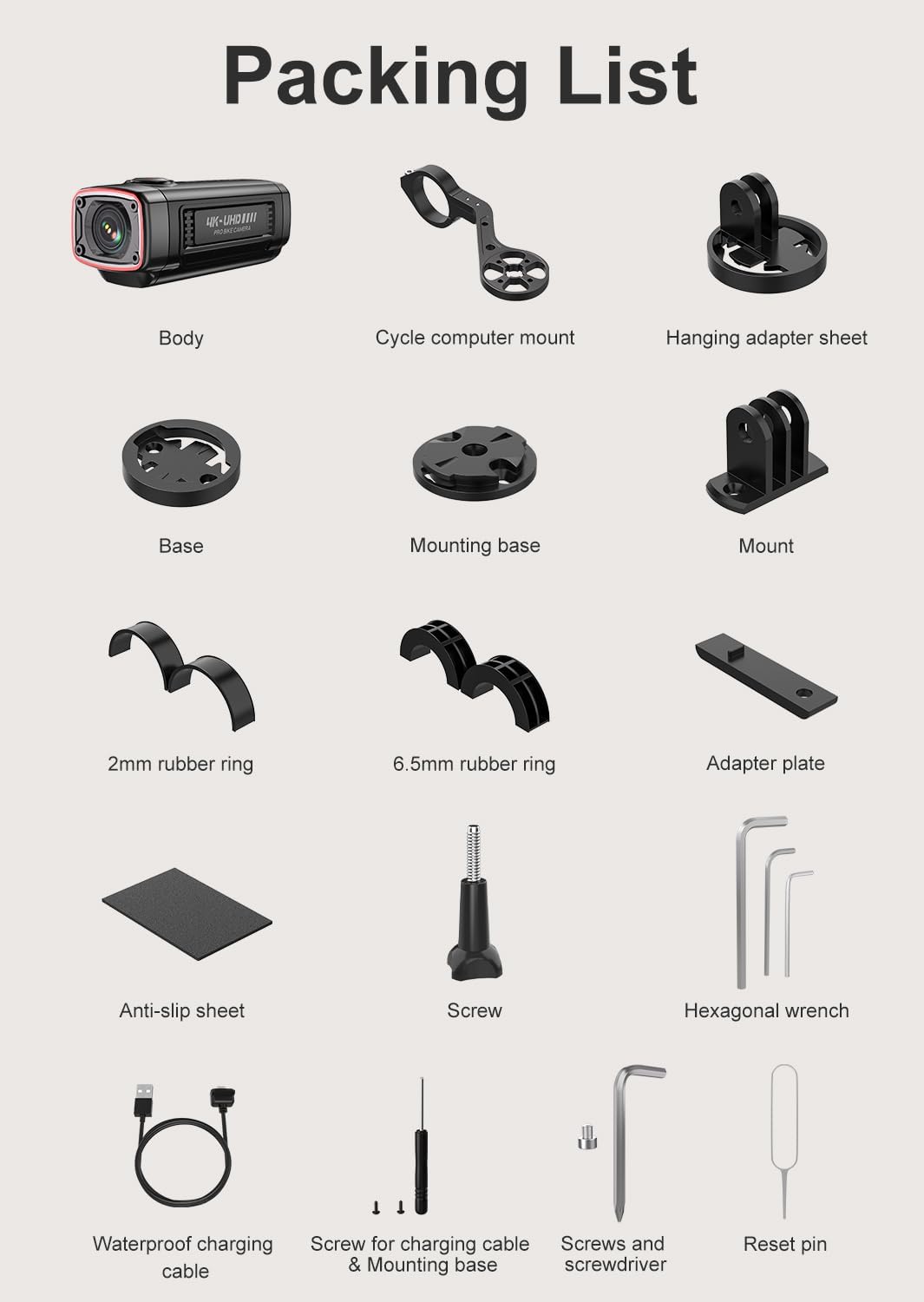
Figure 2.1 : Détaillé view of all components included in the AKY-710S package. This includes the camera body, various mounts, cables, and tools.
- Boîtier de l'appareil photo
- Cycle Computer Mount
- Hanging Adapter Sheet
- Base
- Base de montage
- Monter
- Anneau en caoutchouc de 2 mm
- Anneau en caoutchouc de 6.5 mm
- Plaque De Fixation
- Anti-slip Sheet
- Vis
- Clé hexagonale
- Waterproof Charging Cable
- Screw for Charging Cable & Mounting Base
- Vis et tournevis
- Réinitialiser la broche
- Carte Micro SD 64 Go (préinstallée ou fournie séparément)
3. Configuration et installation
3.1 Chargement de l'appareil
Before first use, fully charge the AKY-710S camera using the provided waterproof charging cable. Connect the cable to the camera's charging port and a standard USB power source (e.g., computer USB port, wall adapter, or power bank). A full charge provides over 5.5 hours of 1080P video recording.
3.2 Insertion de la carte Micro SD
The AKY-710S comes with a 64GB high-performance Micro SD card. Locate the SD card slot on the camera, insert the card with the gold contacts facing down until it clicks into place. Ensure the card is properly seated before operation.
3.3 Montage de la caméra
The AKY-710S offers versatile mounting options for your bicycle. Use the included cycle computer mount and other accessories to secure the camera.
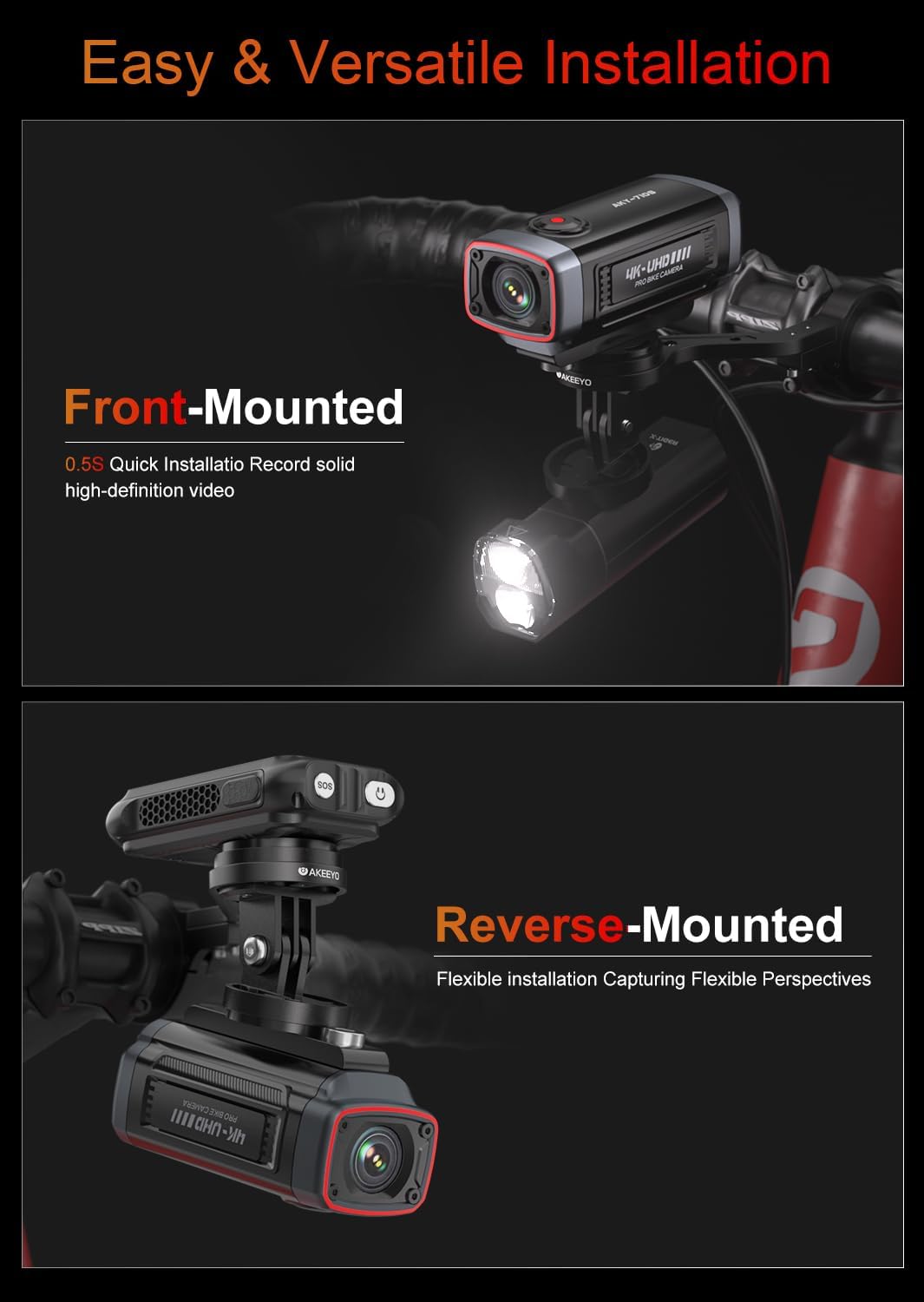
Figure 3.1: Illustration of front-mounted and reverse-mounted camera configurations on a bicycle handlebar. The camera can be quickly attached and detached.
- Front-Mounted: Attach the camera to the front of your handlebars for forward-facing recording. This setup is ideal for capturing the road ahead.
- Reverse-Mounted: The camera can also be mounted facing backward, allowing you to record activity behind your bicycle. Adjust the display orientation via the dedicated app if needed.
- Utilize the rubber rings and adapter plate to ensure a secure and stable fit on your bike.
4. Mode d'emploi
4.1 Mise sous/hors tension
Press and hold the power button located on the camera to turn it on or off. An indicator light will confirm the power status.
4.2 Modes d'enregistrement
- Enregistrement en boucle : The camera continuously records video in short segments. When the memory card is full, the oldest fileLes enregistrements sont automatiquement écrasés pour faire de la place aux nouveaux enregistrements.
- Enregistrement d'urgence (capteur G) : In the event of a sudden impact or collision, the built-in G-sensor automatically detects the event and locks the current video segment, preventing it from being overwritten by loop recording.
- Moniteur de stationnement : When your bike is parked, the camera can detect motion or impact and automatically begin recording, providing 24-hour surveillance. This feature helps protect your bike from theft or damage.
4.3 Smartphone Connectivity and App Usage
The AKY-710S features 2.4GHz Wi-Fi connectivity, allowing you to connect the camera to your smartphone via a dedicated application. This app enables real-time previews, video playback, settings adjustments, and easy sharing of your recordings.

Figure 4.1: The AKEEYO smartphone application displaying a live view from the camera, along with options for settings and playback. The app supports OTA updates.
- Download the official AKEEYO app from the Google Play Store or Apple App Store.
- Activez le Wi-Fi de la caméra.
- Connect your smartphone to the camera's Wi-Fi network (SSID and password usually found on the camera or in the manual).
- Launch the app to access camera functions.
- Important: During setup, ensure you check the "Privacy Consent" option to establish a successful Wi-Fi connection.
4.4 Mises à jour OTA
The camera supports Over-The-Air (OTA) firmware updates via the smartphone app. This allows for convenient updates without needing to remove the SD card or connect to a computer.
4.5 Fonctionnalités GPS
The AKY-710S supports GPS functionality for recording location data with your videos. Note that the GPS cable must be purchased separately.
5. Principales caractéristiques

Figure 5.1: Visual representation of the AKY-710S's advanced imaging components, highlighting the Sony Starvis IMX335 sensor, F1.6 aperture, 142-degree wide-angle lens, and 4K recording capability.
- Enregistrement haute résolution : Records smooth 2K video at 55 frames per second (FPS), upgradable to 4K at 28 FPS.
- Capteur avancé : Equipped with a Starvis IMX335 sensor for clear footage même dans des conditions de faible luminosité.
- Lentille Grand angle: Un objectif grand angle de 142 degrés capture un large champ de view.
- Conception durable : Rated IP66 for dustproof and waterproof performance, ensuring reliability in various weather conditions.
- Longue durée de vie de la batterie : Features a robust 1800mAh battery, providing over 5.5 hours of 1080P video recording on a single charge.
- Compact et léger : Designed for portability and minimal impact on your bike's handling.

Figure 5.2: The AKY-710S camera operating in rainy conditions, illustrating its IP66 dustproof and waterproof capabilities for stable performance in harsh environments.

Figure 5.3 : Plusview of the AKY-710S's compact design and key functionalities, including its lightweight build, 1800mAh battery, G-sensor for emergency recording, GPS capability, Wi-Fi, and dedicated app support.
6. Entretien
- Nettoyage: Utilisez un chiffon doux et sec.amp cloth to clean the camera body and lens. Avoid abrasive cleaners or solvents. Ensure the charging port cover is securely closed before cleaning with water.
- Stockage: Rangez l'appareil photo dans un endroit frais et sec, à l'abri de la lumière directe du soleil et des températures extrêmes lorsqu'il n'est pas utilisé.
- Entretien de la batterie: Pour une durée de vie optimale de la batterie, évitez de la décharger complètement fréquemment. En cas de stockage prolongé, rechargez-la à environ 50 % tous les deux ou trois mois.
- Mises à jour du micrologiciel : Regularly check for and install firmware updates via the dedicated app to ensure optimal performance and access to new features.
7. Dépannage
- Impossible de se connecter au Wi-Fi: Ensure the "Privacy Consent" option is checked within the app during the setup process. If this option is not selected, the connection may fail. Restarting both the camera and your smartphone may also resolve connectivity issues.
- La caméra n'enregistre pas : Check if the Micro SD card is properly inserted and formatted. Ensure there is sufficient space on the card. If loop recording is enabled, older files sera écrasé.
- Mauvaise qualité vidéo : Ensure the lens is clean and free from smudges. Check that the camera's resolution settings are configured as desired in the app.
- La batterie ne tient pas la charge : Ensure the charging cable is securely connected. If the issue persists, contact customer support.
8. Spécifications
| Fonctionnalité | Détail |
|---|---|
| Marque | AKEYO |
| Nom du modèle | AKY-710S-BIKE 2 |
| Technologie de capteur photo | CMOS (Starvis IMX335) |
| Résolution de capture vidéo | 4096x2160 (4K), 3840x2160, 2560x1440 (2K), 2048x1080 |
| Type de mémoire flash | Carte microSD (carte de 64 Go incluse) |
| Taille de l'écran | 1 Centimeter (internal display, likely for status) |
| Technologie de connectivité | Wi-Fi (2.4GHz), USB, OTA updates |
| Caractéristiques spéciales | Bike Camera with Mount, Lightweight, Night Vision, App Control, IP66 Waterproof & Dustproof, Loop Recording, Emergency Recording (G-Sensor), Parking Monitor, Rechargeable, GPS (cable sold separately) |
| Type de caméscope | action Camera |
| Capacité de la batterie | 1800mAh (up to 5.5 hours 1080P recording) |
| Grand angle | 142 degrés |
9. Garantie et assistance
9.1 Garantie du produit
The AKEEYO AKY-710S Bike Camera comes with a one-year warranty from the date of purchase. This warranty covers manufacturing defects and ensures peace of mind regarding product quality. Please retain your proof of purchase for warranty claims.
9.2 Assistance clientèle
For further assistance, technical support, or warranty inquiries, please contact the AKEEYO support team. Refer to the product packaging or the official AKEEYO website pour les informations de contact les plus récentes.
Note: If you encounter issues with registration or passwords within the app, you may click "SKIP" in the upper right corner to access all app features without registration.