
GZCRDZ V011
User Manual for GZCRDZ V011 Bluetooth OBD2 Scanner
Modèle : V011
1. Introduction
Thank you for choosing the GZCRDZ V011 Bluetooth OBD2 Scanner. This manual provides detailed instructions on how to set up, operate, and maintain your device. Please read this manual thoroughly before using the scanner to ensure proper functionality and to maximize its benefits for vehicle diagnostics.
2. Produit terminéview
The GZCRDZ V011 is a state-of-the-art Bluetooth 5.4 OBD2 diagnostic tool designed to provide comprehensive insights into your vehicle's health. It connects wirelessly to your smartphone or tablet via the 'OBD Home' application, offering a user-friendly interface for various diagnostic functions.

Image: The GZCRDZ V011 Bluetooth OBD2 Scanner, a compact diagnostic device.
Caractéristiques principales :
- Connectivité Bluetooth 5.4 : Ensures a fast and stable wireless connection to your mobile device.
- Comprehensive OBD2 Diagnosis: Supports all standard OBD2 full modes, including reading and clearing Diagnostic Trouble Codes (DTCs), turning off the Check Engine Light (CEL), MIL status, battery voltage check, freeze frame data, and more.
- Performance Test Function: Analyze speed changes, engine speed, and fuel consumption to assess engine power output.
- Base de données DTC exhaustive : Built-in database of over 35,000 DTCs for accurate fault identification.
- Application conviviale : Works with the 'OBD Home' app (iOS/Android) for intuitive operation and data visualization.

Image : Terminéview of the V011's diagnostic capabilities and the 'OBD Home' app interface.
3. Contenu du colis
Veuillez vérifier le contenu du colis lors du déballage pour vous assurer que tous les éléments sont présents :
- 1x V011 Device
- 1x Manuel d'utilisation
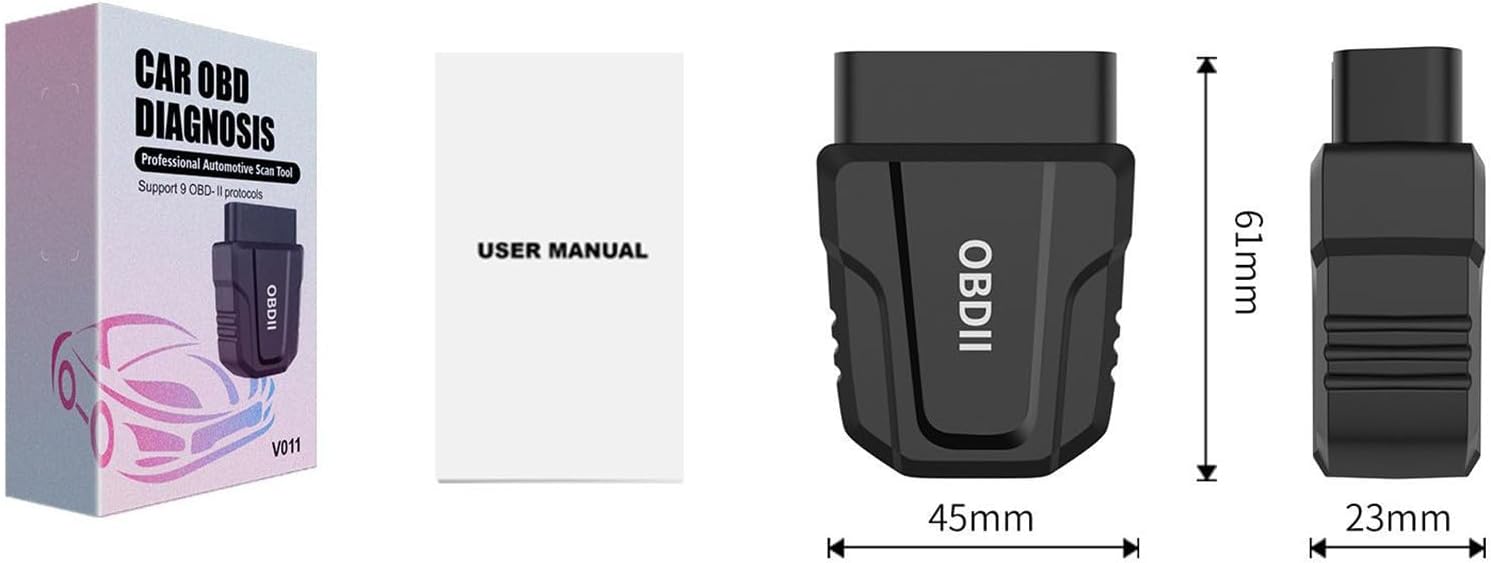
Image: The V011 device, user manual, and product packaging.
4. Installation
Follow these steps to set up your GZCRDZ V011 OBD2 Scanner:
- Localisez le port OBD2 : The OBD2 port is typically located under the dashboard on the driver's side, usually near the steering wheel. Refer to your vehicle's owner's manual if you cannot find it.
- Plug in the V011 Device: Firmly insert the V011 scanner into your vehicle's OBD2 port. Ensure it is securely connected. The device will power on automatically.
- Download the 'OBD Home' App: Rechercher 'OBD Home' in your device's app store (Google Play Store for Android or Apple App Store for iOS) and install it.
- Activer Bluetooth : Assurez-vous que le Bluetooth est activé sur votre smartphone ou votre tablette.
- Se connecter à l'appareil : Open the 'OBD Home' app. The app is designed to automatically detect and connect to the V011 device via Bluetooth 5.4. No manual pairing through your phone's Bluetooth settings is typically required.
- Début du diagnostic : Once connected, the app will display a 'Connection succeeded' message, and you can begin using the diagnostic functions.

Image: The V011 scanner connected and communicating with the 'OBD Home' application on a smartphone.
5. Mode d'emploi
The 'OBD Home' app provides a comprehensive suite of diagnostic functions. Here are the primary operations:
5.1. Lecture et effacement des codes d'erreur
This function allows you to identify and clear Diagnostic Trouble Codes (DTCs) that trigger the Check Engine Light (CEL).
- Navigate to the 'Read/Clear Codes' section in the app.
- The scanner will perform a scan and display any active or pending DTCs.
- For each code, the app provides a brief description. You can use the built-in Google search engine within the app for more detailed definitions.
- To clear codes, select the 'Clear Codes' option. This will turn off the Check Engine Light. Ensure you address the underlying issue before clearing codes to prevent recurrence.

Image: Visual representation of diagnosing and clearing a fault, showing the Check Engine Light turning off.
5.2. Flux de données en direct
View real-time sensor data from your vehicle's engine control unit (ECU). This includes parameters like engine RPM, vehicle speed, coolant temperature, fuel system status, and more. This data is crucial for diagnosing intermittent issues.
5.3. Données d'arrêt sur image
When a DTC is set, the ECU records a snapshot of critical sensor values at that moment. This 'freeze frame' data helps technicians determine the conditions under which the fault occurred.
5.4. État de préparation I/M
Check the readiness status of various emission-related monitors. This is essential for vehicle inspections and ensures all systems are functioning correctly.
5.5. Test de performance
Utilize the performance test function to analyze your vehicle's acceleration, speed changes, engine RPM, and fuel consumption. This feature can help assess the overall power output and efficiency of your engine, particularly useful for evaluating used vehicles.
5.6. Volume de la batterietage Vérifier
Surveillez le volume de la batterie de votre véhiculetage in real-time to ensure it is within optimal operating ranges.
5.7. On-Board Monitoring Test
Accédez aux résultats des tests de surveillance et de diagnostic embarqués pour des composants/systèmes spécifiques.
5.8. Trip Analysis Reports
Generate reports based on your driving trips, providing insights into fuel efficiency and driving habits.
5.9. Retrieve VIN
Quickly retrieve your vehicle's Vehicle Identification Number (VIN) directly from the ECU.
6. Compatibilité
The GZCRDZ V011 scanner is compatible with most vehicles manufactured after 1996 (US cars), after 2002 (EU cars), and after 2008 (Asia cars) that support standard OBD2 protocols. Please note that it is generally not compatible with diesel vehicles and new energy vehicles.
Supported OBD2 Protocols:
- SAE J1850 PWM (41.6 Kbauds)
- SAE J1850 VPW (10.4 Kbauds)
- ISO 9141-2 (initialisation 5 bauds, 10.4 Kbauds)
- ISO14230-4 KWP (5 baud init, 10.4 Kbaud)
- ISO14230-4 KWP (init rapide, 10.4 Kbaud)
- CAN ISO15765-4 (ID 11bit, 500 Kbaud)
- CAN ISO15765-4 (ID 29bit, 500 Kbaud)
- CAN ISO15765-4 (ID 11bit, 250 Kbaud)
- CAN ISO15765-4 (ID 29bit, 250 Kbaud)

Image: Details on vehicle compatibility and the list of supported OBDII communication protocols.
7. Entretien
Pour garantir la longévité et les performances optimales de votre scanner V011, suivez ces consignes d'entretien :
- Nettoyage: Utilisez un chiffon doux et sec pour nettoyer l'appareil. N'utilisez pas de nettoyants abrasifs ni de solvants.
- Stockage: Conservez l'appareil dans un endroit frais et sec, à l'abri de la lumière directe du soleil et des températures extrêmes.
- Manutention: Évitez de faire tomber l'appareil ou de le soumettre à des chocs violents.
- Mises à jour du micrologiciel : Periodically check the 'OBD Home' app for any available firmware updates for the V011 device to ensure you have the latest features and bug fixes.
8. Dépannage
If you encounter issues with your V011 scanner, refer to the following common troubleshooting steps:
8.1. L'appareil ne s'allume pas
- Ensure the V011 is firmly plugged into the vehicle's OBD2 port.
- Verify that the vehicle's ignition is in the 'ON' position (engine can be off).
- Vérifiez le fusible du véhicule pour le port OBD2 (consultez le manuel de votre véhicule).
8.2. Connexion Bluetooth impossible
- Assurez-vous que Bluetooth est activé sur votre smartphone/tablette.
- Close and reopen the 'OBD Home' app.
- Redémarrez votre smartphone/tablette.
- Unplug the V011 from the OBD2 port, wait 10 seconds, and plug it back in.
- Assurez-vous qu'aucun autre appareil Bluetooth n'interfère avec la connexion.
8.3. App Not Displaying Data or Errors
- Confirm the V011 is successfully connected to the app.
- Ensure your vehicle is OBD2 compliant and the ignition is on.
- Try connecting the scanner to a different OBD2 compliant vehicle to rule out vehicle-specific issues.
- Update the 'OBD Home' app to the latest version.
9. Spécifications
| Fonctionnalité | Spécification |
|---|---|
| Modèle | V011 |
| Connectivité | Bluetooth 5.4 |
| Protocoles pris en charge | SAE J1850 PWM, SAE J1850 VPW, ISO 9141-2, ISO14230-4 KWP, ISO15765-4 CAN |
| Compatibilité du système d'exploitation | iOS, Android (via 'OBD Home' app) |
| Source d'énergie | Vehicle OBD2 Port (Corded Electric) |
| Poids de l'article | 1.98 onces |
| Dimensions du colis | 4 x 2.4 x 1.2 pouces |
| Fabricant | Chine |
| Cote de sécurité | FCC: GCT210468050F |
| Code UPC | 799748789062 |
10. Garantie et assistance
For warranty information and technical support, please refer to the contact details provided with your purchase or visit the official GZCRDZ website. Our customer service team is available to assist you with any questions or issues regarding your V011 OBD2 scanner.
Ask a question about this manual
Ask about setup, troubleshooting, compatibility, parts, safety, or missing instructions. Manuals+ will review the question and use this page’s manual context to help answer it.