
1. Introduction
Thank you for choosing the Techno Line WD2200 Weather Station. This device provides comprehensive weather data, including indoor and outdoor temperature and humidity, barometric pressure, and a 3-day weather forecast. It also features connectivity with the 'Direct Weather' application for smartphones (iOS and Android), allowing you to view data on your mobile device. This manual will guide you through the setup, operation, and maintenance of your weather station to ensure optimal performance.
2. Consignes de sécurité
- Lisez attentivement toutes les instructions avant d'utiliser l'appareil.
- Tenez l'appareil à l'écart des températures extrêmes, de la lumière directe du soleil, des fortes vibrations et des chocs.
- Ne plongez pas l’appareil dans l’eau ou d’autres liquides.
- N’essayez pas de démonter ou de réparer l’appareil vous-même. Confiez toute intervention à un personnel qualifié.
- Jetez les piles usagées de manière responsable conformément aux réglementations locales.
- Assurez-vous que les piles sont insérées en respectant la polarité.
3. Contenu du colis
Veuillez vérifier que tous les composants sont présents dans votre colis :
- WD2200 Weather Station (Main Unit)
- TX205DTH Outdoor Transmitter (Sensor)
- Manuel d'utilisation
Remarque : les piles ne sont pas incluses et doivent être achetées séparément.
4. Produit terminéview
The Techno Line WD2200 Weather Station consists of a main display unit and an external wireless sensor. The main unit displays all collected data and forecasts, while the external sensor measures outdoor temperature and humidity.
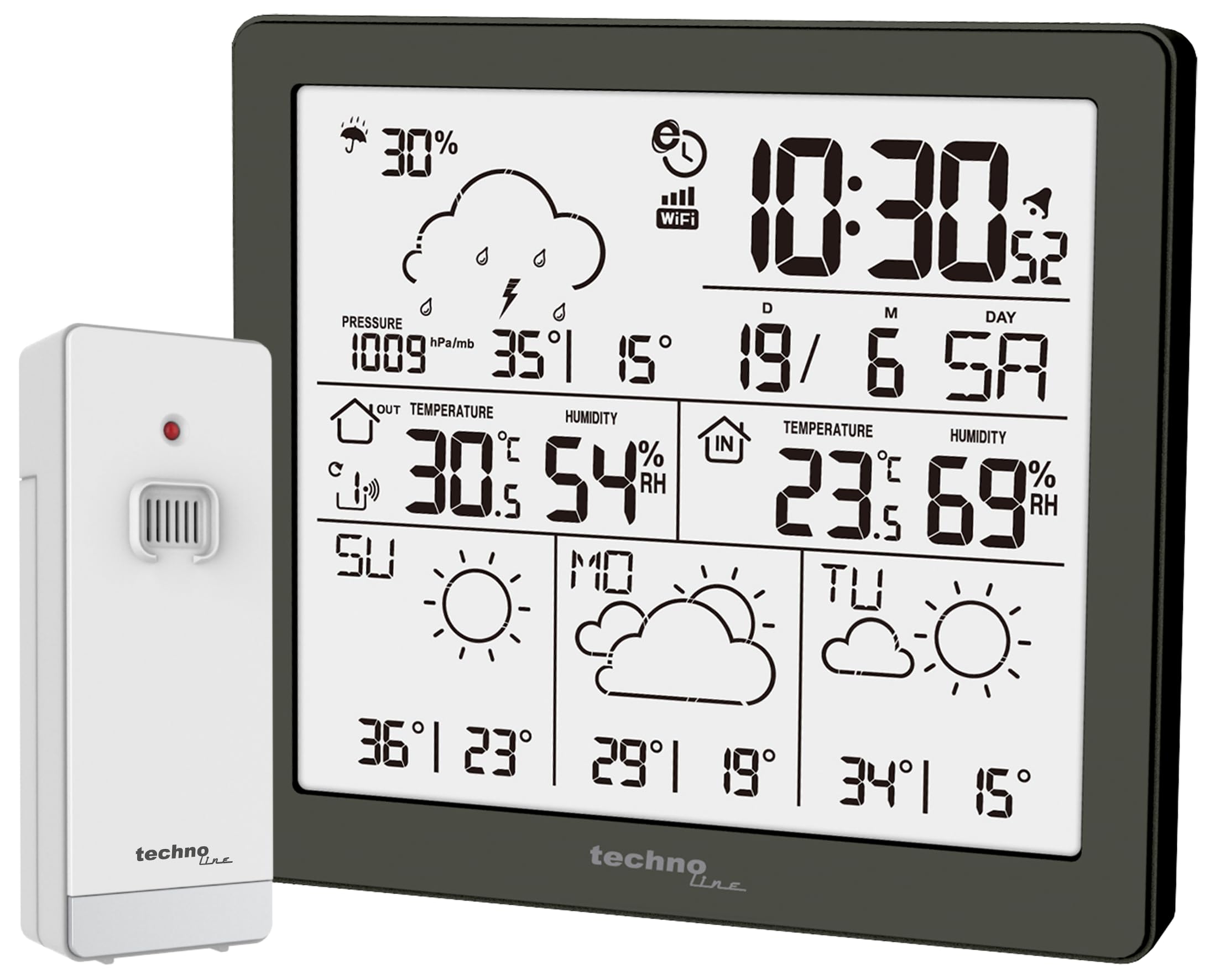
Figure 1 : Devant view of the Techno Line WD2200 Weather Station display. The display shows time, date, indoor and outdoor temperature and humidity, barometric pressure, precipitation probability, and a 3-day forecast with corresponding weather icons and min/max temperatures.
Éléments d'affichage :
- En haut à gauche: Precipitation probability (e.g., 30%).
- En haut à droite: Current time (e.g., 10:30) and date (e.g., 19/6 SA for June 19th, Saturday).
- Middle Left (Outdoor Data): Barometric pressure (e.g., 1009 hPa/mb), outdoor temperature (e.g., 30.5°C), and outdoor humidity (e.g., 54% RH).
- Middle Right (Indoor Data): Indoor temperature (e.g., 23.6°C) and indoor humidity (e.g., 69% RH).
- Partie inférieure : 3-day forecast (e.g., Sunday, Monday, Tuesday) with weather icons (sunny, cloudy) and corresponding minimum and maximum temperatures (e.g., SU: 36°/23°, MO: 29°/19°, TU: 34°/15°).
5. Installation
5.1 Installation de la batterie
- Outdoor Transmitter (TX205DTH): Open the battery compartment on the back of the sensor. Insert 2 x AA Mignon LR06 batteries, observing the correct polarity (+/-). Close the compartment securely.
- Main Unit (WD2200): Open the battery compartment on the back of the main unit. Insert 4 x AA Mignon LR06 batteries, observing the correct polarity (+/-). Close the compartment securely.
Note: It is recommended to insert batteries into the outdoor sensor first, then into the main unit, to ensure proper pairing.
5.2 Mise sous tension initiale et appariement des capteurs
Upon inserting batteries into the main unit, the display will light up, and the unit will begin searching for the outdoor sensor. The outdoor temperature and humidity readings should appear on the main unit within a few minutes. If the outdoor data does not appear, refer to the Troubleshooting section.
5.3 App Connection (Direct Weather)
The WD2200 Weather Station connects to your smartphone via Bluetooth for enhanced data viewing and settings management through the 'Direct Weather' app.
- Download the 'Direct Weather' app from the App Store (iOS) or Google Play Store (Android).
- Assurez-vous que Bluetooth est activé sur votre smartphone.
- Open the 'Direct Weather' app and follow the on-screen instructions to pair with your WD2200 Weather Station. The app will guide you through the connection process.
6. Fonctionnement de la station météo
6.1 Lecture de l'écran
L'écran de l'unité principale offre une vue d'ensemble complète.view of current and forecasted weather conditions:
- Heure et date : Automatically synchronized via the app or manually set.
- Température et humidité intérieures : Mesuré par l'unité principale.
- Température et humidité extérieures : Received from the TX205DTH outdoor sensor.
- Pression barométrique: Affiche la pression atmosphérique actuelle.
- Precipitation Probability: Indicates the likelihood of rain or snow.
- Prévisions à 3 jours : Provides weather icons and expected high/low temperatures for today and the next three days.
6.2 Using the Direct Weather App
The 'Direct Weather' app offers additional functionalities:
- Données détaillées View: Access historical data and more detailed graphs of temperature, humidity, and pressure.
- Configuration des paramètres: Adjust time, date, measurement units (°C/°F, hPa/inHg), and other preferences directly from your phone.
- Alertes : Set up custom alerts for specific temperature or humidity thresholds.
7. Entretien
7.1 Nettoyage
Essuyez l'unité principale et le capteur extérieur avec un chiffon doux et sec.amp Chiffon. N’utilisez pas de nettoyants abrasifs ni de solvants, car ils pourraient endommager les surfaces ou les composants électroniques.
7.2 Remplacement de la batterie
When the battery indicator appears on the display, replace the batteries in the respective unit (main station or outdoor sensor). Always replace all batteries in a unit at the same time with new ones of the same type.
7.3 Emplacement des capteurs extérieurs
For accurate outdoor readings, place the TX205DTH sensor in a shaded area, protected from direct sunlight and precipitation. Ensure it is within the effective transmission range of the main unit (typically up to 30 meters, depending on obstacles).
8. Dépannage
- Pas d'affichage : Vérifiez la polarité des piles et assurez-vous qu'elles sont neuves.
- Outdoor Data Not Appearing:
- Ensure batteries in the outdoor sensor are correctly installed and fresh.
- Rapprochez le capteur extérieur de l'unité principale.
- Press the reset button on both the main unit and the outdoor sensor (if available) and allow them to re-pair.
- Lectures incorrectes : Ensure both units are placed in appropriate locations (main unit indoors, sensor outdoors in a shaded, protected area). Allow some time for readings to stabilize after setup or relocation.
- Problèmes de connectivité des applications :
- Assurez-vous que Bluetooth est activé sur votre smartphone.
- Restart the 'Direct Weather' app.
- Essayez de dissocier puis de réassocier l'appareil dans les paramètres de l'application.
9. Spécifications
| Numéro de modèle | WD2200 |
| Main Unit Dimensions (L x H x P) | 129 x 118 x 29 mm |
| Outdoor Sensor Dimensions (L x H x P) | 40 x 102 x 26 mm |
| Alimentation de l'unité principale | 4 x AA Mignon LR06 batteries (not included) |
| Alimentation pour capteur extérieur | 2 x AA Mignon LR06 batteries (not included) |
| Technologie de connectivité | Bluetooth |
| Utilisation recommandée | surveillance météorologique à domicile |
| Dossier spécial | Lightweight, App integration |
10. Garantie et assistance
Techno Line products are designed for reliability and performance. For information regarding warranty terms and conditions, please refer to the documentation provided at the time of purchase or visit the official Techno Line webPour obtenir une assistance technique ou toute autre aide, veuillez contacter votre revendeur ou le service client du fabricant.


