
1. Introduction
The Triplett WS230 Wall Scanner is a versatile and compact tool designed for accurately detecting hidden objects behind walls. It features advanced capabilities to locate wood studs, metal objects (ferrous and non-ferrous), and live AC wiring, providing essential information for construction, home improvement, and maintenance tasks. This manual provides detailed instructions for safe and effective use of your WS230 Wall Scanner.
2. Consignes de sécurité
Veuillez lire attentivement toutes les consignes de sécurité et les instructions avant d'utiliser l'appareil. Le non-respect de ces instructions peut entraîner un choc électrique, un incendie ou des blessures graves.
- Always assume that live electrical wires are present behind walls. Exercise extreme caution.
- Do not rely solely on the detection results. Always verify findings through other means if possible.
- Gardez l'appareil au sec et propre. Ne l'exposez pas à l'humidité ni à des températures extrêmes.
- N’essayez pas d’ouvrir ou de modifier l’appareil. Confiez toute réparation à un personnel qualifié.
3. Contenu du colis
Vérifiez que tous les éléments sont présents dans votre colis :
- Triplett WS230 Wall Scanner
- 3.7V/300mAh Lithium Ion Battery (pre-installed)
- Soft Protective Pouch Case
- Manuel de l'utilisateur (ce document)
- Câble de charge USB Type C

Figure 3.1: WS230 Wall Scanner with Pouch and USB-C Cable
4. Produit terminéview
Familiarize yourself with the components of your Triplett WS230 Wall Scanner.

Figure 4.1 : Face avant View of WS230 Wall Scanner

Figure 4.2 : Retour View of WS230 Wall Scanner (QR Code: C242594011)
4.1 Composants clés
- Écran LCD couleur : Displays detection mode, depth, battery status, and object location.
- Bouton d'alimentation : Allume/éteint l'appareil.
- Boutons de sélection du mode : Allows switching between Stud, Metal, and AC Voltage detection modes.
- Zone du capteur : Située à l'arrière de l'appareil, cette zone doit être en contact avec le mur pour une numérisation précise.
- Port de chargement USB-C : For recharging the internal Lithium-ion battery.
5. Configuration et chargement
5.1 Chargement de la batterie
The WS230 is equipped with a rechargeable 3.7V/300mAh Lithium-ion battery. Before first use, ensure the device is fully charged.
- Connect the provided USB Type C charging cable to the charging port on the device.
- Connectez l'autre extrémité du câble USB à un adaptateur secteur USB standard (non inclus) ou à un port USB d'ordinateur.
- L'indicateur de batterie sur l'écran LCD affichera l'état de charge. Une charge complète prend généralement quelques heures.
5.2 Mise sous/hors tension
- Pour allumer, appuyez et maintenez le Bouton d'alimentation (red button) until the screen illuminates.
- Pour mettre hors tension, maintenez la touche Bouton d'alimentation de nouveau jusqu'à ce que l'écran s'éteigne.
6. Fonctionnement
6.1 Consignes générales d'utilisation
- Assurez-vous que la surface du mur est propre et sèche.
- Avoid scanning over freshly painted or wallpapered surfaces until they are completely dry, as moisture can affect accuracy.
- Hold the scanner flat against the wall, ensuring the sensor area is in full contact.
- Move the scanner slowly and steadily across the surface.
6.2 Étalonnage automatique
The WS230 features automatic calibration for accurate results. Calibration occurs automatically upon power-on or when switching detection modes.
- Place the scanner flat against the wall in an area where you are certain there are no studs, metal, or live wires.
- Appuyez sur le Bouton d'alimentation or select your desired mode. The screen will display "Calibrating, please wait."
- Keep the device still against the wall until calibration is complete.

Figure 6.1: Calibration in Progress
6.3 Modes de détection
The WS230 offers three primary detection modes:

Figure 6.2: Multiple Detection Mode Displays
6.3.1 Stud Detection
This mode locates the center and edges of wood or metal studs behind walls.
- Select the Stud Detection mode using the appropriate button.
- Place the scanner flat against the wall and slowly move it horizontally.
- The display will indicate the presence of a stud, its center, and depth (up to 1.5 inches / 38mm). Audio alerts will also sound.

Figure 6.3: Wood Stud Detection
6.3.2 Détection des métaux
This mode identifies ferrous and non-ferrous metals, such as pipes and electrical wiring (even if not live).
- Sélectionnez le mode Détection des métaux.
- Scan the wall slowly. The display will show "Detect metal" and indicate the object's location and type (magnetic/non-magnetic).
- Maximum detection depth is 4.0 inches (100mm).

Figure 6.4: Metal Detection

Figure 6.5: Non-Magnetic Metal Detection
6.3.3 Vol. CAtage Détection
This mode specifically detects live AC wires behind walls, providing an essential safety feature.
- Select the AC Voltage Detection mode.
- Scan the wall slowly. The display will show a lightning bolt icon and indicate the presence of live AC wiring.
- Maximum detection depth is 2 inches (50mm).
7. Entretien
- Nettoyez l'appareil avec un chiffon doux et sec. N'utilisez pas de nettoyants abrasifs ni de solvants.
- Store the device in its protective pouch in a cool, dry place when not in use.
- Regularly charge the battery to maintain its health, even if the device is not used frequently.
8. Dépannage
If you encounter issues with your WS230 Wall Scanner, try the following:
- Lectures inexactes : Ensure the device is properly calibrated on a clear section of the wall. Check for moisture on the wall surface.
- Pas d'alimentation : Verify the battery is charged. Connect the USB-C cable and allow it to charge for at least 30 minutes before attempting to power on again.
- Détection intermittente : Ensure the sensor area is in full contact with the wall and you are moving the device slowly and steadily.
If problems persist, contact Triplett customer support.
9. Spécifications
| Fonctionnalité | Spécification |
|---|---|
| Dimensions du produit | 4.8 x 1 x 2.4 pouces |
| Poids de l'article | 4 onces |
| Numéro de modèle | WS230 |
| Piles | 1 batterie lithium-ion (incluse) |
| Source d'énergie | Alimenté par batterie |
| Stud Detection Depth | Jusqu'à 1.5 pouces (38 mm) |
| Profondeur de détection des métaux | Jusqu'à 4.0 pouces (100 mm) |
| Vol ACtage Detection Depth | Jusqu'à 2 pouces (50 mm) |
| Température de fonctionnement optimale | 0 à 40°C |
| Température de stockage | -20 à 60°C |
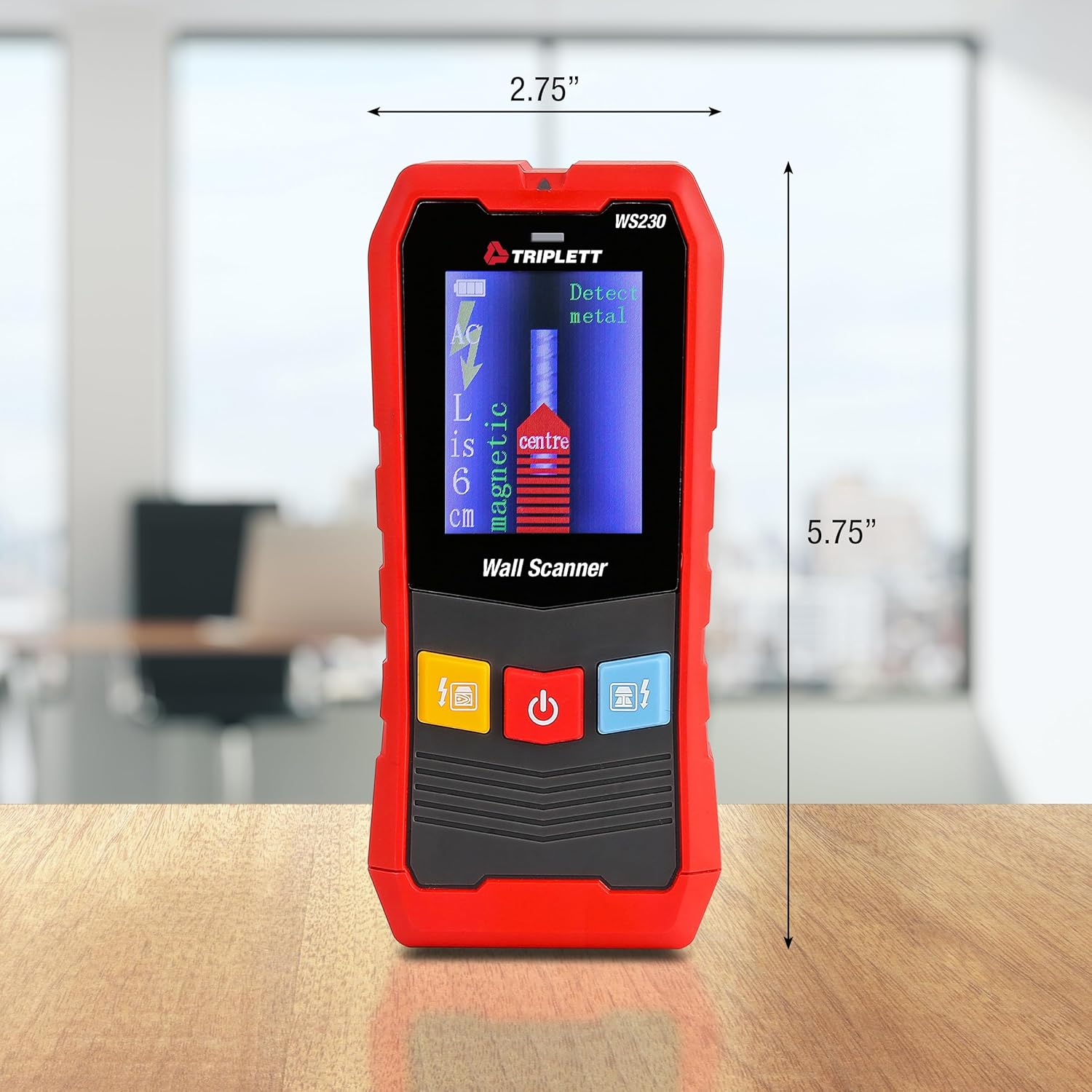
Figure 9.1: WS230 Dimensions
10. Garantie et assistance
For warranty information or technical support, please refer to the official Triplett webConsultez leur site web ou contactez leur service client. Conservez votre reçu d'achat comme preuve d'achat.
Visit the official Triplett Store: Triplett Store on Amazon