
Zinwell ZAT-600B
Manuel d'utilisation du boîtier TV nouvelle génération Zinwell ZAT-600B
Model: ZAT-600B
Introduction
The Zinwell ZAT-600B NextGen TV Box is an advanced external tuner designed to bring the latest ATSC 3.0 (NextGen TV) and traditional ATSC 1.0 broadcast signals to your television. It is ideal for TVs that do not have a built-in ATSC 3.0 tuner, allowing you to access enhanced features such as 4K resolution broadcasts, superior Dolby Audio, and interactive broadcaster applications without needing to upgrade your existing television.
This manual provides comprehensive instructions for setting up, operating, and maintaining your ZAT-600B NextGen TV Box to ensure optimal performance and enjoyment of free over-the-air television.
Caractéristiques principales
- NextGen TV Ready: Decodes and tunes ATSC 1.0 and 3.0 broadcast signals, providing access to the latest NextGen TV features.
- 4K Broadcast Support: Capable of supporting 4K broadcasts, delivering stunning visual clarity (when available).
- Upconverts HD to 4K: Enhances HD broadcasts by upconverting them to 4K, improving picture quality and detail.
- Enhanced Dolby Audio: Equipped with Dolby AC4 decoding for superior audio quality, supporting features like Voice + Dialogue Enhancement, Consistent Volume, Personalized Audio, and Dolby Atmos.
- Broadcaster Apps: Launches interactive applications provided by broadcasters, merging broadcast TV with internet content, including sports scores, weather alerts, and more.
- On-Screen TV Guide: Features an easy-to-use on-screen guide for convenient channel browsing.
- Télécommande universelle d'apprentissage : Includes a universal learning remote control that can be programmed to control your TV and/or sound bar.
- Prêt pour l’avenir : Designed to be upgradeable, ensuring compatibility with future NextGen TV advancements.
Contenu du colis
Vérifiez que tous les éléments sont présents dans le colis :
- Boîtier TV Zinwell ZAT-600B NextGen
- Télécommande universelle d'apprentissage
- Adaptateur secteur
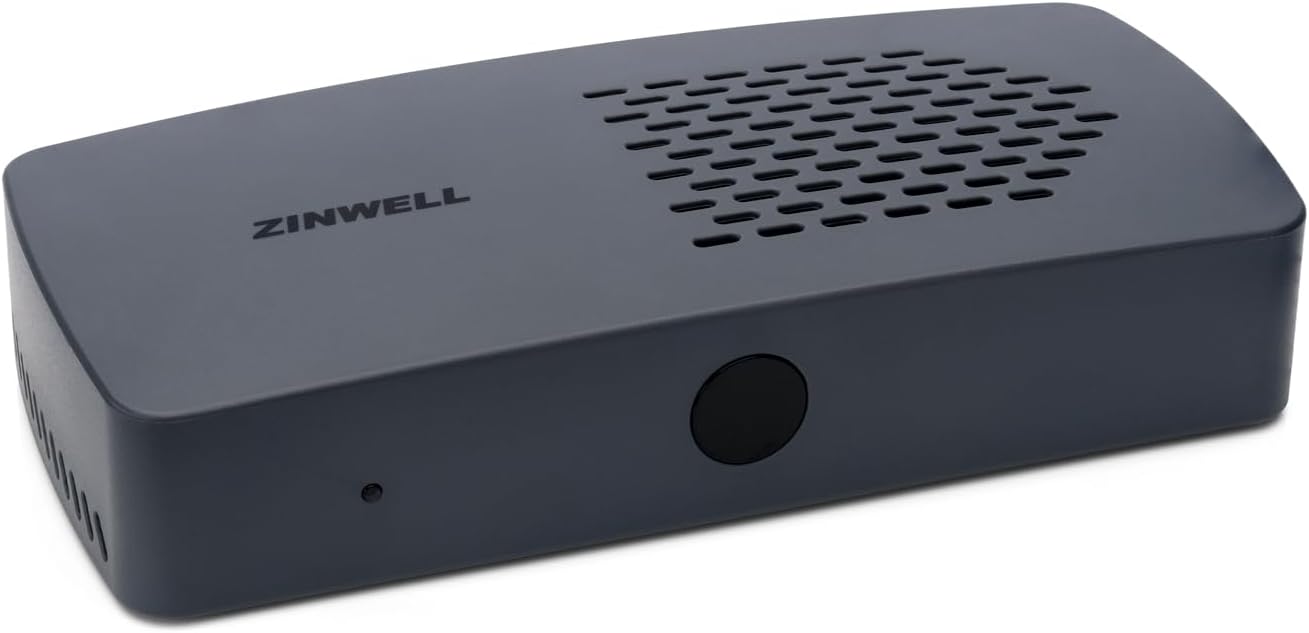
Image : Avant view of the Zinwell ZAT-600B NextGen TV Box. This image displays the compact, gray rectangular device with the "ZINWELL" logo on top and a small indicator light on the front.

Image: The universal learning remote control included with the ZAT-600B. The remote is black with various buttons for power, channel, volume, navigation, and app access.
Installation
Follow these steps to connect your Zinwell ZAT-600B NextGen TV Box to your television and antenna.
1. Connect the Antenna
Connect your digital antenna's coaxial cable to the "ANT IN" port on the back of the ZAT-600B box. Ensure the connection is secure.

Image : Arrière view of the Zinwell ZAT-600B NextGen TV Box, highlighting the various connection ports including ANT (antenna), HDMI, LAN, USB, and DC IN.
2. Connectez-vous au téléviseur
Connect one end of an HDMI cable (not included) to the "HDMI" port on the ZAT-600B box and the other end to an available HDMI input on your television.
3. Connectez-vous à l'alimentation
Plug the included power adapter into the "DC IN" port on the ZAT-600B box, then plug the adapter into a standard electrical outlet.
4. Connexion réseau (facultatif)
For software updates and future broadcaster app functionality, you can connect the ZAT-600B to your home network:
- Connexion filaire : Connect an Ethernet cable from your router to the "LAN" port on the ZAT-600B.
- Connexion sans fil : The device supports Wi-Fi. You can configure the wireless connection through the on-screen settings menu after initial power-up.
5. Configuration initiale et recherche des chaînes
Turn on your television and select the correct HDMI input connected to the ZAT-600B. The device will guide you through an initial setup process, which typically includes language selection and an automatic channel scan. Allow the scan to complete to find all available ATSC 1.0 and ATSC 3.0 channels in your area.

Image: An installation diagram illustrating how to connect the Zinwell NextGen TV Box. It shows an antenna connected to the box via a coaxial cable, and the box connected to a TV via an HDMI cable. An optional Wi-Fi router connection is also depicted.
Mode d'emploi
Utilisation de la télécommande
The included universal learning remote control allows you to operate the ZAT-600B and can be programmed to control your TV or sound bar. Familiarize yourself with the main functions:
- Bouton d'alimentation : Turns the ZAT-600B on or off.
- Canal haut/bas : Change de chaîne.
- Volume haut/bas : Règle le volume.
- Bouton Guide : Accède au guide électronique des programmes (EPG).
- Bouton de l'application : Launches interactive broadcaster applications.
- Boutons de navigation (Haut/Bas/Gauche/Droite/OK) : Permet de naviguer dans les menus et de sélectionner les options.
- Boutons numériques : Saisissez directement les numéros de chaîne.
Guide électronique des programmes (EPG)
Appuyez sur le Guide bouton de la télécommande pour view the on-screen program guide. The EPG displays current and upcoming programs for all scanned channels, including details like program title, time, and description. Use the navigation buttons to browse through channels and program listings.

Image: A screenshot of the Electronic Program Guide (EPG) displayed on a television screen, showing channel listings, program titles, and broadcast times.
Broadcaster Applications
The ZAT-600B supports interactive applications provided by broadcasters via NextGen TV. These apps can offer additional content, such as sports scores, weather alerts, or on-demand video clips. Press the Application button on the remote to access these features when available on a broadcast channel.

Image: A channel information overlay on a television screen, indicating the channel number, program title, broadcast time, and displaying the NextGen TV and Dolby Audio logos.
4K Upconversion and Enhanced Audio
The ZAT-600B automatically upconverts HD (1080p) broadcasts to 4K resolution for compatible 4K televisions, enhancing picture quality. It also processes Dolby AC4 audio, providing features like Voice + Dialogue Enhancement and Consistent Volume for a richer audio experience.
Entretien
- Nettoyage: Use a soft, dry cloth to clean the exterior of the ZAT-600B. Do not use liquid cleaners or aerosols.
- Mises à jour logicielles : Ensure the ZAT-600B is connected to the internet (via Wi-Fi or Ethernet) to receive automatic software updates. These updates provide new features, performance improvements, and compatibility with future NextGen TV advancements. Check the system settings menu for manual update options.
- Ventilation: Ensure the device is placed in a well-ventilated area. Do not block the ventilation slots on the top or sides of the unit.
Dépannage
| Problème | Cause possible | Solution |
|---|---|---|
| Pas d'image ni de son |
|
|
| Impossible de trouver les chaînes |
|
|
| La télécommande ne fonctionne pas |
|
|
| Broadcaster apps not loading |
|
|
Caractéristiques
| Fonctionnalité | Détail |
|---|---|
| Numéro de modèle | ZAT-600B |
| Dimensions (L x l x H) | 6.25 x 3.5 x 1.25 pouces |
| Poids | 1 livre |
| Couleur | Gris |
| Type de syntoniseur | ATSC 1.0 / ATSC 3.0 (NextGen TV) |
| Sortie vidéo | HDMI (up to 4K) |
| Décodage audio | Dolby AC4 |
| Connectivité | Wi-Fi, Ethernet, coaxial |
| Appareils compatibles | TVs, Monitors, Projectors |
Garantie et assistance
For warranty information and technical support, please refer to the official Zinwell website or contact their customer service. Specific warranty terms and support contact details may vary and are typically provided with your product purchase documentation.
You can often find support resources, FAQs, and contact information by visiting the manufacturer's website:
Ask a question about this manual
Ask about setup, troubleshooting, compatibility, parts, safety, or missing instructions. Manuals+ will review the question and use this page’s manual context to help answer it.