
Tikom L9000 Plus
Manuel d'utilisation du robot aspirateur et laveur de sols Tikom L9000 Plus
Modèle : L9000 Plus
1. Produit terminéview
The Tikom L9000 Plus is an advanced robot vacuum and mop combo designed to provide comprehensive floor cleaning. It features automatic self-emptying, precise LiDAR navigation for efficient mapping, powerful suction, and integrated sweeping and mopping capabilities. This manual provides essential information for setting up, operating, and maintaining your device.

The Tikom L9000 Plus robot vacuum and its accompanying self-emptying base, shown with the mobile application interface displaying a mapped home layout.

Illustration of the automatic self-emptying feature, demonstrating how the robot's dustbin contents are transferred to the 2.5L dust bag in the base, providing up to 60 days of hands-free cleaning.

The robot utilizing 360° LiDAR navigation to create accurate maps, enabling efficient room mapping, path planning, and optimized cleaning routes. The mobile app displays the generated map.

Un example of customized cleaning schedules and zones, showing how users can define specific cleaning times for different rooms, set virtual walls, and designate no-go zones or no-mop zones via the app.

Visual representation of the robot's powerful 4000 Pa suction, capable of effectively cleaning various floor types, including hard floors, tiles, wooden floors, and low-pile carpets. Suction levels can be adjusted.

The L9000 Plus performing both vacuuming and mopping functions simultaneously. It features a 300ml dustbin, a 250ml water tank, and adjustable 3-level water output for thorough cleaning on various hard floor surfaces.
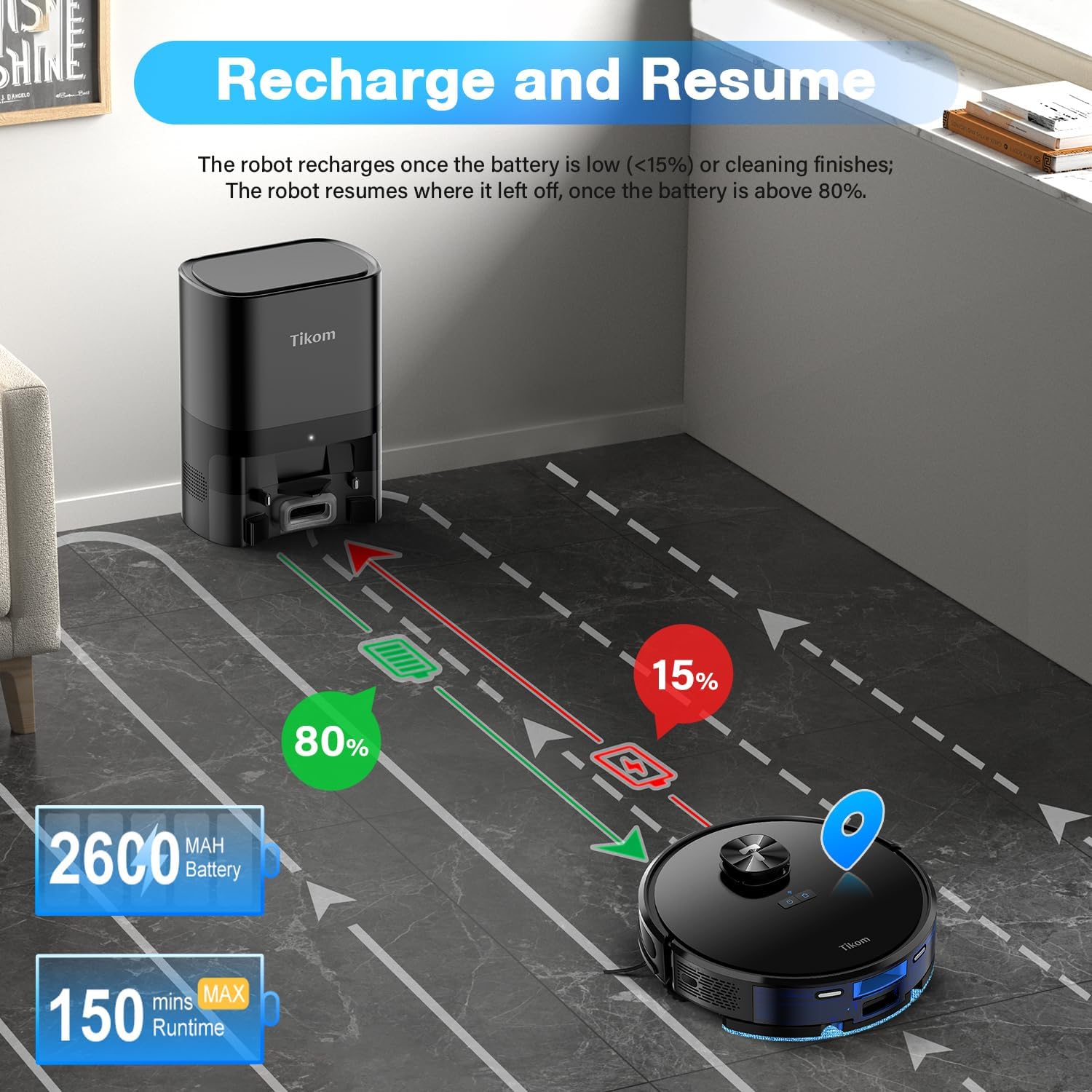
Diagram illustrating the robot's recharge and resume function. The robot automatically returns to the charging station when its battery is low (below 15%) or cleaning is complete, and resumes cleaning from where it left off once the battery reaches 80%.

Examples of smart map settings, including the creation of virtual walls to restrict access to certain areas, no-go zones to prevent the robot from entering, and no-mop zones to protect carpets or rugs during mopping.

The robot can be controlled via the Tuya Smart App or voice commands through compatible devices like Alexa or Google Assistant. The image shows the robot's compact height of 4.33 inches, allowing it to clean under furniture.
2. Contenu de la boîte
Upon unboxing your Tikom L9000 Plus, please verify that all the following components are included:
- Aspirateur robot (1)
- Automatic Self-Emptying Base (1)
- 2-in-1 Dust Bin & Water Tank (1)
- Support pour chiffon à serpillière (1)
- Chiffon de nettoyage de rechange (1)
- Station de recharge (1)
- Adaptateur secteur (1)
- Brosses latérales (4)
- Brosse de nettoyage (1)
- Spare HEPA and Sponge (1)
- Dust Bin Transparent Blocking Plate (2)
- Guide de démarrage rapide (1)
- Manuel d'utilisation (1)
3. Installation
3.1 Emplacement des bornes de recharge
Place the Automatic Self-Emptying Base against a wall in an open area, ensuring there are no obstacles within 1.5 meters (5 feet) in front of the base and 0.5 meters (1.6 feet) on either side. This allows the robot to easily dock and empty its dustbin.
3.2 Frais initiaux
Connect the power adapter to the charging station and plug it into a wall outlet. Place the robot onto the charging pins of the base. Ensure the robot is properly aligned. The robot will begin charging automatically. For first-time use, fully charge the robot before operation.
3.3 Connexion et mappage de l'application
- Téléchargez le Application Tuya Smart depuis la boutique d'applications de votre appareil mobile.
- Inscrivez-vous ou connectez-vous à votre compte.
- Follow the in-app instructions to add your Tikom L9000 Plus. Ensure your Wi-Fi network is 2.4GHz, as the robot only supports this frequency.
- Once connected, initiate a mapping run. The robot will use its LiDAR navigation to scan your home and create an accurate map. This map can be saved and customized within the app. The L9000 Plus can save up to 5 different maps.
4. Mode d'emploi
4.1 Cleaning Modes and Scheduling
- Nettoyage automatique : The robot cleans the entire mapped area automatically.
- Nettoyage localisé : Direct the robot to clean a specific small area with concentrated dirt.
- Zone Clean : Définissez des zones spécifiques sur la carte que le robot devra nettoyer.
- Chambre propre : Sélectionnez les pièces à nettoyer sur la carte.
- Programmation: Set up recurring cleaning schedules for different rooms or the entire home via the Tuya Smart App.
4.2 Suction and Water Output Adjustment
Through the Tuya Smart App, you can adjust the suction power (Low, Medium, High) and the water output level (3 levels) to suit different floor types and cleaning needs.
4.3 Murs virtuels et zones interdites
Use the Tuya Smart App to set up virtual walls, no-go zones, and no-mop zones on your map. This prevents the robot from entering specific areas or mopping carpets.
4.4 Automatic Self-Emptying
After each cleaning cycle, the robot will automatically return to the self-emptying base to transfer collected dust and debris into the 2.5L dust bag. This allows for up to 60 days of cleaning without manual dustbin changes.
4.5 Recharge et reprise
If the battery level drops below 15% during a cleaning cycle, the robot will automatically return to the charging station. Once the battery is charged to 80%, it will resume cleaning from where it left off.
4.6 Commande vocale
The Tikom L9000 Plus is compatible with Alexa. Once connected, you can use voice commands such as "Alexa, turn on the robot" to start or stop cleaning.
5. Entretien
Regular maintenance ensures optimal performance and extends the lifespan of your Tikom L9000 Plus.
5.1 Dust Bag Replacement (Self-Emptying Base)
The 2.5L dust bag in the self-emptying base should be replaced approximately every 60 days, or when the indicator light on the base signals it is full. Open the top lid of the base, remove the full bag, and insert a new one.
5.2 2-in-1 Dust Bin & Water Tank Cleaning
- Dust Bin (300ml): After each cleaning cycle, remove the dust bin from the robot, open it, and empty the collected debris. Rinse the dust bin with water if necessary, and allow it to air dry completely before reinserting.
- Réservoir d'eau (250 ml) : Empty any remaining water after each mopping session. Clean the tank with clean water and allow it to air dry.
5.3 Nettoyage/remplacement du filtre
The HEPA filter inside the dust bin should be cleaned regularly using the provided cleaning brush. Tap off excess dust. Replace the HEPA filter and sponge every 3-6 months, or as needed, to maintain suction performance.
5.4 Nettoyage des brosses
- Brosse principale : Remove the main brush cover and the brush itself. Use the cleaning tool to remove hair and debris tangled around the brush.
- Brosses latérales : Check the side brushes for tangled hair or debris. Remove and clean them as needed. Replace worn or damaged side brushes.
5.5 Nettoyage du capteur
Wipe the cliff sensors, wall sensors, and charging contacts on the robot and charging base with a clean, dry cloth regularly to ensure proper navigation and charging.
6. Dépannage
If you encounter issues with your Tikom L9000 Plus, refer to the following common problems and solutions:
| Problème | Cause possible | Solution |
|---|---|---|
| Le robot ne démarre pas et ne répond pas. | Batterie faible ; interrupteur d’alimentation éteint ; robot bloqué. | Assurez-vous que le robot est chargé ; allumez-le ; dégagez tout obstacle. |
| Le robot ne trouve pas la station de recharge. | Charging station obstructed; Robot too far from base. | Ensure clear path to base; Place robot closer to base. |
| Mauvaise performance de nettoyage. | Full dust bin; Clogged filter; Worn brushes. | Empty dust bin; Clean/replace filter; Clean/replace brushes. |
| Problèmes de connectivité de l'application. | Incorrect Wi-Fi (not 2.4GHz); Network instability. | Ensure 2.4GHz Wi-Fi; Restart router; Re-pair device in app. |
| Erreurs de cartographie ou perte du robot. | LiDAR sensor obstructed; Significant changes in environment. | Clean LiDAR sensor; Reset and remap the area if necessary. |
| Le robot se bloque fréquemment. | Cables, small objects on floor; Steep drops. | Dégager le sol de tout obstacle ; utiliser des zones interdites pour les zones problématiques. |
For persistent issues not covered here, please refer to the detailed troubleshooting section in the full user manual or contact Tikom customer support.
7. Spécifications
| Fonctionnalité | Spécification |
|---|---|
| Marque | Tikom |
| Nom du modèle | L9000 Plus |
| Caractéristiques spéciales | LiDAR Navigation Laser, Smart Mapping, 2-in-1 Sweeping & Mopping, Automatic Self-Emptying |
| Couleur | Noir |
| Dimensions du produit | 12.6"L x 12.6"l x 3.66"H |
| Type de filtre | Filtre HEPA |
| Autonomie de la batterie | 150 minutes (in quiet mode) |
| Voltage | 14.4 volts |
| Capacité du sac à poussière | 2.5 litres |
| Capacité du bac à poussière | 300 ml |
| Capacité du réservoir d'eau | 250 ml |
| Source d'énergie | Alimenté par batterie |
| Méthode de contrôle | Application, Voix (Alexa) |
| Appareils compatibles | Smartphones |
| Poids de l'article | 6.17 livres |
| Fabricant | Tikom |
| Date de première disponibilité | 24er août 2024 |
8. Garantie et assistance
Your Tikom L9000 Plus Robot Vacuum and Mop Combo is covered by a manufacturer's warranty. Please refer to the warranty card included in your packaging for specific terms and conditions, including the warranty period and coverage details.
For technical assistance, troubleshooting beyond this manual, or warranty claims, please contact Tikom customer support. Contact information can typically be found on the official Tikom website ou sur l'emballage du produit.
Ask a question about this manual
Ask about setup, troubleshooting, compatibility, parts, safety, or missing instructions. Manuals+ will review the question and use this page’s manual context to help answer it.