
1. Introduction
Thank you for choosing the Hama DR2002BT Digital Radio. This device offers a comprehensive audio experience with FM, DAB/DAB+ digital radio reception, and Bluetooth connectivity. Its user-friendly design, featuring large buttons and a clear 4.3-inch TFT color display, makes it suitable for all users. This manual will guide you through the setup, operation, and maintenance of your new digital radio.
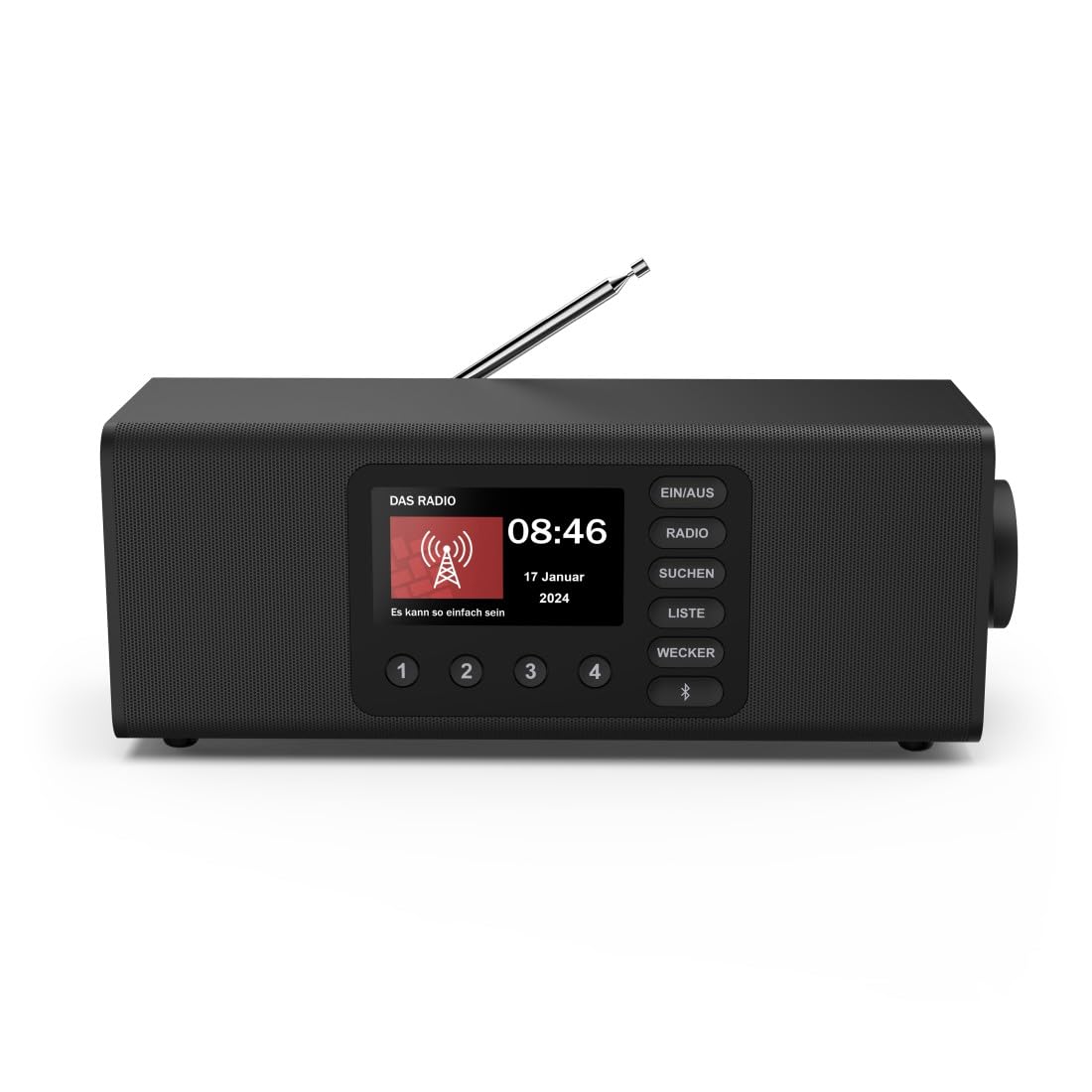
Image : Avant view of the Hama DR2002BT Digital Radio, showcasinet ses boutons d'affichage et de commande.
2. Consignes de sécurité
Veuillez lire attentivement ces consignes de sécurité avant d'utiliser l'appareil. Conservez ce manuel pour toute consultation ultérieure.
- N’exposez pas l’appareil à l’humidité, à la pluie ou à des températures extrêmes.
- Évitez de placer l'appareil à proximité de sources de chaleur ou à la lumière directe du soleil.
- N'ouvrez pas l'appareil casing. Les réparations ne doivent être effectuées que par du personnel qualifié.
- Utilisez uniquement l’adaptateur secteur fourni.
- Assurez une bonne ventilation autour de l’appareil.
3. Contenu du colis
Vérifiez que tous les articles sont présents lors du déballage :
- Hama DR2002BT Digital Radio
- Adaptateur secteur
- Manuel d'utilisation
4. Produit terminéview
4.1 Commandes et affichage du panneau avant

Image: Front panel of the radio highlighting the display and control buttons, with icons for Bluetooth, DAB+, and Alarm functions.
The front panel features a 4.3-inch TFT color display, large control buttons, and a rotary knob for easy navigation and selection. Key buttons include:
- EIN/AUS (ON/OFF): Allume ou éteint l'appareil.
- RADIO: Switches between FM and DAB/DAB+ modes.
- SUCHEN (SEARCH): Initiates station scanning.
- LISTE (LIST): Accesses the list of available stations.
- WECKER (ALARM): Configure les paramètres d'alarme.
- Bouton Bluetooth : Active le mode de couplage Bluetooth.
- Boutons préréglés (1-4) : Accès rapide aux stations favorites enregistrées.
- Rotary Knob (LAUTSTÄRKE/NAVIGIEREN): Controls volume and navigates menus.
4.2 Connexions du panneau arrière
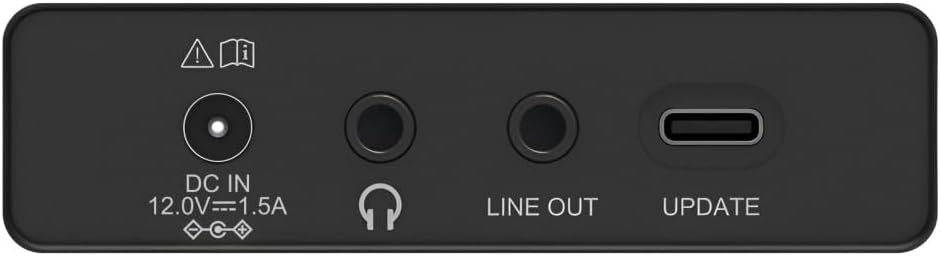
Image: Close-up of the rear panel showing the DC IN, Headphone, Line Out, and UPDATE (USB-C) ports.
The rear panel provides essential connectivity options:
- DC IN 12.0V --- 1.5A: Power input for the external adapter.
- Prise casque (3.5 mm) : Pour une écoute privée.
- SORTIE DE LIGNE : Sortie audio pour connexion à un périphérique externe amplificateurs ou haut-parleurs.
- UPDATE (USB-C): Pour les mises à jour du micrologiciel.
- Antenne télescopique : For FM and DAB/DAB+ reception.

Image : Arrière view of the Hama DR2002BT Digital Radio with its telescopic antenna extended for optimal signal reception.
5. Installation
5.1 Connexion d'alimentation
- Branchez l'adaptateur secteur fourni à l'appareil. Entrée CC port situé à l'arrière de la radio.
- Branchez l'adaptateur secteur dans une prise de courant appropriée.
- La radio s'allumera automatiquement ou passera en mode veille.
5.2 Positionnement de l'antenne
For optimal FM and DAB/DAB+ reception, fully extend the telescopic antenna. Position the radio near a window if reception is poor.
5.3 Configuration initiale (Première utilisation)
Upon first power-on, the radio may guide you through an initial setup process, including language selection and an automatic DAB station scan. Follow the on-screen prompts.
6. Mode d'emploi
6.1 Mise sous/hors tension
Appuyez sur le ALLUMÉ ÉTEINT bouton pour allumer ou éteindre la radio.
6.2 Mode radio DAB/DAB+
- Appuyez sur le RADIO bouton pour sélectionner le mode DAB.
- If this is the first time in DAB mode or if you want to rescan, press SUCHEN to perform a full scan for available stations.
- Use the rotary knob to navigate through the station list. Press the knob to select a station.
- À view the station list, press the LISTE bouton.
6.3 Mode radio FM
- Appuyez sur le RADIO bouton pour sélectionner le mode FM.
- Presse SUCHEN to automatically scan for the next available FM station.
- Alternatively, use the rotary knob to manually tune to a frequency.
6.4 Enregistrement et rappel des préréglages
The radio allows you to store up to 4 favorite stations using the dedicated preset buttons (1-4).
- Tune to the desired station (DAB or FM).
- Press and hold one of the preset buttons (1-4) until the display confirms the station has been saved.
- To recall a preset station, simply press the corresponding preset button (1-4).
6.5 Fonctionnement Bluetooth

Image : Avant view of the radio with Bluetooth and stereo speaker icons, indicating its wireless audio streaming capability.
The Hama DR2002BT can stream audio from your smartphone, tablet, or laptop via Bluetooth 5.0.
- Press the Bluetooth button on the front panel to enter Bluetooth pairing mode. The display will show a pairing indicator.
- On your external device (smartphone, tablet), enable Bluetooth and search for available devices.
- Select "Hama DR2002BT" from the list of devices to pair.
- Once paired, you can play audio from your device, and it will be output through the radio's speakers.
6.6 Fonction réveil

Image: A person waking up with the Hama DR2002BT Digital Radio placed on a bedside table, illustrating its alarm clock functionality.
The radio features two independent alarm settings.
- Appuyez sur le RÉVEIL bouton permettant d'accéder aux paramètres de l'alarme.
- Use the rotary knob to select Alarm 1 or Alarm 2.
- Configure the alarm time, source (buzzer or radio station), and repetition (once, daily, weekdays, weekends, or specific days).
- Press the rotary knob to confirm each setting.
- To quickly activate/deactivate an alarm, press the RÉVEIL button and use the rotary knob to toggle the alarm status.

Image: A person interacting with the Hama DR2002BT Digital Radio, demonstrating its ease of use for setting functions like alarms or tuning stations.
7. Entretien
To ensure the longevity and optimal performance of your Hama DR2002BT Digital Radio, follow these maintenance guidelines:
- Nettoyage: Utilisez un chiffon doux, sec et non pelucheux pour nettoyer l'extérieur de la radio. N'utilisez pas de nettoyants abrasifs, de cires ni de solvants.
- Poussière: Regularly dust the device to prevent accumulation in vents and ports.
- Stockage: Si vous devez ranger la radio pendant une période prolongée, débranchez-la de l'alimentation électrique et rangez-la dans un endroit frais et sec.
- Antenne: Manipulez l'antenne télescopique avec précaution pour éviter de la plier ou de la casser.
8. Dépannage
Si vous rencontrez des problèmes avec votre radio, consultez les problèmes courants et leurs solutions ci-dessous :
| Problème | Cause possible | Solution |
|---|---|---|
| Pas de courant | Adaptateur secteur non connecté ; prise de courant défectueuse | Vérifiez la connexion de l'adaptateur secteur ; essayez une autre prise de courant. |
| Mauvaise réception radio (DAB/FM) | Antenne non déployée ; zone de faible signal ; interférences | Fully extend the telescopic antenna; Reposition the radio (e.g., near a window); Perform a new station scan. |
| L'appairage Bluetooth échoue | Bluetooth not enabled on external device; Radio not in pairing mode; Device too far | Ensure Bluetooth is on and visible on your device; Press the Bluetooth button on the radio; Move devices closer (within 10m). |
| Pas de son | Volume trop faible ; mode muet activé ; source incorrecte sélectionnée | Increase volume using the rotary knob; Check if mute is active; Ensure the correct mode (DAB, FM, Bluetooth) is selected. |
| L'alarme ne sonne pas | Alarm not activated; Incorrect alarm time/day set | Verify alarm is enabled in settings; Check alarm time and repetition settings. |
9. Spécifications

Image: Diagram showing the dimensions of the Hama DR2002BT Digital Radio: 35 cm (width), 12.5 cm (depth), and 13 cm (height).
| Fonctionnalité | Détail |
|---|---|
| Numéro de modèle | DR2002BT (00054298) |
| Réception | DAB, DAB+, FM |
| Version Bluetooth | 5.0 |
| Puissance de sortie (RMS) | 10 W (Stéréo) |
| Afficher | Écran couleur TFT 4.3 pouces |
| Relations | 3.5mm Jack (Headphone), USB-C (Update), Line Out, DC IN |
| Alimentation électrique | Adaptateur d'alimentation externe |
| Dimensions (L x P x H) | 35 x 12.5 x 13 cm |
| Poids | 1788 gramme |
| Matériel | Plastique |
| Couleur | Noir |
| Fonctionnalités supplémentaires | Alarm Function (2 alarms), Direct Selection Keys |
10. Garantie et assistance
Hama GmbH & Co KG provides a warranty for this product. Please refer to the warranty card included in your package or visit the official Hama webConsultez le site pour connaître les conditions générales de garantie détaillées.
For technical support, troubleshooting assistance, or spare parts, please contact Hama customer service or visit their website. The availability of spare parts in the EU is guaranteed for 7 years.
- Fabricant: Hama GmbH & Co KG
- Pays d'origine : Allemagne
- Disponibilité des pièces détachées dans l'UE : 7 années