
1. Produit terminéview
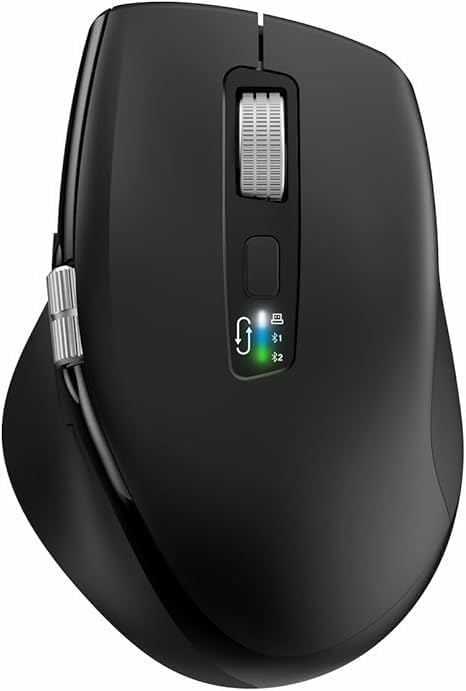
The INFINMIND L910 is a versatile wireless mouse designed for comfort and efficiency across multiple devices. It features both 2.4G wireless and Bluetooth connectivity, adjustable DPI settings, and specialized scrolling functions.
2. Contenu du colis
- INFINMIND L910 Wireless Bluetooth Mouse
- Récepteur USB (généralement rangé dans le compartiment des piles de la souris)
- 2 piles AA
- Manuel de l'utilisateur (ce document)
3. Instructions de configuration
3.1. Installation de la batterie
- Localisez le compartiment à piles sous la souris.
- Ouvrez le couvercle du compartiment à piles.
- Insert one or two AA batteries, ensuring correct polarity (+/-). The mouse can operate with either one or two batteries, allowing for weight preference.
- Fermez soigneusement le couvercle du compartiment à piles.
3.2. Modes de connectivité
The mouse supports three connection channels: one 2.4G wireless channel and two Bluetooth channels (BT1 and BT2). You can switch between these channels using the dedicated mode switch button on the mouse.
3.3. Connexion sans fil 2.4G
- Remove the USB receiver from its storage slot, usually located in the battery compartment.
- Branchez le récepteur USB dans un port USB disponible sur votre ordinateur.
- Switch the mouse to the 2.4G wireless mode (indicated by a specific LED light, refer to mouse markings).
- L'ordinateur devrait détecter et installer automatiquement les pilotes nécessaires. La souris est prête à l'emploi.
3.4. Connexion Bluetooth (BT1 / BT2)
- Switch the mouse to either BT1 or BT2 mode using the mode switch button.
- Press and hold the mode switch button for 3-5 seconds until the corresponding Bluetooth LED indicator starts blinking rapidly. This indicates the mouse is in pairing mode.
- On your device (computer, smartphone, tablet), navigate to the Bluetooth settings.
- Rechercher new devices. The mouse should appear as "INFINMIND L910" or similar.
- Select the mouse to pair. Once paired, the LED indicator will stop blinking and remain solid for a few seconds before turning off.
- Répétez ces étapes pour le deuxième canal Bluetooth (BT2) si vous souhaitez vous connecter à un autre appareil.
4. Mode d'emploi
4.1. Gestion de l'alimentation
The mouse features an automatic sleep mode to conserve battery life. To wake the mouse from sleep, simply move it. There is no manual on/off switch; power is managed by battery insertion and activity.
4.2. Réglage DPI
The mouse offers four adjustable DPI (Dots Per Inch) settings to suit various tasks and preferences. Press the DPI button, located near the main scroll wheel, to cycle through the available settings: 1000, 1600, 2400, and 3000 DPI.

4.3. Smart Flying Scroll Wheel
The main scroll wheel features a 'Smart Flying Scroll' function, allowing for rapid vertical scrolling. This is particularly useful for navigating long documents or web pages quickly and silently.
4.4. Side Scroll Wheel (Thumb Scroll)
A dedicated side scroll wheel, operated by the thumb, provides horizontal page scrolling. This feature enhances productivity, especially when working with wide spreadsheets or timelines.

4.5. Commutation multi-appareils
To switch between connected devices (2.4G, BT1, BT2), simply press the mode switch button. The corresponding LED indicator will light up to confirm the active connection.
4.6. Commutateur de compatibilité système
The mouse includes a one-touch switch specifically designed for seamless transitions between Windows and Mac operating systems, ensuring optimal performance on both platforms.
4.7. Ergonomic Design and Quiet Click
The contoured shape and soft rubber grips of the mouse are designed to reduce hand fatigue during extended use. The quiet click feature allows for multi-scene use without disturbing others.

5. Entretien
5.1. Remplacement de la batterie
When the mouse performance degrades or the LED indicator suggests low power, replace the AA batteries. Battery life can extend up to 20 months with one battery or 40 months with two batteries, depending on usage environment.
5.2. Nettoyage
Pour nettoyer la souris, utilisez un chiffon doux et sec. Pour les saletés tenaces, un chiffon légèrement plus sec peut être utile.amp Un chiffon imbibé de savon doux peut être utilisé, en veillant à ce qu'aucun liquide ne pénètre dans les composants internes. Évitez les nettoyants abrasifs et les solvants.
5.3. Stockage
Store the mouse in a cool, dry place away from direct sunlight and extreme temperatures. If storing for an extended period, it is recommended to remove the batteries to prevent leakage.
6. Dépannage
6.1. Souris ne répondant pas
- Vérifiez que les piles sont correctement insérées et suffisamment chargées. Remplacez-les si nécessaire.
- Ensure the mouse is switched to the correct connection mode (2.4G, BT1, or BT2) for your device.
- For 2.4G connection, ensure the USB receiver is securely plugged into the computer. Try a different USB port.
- Pour la connexion Bluetooth, assurez-vous que le Bluetooth est activé sur votre appareil et que la souris est appairée. Essayez de réappairer la souris.
6.2. Connectivity Issues / Lag
- Réduisez la distance entre la souris et le récepteur/appareil.
- Éliminez toute source potentielle d'interférences (par exemple, d'autres appareils sans fil, de gros objets métalliques).
- Try connecting to a different USB port or re-pairing the Bluetooth connection.
6.3. Le DPI ne change pas
- Ensure you are pressing the DPI button firmly.
- If the issue persists, try restarting the mouse by removing and reinserting the batteries.
7. Spécifications
| Fonctionnalité | Détail |
|---|---|
| Marque | INFINIMENT |
| Numéro de modèle | L910 |
| Couleur | Noir |
| Technologie de connectivité | Bluetooth, USB (sans fil 2.4 GHz) |
| Caractéristiques spéciales | Ergonomic Design, Thumb Scroll, Smart Flying Scroll |
| Appareils compatibles | Ordinateur personnel, smartphone, tablette |
| Composition de la batterie | Alcalin |
| Technologie de détection de mouvement | Optique |
| Nombre de boutons | 8 |
| Orientation de la main | Droite |
| Utilisations recommandées pour le produit | Bureau |
| Autonomie de la batterie | Up to 40 months (with 2 AA batteries) |
| Paramètres PPP | 1000/1600/2400/3000 |
8. Garantie et assistance
Information regarding product warranty and specific customer support contact details is not available in this document. Please refer to the product packaging or the retailer's website pour les conditions de garantie et les options d'assistance.