
ZN-2CO18
Generic 20-in-1 Tuya WiFi Air Quality Monitor User Manual
Model: ZN-2CO18
1. Produit terminéview
The Generic 20-in-1 Tuya WiFi Air Quality Monitor and Smart Weather Station is a versatile device designed to provide comprehensive environmental data. It monitors various air quality parameters and acts as a smart weather station, displaying time, date, and temperature/humidity data from multiple wireless sensors. The device features a clear 2.8-inch color TFT screen and offers smart app connectivity for real-time and historical data viewing.

Image: The main unit displaying air quality data and time, alongside five wireless temperature and humidity sensors, and a smartphone showing the companion app interface.
2. Contenu de la boîte
- 1 x Unité hôte
- 5 x Wireless Temperature and Humidity Sensors
- 1 x câble de chargement USB
- Lanyard and Velcro (for sensor mounting)
- 1 x Manuel d'utilisation
3. Guide de configuration
3.1 Mise sous tension initiale
Connect the host unit to a power source using the provided USB cable. The device will power on automatically. Ensure the host unit's internal battery is charged for portable use.
3.2 Installation de la batterie du capteur
Each wireless sensor requires 2 AAA batteries (not included). Open the battery compartment on the back of each sensor and insert the batteries, observing correct polarity.
3.3 Connexion à l'application pour smartphone
Download the companion smartphone application (Tuya Smart or Smart Life app) from your device's app store. Follow the in-app instructions to add the air quality monitor. The host monitor will automatically synchronize its time and date with your smartphone upon connection.

Image: The smartphone app showing real-time air quality and temperature/humidity data, demonstrating connectivity with the main unit.
4. Mode d'emploi
4.1 Modes d'affichage
The host unit features a 2.8-inch color TFT display. Upon power-on, it will initially display 7 air quality parameters. After 5 seconds, it will switch to display the time and 5 temperature and humidity parameters from the wireless sensors. The two display screens will alternate every 5 seconds.
To fix the current display interface, press the key three times consecutively. To exit the fixed display interface and resume alternating, press the key three times consecutively again.

Image: The two primary display modes of the host unit: one showing detailed air quality metrics (PM2.5, CO2, HCHO, etc.) and the other showing time, date, and temperature/humidity from connected sensors.
4.2 Air Quality Parameters
The monitor detects the following air quality parameters:
- PM2.5, PM1.0, PM10 (Particulate Matter)
- CO2 (Carbon Dioxide) - NDIR infrared sensor
- CO (Carbon Monoxide) - Electrochemical sensor
- HCHO (Formaldéhyde)
- TVOC (Total Volatile Organic Compounds)

Image: The air quality monitor displaying CO2 levels, indicating the use of a high-precision NDIR infrared sensor for accurate readings.

Image: The monitor's display showing a comprehensive overview of air quality parameters, current date, time, and temperature/humidity readings from connected sensors.
4.3 Fonctionnalités intelligentes de l'application
The smartphone app allows you to:
- View real-time air quality and weather data remotely.
- Access 1-year historical data (day, month, year).
- Régler la luminosité de l'affichage.
- Basculer entre les unités de température Celsius et Fahrenheit.
- Set alarms for specific parameter thresholds.

Image: The main unit and time display unit on a table, illustrating that the smart app allows real-time data monitoring and historical data viewing, with automatic time/date synchronization.
5. Placement and Usage Environments
The compact and lightweight design makes the monitor suitable for various environments. The sensors offer multiple mounting options including stand, wall mount, and paste mount using double-sided tape or suspension holes. They also come with a lanyard and Velcro for flexible placement.

Image: Visual representation of diverse applications for the Smart WiFi Air Quality Detector, highlighting its suitability for homes, offices, farms, cold storage, and other specific environments.
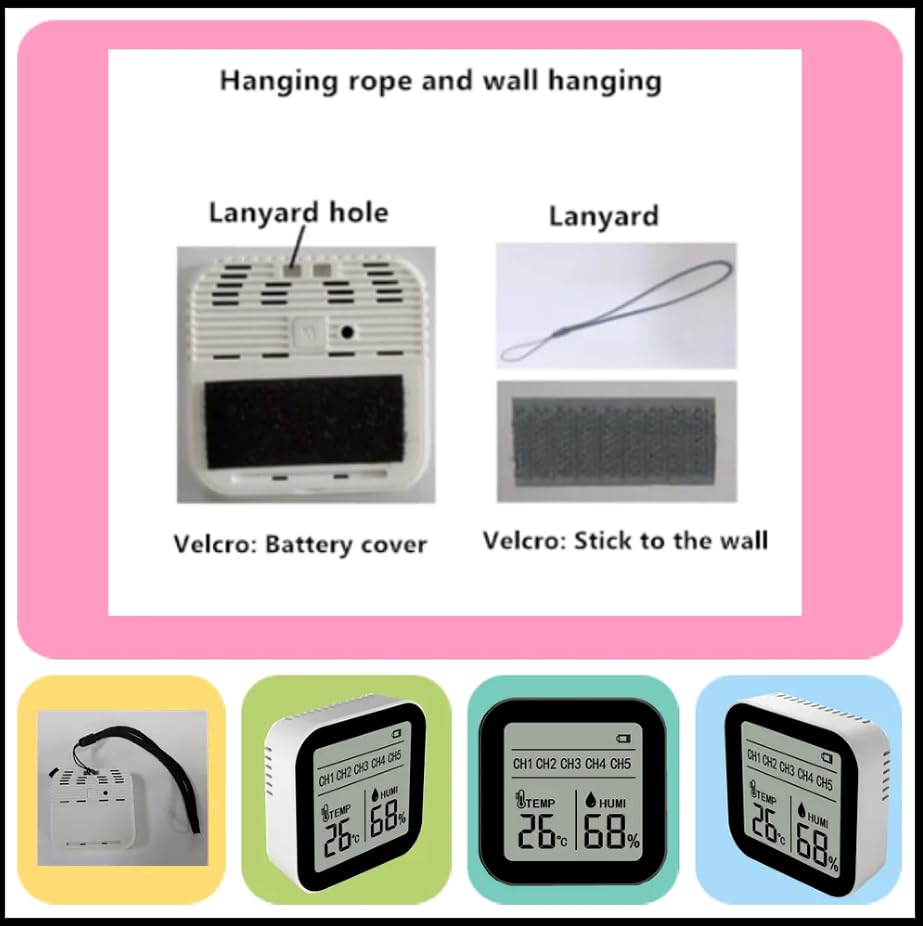
Image: Details on the multiple mounting options for the sensors, including a lanyard hole for hanging and Velcro for attaching to surfaces.
6. Entretien
To ensure optimal performance and longevity of your air quality monitor:
- Nettoyez l'appareil avec un chiffon doux et sec. Évitez d'utiliser des nettoyants abrasifs ou des solvants.
- Ensure proper ventilation around the device; do not block air inlets or outlets.
- Replace AAA batteries in the wireless sensors as needed to maintain continuous data transmission.
- Rangez l'appareil dans un endroit frais et sec lorsqu'il n'est pas utilisé pendant une période prolongée.
7. Dépannage
7.1 No Display/Device Not Powering On
- Ensure the USB cable is securely connected to the host unit and a working power adapter.
- Vérifiez si l'adaptateur secteur fonctionne correctement.
- Allow the internal battery to charge for at least 30 minutes before attempting to power on again.
7.2 Sensors Not Transmitting Data
- Verify that fresh AAA batteries are correctly installed in each sensor.
- Ensure sensors are within the effective range of the host unit.
- Check for any physical obstructions between the sensors and the host unit that might interfere with the wireless signal.
7.3 Problèmes de connectivité de l'application
- Ensure your smartphone's Wi-Fi is enabled and connected to a stable network.
- Verify that the air quality monitor is connected to the same Wi-Fi network.
- Restart both the monitor and your smartphone, then try connecting again.
- Mettez à jour l'application vers la dernière version.
8. Spécifications
| Fonctionnalité | Détail |
|---|---|
| Numéro de modèle | 2CO18 (with 5 Sensor) |
| Product Dimensions (Host) | 89 mm x 83 mm x 36 mm (3.5 x 1.4 x 3.3 pouces) |
| Dimensions du produit (capteur) | 59 mm x 59 mm x 19 mm |
| Poids net de l'hôte | 165 g (0.36 lb) |
| Sensor Net Weight | 40 g (0.09 lb) |
| Type d'affichage | 2.8-inch Color TFT Screen (Host), 2-inch LCD Display (Sensor) |
| Connectivité | Wifi |
| Source d'énergie | Battery Powered (1 Lithium Metal battery included for host, 2 AAA batteries per sensor, not included) |
| Paramètres surveillés | PM2.5, PM1.0, PM10, CO2, CO, HCHO, TVOC, Temperature, Humidity, Time, Date, Alarm Clock |
| Type de capteur de CO2 | NDIR Infrared Sensor |
| Type de capteur de monoxyde de carbone | Capteur électrochimique |
| Matériel | Acrylonitrile butadiène styrène (ABS) |

Image: Detailed product dimensions for both the main host unit and the individual wireless sensors.
9. Vidéo produit
Video: An official product video demonstrating the features and usage of the Generic 20-in-1 Tuya WiFi Air Quality Monitor, including its various sensors and smart app integration.
10. Garantie et assistance
For warranty information and technical support, please refer to the contact details provided in the packaging or visit the manufacturer's official website. Conservez votre reçu d’achat pour les réclamations au titre de la garantie.
Ask a question about this manual
Ask about setup, troubleshooting, compatibility, parts, safety, or missing instructions. Manuals+ will review the question and use this page’s manual context to help answer it.