1. Introduction
This manual provides detailed instructions for the installation, operation, and maintenance of your Hikity Android Carplay Wireless Autoradio. This multimedia system is specifically designed for the Seat Leon MK3 (Left-Hand Drive) models from 2013 to 2019, offering a 9-inch touchscreen display with advanced features such as wireless CarPlay, Android Auto, GPS navigation, Bluetooth, and support for a reversing camera.
Veuillez lire attentivement ce manuel avant l'installation et l'utilisation afin de garantir un bon fonctionnement et d'optimiser votre expérience utilisateur.
2. Consignes de sécurité
- Installation professionnelle recommandée : En raison de la complexité des systèmes électriques automobiles, une installation par un professionnel est fortement recommandée afin d'éviter d'endommager l'appareil ou votre véhicule.
- Sureté de conduite: N’utilisez pas le système d’une manière qui vous distrait de la conduite. La sécurité routière doit toujours être votre priorité.
- Alimentation: Assurez-vous que l'appareil est branché sur une alimentation 12 V CC avec une masse négative. Un câblage incorrect peut provoquer des dommages ou un incendie.
- Éviter l’humidité : N’exposez pas l’appareil à l’eau ou à une humidité excessive.
- Température: Avoid extreme temperatures. The operating temperature range is typically -20°C to +70°C.
- Ventilation: Assurez une ventilation adéquate autour de l'appareil pour éviter toute surchauffe.
3. Contenu du colis
Verify that all items are present in your package before proceeding with installation:
- Hikity Android Autoradio Unit (9-inch touchscreen)
- Câble d'alimentation
- Câble RCA
- Câbles USB (x2)
- Câble d'entrée de caméra
- Antenne GPS
- Antenne radio
- Décodeur CANbus
- AHD Rear Camera (optional, if included in your package)
- Microphone
- Outil d'installation
- Ligne inversée

4. Configuration et installation
This autoradio is designed for direct fitment in Seat Leon MK3 (2013-2019) Left-Hand Drive vehicles. Ensure your vehicle's dashboard matches the 'Before' image for compatibility.

4.1 Connexions de câblage
Refer to the wiring diagram provided with your unit and the image below for connecting the various cables. Incorrect wiring can lead to malfunction or damage.

- Câble d'alimentation: Connect the main power harness to your vehicle's wiring. Ensure correct positive (B+) and accessory (ACC) connections, and a secure ground (GND). The Canbus decoder should be integrated as per the vehicle's specific wiring.
- Câbles RCA : Pour externe ampamplificateurs, caissons de basses ou entrées/sorties audio/vidéo auxiliaires.
- Câbles USB : Connect the two provided USB cables for media playback, phone charging, or wired CarPlay/Android Auto connections.
- Entrée caméra : Connect the AHD rear camera cable here.
- Antenne GPS: Installez l'antenne GPS dans un endroit dégagé. view du ciel, généralement sur le tableau de bord ou sous le pare-brise.
- Antenne Radio : Branchez l'antenne radio de votre véhicule.
- Microphone: Connectez le microphone externe pour une meilleure qualité d'appel et des commandes vocales améliorées.
Note: Some users have reported that the provided connection harness may not be a direct 'plug and play' for all Seat Leon FR models, requiring modifications or extensions for certain cables (e.g., the cable from the glove compartment CD unit). Please verify your vehicle's specific wiring before installation.
5. Mode d'emploi
5.1 Système terminéview
The unit runs on Android 13 with a Quad Core processor, 2GB RAM, and 64GB ROM, providing a responsive user experience on its 9-inch Ultra HD touchscreen with a resolution of 1024*600 pixels.


5.2 CarPlay sans fil et Android Auto
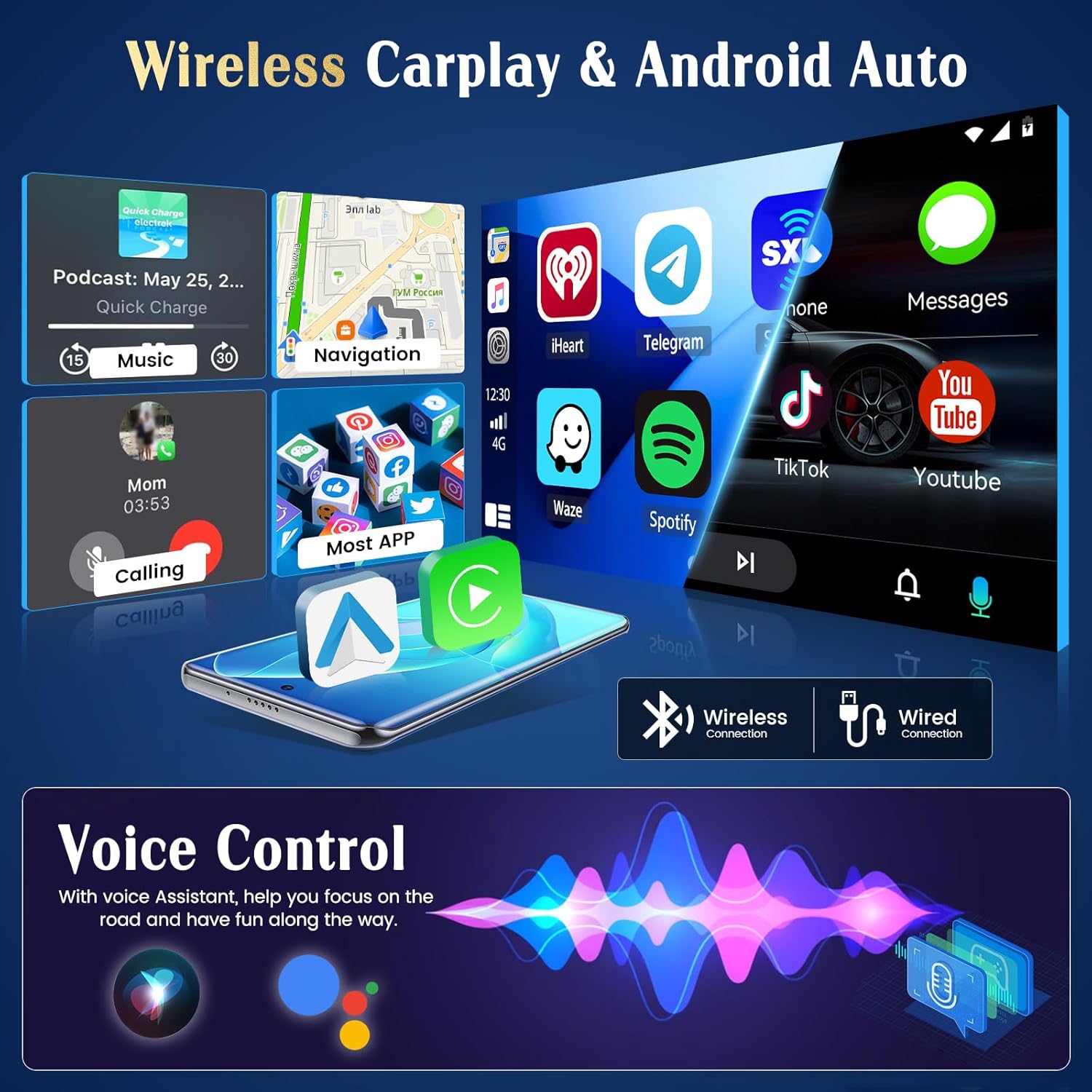
The unit supports both wireless and wired CarPlay and Android Auto. This feature integrates your smartphone's interface directly onto the car's display, allowing access to navigation, music, messages, and calls safely while driving.
- Connexion: Connect your iPhone via Bluetooth for wireless CarPlay or a USB cable for wired CarPlay. For Android phones, connect via Bluetooth for wireless Android Auto or a USB cable for wired Android Auto.
- Fonctionnalité: Once connected, your phone's compatible apps will appear on the autoradio screen.

5.3 Navigation GPS
The autoradio has an integrated GPS receiver and supports both online and offline maps. The pre-installed Herewego app allows you to download free offline maps for global navigation.
- Cartes en ligne : Requires a WiFi connection to access real-time traffic and map updates.
- Cartes hors ligne : Download maps in advance to navigate without an internet connection.


5.4 Connexion Wi-Fi
Connect the autoradio to a WiFi network (e.g., your phone's hotspot) to access online features.
- Téléchargements d'applications : Accédez au Google Play Store pour télécharger diverses applications.
- Online Browsing: Surfer le web, stream content, and use online services.

Radio FM/RDS 5.5 GHz
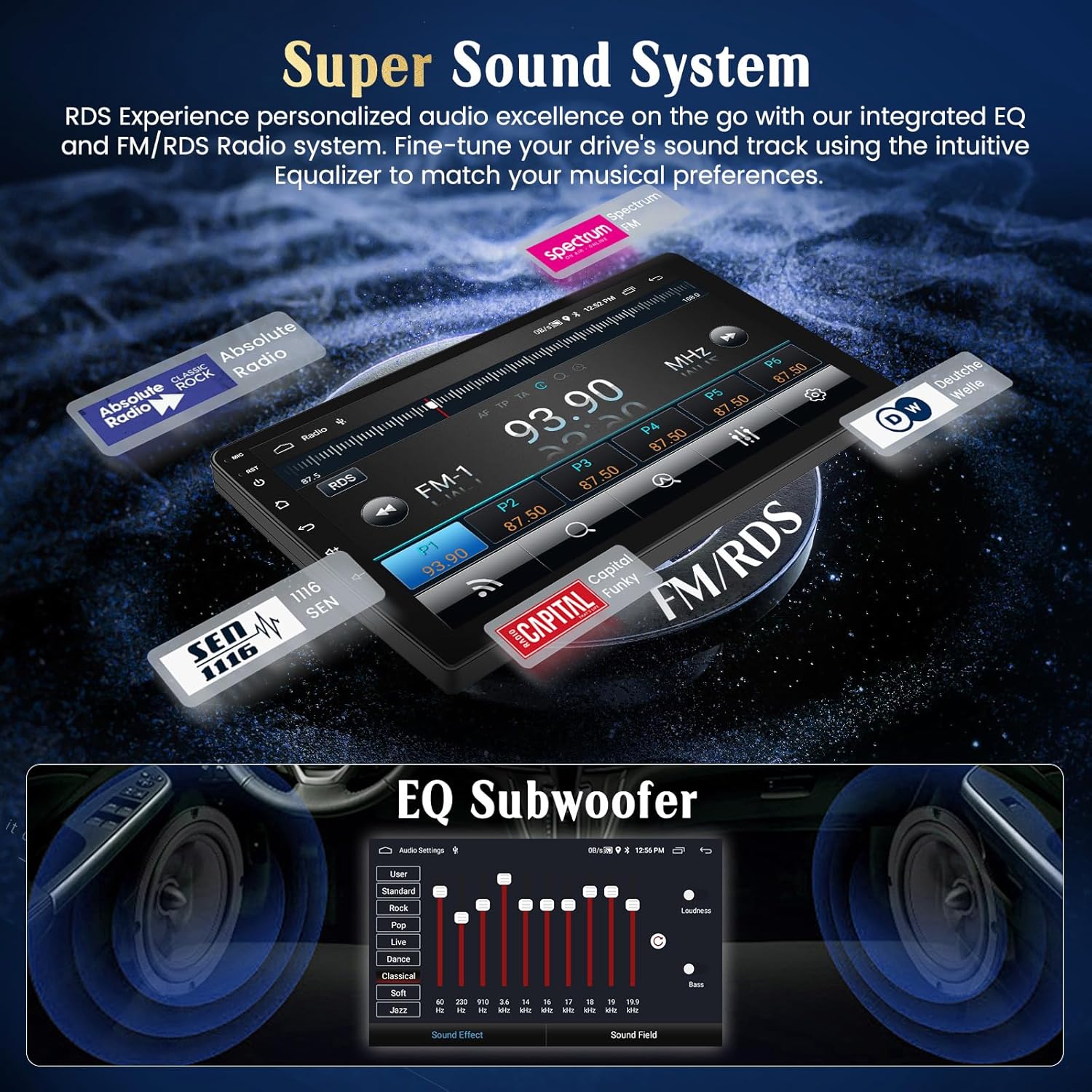
Tune into your favorite FM radio stations and enjoy real-time broadcast information via RDS (Radio Data System).
- Analyse automatique : Utilisez la fonction de balayage automatique pour trouver et enregistrer les stations disponibles.
- Réglage manuel: Manually adjust the frequency to specific stations.
5.6 Fonctionnalités Bluetooth
Connectez votre smartphone via Bluetooth pour passer des appels mains libres et écouter de la musique en streaming.
- Jumelage : Enable Bluetooth on your phone and search for the autoradio unit. Select it to pair.
- Appels mains libres : Make and receive calls directly from the touchscreen.
- Streaming audio: Diffusez la musique de votre téléphone via les haut-parleurs de la voiture.
5.7 Commande au volant
Cet appareil est compatible avec les commandes au volant d'origine de votre véhicule, vous permettant de gérer l'audio et d'autres fonctions sans lâcher le volant.
- Configuration: Access the 'Steering Wheel Control' settings in the system menu to map your vehicle's buttons to the desired functions (e.g., volume up/down, track skip, mode).

5.8 AHD Reversing Input (Backup Camera)
When your vehicle is shifted into reverse gear, the system automatically switches to the rear camera view, offrant une image claire pour faciliter le stationnement et les manœuvres.
- Caractéristiques: The supported AHD camera offers HD image quality, waterproof design, night vision, and a wide-angle view avec des règles de stationnement.


Système audio 5.9
Customize your audio experience with the integrated equalizer (EQ) and subwoofer output.
- Equalizer: Adjust various frequency bands to tailor the sound to your preferences.
- Sortie caisson de basses : Connectez un caisson de basses externe pour des basses améliorées.
5.10 Lien miroir du téléphone
Mirror your Android or iOS smartphone screen directly onto the autoradio display.
- Androïde: Connexion via USB ou Wi-Fi.
- iOS : Connexion via USB ou Wi-Fi.

5.11 Commande vocale intelligente
Utilize voice commands through Siri (for CarPlay) or Google Assistant (for Android Auto) to control various functions, keeping your hands on the wheel and eyes on the road.
- Activation : Activate voice control through your connected smartphone's interface.
- Commandes: Use commands for navigation, music playback, calls, and messages.

5.12 Thèmes d'interface utilisateur
Personalize your user interface with a selection of 28 different UI themes.
- Thèmes changeants : Long-press on an empty space on the desktop to access theme options and switch between different designs.

6. Entretien
- Nettoyage de l'écran : Utilisez un chiffon doux non pelucheux pour nettoyer l'écran tactile. Pour les taches tenaces, frottez légèrement.ampNettoyez le chiffon avec de l'eau ou un nettoyant adapté aux écrans. Évitez les produits chimiques agressifs.
- Mises à jour logicielles : Vérifiez régulièrement les mises à jour logicielles via les paramètres système ou le site du fabricant. website pour garantir des performances optimales et l'accès aux nouvelles fonctionnalités.
- Soins généraux: Avoid placing heavy objects on the unit or exposing it to direct sunlight for extended periods when parked.
7. Dépannage
If you encounter issues with your Hikity Autoradio, refer to the following common problems and solutions:
| Problème | Cause possible | Solution |
|---|---|---|
| L'unité ne s'allume pas. | Mauvaise connexion électrique, fusible grillé, câblage incorrect. | Check all power cables (B+, ACC, GND) for secure connection. Inspect vehicle fuses and the unit's fuse. Ensure correct 12V DC connection. |
| Pas de son. | Volume trop faible, mode muet activé, câblage des haut-parleurs incorrect, ampproblème de lifier. | Increase volume. Check if mute is active. Verify speaker connections. If using an external ampAmplificateur, vérifiez son alimentation et ses connexions. |
| Signal GPS perdu ou imprécis. | Antenne GPS obstruée ou mal positionnée, antenne défectueuse. | Assurez-vous que l'antenne GPS a un signal clair. view of the sky. Check antenna connection. Try repositioning the antenna. |
| CarPlay/Android Auto ne se connecte pas. | Bluetooth/USB connection issue, phone compatibility, app not updated. | Ensure Bluetooth is on and paired. Try a different USB cable. Update phone OS and CarPlay/Android Auto apps. Restart both phone and autoradio. |
| La caméra arrière ne s'affiche pas. | Camera not powered, incorrect camera input connection, reverse trigger wire issue. | Check camera power supply. Verify camera input cable is securely connected. Ensure the reverse trigger wire is correctly connected to the vehicle's reverse light circuit. |
| Les commandes au volant ne fonctionnent pas. | Canbus connection issue, incorrect configuration. | Ensure Canbus decoder is correctly installed and connected. Re-enter the steering wheel control learning interface and re-map buttons. |
Si le problème persiste après avoir essayé ces solutions, veuillez contacter le service client de Hikity.
8. Spécifications
| Fonctionnalité | Détail |
|---|---|
| Marque | Hikité |
| Numéro de modèle | ManJu-A7195A3195A4MI2 |
| Taille de l'écran | 9 pouces |
| Résolution de l'écran | 1024*600 |
| Système opérateur | Android 13 |
| Processeur | Quad Core |
| BÉLIER | 2 Go |
| ROM (Stockage interne) | 64 Go |
| CarPlay / Android Auto | Sans fil et filaire |
| Navigation GPS | Integrated receiver, supports online/offline maps |
| Connectivité WiFi | Oui |
| Bluetooth | Hands-free calls, audio streaming |
| Radio | FM avec RDS |
| Ports USB | 2 |
| Appareils compatibles | Smartphone |
| Caractéristiques spéciales | EQ settings, Subwoofer output, Steering Wheel Control, AHD Reversing Input, Phone Mirror Link, Voice Control, 28 UI Themes |
9. Garantie et assistance
9.1 Informations sur la garantie
This Hikity Autoradio comes with a Garantie constructeur d'un an. Please retain your proof of purchase for warranty claims. The warranty covers manufacturing defects and malfunctions under normal use. It does not cover damage caused by improper installation, misuse, accidents, or unauthorized modifications.
9.2 Assistance clientèle
Pour toute assistance technique, dépannage ou question relative à la garantie, veuillez contacter le service client de Hikity :
- E-mail: hikityservices@163.com
- Ressources en ligne : Visitez le site officiel de Hikity webSite regroupant les FAQ, les manuels mis à jour et les téléchargements de logiciels.