
Introduction
Thank you for choosing the YOVDA W2 4-Channel Dash Cam. This manual provides detailed instructions for the proper installation, operation, and maintenance of your device. Please read this manual thoroughly before use to ensure optimal performance and safety.
The YOVDA W2 dash cam is designed to enhance driving safety by providing comprehensive 360-degree video surveillance around and inside your vehicle. It features four 1080P cameras, advanced night vision, GPS tracking, Wi-Fi connectivity, and a 24-hour parking monitoring system.
Produit terminéview
Caractéristiques principales
- Enregistrement sur 4 canaux : Simultaneously records front, rear, left, and right views in 1080P resolution.
- 360° Adjustable Cameras: All four cameras can be rotated to capture desired angles.
- Vision nocturne supérieure : F1.8 aperture, 170° ultra-wide angle, 4 infrared lights, and WDR technology for clear recordings in low-light conditions.
- GPS intégré : Records real-time speed, time, and route location, viewable on Google Maps via the GPS player.
- Wi-Fi intégré et contrôle par application : Connect to your smartphone via Wi-Fi to view, manage, and download recorded videos.
- Capteur G : Automatically detects collisions and locks current video files pour éviter l'écrasement.
- Enregistrement en boucle : Écrase le plus ancien déverrouillé files when the memory card is full, ensuring continuous recording. Supports up to 128GB Micro SD card (64GB card included).
- Surveillance du stationnement 24 heures sur 24 : Provides continuous surveillance when the vehicle is parked (requires optional hardwire kit).
- Super condensateur : Enhances durability and extends the device's lifespan.

Cette image offre une vue d'ensemble.view of the YOVDA W2 dash cam, highlighting its four cameras for comprehensive 360-degree coverage and the built-in G-Sensor feature.
Qu'y a-t-il dans la boîte
- 1 x YOVDA W2 4-Channel Dash Cam
- 1 x 64GB Carte Micro SD
- Câble d'alimentation (chargeur de voiture)
- Support de montage (ventouse)
Note: A hardwire kit for the 24-hour parking monitor is sold separately.
Installation
1. Insertion de la carte Micro SD
Before inserting or removing the Micro SD card, ensure the dash cam is powered off. The device supports Micro SD cards up to 128GB. For optimal performance, use a U3 or higher speed card.
After inserting the card, it is recommended to format it directly within the dash cam's settings menu. This ensures compatibility and prepares the card for recording.
2. Montage de la Dash Cam
The YOVDA W2 dash cam typically uses a suction cup mount for installation on the windshield. Choose a location that does not obstruct your view de la route.
- Nettoyez la surface du pare-brise à l'endroit où vous comptez installer la caméra embarquée.
- Fixez le support à ventouse à la caméra embarquée.
- Press the suction cup firmly onto the windshield, ensuring it is in a flat position and securely attached.
- Adjust the angle of the dash cam and its individual cameras to cover the desired viewing areas (front, rear, left, right, and interior).
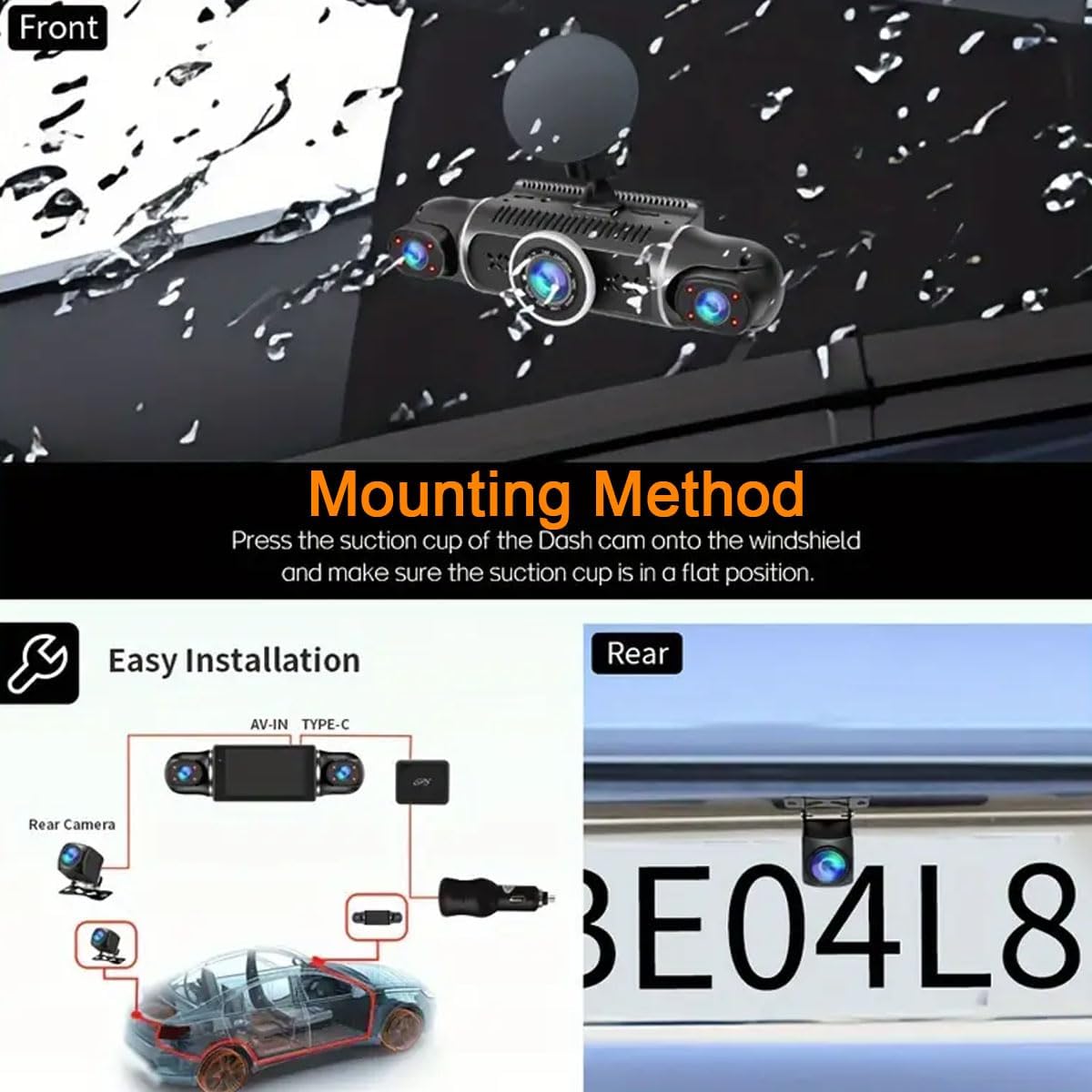
This image illustrates the suction cup mounting method for the dash cam on the windshield and a wiring diagram for connecting the front and rear cameras, along with the power source.
3. Connexion de l'alimentation
Connect the provided power cable to the dash cam and plug the other end into your vehicle's 12V power outlet (cigarette lighter socket). The dash cam will typically power on automatically when the vehicle starts and power off when the engine is turned off.
Mode d'emploi
Fonctionnement de base
- Marche/Arrêt : The dash cam powers on automatically with vehicle ignition and powers off when the engine is off. Manual power buttons may also be present for specific functions.
- Enregistrement: Une fois allumée, la caméra embarquée démarre automatiquement l'enregistrement en boucle.
- Afficher: L'écran IPS de 3.0 pouces affiche en direct views des caméras. Vous pouvez basculer entre les caméras views through the device's menu.
Fonctionnalités avancées
Enregistrement en boucle
The dash cam continuously records video in segments. When the Micro SD card reaches its maximum capacity, the oldest unlocked video files are automatically overwritten to make space for new recordings. This ensures uninterrupted recording.
G-Sensor (Collision Detection)
En cas de choc ou de collision soudaine, le capteur G intégré détecte automatiquement l'événement et verrouille la vidéo en cours. fileCela empêche la nourrituretage pour éviter d'être écrasé par l'enregistrement en boucle, préservant ainsi des preuves essentielles.

This image illustrates the G-Sensor feature, which locks video footage during a collision, and the loop recording function, which continuously records over older files.
Surveillance du stationnement 24 heures sur 24
To activate the 24-hour parking monitoring feature, an optional hardwire kit (not included) is required. This kit provides continuous power to the dash cam, allowing it to record events even when the vehicle is parked and the engine is off. The system typically uses motion detection or G-sensor triggers to record parking incidents.
Vision nocturne
The dash cam is equipped with advanced night vision capabilities, including an F1.8 large aperture, 4 infrared lights, and WDR (Wide Dynamic Range) technology. This allows for clear video recording in low-light conditions, both inside and outside the vehicle.

This image highlights the dash cam's excellent night vision, showing a clear view of a city street at night, contrasting with typical low-light and dark conditions.
GPS intégré
The integrated GPS module records your vehicle's speed, time, and geographical location. This data can be viewed on a map using a dedicated GPS player software on your computer, providing a detailed record of your routes.
Built-in Wi-Fi and App Control
Connect your smartphone to the dash cam via Wi-Fi using the dedicated mobile application. This allows you to:
- View vivre footage des caméras.
- Manage recorded videos.
- Download videos directly to your smartphone for easy sharing or backup.
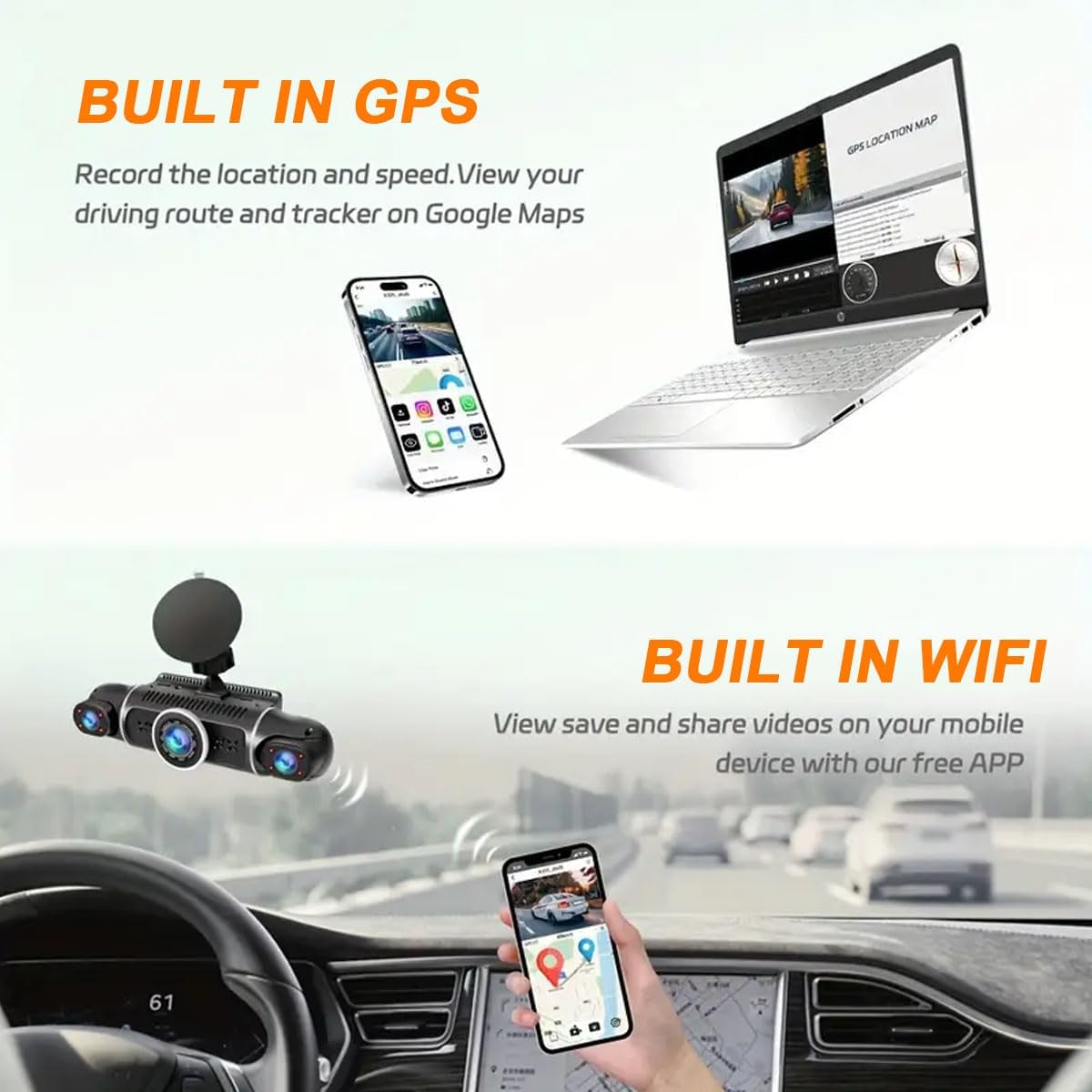
This image illustrates the built-in GPS feature, showing a map with a driving route on a laptop, and the built-in Wi-Fi feature, showing the dash cam app interface on a smartphone.
Refer to the app's instructions for detailed connection and usage procedures. Ensure the app is updated for best performance.
Entretien
- Formatage de la carte SD : Regularly format the Micro SD card (e.g., once a month) within the dash cam's settings to maintain optimal recording performance and prevent data corruption. Back up any important files avant le formatage.
- Nettoyage: Utilisez un chiffon doux et sec pour nettoyer l'objectif et l'écran de la caméra embarquée. Évitez d'utiliser des nettoyants abrasifs ou des solvants.
- Température: Operate the dash cam within the specified temperature range of -20℃ to 65℃. Extreme temperatures can affect performance and lifespan.
- Mises à jour du micrologiciel : Vérifiez le fabricant webConsultez le site ou l'application pour connaître les mises à jour du micrologiciel disponibles et vous assurer que votre caméra embarquée bénéficie des dernières fonctionnalités et corrections de bugs.
Dépannage
| Problème | Cause possible | Solution |
|---|---|---|
| La caméra embarquée ne s'allume pas. | Pas d'alimentation électrique ; câble d'alimentation défectueux ; la prise 12 V du véhicule ne fonctionne pas. | Check power cable connection. Test the 12V outlet with another device. Ensure vehicle ignition is on. |
| L'enregistrement s'arrête ou se fige. | SD card is full; SD card error; incompatible SD card; faulty SD card. | Format the SD card. Replace with a new, high-speed (U3 or higher) Micro SD card (max 128GB). |
| Mauvaise qualité vidéo la nuit. | Lens is dirty; extreme low light conditions. | Clean the camera lenses. Ensure WDR is enabled in settings. |
| Problèmes de connexion Wi-Fi. | Incorrect app usage; interference; outdated app. | Ensure Wi-Fi is enabled on the dash cam and your phone. Restart both devices. Update the mobile app. |
| Le système de surveillance du parking ne fonctionne pas. | Kit de câblage non installé ; paramètres incorrects. | Install the optional hardwire kit. Check parking monitor settings in the dash cam menu. |
Caractéristiques
| Fonctionnalité | Détail |
|---|---|
| Numéro de modèle | W2 |
| Résolution de capture vidéo | 4 x 1080P (Front, Rear, Left, Right) |
| Taille de l'écran | Écran IPS 3.0 pouces |
| Domaine de View | 170° (Front/Rear), 140° (Left/Right Interior) |
| Connectivité | Wi-Fi, GPS |
| Caractéristiques spéciales | 360° View, Loop Recording, WDR, Night Vision, Motion Detection, G-Sensor, Parking Mode, App Control |
| Stockage | Supports Micro SD card up to 128GB (U3 or higher recommended, 64GB included) |
| Température de fonctionnement | -20℃ à 65℃ (-4°F à 149°F) |
| Source d'énergie | 1 Lithium Ion battery (included), Vehicle 12V power outlet |
| Dimensions du produit | 6.9 x 1.6 x 1.9 pouces |
| Poids de l'article | 15.8 onces |
| Type de montage | Support de ventouse |
Garantie et assistance
For warranty information and technical support, please refer to the official YOVDA website or contact YOVDA customer service directly. Contact details are typically provided on the product packaging or within the mobile application.
You can also reach out to the seller through the platform where the product was purchased for assistance.