
1. Introduction
The PEAKMETER PM2016S is a compact and intelligent digital clamp meter designed for accurate electrical measurements. This instrument features a liquid crystal display with a maximum count value of 5999 and a backlight function for improved visibility in various environments. It offers a range of measurement functions with automatic range selection, making it suitable for both beginners and experienced users. The PM2016S can measure AC and DC voltage, AC current, resistance, frequency, and also includes continuity testing, Non-Contact Voltage (NCV) detection, and V/Ω/A auto-scan capabilities. Its portable design ensures ease of use and convenience.
2. Consignes de sécurité
WARNING: To avoid electric shock or personal injury, read and understand all instructions and safety information before using this instrument.
- Vérifiez toujours que l'instrument est en bon état de fonctionnement avant utilisation.
- Ne pas appliquer plus que le volume nominal.tage, as marked on the instrument, between the terminals or between any terminal and earth ground.
- Soyez prudent lorsque vous travaillez avec des volumestages au-dessus de 30 V CA RMS, 42 V crête ou 60 V CC. Ces voltagils présentent un risque d'électrocution.
- N’utilisez pas l’instrument s’il semble endommagé ou si son isolation est compromise.
- Ensure the test leads are in good condition, without any cracks or breaks in the insulation.
- Débranchez toujours les cordons de test du circuit avant de modifier les fonctions.
- Remplacez immédiatement les piles dès que le voyant de batterie faible s'allume afin de garantir des mesures précises.
- Respectez les codes de sécurité locaux et nationaux.
This instrument complies with EN61010-1, EN61010-2-033, EN61326, CAT. III 600V safety ratings.
3. caractéristiques du produit
- High Quality Jaw Head: Durable and precise clamp mechanism for current measurement.
- Clear LCD Display and Backlight: Easy-to-read 6000-count display with backlight for visibility in various lighting conditions.
- Utilisation facile : Simple, intuitive controls, often requiring just one click for common functions.
- Réglage automatique de la distance : Sélection automatique de la plage de mesure appropriée, simplifiant ainsi l'utilisation.
- Maintien de données: Fige la lecture affichée pour faciliter l'enregistrement.
- Vol sans contacttage (NCV) Détection : Détecte en toute sécurité le volume CAtage sans contact direct.
- V/Ω/A Auto Scan: Identifie et mesure automatiquement le vol.tage, resistance, or current.
- Test de continuité : Vérifie la continuité électrique à l'aide d'un avertisseur sonore.
- Mesure de fréquence: Measures frequency via clamp ou voltage entrée.
- Compact et léger : Conception portable pour une utilisation simplifiée.
- Auto Off: Automatically shuts down after 10 minutes of inactivity to conserve battery life.
4. Contenu du colis

Le colis comprend généralement les éléments suivants :
- Boîte couleur (emballage)
- PEAKMETER PM2016S Digital Clamp Mètre
- Cordons de test (rouge et noir)
- AAA Batteries (2x 1.5V)
- Manuel d'utilisation
Description: This image displays the complete contents of the PEAKMETER PM2016S Digital Clamp Multimeter package, including the device itself, test leads, batteries, and the user manual, all presented within its retail packaging.
5. Installation
5.1 Installation de la batterie
The PM2016S requires two 1.5V AAA batteries. To install or replace batteries:
- Assurez-vous que le compteur est éteint.
- Repérez le couvercle du compartiment à piles à l'arrière de l'appareil.
- Utilisez un tournevis pour ouvrir le compartiment à piles.
- Insert the two AAA batteries, observing the correct polarity (+ and -).
- Replacez le couvercle du compartiment des piles et fixez-le avec la vis.
5.2 Connexion des cordons de test
Pour voltage, resistance, frequency (voltage), and continuity measurements, connect the test leads:
- Insérez le fil de test noir dans la prise d'entrée « COM » (commune).
- Insérez le fil de test rouge dans la prise d'entrée « VΩ ».
6. Mode d'emploi
The PM2016S features an auto-ranging function, simplifying most measurements. Press the red power button to turn the meter on or off. The meter will typically start in auto-scan mode (V/Ω/A Auto Scan).
6.1 Volume CA/CCtage Mesure
- Connectez les cordons de test comme décrit dans la section 5.2.
- Turn on the meter. It will automatically detect AC or DC voltage.
- Touchez les points du circuit où vous souhaitez mesurer le volume avec les sondes de test rouge et noire.tage.
- Lire le voltage valeur sur l'écran LCD.
Description: This video demonstrates the unboxing of the PEAKMETER PM2016S and its accessories, followed by a practical demonstration of measuring AC voltage using the test leads. The user connects the leads to a power outlet and the meter displays the voltage lecture.
6.2 Mesure du courant alternatif (Clamp Une fonction)
- Ensure the meter is on.
- Appuyez sur la touche clamp déclencher l'ouverture des mâchoires.
- Enclose a single conductor (not a bundle of wires) within the jaws. Ensure the jaws are fully closed.
- The meter will display the AC current reading.
Description: This video demonstrates the AC current measurement function of the PEAKMETER PM2016S. The user clamps the meter around a power cable connected to an appliance (kettle), and the meter displays the current draw.
6.3 Mesure de fréquence
The PM2016S can measure frequency in two ways:
- Via Test Leads (Voltage Frequency): En voltage measurement mode, the meter can display frequency. Press the "Hz/NCV" button to toggle to frequency display.
- Via Clamp (Current Frequency): Lors de la mesure du courant alternatif avec le clamp, the meter can also display the frequency of the current. Press the "Hz/NCV" button to toggle to frequency display.

Description: This image shows the clear LCD display of the PM2016S, highlighting its backlight feature and the various measurement indicators, including frequency (Hz).
6.4 volumes sans contacttage (NCV) Détection
- Press the "Hz/NCV" button to activate NCV mode. The display will show "NCV".
- Move the top end of the meter near a live AC voltagla source.
- The meter will beep and the NCV indicator will light up, with the frequency of beeps and light increasing as it gets closer to the voltagla source.
Description: This video demonstrates the NCV (Non-Contact Voltage) function of the PEAKMETER PM2016S. The user activates NCV mode and brings the meter near a power outlet, showing the audible and visual alerts when voltage est détecté.
6.5 Essai de continuité
- Connectez les cordons de test comme décrit dans la section 5.2.
- The meter will automatically enter continuity mode if resistance is low.
- Mettez les sondes de test en contact avec les deux points dont vous souhaitez vérifier la continuité.
- If there is continuity (resistance less than 30Ω), the buzzer will sound.
6.6 Maintien des données et rétroéclairage
- Maintien de données: Press the "HOLD" button (often combined with the backlight button) to freeze the current reading on the display. Press again to release.
- Rétroéclairage : Press and hold the "HOLD" button (or a dedicated backlight button if present) to turn the backlight on or off.

Description: This image highlights the user-friendly design of the PM2016S, showing the main power button and other function buttons, emphasizing its easy operation.
7. Entretien
7.1 Nettoyage
Essuyez le boîtier avec la publicitéamp Nettoyer avec un chiffon et un détergent doux. Ne pas utiliser de produits abrasifs ni de solvants. Maintenir les bornes d'entrée propres et sèches.
7.2 Remplacement de la batterie
When the low battery indicator appears on the display, replace the batteries as described in Section 5.1. Remove batteries if the meter is not used for an extended period to prevent leakage.
8. Dépannage
- Aucun affichage/compteur ne s'allume pas : Vérifiez l'installation des piles et assurez-vous qu'elles ne sont pas déchargées. Remplacez-les si nécessaire.
- Lectures inexactes : Ensure test leads are properly connected. Check for damaged leads. Verify the correct measurement function is selected (though auto-ranging minimizes this). Ensure the clamp jaws are fully closed for current measurements.
- Indication « OL » ou de surcharge : The measured value exceeds the meter's range. Select a higher range if available, or ensure the input is within the meter's specifications.
- Aucune détection NCV : Ensure NCV mode is active. The NCV sensor is typically at the top of the clamp head; ensure it is close to the AC source.
9. Spécifications
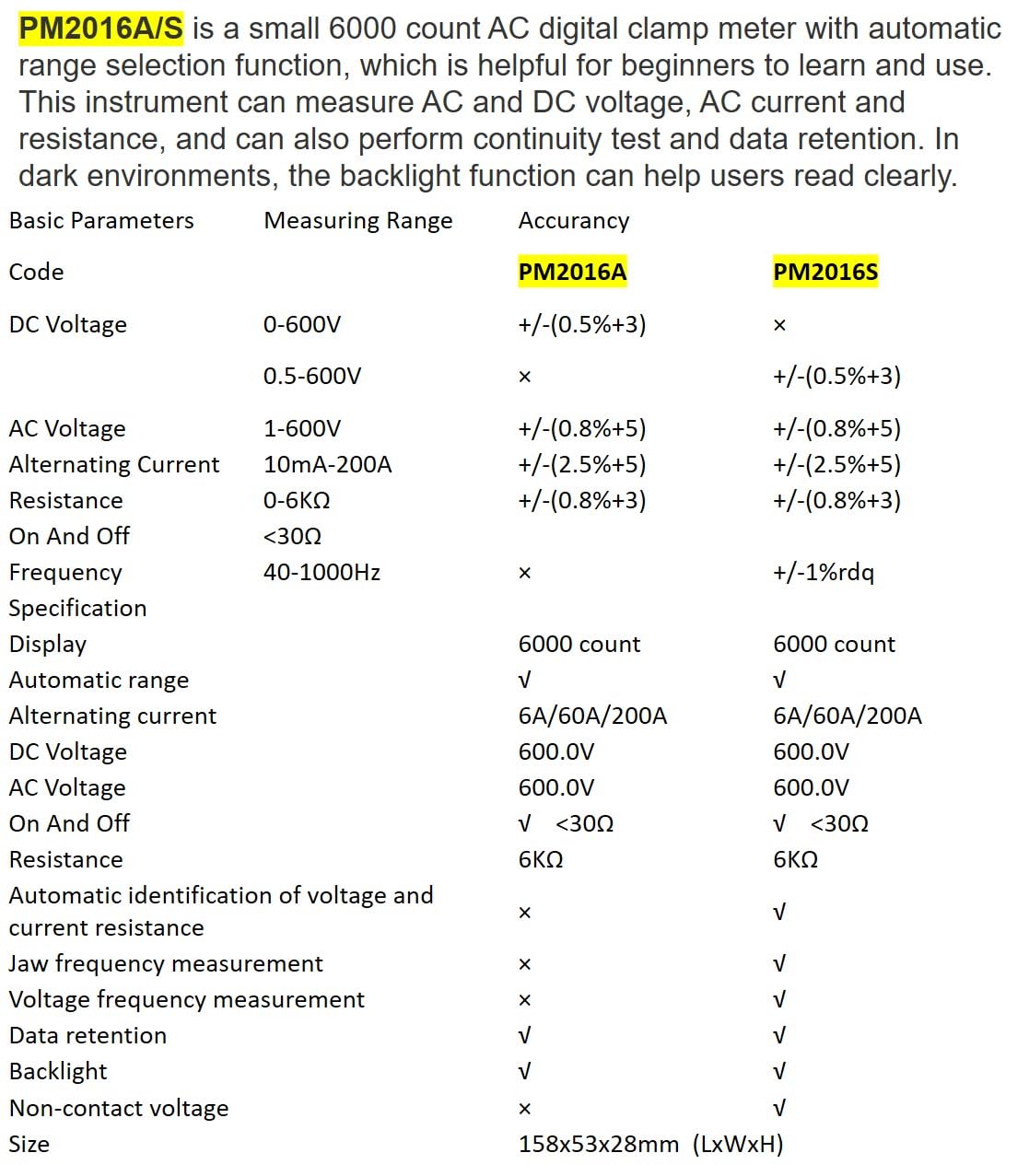
Description: This image presents a comprehensive table detailing the basic parameters, measuring ranges, and accuracy for both the PM2016A and PM2016S models, including features like display count, auto-ranging, and NCV.
| Paramètre | Range (PM2016S) | Accuracy (PM2016S) |
|---|---|---|
| Vol CCtage | 0.5~600V | ±(0.5%+3) |
| Vol ACtage | 1.0~600V | ±(0.8%+5) |
| Courant alternatif | 6A/60A/200A | ±(2.5%+8) |
| Résistance | 0~6kΩ | ±(0.8%+3) |
| Fréquence | 60 Hz à 1000 Hz | ±(1.0%+5) |
| Afficher | 6000 comptes | |
| Gamme automatique | Oui | |
| Continuité | <30Ω | |
| V/Ω/A Auto Scan | Oui | |
| Frequency (Clamp) | Oui | |
| Frequency (Voltage) | Oui | |
| Conservation des données | Oui | |
| Rétroéclairage | Oui | |
| NCV | Oui | |
| Alimentation électrique | 2 piles AAA de 1.5 V | |
| Poids net | 122.4g (sans batteries) | |
| Taille | 158 mm x 55 mm x 29 mm | |
| Taille de la mâchoire | Ø20mm | |
| Cote de sécurité | EN61010-1, EN61010-2-033, EN61326, CAT. III 600 V | |

Description: This image provides a visual representation of the physical dimensions of the PEAKMETER PM2016S, including its length, width, and jaw opening size, along with its weight.
10. Garantie et assistance
The PEAKMETER PM2016S Digital Clamp Multimeter comes with a Garantie de 1 ans à compter de la date d'achat. Cette garantie couvre les défauts de matériaux et de fabrication dans des conditions normales d'utilisation.
For technical support, warranty claims, or service inquiries, please contact your retailer or the manufacturer directly. Keep your purchase receipt as proof of purchase for warranty purposes.