
1. Introduction
Merci pour votre achatasing the Edifier R990BT Bluetooth Computer Speakers. These 2.0 active bookshelf speakers are designed to provide high-quality audio for your PC, smartphone, tablet, and other compatible devices. Featuring Bluetooth V5.4 connectivity and dual RCA inputs, the R990BT offers versatile audio options in a classic MDF enclosure. Please read this manual thoroughly to ensure proper setup and optimal performance of your speakers.
2. Contenu du colis
Veuillez vous assurer que tous les articles sont présents dans le colis :
- Edifier R990BT Active Bookshelf Speakers (1 Pair)
- Câble de connexion haut-parleur
- Câble audio RCA vers RCA
- Câble audio 3.5 mm vers RCA
- Câble d'alimentation
- Guide de démarrage rapide
3. Installation
3.1 Placement des enceintes
Place the speakers on a stable, flat surface such as a desk or shelf. For optimal stereo imaging, position the speakers equidistant from your listening position, forming an equilateral triangle. Ensure there is adequate space behind the speakers for cable connections and ventilation.

Image: Edifier R990BT speakers positioned on a desk, demonstrating typical placement for computer use.
3.2 Connexion des haut-parleurs
- Connect the Passive Speaker: Use the included speaker connection cable to link the active speaker (with controls) to the passive speaker. Ensure the correct polarity (+ to + and - to -) for proper sound reproduction.
- Connexion à l'alimentation : Plug the power cable into the active speaker's power input and then into a wall outlet.
3.3 Connexion des sources audio
The R990BT speakers support both wired (RCA) and wireless (Bluetooth) connections.
Connexion filaire (RCA)
The speakers feature two sets of RCA input ports (Line In 1 and Line In 2) for connecting two different wired audio devices simultaneously.
- Use the RCA to RCA cable to connect devices with RCA outputs (e.g., CD player, turntable with pre-amp).
- Use the 3.5mm to RCA cable to connect devices with a 3.5mm audio jack (e.g., computer, smartphone, tablet).

Image: Close-up of the rear panel of the active speaker, highlighting the dual RCA input ports (Line In 1 and Line In 2) and the power input.
Connexion Bluetooth
The R990BT features Bluetooth V5.4 for wireless audio streaming.
- Allumez les haut-parleurs.
- Press the volume/input knob on the rear panel to select the Bluetooth input. The indicator light will flash blue.
- Sur votre appareil audio (smartphone, tablette, ordinateur), activez le Bluetooth et recherchez les appareils disponibles.
- Select "EDIFIER R990BT" from the list to pair. The indicator light will turn solid blue once connected.

Image: A single Edifier R990BT speaker on a desk next to a laptop, symbolizing the ease of Bluetooth connectivity.
4. Mode d'emploi
4.1 Mise sous/hors tension
The power switch is located on the rear panel of the active speaker. Flip the switch to the 'ON' position to power on the speakers. Flip to 'OFF' to power off.
4.2 Contrôle du volume
The large knob on the rear panel of the active speaker controls the master volume. Rotate clockwise to increase volume and counter-clockwise to decrease volume.
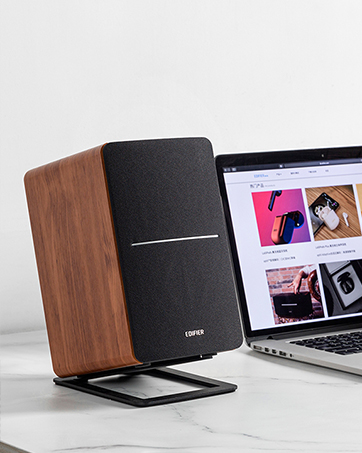
Image : détaillée view of the multi-function control knob on the rear of the speaker, used for volume adjustment and input selection.
4.3 Sélection d'entrée
Press the volume/input knob on the rear panel to cycle through the available audio inputs: Line In 1, Line In 2, and Bluetooth. The indicator light will change color or flash to indicate the selected input mode.
- Line In 1 / Line In 2: Solid green or red indicator (depending on model/firmware).
- Bluetooth : Flashing blue (pairing mode) or solid blue (connected).
4.4 Using the Edifier ConneX App
For enhanced control and customization, download the Edifier ConneX mobile application. The app allows you to adjust equalization settings and access additional features for your R990BT speakers.
- Download the Edifier ConneX app from your device's app store.
- Ensure your speakers are powered on and connected via Bluetooth to your mobile device.
- Open the app and follow the on-screen instructions to connect to your R990BT speakers.

Image: The official logo for the Edifier ConneX mobile application.
5. Entretien
5.1 Nettoyage
Pour préserver l'apparence et les performances de vos haut-parleurs :
- Wipe the speaker cabinets with a soft, dry cloth.
- N’utilisez pas de nettoyants liquides, d’aérosols ou de produits chimiques abrasifs, car ils pourraient endommager la finition ou les composants internes.
- Gently brush dust from the speaker grilles using a soft brush or vacuum cleaner with a brush attachment.
5.2 Stockage
If storing the speakers for an extended period, ensure they are powered off and disconnected from the power source. Store them in a cool, dry place away from direct sunlight and extreme temperatures.
6. Dépannage
Si vous rencontrez des problèmes avec vos enceintes Edifier R990BT, veuillez consulter les problèmes et solutions courants suivants :
| Problème | Cause possible | Solution |
|---|---|---|
| Pas de son |
|
|
| Son déformé |
|
|
| Bluetooth not connecting/disconnecting |
|
|
| Difficulty switching inputs |
|
|
7. Spécifications
Detailed technical specifications for the Edifier R990BT speakers:
- Nom du modèle : R990BT
- Type de haut-parleur : Bibliothèque
- Type de montage : Shelf Mount/Tabletop Mount
- Matériel: MDF (panneau de fibres à densité moyenne)
- Technologie de connectivité: Bluetooth V5.4, Wired (Dual RCA)
- Mode de sortie audio : Stéréo (2.0)
- Puissance de sortie maximale du haut-parleur : 24 watts (RMS)
- Diamètre du haut-parleur : 4 pouces
- Diamètre du tweeter : 1 pouces
- Réponse en fréquence : 18 KHz (Upper limit, typical for compact speakers)
- Rapport signal sur bruit: 85 dB
- Méthode de contrôle : Touch (via rear knob)
- Source d'alimentation : Corded Electric (100-240V ~ 50/60Hz)
- Dimensions du produit : 11.5"D x 7.5"W x 17"H (per speaker, approximate)
- Poids de l'article : 7.94 livres (par haut-parleur, environ)
- Couleur: Noir
- Appareils compatibles : Devices with Bluetooth technology, devices with RCA or 3.5mm audio output.
8. Garantie et assistance
8.1 Informations sur la garantie
The Edifier R990BT speakers come with a Limited Warranty. Please refer to the warranty card included in your package or visit the official Edifier webConsultez le site pour connaître les conditions générales détaillées relatives à la garantie de votre produit.
8.2 Assistance clientèle
For technical assistance, troubleshooting, or general inquiries, please contact Edifier customer support. Contact details can typically be found on the official Edifier websur le site ou dans le guide de démarrage rapide de votre produit.
Support en ligne: Visite www.edifier.com Pour les questions fréquentes, les ressources d'assistance et les informations de contact.