
Informations importantes sur la sécurité
Veuillez lire attentivement toutes les instructions avant le montage et l'utilisation. Conservez ce manuel pour toute consultation ultérieure.
- This product has a maximum weight recommendation of 350 LBS (158 kg). Do not exceed this weight limit.
- Improper assembly or use may lead to instability or malfunction, potentially causing injury.
- To avoid health issues associated with prolonged sitting, take regular breaks and adjust your posture during extended use.
- Avant utilisation, assurez-vous que toutes les vis et connexions sont bien serrées et vérifiez régulièrement qu'elles ne sont pas desserrées.
Contenu du colis
Veuillez vérifier que tous les composants sont présents avant de commencer l'assemblage. Si des pièces sont manquantes ou endommagées, veuillez contacter le service client.
- Accoudoirs (2)
- Roulettes (5)
- Vérin à gaz (1)
- Appui-tête (1)
- Guide de l'utilisateur (1)
- Assembly Tools (1 set)
- Chair Base (1)
- Coussin de siège (1)
- Dossier (1)

Figure 1 : Example of a caster wheel, part of the chair's base assembly.
Configuration et assemblage
The FLEXISPOT OC4 Lite chair is designed for straightforward assembly. A detailed user manual with step-by-step instructions and all necessary tools are included in the package. Assembly can typically be completed in approximately 30 minutes.
- Déballer les composants : Retirez soigneusement toutes les pièces de leur emballage et disposez-les sur une surface propre et plane.
- Fixez les roulettes à la base : Insert the five caster wheels into the holes on the chair base until they click securely into place.
- Insérer le vérin à gaz : Insérez le vérin à gaz dans l'orifice central du pied de la chaise.
- Assembler l'assise et le dossier : Follow the specific instructions in the included user guide to attach the backrest to the seat cushion and then to the chair mechanism.
- Fixer l'appui-tête : Secure the headrest to the top of the backrest.
- Connect to Gas Lift: Placez soigneusement l'assise et le dossier assemblés sur le vérin à gaz.
- Vérifications finales : Ensure all connections are tight and the chair is stable before use.
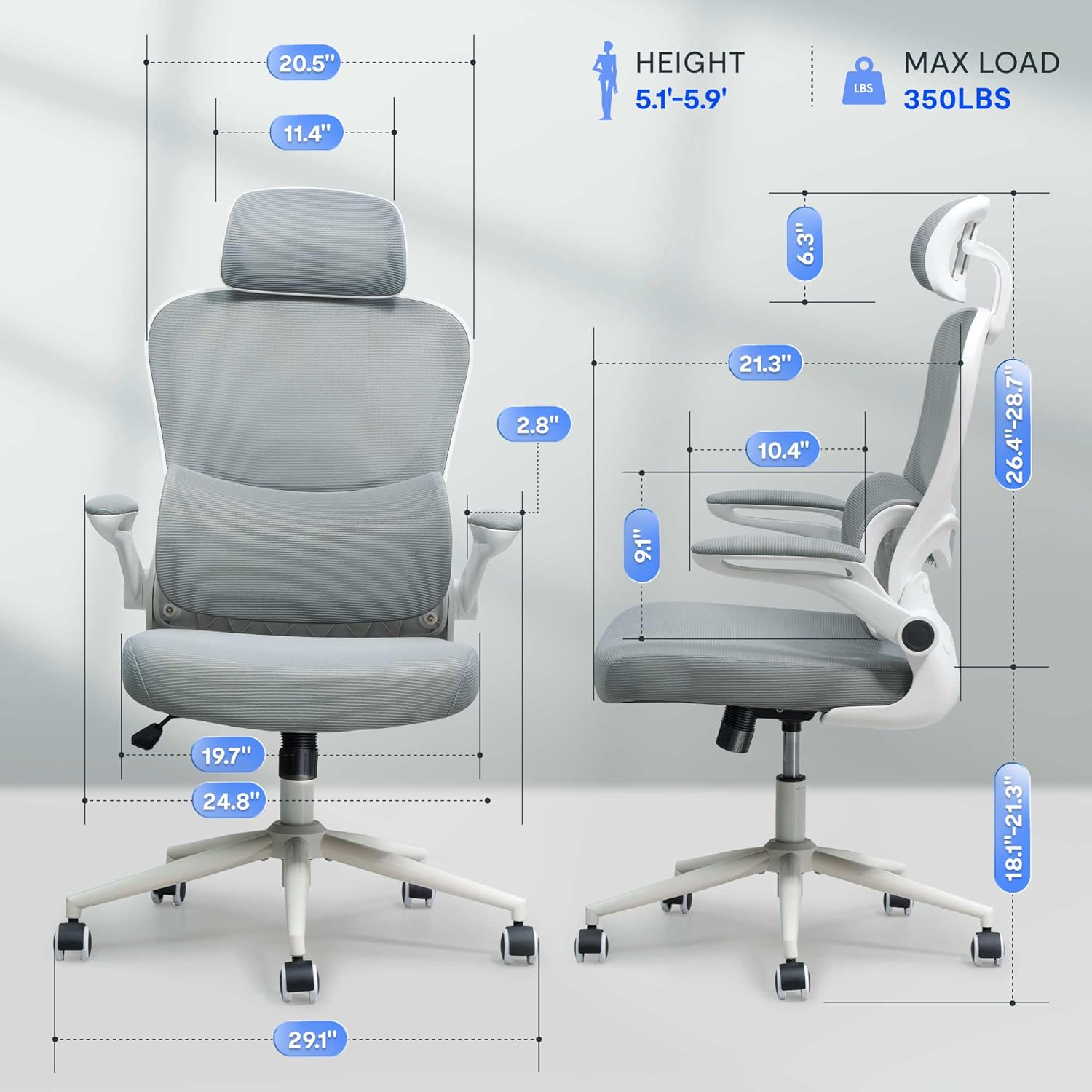
Figure 2 : Assembled chair with key dimensions for reference.
Mode d'emploi
The FLEXISPOT OC4 Lite chair offers multiple adjustment points to customize your seating experience for optimal comfort and support.
1. Réglage de la hauteur du siège
To adjust the seat height, locate the lever on the right side beneath the seat. Pull the lever up while seated to lower the seat, or pull it up while standing to raise the seat. Release the lever at the desired height.
2. Tilt Function and Tension Control
The chair features a tilt function allowing the backrest and seat to recline together. Use the lever on the left side beneath the seat to lock or unlock the tilt. The tilt tension knob, located at the front center beneath the seat, can be rotated to adjust the resistance of the tilt mechanism.

Figure 3 : Adjusting the chair's tilt angle and tension.
3. Support lombaire réglable
The chair includes adjustable lumbar support that adapts to your waist movement, providing dynamic support. The lumbar support can be adjusted vertically by sliding it up or down along the backrest frame to align with the natural curve of your spine.
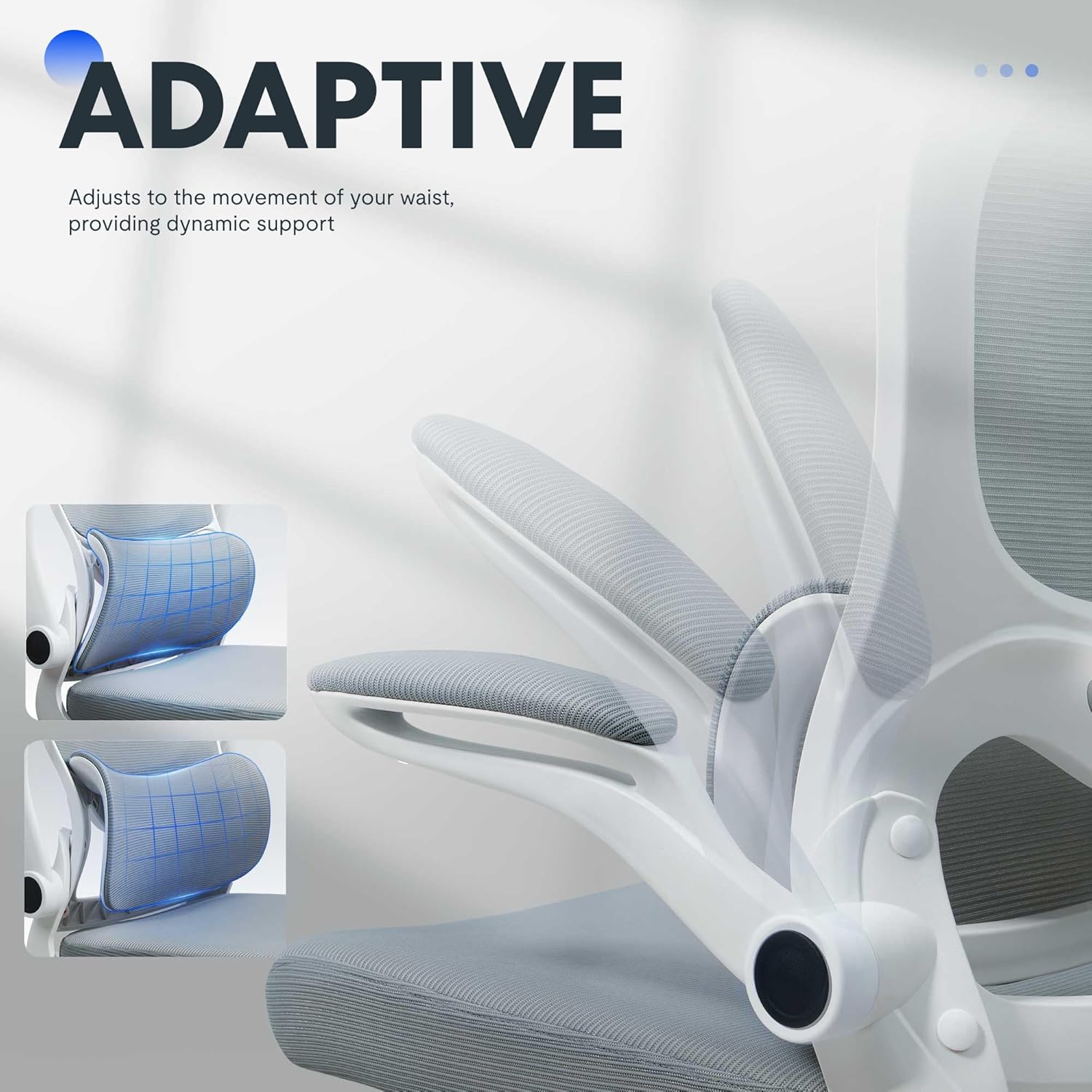
Figure 4 : Adaptive lumbar support for personalized comfort.
4. Appui-tête réglable
The headrest can be adjusted for height and angle to provide optimal neck and head support. Gently push or pull the headrest to move it to your preferred position.
5. Accoudoirs relevables
The armrests can be flipped up to allow the chair to be pushed closer to a desk, saving space. To flip them up, lift the armrests until they lock into the vertical position. To return them, gently pull them down.

Figure 5 : Chair with armrests flipped up for space-saving storage.
Entretien
Un entretien approprié prolongera la durée de vie et préservera l'apparence de votre chaise de bureau.
- Nettoyage: Pour le nettoyage général, essuyez les surfaces avec un chiffon humide.amp cloth. For fabric areas, dry clean or wipe clean as needed. Avoid harsh chemical cleaners that may damage the material.
- Inspection: Vérifiez régulièrement le serrage de tous les boulons et vis. Resserrer si nécessaire pour garantir la stabilité et la sécurité.
- Entretien des roulettes : Pour assurer un mouvement fluide, veillez à ce que les roulettes soient exemptes de cheveux et de débris.
Dépannage
Si vous rencontrez des problèmes avec votre chaise, consultez la section « Problèmes courants et solutions » ci-dessous.
| Problème | Cause possible | Solution |
|---|---|---|
| La hauteur de la chaise n'est pas réglable. | Dysfonctionnement du vérin à gaz ou levier non enclenché. | Assurez-vous que le levier de réglage en hauteur est bien enclenché. Si le problème persiste, le vérin à gaz devra peut-être être remplacé. Contactez le service client. |
| La chaise vacille ou semble instable | Vis desserrées ou sol inégal. | Vérifiez et resserrez toutes les vis de montage. Assurez-vous que la chaise repose sur une surface plane et stable. |
| Les roulettes ne roulent pas en douceur. | Débris dans les roulettes ou roulettes endommagées. | Enlevez les cheveux et les débris des roulettes. Si les roulettes sont endommagées, il faudra peut-être les remplacer. |
| Le dossier ne s'incline pas et ne se verrouille pas. | Tilt mechanism locked or tension too high. | Ensure the tilt lock lever is disengaged. Adjust the tilt tension knob to a lower setting. |
Spécifications du produit
| Marque | FLEXIPOT |
| Nom du modèle | OC4-V2 |
| Couleur | Blanc |
| Matériel | Alloy Steel, Mesh, Nylon |
| Dimensions du produit (P x L x H) | 29.1" x 29.1" x 50" (73.9 cm x 73.9 cm x 127 cm) |
| Poids de l'article | 32 livres (14.5 kg) |
| Poids maximum recommandé | 350 livres (158 kg) |
| Profondeur du siège | 21.3 pouces (54.1 cm) |
| Largeur du dossier de la chaise | 20.5 pouces (52.1 cm) |
| Style du dos | Dos en maille |
| Style de bras | Flip-up arms |
| Mouvement de la base du meuble | Pivot |
| Assemblage requis | Oui |
| Certifications | BIFMA, SGS |
Garantie et assistance
The FLEXISPOT OC4 Lite Ergonomic Office Chair is rigorously tested and certified by BIFMA and SGS, ensuring durability and safety. The reinforced nylon base is capable of supporting significant weight, and the resilient mesh fabric is designed to maintain its shape over time.
For any questions, concerns, or assistance with assembly, operation, or troubleshooting, please contact our professional customer service team. Refer to the contact information provided with your purchase or visit the official FLEXISPOT website pour les détails de l'assistance.