
Introduction
This manual provides comprehensive instructions for the ProtoArc EK01 Plus Ergonomic Wireless Backlit Keyboard. Please read this guide carefully to ensure proper setup, operation, and maintenance of your device. Keep this manual for future reference.
Contenu du colis
Vérifiez que tous les éléments sont présents dans le colis :
- ProtoArc EK01 Plus Ergonomic Wireless Backlit Keyboard
- Repose-poignet
- Câble de chargement USB-C
- Récepteur USB 2.4 G
- Manuel d'utilisation
Produit terminéview
The ProtoArc EK01 Plus is a full-size ergonomic keyboard designed to enhance typing comfort and reduce muscle strain. Its split and curved keyframe design promotes a natural hand and wrist posture.
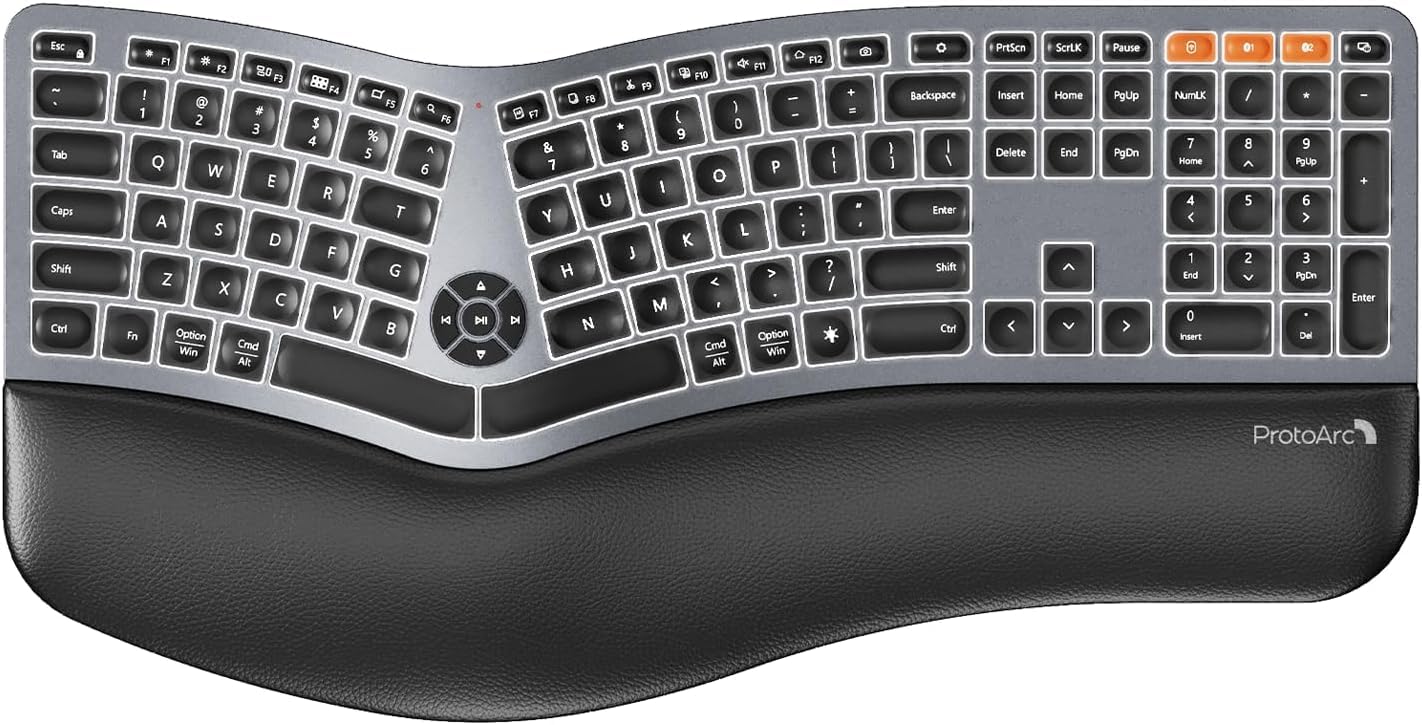
Image 1: ProtoArc EK01 Plus Ergonomic Wireless Backlit Keyboard. This image displays the full keyboard with its split design, integrated wrist rest, and key layout.
Caractéristiques principales :
- Ergonomic Full-Size Design: Features a split, curved keyframe and integrated wrist rest to minimize muscle fatigue and promote proper posture.
- Pieds inclinables réglables : Four adjustable tilt feet allow customization of the keyboard angle for optimal comfort.
- Adjustable Backlighting: Soft white LED backlighting with three adjustable brightness levels (low-medium-high) for comfortable typing in various lighting conditions.
- Connectivité multi-appareils : Connects to up to three devices simultaneously via Bluetooth and 2.4G USB. Easily switch between devices with a dedicated key.
- Rechargeable par USB-C : Equipped with a 2000 mAh rechargeable lithium battery for extended use.
- Mode veille automatique : Enters sleep mode after 60 minutes of inactivity to conserve power, waking up within 3 seconds upon key press.
- Compatibilité: Widely compatible with Windows 7/8/10, Mac OS X 10.12 or higher, and Android 4.3 or higher.
Installation
1. Charger le clavier
- Repérez le port de chargement USB-C sur le clavier.
- Connectez le câble USB-C fourni au clavier et l'autre extrémité à une source d'alimentation USB (par exemple, un port USB d'ordinateur, un adaptateur secteur).
- Le voyant de charge s'allume. Une fois la charge complète, le voyant peut changer de couleur ou s'éteindre.
2. Connexion aux appareils
The keyboard supports both 2.4G USB and Bluetooth connectivity.
2.1. Connexion USB 2.4 GHz
- Locate the 2.4G USB receiver (dongle). It is usually stored in a compartment on the keyboard or in the packaging.
- Branchez le récepteur USB dans un port USB disponible sur votre ordinateur.
- Allumez le clavier à l'aide de l'interrupteur d'alimentation.
- Le clavier devrait se connecter automatiquement à votre appareil.
2.2. Connexion Bluetooth (jusqu'à 3 appareils)
- Allumez le clavier.
- Maintenez enfoncée l'une des touches de canal Bluetooth (par exemple, BT1, BT2, ou BT3) pendant 3 à 5 secondes jusqu'à ce que le voyant clignote, indiquant le mode d'appairage.
- Sur votre appareil (ordinateur, tablette, smartphone), activez le Bluetooth et recherchez de nouveaux appareils.
- Select "ProtoArc EK01 Plus" (or similar name) from the list of available devices.
- Suivez les instructions à l'écran pour terminer le processus d'appairage. Le voyant cessera de clignoter une fois la connexion établie.
- Repeat these steps for up to two additional Bluetooth devices using the other Bluetooth channel keys.
Opération
1. Basculement entre les appareils
Pour passer d'un appareil connecté à un autre, il suffit d'appuyer sur la touche de connexion correspondante :
- Presse 2.4 G pour passer à l'appareil connecté via le récepteur USB.
- Presse BT1 to switch to the first Bluetooth device.
- Presse BT2 to switch to the second Bluetooth device.
- Presse BT3 to switch to the third Bluetooth device.
2. Réglage du rétroéclairage
The keyboard features a soft white LED backlight with three brightness levels.
- To cycle through brightness levels (low, medium, high, off), press the dedicated backlight key (refer to keyboard layout for specific key).
3. Sleep Mode and Power Saving
To conserve battery life, the keyboard will automatically enter sleep mode after 60 minutes of inactivity. To wake the keyboard, press any key. The keyboard will be ready for use within 3 seconds.
4. Inclinaison réglable
The keyboard includes four adjustable tilt feet. Extend or retract these feet to customize the typing angle to your preference, ensuring comfortable wrist positioning whether sitting or standing.
Entretien
1. Nettoyage du clavier
- Débranchez le clavier de tous les appareils et sources d'alimentation avant de le nettoyer.
- Utilisez un chiffon doux et non pelucheux légèrement dampTerminer par un rinçage à l'eau ou avec une solution nettoyante douce pour essuyer la surface du clavier.
- Évitez d'utiliser des produits chimiques agressifs, des nettoyants abrasifs ou des solvants, car ils peuvent endommager la finition du clavier.
- Pour nettoyer entre les touches, utilisez de l'air comprimé pour éliminer la poussière et les débris.
2. Entretien de la batterie
- Rechargez régulièrement le clavier pour préserver la durée de vie de la batterie.
- Évitez de décharger complètement la batterie fréquemment.
- Si vous devez ranger le clavier pendant une période prolongée, chargez-le à environ 50 % avant de le ranger.
Dépannage
| Problème | Cause possible | Solution |
|---|---|---|
| Le clavier ne répond pas | Low battery; Keyboard off; Incorrect connection mode; USB receiver not plugged in (2.4G); Bluetooth not paired. | Charge the keyboard; Turn on the keyboard; Switch to the correct connection mode (2.4G, BT1/2/3); Ensure USB receiver is securely plugged in; Re-pair Bluetooth. |
| Entrée retardée ou différée | Interférences ; Distance du récepteur/appareil ; Batterie faible. | Move closer to the receiver/device; Ensure no strong interference sources nearby; Charge the keyboard. |
| Le rétro-éclairage ne fonctionne pas | Rétroéclairage désactivé ; batterie faible. | Press the backlight key to adjust brightness; Charge the keyboard. |
| Impossible de se connecter via Bluetooth | Keyboard not in pairing mode; Device Bluetooth off; Already connected to 3 devices. | Ensure keyboard is in pairing mode (flashing indicator); Enable Bluetooth on your device; Disconnect from an existing Bluetooth device if maximum reached. |
Caractéristiques
| Marque | ProtoArc |
| Numéro de modèle | EK01 Plus |
| Technologie de connectivité | Bluetooth, USB 2.4 GHz |
| Description du clavier | Ergonomic, Full Size, Split Design |
| Caractéristiques spéciales | Ergonomic, Full Size, Wrist Rest, Backlit, Rechargeable |
| Couleur | Gris sidéral |
| Prise en charge des couleurs de rétroéclairage | Monochromatic (White LED) |
| Matériel | Plastique |
| Source d'énergie | Alimenté par batterie (batterie au lithium de 2000 mAh) |
| Type de commutateur | Membrane |
| Disposition du clavier | QWERTY (UK layout for this variant) |
| Nombre de clés | 117 |
| Appareils compatibles | Laptop, PC, Tablet, Windows/Mac/Android |
| Poids de l'article | 1.6 kilogrammes |
| Dimensions (environ) | 48 cm (Longueur) x 25 cm (Largeur) |
Garantie et assistance
For warranty information and technical support, please refer to the ProtoArc official website or contact their customer service. Details are typically provided on the product packaging or the official brand store.
ProtoArc Official Store: Visit ProtoArc Store on Amazon