
Introduction
Thank you for choosing the KOLMAX BK98 Wireless Gaming Keyboard. This manual provides detailed instructions for setting up, operating, and maintaining your keyboard to ensure optimal performance and longevity. Please read this manual thoroughly before using the product.

Image: KOLMAX BK98 Wireless Gaming Keyboard, showcasing its full layout, RGB backlighting, and the included 2.4G USB receiver.
Contenu du colis
Veuillez vérifier le contenu du colis pour vous assurer que tous les éléments sont présents :
- KOLMAX BK98 Wireless Gaming Keyboard
- Manuel d'utilisation
- Câble USB-C
Caractéristiques du produit
- Dual Modes Gaming Keyboard Connection: Supports Bluetooth and 2.4G Wireless connectivity for versatile device compatibility.
- Wireless Bluetooth RGB Keyboard: Features customizable RGB backlighting with various modes (breathing, horse racing) and adjustable brightness/speed.
- Quick Charge, Longer Lasting: Equipped with a Type-C charging port and a power-saving feature that automatically turns off backlight after 60 seconds of inactivity.
- Strong Compatibility with 98 Layout: Compact 98-key layout saves desk space while retaining a number pad. Compatible with PC, Windows, Mac, iOS, Linux, Chrome OS, Android, Laptops, Chromebooks, Tablets, and TVs.
Installation
Modes de connexion
The BK98 keyboard supports two wireless connection modes: Bluetooth and 2.4G Wireless. The USB-C cable is for charging only.

Image: Illustration of the keyboard's dual connection modes (Bluetooth and 2.4G Wireless) and the multifunctional knob for switching between devices.
Connexion sans fil 2.4G
- Repérez le récepteur USB 2.4 GHz, généralement rangé dans un compartiment du clavier.
- Branchez le récepteur USB dans un port USB disponible sur votre ordinateur.
- Allumez le clavier. Il devrait se connecter automatiquement au récepteur.
Connexion Bluetooth
- Allumez le clavier.
- Long press the multifunctional knob or the designated FN key combination (e.g., FN+1/2/3) to switch to Bluetooth mode. The indicator light will flash, indicating pairing mode.
- On your device (PC, Mac, tablet, smartphone), go to Bluetooth settings and search for new devices.
- Select "KOLMAX BK98" (or similar name) from the list of available devices to pair.
- Une fois couplé, le voyant cessera de clignoter et restera fixe.
Charge initiale
Before first use, it is recommended to fully charge the keyboard. Connect the provided USB-C cable to the keyboard's charging port and the other end to a USB power source (e.g., computer USB port, wall adapter).
Opérationnel
Contrôle du rétroéclairage
The keyboard features RGB backlighting with multiple effects. Use the FN key combinations to control the backlight:
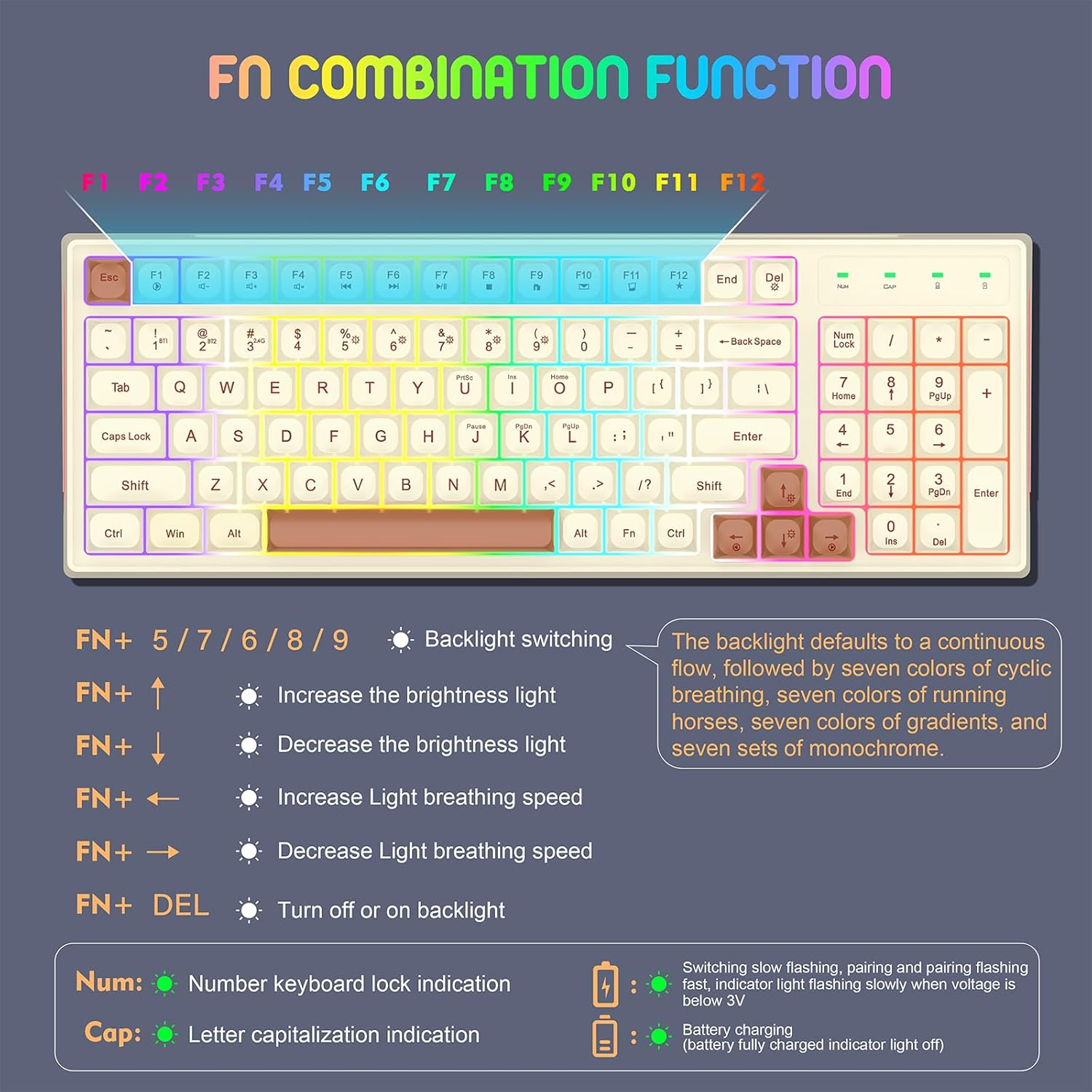
Image: A detailed guide to the FN key combinations for controlling the keyboard's backlight effects, brightness, and speed.
- FN + 5/7/6/8/9: Basculez entre différents modes de rétroéclairage.
- FN + ↑: Augmenter la luminosité du rétroéclairage.
- FN + ↓: Diminuer la luminosité du rétroéclairage.
- FN + ←: Increase light breathing speed.
- FN + →: Decrease light breathing speed.
- FN + SUPPR : Turn backlight on or off.

Image: A visual guide to the 12 distinct RGB backlight effects, demonstrating the variety of lighting options for the keyboard.
Compatibilité multi-appareils
The keyboard is designed for wide compatibility across various operating systems and devices.
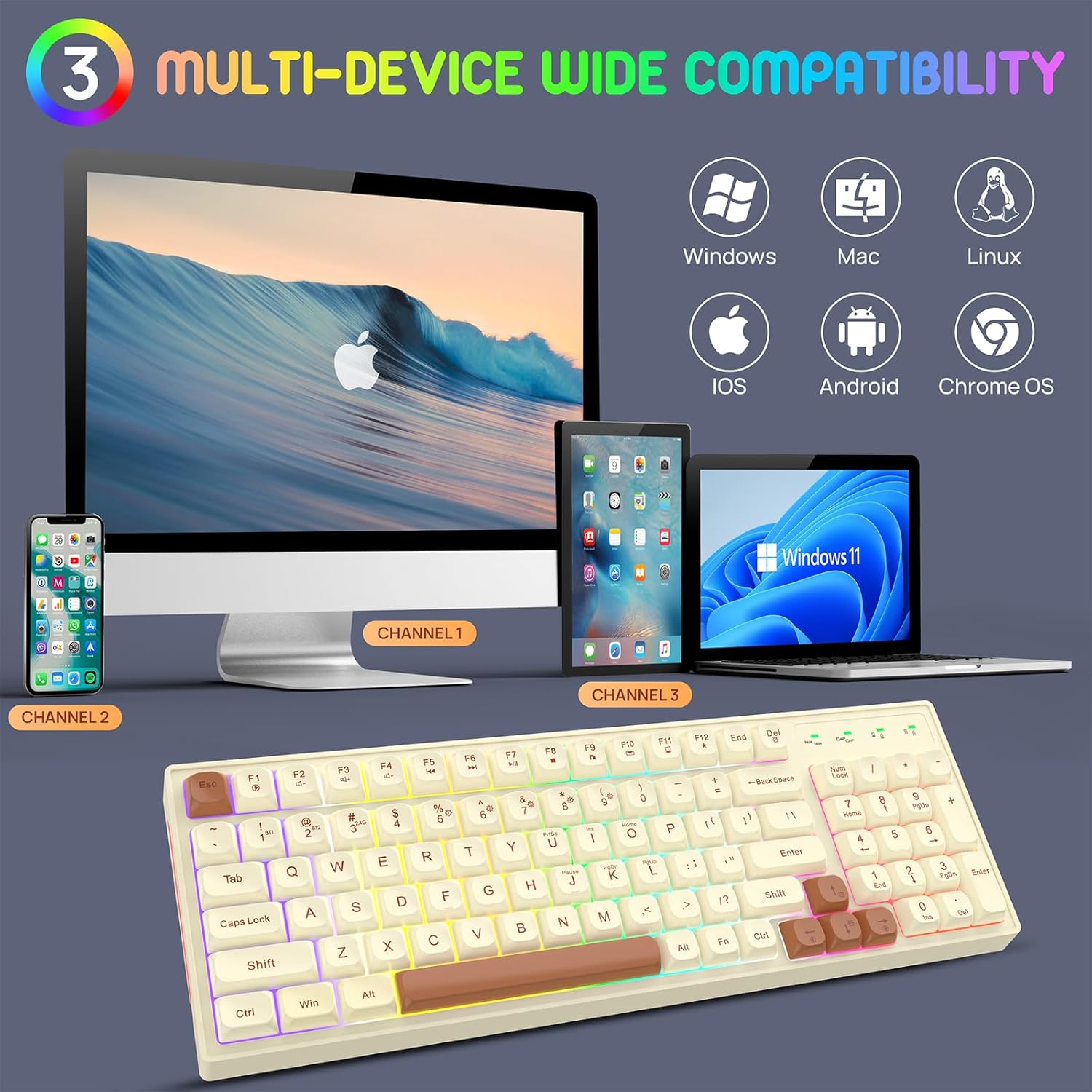
Image: The keyboard demonstrating its multi-device compatibility with various operating systems including Windows, Mac, Linux, iOS, Android, and Chrome OS.
Entretien
Charger le clavier
The keyboard is equipped with a rechargeable battery. When the battery is low, the indicator light will flash slowly. Connect the USB-C cable to charge.

Image: The keyboard's Type-C rechargeable feature, highlighting its 2000mAh battery, smart sleep mode, and long standby time.
- Connectez le câble USB-C fourni au port du clavier.
- Connectez l'autre extrémité du câble à une source d'alimentation USB.
- The battery charging indicator will illuminate during charging and turn off when fully charged.
Fonctions d'économie d'énergie
To conserve battery life, the keyboard features:
- Automatic backlight turn-off after 60 seconds of non-use.
- A separate power switch to completely turn off the keyboard when not in use for extended periods.
Nettoyage
To clean the keyboard, gently wipe the surface with a soft, dry cloth. For deeper cleaning, you may use a slightly damp cloth, ensuring no liquid enters the keyboard. Do not use harsh chemicals or abrasive materials.
Dépannage
- Le clavier ne se connecte pas :
- Assurez-vous que le clavier est allumé.
- Check if the correct connection mode (Bluetooth or 2.4G) is selected.
- Pour la bande 2.4 GHz, assurez-vous que le récepteur USB est correctement branché.
- Pour le Bluetooth, assurez-vous que le Bluetooth est activé sur votre appareil et essayez de le réappairer.
- Assurez-vous que le clavier est chargé.
- Le rétroéclairage ne fonctionne pas :
- Press FN + DEL to toggle the backlight.
- Réglez la luminosité à l'aide de FN + ↑/↓.
- Assurez-vous que la batterie du clavier est suffisamment chargée.
- Les touches ne répondent pas :
- Rechargez le clavier.
- Try reconnecting the keyboard (unplug/replug receiver, re-pair Bluetooth).
- Redémarrez votre ordinateur/appareil.
Caractéristiques

Image: The ergonomic design and dimensions of the 98-key KOLMAX BK98 keyboard, including its adjustable height.
| Fonctionnalité | Détail |
|---|---|
| Dimensions du produit | 15.3 x 5.5 x 1.5 pouces |
| Poids de l'article | 1.72 livres |
| Numéro de modèle | BK98 |
| Piles | 1 batterie Lithium Polymère (incluse) |
| Technologie de connectivité | Bluetooth, sans fil 2.4 GHz |
| Caractéristiques spéciales | Backlit, Ergonomic, Portable, Rechargeable |
| Appareils compatibles | Console de jeux, ordinateur portable, ordinateur personnel, smartphone, tablette |
Garantie et assistance
Every KOLMAX product comes with a 30-day money-back guarantee and a 12-month worry-free warranty. If you encounter any problems or have questions, please do not hesitate to contact KOLMAX customer service. We are committed to providing the best service and will reply within 12 hours to assist you.
For support, please refer to the contact information provided with your purchase or visit the official KOLMAX website.