
AKEEYO NiZ-Atom66-1M
Manuel d'utilisation du clavier filaire NiZ Atom66-1M
Model: NiZ-Atom66-1M
Introduction
Merci pour votre achatasing the NiZ Atom66-1M Wired Keyboard. This compact 66-key keyboard features advanced electrostatic capacitive non-contact switches, offering a unique and comfortable typing experience. Designed for versatility, it supports multiple operating systems and provides extensive customization options through dedicated software. This manual will guide you through the setup, operation, maintenance, and troubleshooting of your new keyboard.

Figure 1: NiZ Atom66-1M Wired Keyboard Overview.
The image displays the NiZ Atom66-1M wired keyboard, featuring a compact 66-key layout with a white frame and a mix of white and grey keycaps. The USB-C cable is visible extending from the top left.
Installation
Contenu du colis
- NiZ Atom66-1M Wired Keyboard
- Câble USB-C (détachable)
- Extracteur de capuchon
- MAC-specific Keycaps
- 10g Pressure Springs (x10)
- Manuel de l'utilisateur (ce document)
Connexion du clavier
The NiZ Atom66-1M keyboard connects via a detachable USB Type-C cable, ensuring a stable and reliable connection without input lag. This design is ideal for professional use and gaming environments.
- Repérez le port USB Type-C à l'arrière du clavier.
- Connectez une extrémité du câble USB Type-C fourni au clavier.
- Connect the other end of the USB Type-A connector to an available USB port on your computer or device.
- The keyboard features grooves on the underside allowing the cable to be routed in three directions (left, center, right) for optimal desk organization.

Figure 2: USB Type-C Cable Connection and Routing.
This image shows the detachable USB Type-C port on the back of the keyboard, illustrating how the cable can be routed in three different directions (left, center, right) through integrated grooves for a tidy setup.
Compatibilité du système d'exploitation
The NiZ Atom66-1M keyboard is designed for broad compatibility, supporting various operating systems. It can be used with Windows, macOS, Android, and Linux devices. For Windows users, dedicated software is available for advanced customization.

Figure 3: OS Compatibility.
The image displays icons representing Android, iOS, Mac, and Windows operating systems, indicating the keyboard's broad compatibility across these platforms.
Utilisation du clavier
Electrostatic Capacitive Non-Contact Switches
The keyboard utilizes electrostatic capacitive non-contact switches, providing a quiet yet tactile typing experience. This technology ensures no physical contact is made upon key actuation, leading to increased durability and a smooth feel. The standard key weight is 35g, but it can be adjusted to 45g by adding the included pressure springs to suit your preference.
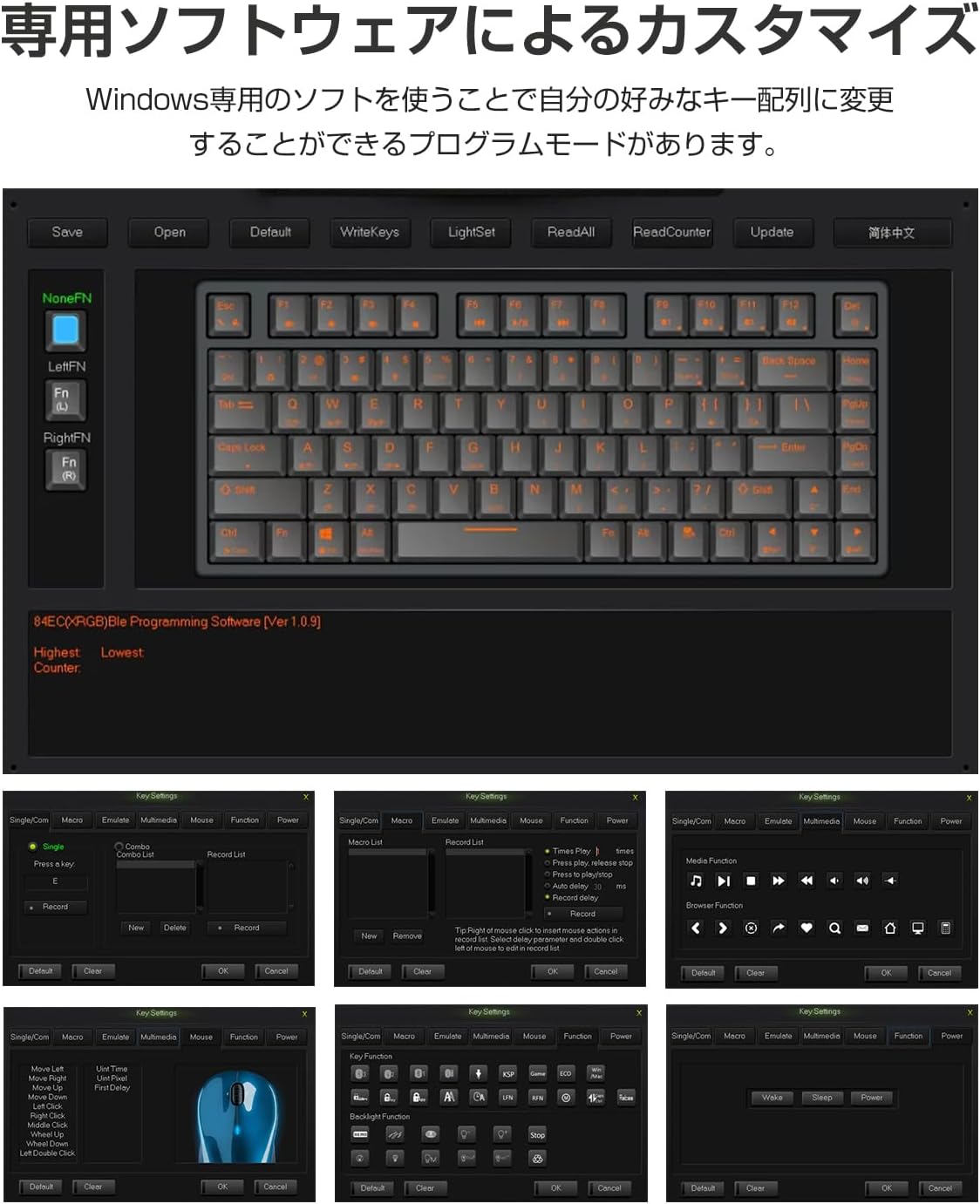
Figure 4: Electrostatic Capacitive Switch Mechanism.
This diagram illustrates the difference between traditional membrane switches and electrostatic capacitive non-contact switches. It shows that the latter operates without physical contact, reducing wear and tear.
To change the key weight from 35g to 45g, carefully remove the keycap using the provided keycap puller. Place one of the 10g pressure springs onto the switch stem, then reattach the keycap. This modification allows you to customize the typing feel.

Figure 5: Adjusting Key Weight and Keycap Compatibility.
This image demonstrates how to increase the key weight by adding a spring inside the keycap. It also highlights the keyboard's compatibility with Cherry MX keycaps, allowing for various customization options.
Combinaisons de touches FN
The keyboard features independent Left FN and Right FN keys, which can be combined with other keys to activate various functions. This compact design allows for a wide range of functionalities without requiring a full-sized layout. Refer to the dedicated software section for customizing these combinations.
Roulement de N-Key (NKRO)
The NiZ Atom66-1M supports N-Key Rollover, meaning every key press is registered accurately, even when multiple keys are pressed simultaneously. This feature is crucial for fast typists and gamers, preventing missed inputs.
APC (Actuation Point Changer) Function
The APC function allows you to adjust the actuation point of each key switch across four levels of depth. This means you can customize how sensitive each key is, which can be particularly beneficial for gaming, allowing for faster response times depending on the game content.

Figure 6: Dedicated Software and APC Function.
This image shows a screenshot of the NiZ dedicated software interface for customizing key layouts and functions. It also illustrates the APC (Actuation Point Changer) function, allowing users to adjust the key's actuation point.
Customization with Dedicated Software
The NiZ Atom66-1M keyboard is highly customizable through its dedicated Windows software. This software allows you to:
- Change key assignments and layout.
- Assign custom functions to individual keys.
- Save configurations directly to the keyboard's onboard memory.
- Gérer plusieurs profiles (Program 1/2/3).
To download the software, please visit the official AKEEYO website or refer to the product page where you purchased the keyboard for a download link. Install the software on your Windows PC to unlock the full customization potential of your keyboard.
Entretien
Nettoyage du clavier
Regular cleaning helps maintain the performance and appearance of your keyboard. The keycaps are made of durable PBT material.
- Nettoyage général : Utilisez un chiffon doux et non pelucheux légèrement dampNettoyez les touches et le cadre avec de l'eau ou une solution nettoyante douce. Évitez toute humidité excessive.
- Nettoyage en profondeur: For thorough cleaning, you can remove the keycaps using the provided keycap puller. Clean the keycaps with mild soap and water, then dry them completely before reattaching. Use compressed air to clear debris from under the keycaps.

Figure 7: Keycap Removal for Maintenance.
This image shows a detached keycap and the underlying switch, illustrating how keycaps can be removed for cleaning or replacement. The PBT material of the keycaps is durable and resistant to shine.
Dépannage
If you encounter issues with your NiZ Atom66-1M keyboard, please refer to the following common solutions:
- Le clavier ne répond pas :
- Assurez-vous que le câble USB-C est correctement connecté à la fois au clavier et à votre ordinateur.
- Essayez de connecter le clavier à un autre port USB de votre ordinateur.
- Testez le clavier sur un autre ordinateur pour exclure un problème lié au système.
- Si vous utilisez un concentrateur USB, essayez de vous connecter directement à l'ordinateur.
- Touches non enregistrées ou double saisie :
- Check for any debris under the affected keycap. Remove the keycap and clean the switch area.
- Ensure the dedicated software is not interfering with key inputs. Try resetting the keyboard settings via the software to default.
- Problèmes liés aux logiciels de personnalisation :
- Ensure you have downloaded the correct software version for your keyboard model.
- Exécutez le logiciel en tant qu'administrateur.
- Désactivez temporairement tout logiciel antivirus ou pare-feu susceptible de bloquer l'application.
Si le problème persiste après avoir suivi ces étapes, veuillez contacter le service client pour obtenir de l'aide supplémentaire.
Caractéristiques
| Fonctionnalité | Description |
|---|---|
| Marque | AKEYO |
| Numéro de modèle | NiZ-Atom66-1M |
| Technologie de connectivité | USB-C (filaire) |
| Nombre de clés | 66 touches |
| Type de commutateur | Electrostatic Capacitive Non-Contact |
| Key Weight | 35g (Adjustable to 45g with included springs) |
| Matériau du capuchon | PBT |
| Compatibilité | Windows, macOS, Android, Linux |
| Dimensions | 37.1 x 18.4 x 4.9 cm |
| Poids | 920 g |
| Caractéristiques spéciales | Detachable USB Cable, Customizable Keys, APC Function, N-Key Rollover |

Figure 8 : Dimensions du clavier.
Cette image fournit des détails views of the keyboard from the front, side, and back, along with its precise dimensions (299mm length, 110mm width, 36mm height).
Garantie et assistance
For warranty information and technical support, please refer to the warranty card included with your product or visit the official AKEEYO website. Our customer service team is available to assist you with any questions or issues you may have regarding your NiZ Atom66-1M keyboard.
Coordonnées: Please refer to the contact details provided on the AKEEYO official website ou votre reçu d'achat.
Ask a question about this manual
Ask about setup, troubleshooting, compatibility, parts, safety, or missing instructions. Manuals+ will review the question and use this page’s manual context to help answer it.