
1. Introduction
Thank you for choosing the RIGOL DS1102Z-E Digital Oscilloscope. This manual provides essential information for the safe and efficient use of your device. Please read it thoroughly before operation and keep it for future reference.
The DS1102Z-E is a high-performance digital oscilloscope designed for various applications including research and development, education, maintenance, and industrial testing. It features a 100 MHz bandwidth, 1 GSa/s sample rate, and a 24 Mpts memory depth, enabling precise analysis of complex waveforms.
2. Produit terminéview
The RIGOL DS1102Z-E is a versatile measurement instrument integrating a frequency counter and supporting protocol decoding for RS232/UART, I2C, and SPI. It also includes FFT analysis and automatic measurement functions to enhance testing efficiency.
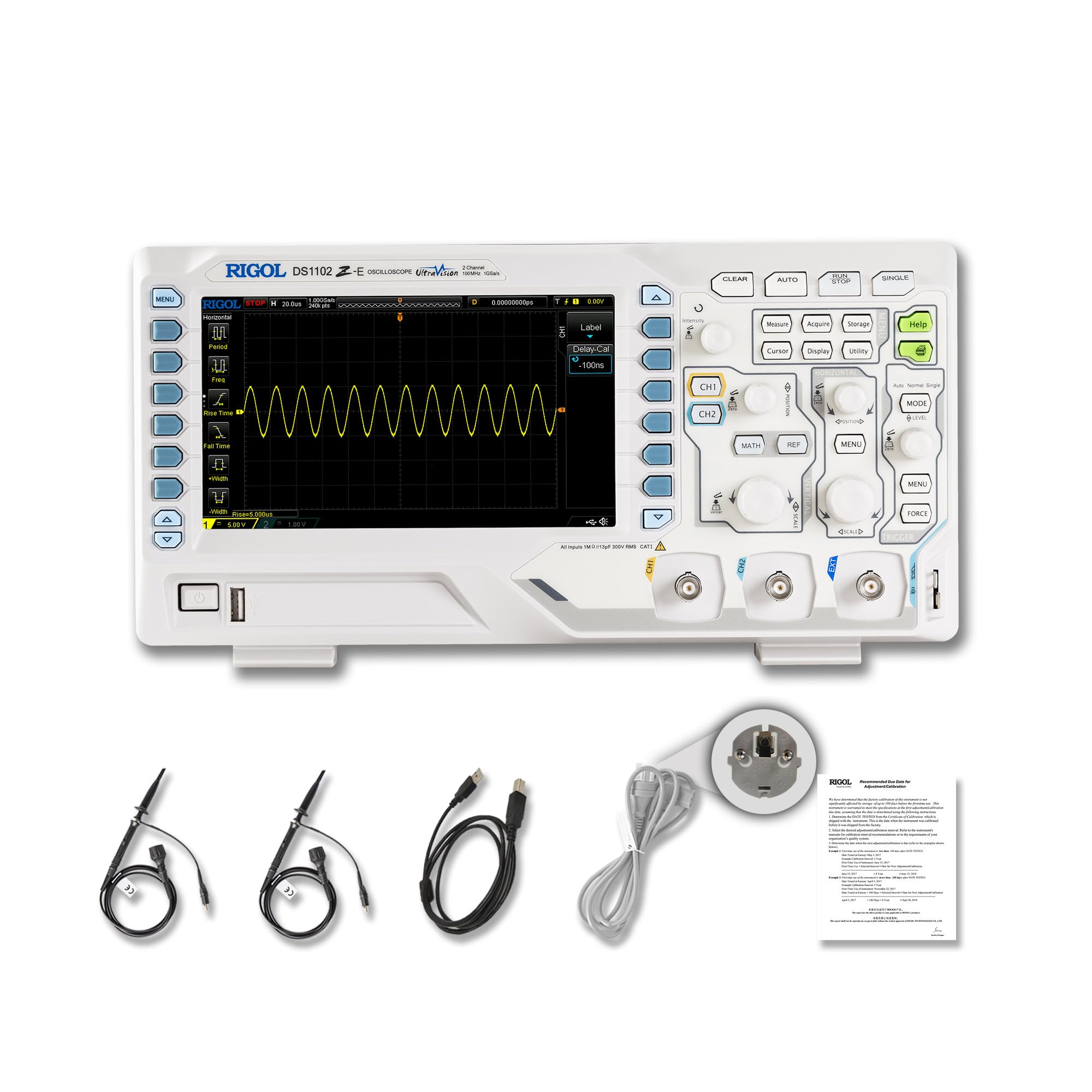
Figure 2.1 : Face avant view of the RIGOL DS1102Z-E Digital Oscilloscope.
2.1 Principales caractéristiques
- 100 MHz Bandwidth, 1 GSa/s Sample taux : Captures signals with high precision.
- 24 Mpts Memory Depth: Allows for extended signal capture and detailed waveform analysis.
- Multi-function Measurement Device: Includes frequency counter, protocol decoding (RS232/UART, I2C, SPI), FFT analysis, and automatic measurement functions.
- Waveform Recording and Playback: Records signal variations and replays them for fault identification.
- Affichage haute définition : 7-inch TFT screen with 256-level grayscale, offering a phosphor-like display effect for clear waveform details.
- Remote Control & Secondary Development Support: Equipped with USB and LAN ports for PC remote control, compatible with SCPI commands, LabVIEW, Visual Basic, and Visual C++.
2.2 Contenu de la boîte

Figure 2.2: Contents included with the DS1102Z-E Oscilloscope.
- 1x Main Unit (DS1102Z-E Digital Oscilloscope)
- 2x Passive Probes (150MHz)
- 1x Power Cable (EU plug)
- 1x USB A-B Cable
- 1x Carte de garantie
- 1 certificat d'étalonnage
- 1x Declaration of Conformity
3. Installation
Follow these steps to set up your RIGOL DS1102Z-E oscilloscope:
- Déballage: Carefully remove all components from the packaging. Inspect the device for any signs of damage.
- Connexion électrique : Connect the provided power cable to the oscilloscope's power input and then to a suitable AC power outlet.
- Connexion de la sonde : Connect the passive probes to the BNC input connectors (CH1, CH2) on the front panel. Ensure a secure connection.
- Mise à la terre : Always ensure the oscilloscope is properly grounded through the power cable.
- Connexion USB/LAN (en option) : If you plan to use remote control or secondary development, connect the USB cable to a PC or the LAN cable to your network.

Figure 3.1 : Plusview of the oscilloscope's physical dimensions and ports.
4. Mode d'emploi
This section covers the basic operation of your oscilloscope.
4.1 Mise sous/hors tension
- Mise sous tension : Press the power button located on the front panel. The device will perform a self-test and display the main interface.
- Éteindre: Appuyez et maintenez le bouton d'alimentation jusqu'à ce que l'appareil s'éteigne.
4.2 Affichage de la forme d'onde de base
After powering on, connect a signal to one of the input channels (e.g., CH1). Adjust the vertical scale (Volts/Div) and horizontal scale (Time/Div) knobs to display the waveform clearly. Use the AUTO button for automatic setup of the waveform display.

Figure 4.1 : Example of a waveform displayed on the oscilloscope screen.
4.3 fonctions avancées
- Fonctions de mesure : Appuyez sur le MESURE button to access automatic measurements like frequency, period, peak-to-peak voltage, etc
- Système de déclenchement : Use the trigger controls to stabilize repetitive waveforms. Adjust the trigger level and mode (Edge, Pulse, Video, Slope, etc.) as needed.
- Waveform Recording: The oscilloscope allows recording and replaying waveforms. Access this feature through the menu to capture transient events.
- Protocol Decoding: For serial bus analysis (RS232/UART, I2C, SPI), configure the decoding settings via the menu.
- Analyse FFT : Perform Fast Fourier Transform (FFT) to analyze the frequency components of your signal.

Figure 4.2: Complex waveform analysis with measurement data.

Figure 4.3: Multiple waveforms displayed simultaneously for comparison.
5. Entretien
Un entretien approprié garantit la longévité et la précision de votre oscilloscope.
- Nettoyage: Utilisez un chiffon doux et sec pour nettoyer l'extérieur de l'oscilloscope. Pour les saletés tenaces, un chiffon légèrement dégoulinant peut être utile.amp Un chiffon imbibé d'un détergent doux peut être utilisé. Évitez les nettoyants abrasifs et les solvants.
- Entretien de l'écran : Clean the display screen with a soft, lint-free cloth. Do not use excessive force or harsh chemicals.
- Stockage: Lorsqu'il n'est pas utilisé, rangez l'oscilloscope dans un endroit propre et sec, à l'abri de la lumière directe du soleil, des températures extrêmes et de la poussière excessive.
- Entretien de la sonde : Handle probes carefully. Avoid bending or stressing the probe tips. Store them properly to prevent damage.
- Étalonnage: For optimal performance, periodic calibration by qualified personnel is recommended. Refer to the official RIGOL website for calibration services.
6. Dépannage
Cette section propose des solutions aux problèmes courants que vous pourriez rencontrer.
| Problème | Cause possible | Solution |
|---|---|---|
| Aucun courant ne s'allume. | Power cable not connected, power outlet faulty, or power button issue. | Check power cable connection. Test the power outlet. Ensure the power button is fully pressed. |
| Aucune forme d'onde affichée. | No signal input, probe not connected correctly, vertical/horizontal scale incorrect, or trigger not set. | Verify signal source. Check probe connections. Adjust Volts/Div and Time/Div. Press AUTO or adjust trigger settings. |
| La forme d'onde est instable. | Paramètres de déclenchement incorrects. | Adjust trigger level, mode, and source to stabilize the waveform. |
| La télécommande ne fonctionne pas. | USB/LAN cable issue, incorrect network settings, or software driver not installed. | Check cable connections. Verify network configuration. Install necessary drivers and software (e.g., UltraScope). |
If the problem persists, please contact RIGOL technical support.
7. Spécifications
Detailed technical specifications for the RIGOL DS1102Z-E Digital Oscilloscope.

Figure 7.1: Visual representation of key technical specifications.
| Fonctionnalité | Spécification |
|---|---|
| Marque | Rigol |
| Modèle | DS1102Z-E |
| Bande passante | 100 MHz |
| Chaînes | 2 Channels + EXT |
| Sample taux | 1 GSa/s |
| Profondeur de la mémoire | 24 Mpts |
| Taux de capture de forme d'onde | 30,000 XNUMX wfms/s |
| Résolution verticale | 8 bits |
| Sensibilité minimale | 1 mV/div |
| Minimum Time Base | 2 ns/div |
| Prise en charge du décodage | RS232/UART, I2C, SPI |
| Analyse FFT | Standard |
| Afficher | Écran TFT de 7 pouce (800 x 480) |
| Connectivité | USB Host, USB Device, LAN |
| Source d'énergie | Adaptateur secteur |
| Couleur | Gris blanc |
| Poids de l'article | 2.9 kilogrammes |
| Dimensions (L x l x H) | 31.31 x 16.08 x 12.24 centimètres |
| Conformité aux normes | CE, RoHS |
| Numéro de pièce du fabricant | DS1102Z-E |
| Pays d'origine | Chine |
8. Garantie et assistance
RIGOL is committed to providing high-quality products and excellent customer service.
- Garantie: The RIGOL DS1102Z-E Digital Oscilloscope comes with a Garantie de 3 ans à compter de la date d'achat. Cette garantie couvre les défauts de matériaux et de fabrication dans des conditions normales d'utilisation.
- Support technique : RIGOL offers Assistance technique 24h/7 et XNUMXj/XNUMX to assist you with any questions or issues you may encounter. Please refer to the official RIGOL webSite contenant les informations de contact et les ressources d'assistance.
- Ressources en ligne : Visit the official RIGOL website for product documentation, software updates (e.g., UltraScope), and additional support materials.

Figure 8.1: RIGOL oscilloscopes support multiple languages for user convenience.