
Casio Illuminator AE1500WH Digital Watch User Manual
Model: AE1500WH
1. Plus deview
The Casio Illuminator AE1500WH is a digital watch designed for durability and functionality. It features an extra-large, high-visibility LCD display for easy reading of time, date, and various functions. Key features include a 10-year battery life, 100-meter water resistance, multiple alarms, a stopwatch, and a countdown timer.
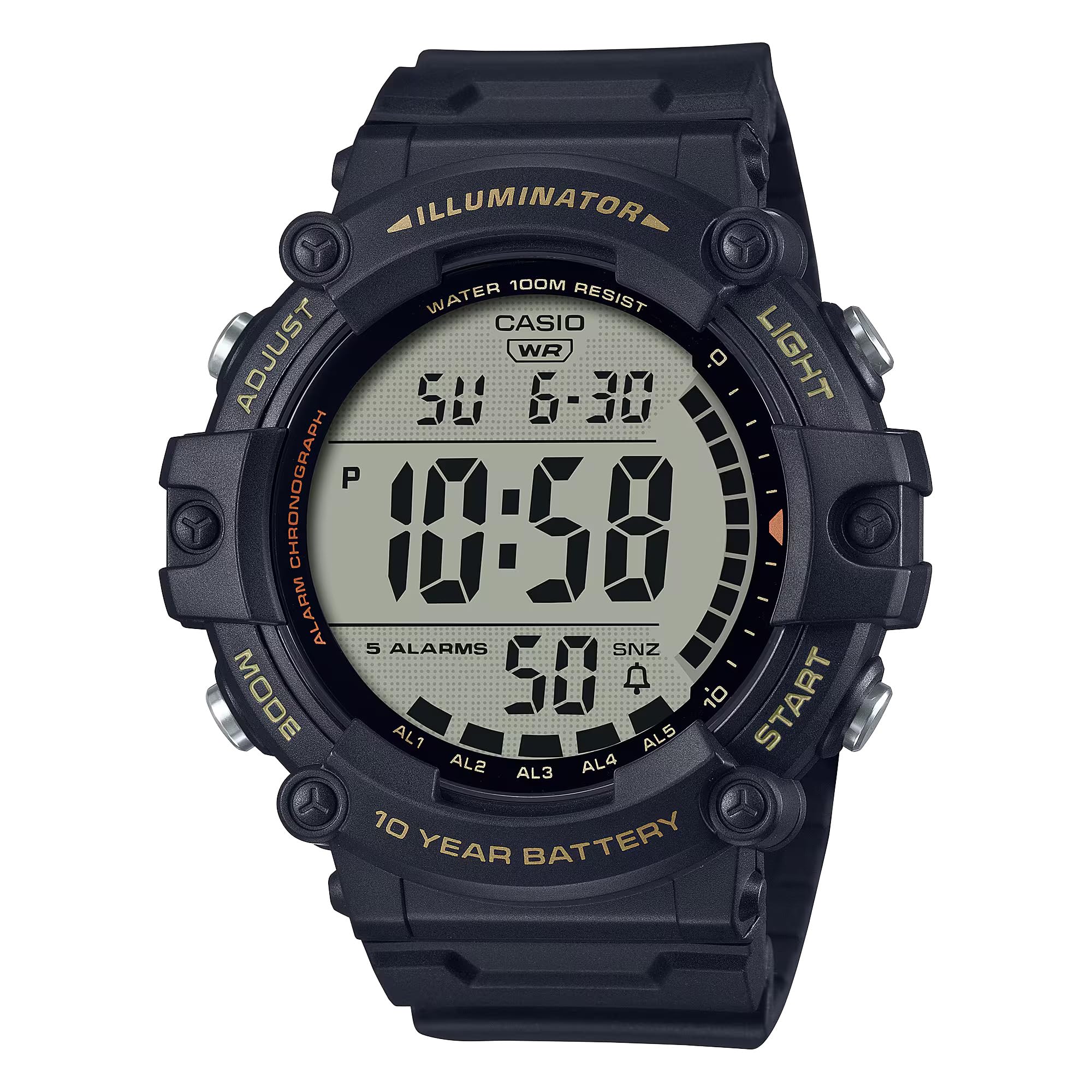
Image : Avant view of the Casio Illuminator AE1500WH digital watch, displaying the time and date.
2. Installation
Réglage initial de la date et de l'heure
To set the time and date on your Casio AE1500WH watch, follow these steps:
- En mode Horloge, maintenez la touche enfoncée. AJUSTER button (top left) until the seconds begin to flash, indicating the setting screen.
- Appuyez sur le MODE bouton (en bas à gauche) pour parcourir les paramètres : Secondes → Heure → Minute → Année → Mois → Jour.
- Utilisez le DÉMARRER/ARRÊTER button (top right) to increase the flashing value. Use the RÉINITIALISER button (bottom right) to decrease the value (if applicable, for some settings).
- Une fois tous les réglages effectués, appuyez sur AJUSTER button to exit the setting screen and return to Timekeeping Mode.
The watch supports both 12-hour and 24-hour formats. To switch between formats, press the DÉMARRER/ARRÊTER button while the hour/minute setting is flashing.
Video: A demonstration of setting the time and date on the Casio AE1500WH digital watch, including how to use the adjustment buttons.
3. Mode d'emploi
Navigation en mode
Appuyez sur le MODE button (bottom left) to cycle through the different modes: Timekeeping → World Time → Alarm → Stopwatch → Countdown Timer.
Video: A visual guide demonstrating how to navigate through the different operational modes of the watch using the mode button.
Alarmes
The watch features 5 multi-function alarms, including one snooze alarm, and an hourly signal horaire.
- In Alarm Mode, use the DÉMARRER/ARRÊTER button (top right) to select the desired alarm (AL1 to AL5 or SNZ for snooze).
- Appuyez et maintenez enfoncé le AJUSTER button until the alarm time begins to flash.
- Utilisez le MODE bouton permettant de sélectionner le réglage entre l'heure et les minutes.
- Utilisez le DÉMARRER/ARRÊTER bouton pour modifier la valeur clignotante.
- Presse AJUSTER pour enregistrer le réglage de l'alarme.
- To turn an alarm on or off, select the alarm in Alarm Mode and press the RÉINITIALISER bouton (en bas à droite).
Chronomètre
The 1/100-second stopwatch measures elapsed time, split times, and 1st-2nd place times.

Image: Icon representing the stopwatch function.
- Navigate to Stopwatch Mode.
- Appuyez sur le DÉMARRER/ARRÊTER bouton pour démarrer le chronomètre.
- Presse DÉMARRER/ARRÊTER encore une fois pour l'arrêter.
- Appuyez sur le RÉINITIALISER bouton pour remettre le chronomètre à zéro.
- For split times, press RÉINITIALISER pendant que le chronomètre fonctionne pour afficher le temps intermédiaire. Appuyez sur RÉINITIALISER again to return to elapsed time measurement.
Compte à rebours
The 24-hour countdown timer features an auto-repeat function.

Image: Icon representing the countdown timer function.
- Accédez au mode Compte à rebours.
- Appuyez et maintenez enfoncé le AJUSTER button until the timer setting begins to flash.
- Utilisez le MODE bouton permettant de sélectionner le réglage entre l'heure et les minutes.
- Utilisez le DÉMARRER/ARRÊTER bouton pour modifier la valeur clignotante.
- Presse AJUSTER to save the timer setting.
- Presse DÉMARRER/ARRÊTER to start or stop the countdown.
- Presse RÉINITIALISER to reset the timer to its set value.
Temps double
The Dual Time mode allows you to keep track of a second time zone.
- Navigate to World Time Mode.
- Appuyez et maintenez enfoncé le AJUSTER button until the city code begins to flash.
- Utilisez le DÉMARRER/ARRÊTER button to scroll through city codes (time zones).
- Presse AJUSTER to set the desired city code. The time for that city will be displayed.
Rétro-éclairage LED
The watch features an amber LED backlight with afterglow for visibility in low-light conditions.
- Appuyez sur le LUMIÈRE button (top right) to activate the backlight.
- The backlight will illuminate for a few seconds.
Video: A demonstration of the watch's LED backlight function, showing how it illuminates the display in dark conditions.
4. Entretien
Autonomie de la batterie
The Casio AE1500WH is powered by a CR2032 battery, providing approximately 10 years of operation. Battery replacement should be performed by a qualified technician to ensure water resistance is maintained.

Image: Graphic indicating a 10-year battery life.
Résistance à l'eau
The watch is rated for 100-meter water resistance, making it suitable for swimming and general water activities. Avoid operating buttons while the watch is submerged to prevent water intrusion.

Image: Icon representing 100-meter water resistance.
Nettoyage et entretien
Clean the watch with a soft, dry cloth. For stubborn dirt, use a mild soap solution and rinse thoroughly. Avoid harsh chemicals or abrasive cleaners. Store the watch away from extreme temperatures and strong magnetic fields.
5. Dépannage
L'écran est vide ou sombre.
- Check if the battery is low. Although designed for 10 years, environmental factors can affect battery life.
- Ensure the watch is not exposed to extreme cold, which can temporarily dim the LCD.
Les boutons ne répondent pas
- Ensure the watch is not in a locked mode (if applicable, refer to specific module instructions for lock functions).
- If the watch has been submerged, ensure it is dry, as water can sometimes affect button responsiveness.
Le temps est inexact
- Réinitialisez la date et l'heure en suivant les instructions de la section 2.
- If inaccuracy persists, the battery may be nearing the end of its life.
6. Spécifications
| Fonctionnalité | Spécification |
|---|---|
| Numéro de modèle | AE-1500WHX-1AVCF |
| Type d'affichage | Numérique |
| Type de mouvement | Quartz |
| Matériau du boîtier | Résine |
| Matériau de la bande | Résine |
| Résistance à l'eau | 100 mètres (330 pieds) |
| Autonomie de la batterie | Approx. 10 years (CR2032) |
| Alarmes | 5 multi-function alarms (1 snooze) |
| Chronomètre | 1/100-second, measuring capacity: 23:59'59.99'' |
| Compte à rebours | Measuring unit: 1 second, countdown range: 24 hours, auto-repeat |
| Rétroéclairage | Amber LED with afterglow |
| Calendrier | Calendrier automatique complet (jusqu'à l'année 2099) |
| Précision | ± 30 secondes par mois |
| Diamètre du boîtier | 5.1 centimètres |
| Épaisseur du boîtier | 16 millimètres |
| Longueur de la bande | 23.5 centimètres |
7. Garantie et assistance
Informations sur la garantie
This Casio watch comes with a limited manufacturer's warranty. Please refer to the warranty card included with your purchase for specific terms and conditions, including coverage duration and what is covered.
Assistance clientèle
Pour obtenir de l'aide supplémentaire, une assistance technique ou des renseignements sur le service après-vente, veuillez consulter le site officiel de Casio. webVous pouvez consulter le site web ou contacter leur service client. Les coordonnées se trouvent généralement sur le site de Casio. websur le site ou dans la documentation fournie avec votre montre.
You can also refer to the official Casio store on Amazon for additional product information: Magasin Casio


