
Mastfuyi FY12DMM
Manuel d'utilisation du multimètre à imageur thermique Mastfuyi FY12DMM
Model: FY12DMM | Brand: Mastfuyi
1. Introduction
The Mastfuyi FY12DMM is a versatile 2-in-1 device combining a high-resolution thermal imager with a comprehensive digital multimeter. This instrument is designed for professionals and enthusiasts requiring precise measurements and visual thermal analysis in various fields, including electrical, mechanical, construction, and automotive diagnostics. This manual provides essential information for safe and effective operation.
2. Consignes de sécurité
Always adhere to the following safety precautions to prevent personal injury or damage to the device.
- Lisez et comprenez toutes les instructions avant utilisation.
- N’utilisez pas l’appareil s’il semble endommagé ou s’il ne fonctionne pas correctement.
- Ensure proper test lead connection before taking any measurements.
- Ne dépassez pas les valeurs d'entrée maximales pour aucune fonction.
- Use caution when working with live electrical circuits.
- Gardez l'appareil sec et propre.
- Utilisez uniquement les accessoires et les pièces de rechange spécifiés par le fabricant.
3. Contenu du colis
Vérifiez que tous les éléments sont présents dans le colis :
- 1 x Mastfuyi FY12DMM Thermal Imager Multimeter
- 1 x câble de chargement (USB Type-C)
- 1 x étui de transport
- 1 x Manuel d'utilisation (ce document)
- Cordons de test (rouge et noir)
Note: The flexible AC current clamp n'est pas inclus dans le forfait standard.

4. Appareil terminéview
The Mastfuyi FY12DMM integrates thermal imaging and digital multimeter functionalities into a single, portable unit. Its design focuses on ease of use and comprehensive diagnostic capabilities.

Les principaux composants comprennent :
- Écran tactile LCD TFT de 3.98 pouces : Un complet-view display for clear visualization of thermal images, multimeter readings, and intuitive menu navigation.
- Thermal Imager Lens: The optical component responsible for capturing infrared radiation.
- Prises d'entrée du multimètre : Standard ports for connecting test leads for electrical measurements.
- Bouton d'alimentation : Contrôle l'état d'alimentation de l'appareil.
- Molette de navigation/Boutons : Provides alternative control for menu selection and parameter adjustments.
- Port USB Type-C : Used for charging the internal battery and transferring data to a computer.

5. Installation
5.1 Charge initiale
Avant la première utilisation, chargez complètement l'appareil.
- Connect the supplied USB Type-C charging cable to the device's charging port.
- Connectez l'autre extrémité du câble à un adaptateur secteur USB standard (non inclus) ou à un port USB d'ordinateur.
- Le voyant de charge s'allume. Laissez l'appareil se charger jusqu'à ce que le voyant indique une charge complète.

5.2 Mise sous/hors tension
- Pour allumer l'appareil : maintenez le bouton d'alimentation enfoncé jusqu'à ce que l'écran s'allume.
- To power off: Press and hold the power button until the shutdown prompt appears, then confirm.
6. Utilisation de la caméra thermique
6.1 Imagerie thermique de base
Upon powering on, the device typically defaults to thermal imaging mode, displaying a real-time thermal image with temperature readings.
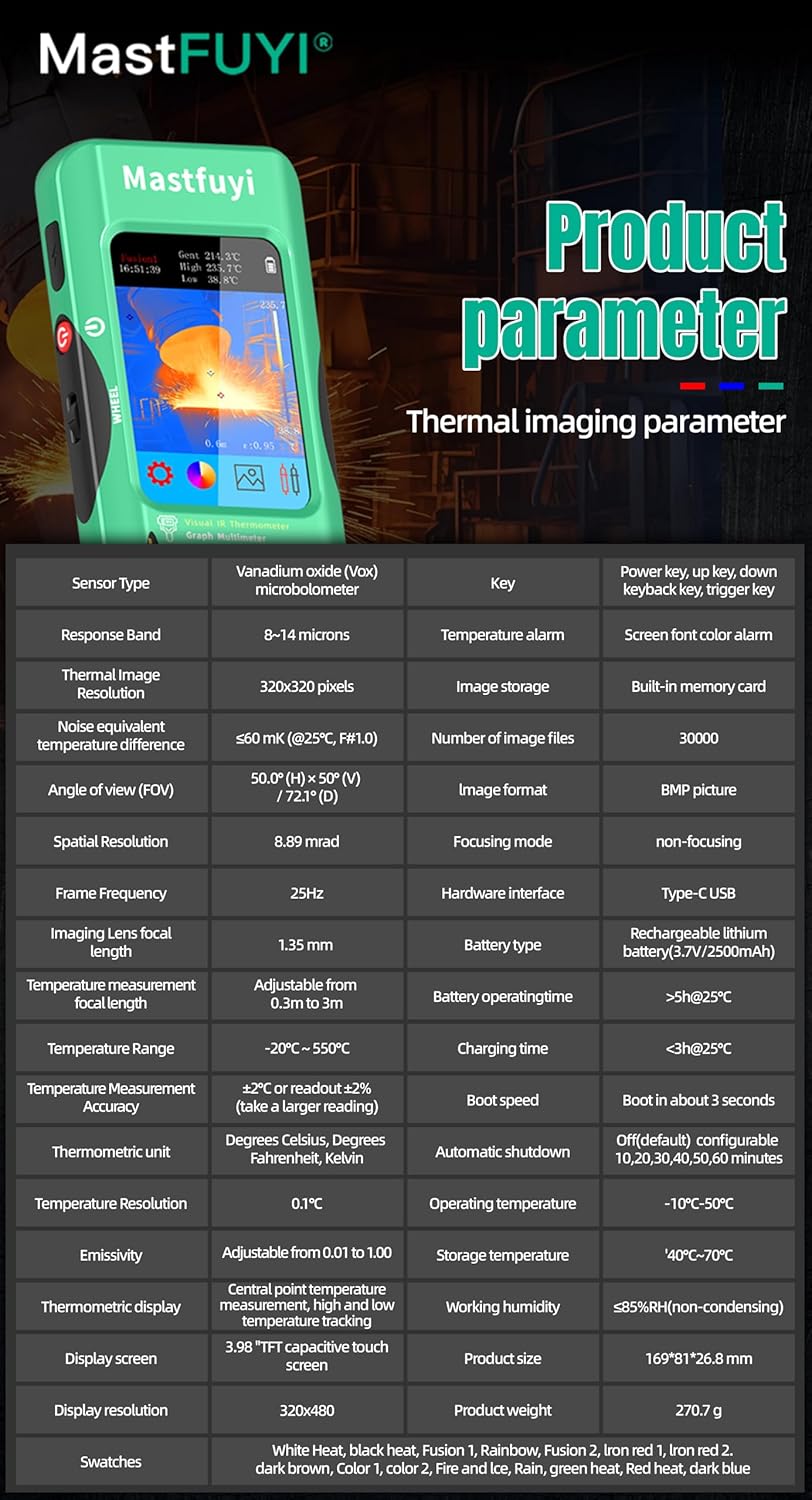
- Plage de température : Mesure les températures de -20℃ à 550℃ (-4℉ à 1022℉).
- Résolution IR: Features a 320 x 320 pixel infrared resolution for clear and detailed thermal images.
- Taux de rafraîchissement : Operates at 25Hz, providing a smooth, real-time thermal video feed.
- Sensibilité Thermique (NETD): With a sensitivity of less than 60mk, the device can detect subtle temperature differences.
The device can perform microscopic detection at a component level, though a macro lens is not included as a standard accessory. If detailed close-up thermal imaging is required, a corresponding macro lens package would need to be acquired separately.

6.2 Palettes thermiques
The device offers 15 distinct thermal palettes to enhance the visualization of temperature differences. Selecting the appropriate palette can significantly improve the clarity of thermal patterns for specific applications.
- Access palette options via the touchscreen menu or navigation controls.
- Experiment with palettes like Iron Red, Rainbow, White Hot, and Black Hot to find the most suitable display for your inspection.
6.3 Ajustement de l'émissivité
Accurate temperature measurements depend on correct emissivity settings. The emissivity value (adjustable from 0.01 to 1.0) should match the material surface being measured.
- Locate the emissivity setting in the thermal imaging menu.
- Consult standard emissivity tables for common materials or adjust the value to achieve the most accurate readings for your specific target.
6.4 Alarme de température haute et basse
The intelligent alarm function allows you to set custom temperature thresholds. The device will trigger immediate audible and visual alerts if temperatures exceed or fall below these predefined safety ranges.
- Access the alarm settings through the thermal imaging interface.
- Configure the upper and lower temperature limits to suit your monitoring requirements.
7. Utilisation du multimètre
The FY12DMM includes a 20,000-count digital multimeter for precise electrical measurements.
7.1 Connexion des cordons de test
- Insérez le fil de test rouge dans la prise d'entrée « VΩmA ».
- Insérez le fil de test noir dans la prise d'entrée « COM » (commune).
- For AC current measurements with an optional clamp, refer to the clamp's instructions.
7.2 Fonctions de mesure
Use the touchscreen or navigation to select the desired measurement function. The device supports auto-ranging for most functions.
- Vol CCtage: Jusqu'à 1000 V.
- Vol ACtage: Jusqu'à 750 V.
- Résistance: Up to 200MΩ.
- Capacitance: Up to 99.999mF.
- Test de diodes : Vérifie le fonctionnement de la diode.
- Test de continuité : Audible indication for continuity.
- Courant alternatif flexible : Up to 2000A (requires optional clamp).
- Température: -20℃ to 1300℃ (-4℉ to 2372℉) using a K-type thermocouple (not included).
L'appareil dispose d'un Prise function to freeze the current reading and Gamme measurement modes for manual range selection if desired.
8. Gestion des données
8.1 Stockage des images
The FY12DMM has a built-in memory card capable of storing up to 30,000 images in BMP format.
- To save a thermal image, press the designated capture button on the screen.
- Images are automatically saved to the internal memory.

8.2 Exportation de données
Stored images and recorded waveform data can be exported to a computer for further analysis.
- Connectez l'appareil à un ordinateur à l'aide du câble USB Type-C.
- Le périphérique doit apparaître comme un périphérique de stockage amovible.
- Copy the desired BMP image files or data logs to your computer.
9. Entretien
9.1 Nettoyage
- Essuyez l'extérieur de l'appareil avec un chiffon doux et sec.amp chiffon. N'utilisez pas de nettoyants abrasifs ou de solvants.
- Gently clean the thermal imager lens with a lens cleaning cloth.
- Avant de nettoyer l'appareil, assurez-vous qu'il est éteint et débranché de toute source d'alimentation.
9.2 Entretien de la batterie
- Rechargez régulièrement la batterie, même si vous n'utilisez pas fréquemment l'appareil, afin de préserver sa durée de vie.
- Évitez de stocker l'appareil à des températures extrêmes.
10. Dépannage
| Problème | Cause possible | Solution |
|---|---|---|
| L'appareil ne s'allume pas. | Batterie faible ou déchargée. | Charge the device fully using the supplied USB Type-C cable. |
| Lectures de température inexactes. | Incorrect emissivity setting; dirty lens. | Adjust emissivity for the target material; clean the thermal imager lens. |
| Les mesures du multimètre sont instables ou incorrectes. | Poor test lead connection; incorrect function selected. | Assurez-vous que les cordons de test sont correctement connectés ; vérifiez que la fonction de mesure appropriée est sélectionnée. |
| Impossible de transférer les données vers l'ordinateur. | Faulty USB cable; incorrect connection mode. | Try a different USB Type-C cable; ensure the device is properly connected and recognized by the computer. |
11. Spécifications
11.1 Spécifications de la caméra infrarouge
| Fonctionnalité | Spécification |
|---|---|
| Taille de l'écran | 3.98 Inch TFT LCD |
| Résolution IR | 320 x 320 pixels |
| Résolution de l'écran | 320 x 480 pixels |
| Angle de View (FOV) | 50.0°(H) x 50.0°(V) / 72.1°(D) |
| Résolution spatiale (IFOV) | 8.89 mrad |
| Plage de température | -20 ℃ à 550 ℃ (-4 ℉ à 1022 ℉) |
| Sensibilité thermique/NETD | Moins de 60 m |
| Taux de rafraîchissement | 25 Hz |
| Paramètres de distance | 0.3 à 3 mètres |
| Émissivité | 0.01 - 1.0 (adjustable) |
| Palettes thermiques | 15 |
| Number of Storage Images | 19,000 (internal memory) |
11.2 Spécifications du multimètre numérique
| Fonctionnalité | Gamme | Résolution | Précision |
|---|---|---|---|
| Affichage MAX | 20000 comptes | ||
| Vol CCtage | 20mV/200mV/2V/20V/200V/1000V | 0.001 mV à 0.1 V | ±(0.05 % + 3) à ±(0.5 % + 3) |
| Vol ACtage | 20mV/200mV/2V/20V/200V/750V | 0.001 mV à 0.1 V | ±(0.1 % + 3) à ±(0.5 % + 3) |
| Courant alternatif flexible | 200A/2000A | 0.1A/1A | ±(1.0%+5) |
| Résistance | 200Ω à 200MΩ | 0.01Ω à 0.01MΩ | ±(0.2 % + 3) à ±(5 % + 5) |
| Capacitance | 999.99 nF à 99.999 mF | 0.01 nF à 0.001 mF | ±(2 % + 5) à ±(5 % + 20) |
| Température | -20℃~1300℃/-4℉-2372℉ | 1℃/1℉ | ±(2%+5) |
| Diode | Oui | ||
| Continuité | Oui | ||

11.3 Spécifications générales
- Pouvoir: Batterie rechargeable 2500 mAh (intégrée)
- Taille: 169 x 81 x 26.8 mm
- Poids: 270g
- Operating System Languages: English, Spanish, German, French, Italian, Japanese, Chinese (selectable)

12. Garantie et assistance
For warranty information and technical support, please refer to the warranty card included with your product or visit the official Mastfuyi website.
Visit the Mastfuyi Store on Amazon pour plus de produits et de ressources d'assistance.